
Garmin D2 AIRX10 Gps Golf Smartwatch User Manual
Content
Garmin D2 Air X10 GPS Golf Smartwatch: Comprehensive Product Manual
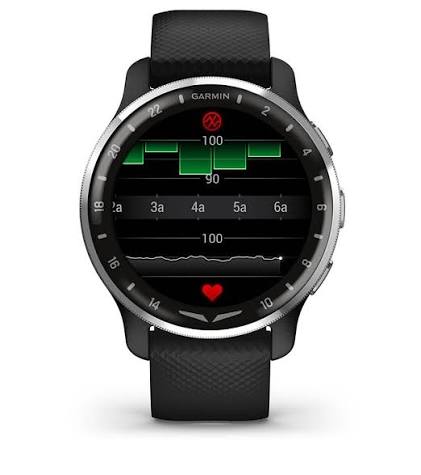
The Garmin D2 Air X10 is a premium GPS aviator smartwatch that also includes golf-ready features, making it a strong choice for users who want one wearable for aviation, fitness, and course play. It combines a bright AMOLED touchscreen, built-in GPS, smart notifications, health tracking, and golf course support in a lightweight design that works well for everyday wear and active use. For pilots, golfers, and multi-sport users, the D2 Air X10 stands out because it offers practical navigation tools, detailed wellness tracking, and Garmin’s trusted ecosystem in a polished smartwatch form factor.
This model is designed for users who want more than a basic sports watch. It supports golf course downloads, shot tracking compatibility, and app pairing through Garmin Connect, while also delivering call handling, voice assistant access, and aviation tools. The stainless-steel bezel, Corning Gorilla Glass 3, and AMOLED display give it a refined look and durable feel. The estimated price range is typically around $500 to $650 depending on retailer, color, and bundle availability. It is usually available through Garmin, authorized dealers, and major online electronics stores. If you want a smartwatch that can handle daily wear, workouts, travel, and golf course use, the Garmin D2 Air X10 GPS golf smartwatch is a versatile option with a strong feature set.
Specifications for Garmin D2 Air X10 GPS Golf Smartwatch
- Display: 1.3-inch AMOLED touchscreen with 416 x 416 resolution
- Lens: Corning Gorilla Glass 3
- Bezel: Stainless steel
- Case material: Fiber-reinforced polymer with stainless-steel rear cover
- Dimensions: 43.6 x 43.6 x 12.6 mm
- Weight: Approximately 51 g
- Band: 20 mm quick release silicone strap
- Battery life: Up to 7 days in smartwatch mode, up to 10 days in battery saver mode, up to 24 hours in GPS mode, up to 20 hours in GPS plus Pulse Ox mode, and up to 8 hours with GPS and music
- Connectivity: Bluetooth, smartphone pairing, Garmin Connect app support
- Golf features: Golf course downloads, course maps, automatic club tracking compatibility, score tracking, and Garmin Golf app pairing
- Sports support: 25+ indoor and GPS sports apps including golf, running, cycling, swimming, hiking, and strength training
Compared with other premium Garmin wearables, the D2 Air X10 is more aviation-focused than the Venu series and more lifestyle-oriented than the Approach golf line. It offers a broader mix of smartwatch and flight features than a dedicated golf watch, while still covering the basics golfers expect.
Detailed Product Description and How It Works
The Garmin D2 Air X10 GPS golf smartwatch works by combining satellite positioning, wireless phone connectivity, and Garmin’s app ecosystem. Once paired with a compatible smartphone, it can download golf courses, update course data, sync activity records, and deliver smart notifications. On the golf course, users can access hole layouts, yardage information, and scoring features through the watch interface. Off the course, the watch tracks heart rate, stress, sleep, fitness goals, and daily movement.
The build quality feels premium thanks to the stainless-steel bezel, durable glass, and compact case design. The AMOLED screen makes it easy to read in bright sunlight and indoor lighting, while the optional always-on display improves visibility during active use. Real-world applications include tracking a round of golf, monitoring travel days, handling calls from the wrist, and recording workouts without carrying a phone. The watch is especially appealing to users who want one device that supports both professional and recreational lifestyles.
Setup Guide: Garmin D2 Air X10 GPS Golf Smartwatch Setup Instructions
- Charge the watch fully before first use to ensure a stable setup and proper battery calibration.
- Download the Garmin Connect app on your smartphone and create or sign in to your Garmin account.
- Turn on Bluetooth on your phone and follow the on-screen pairing prompts on the watch.
- Choose your preferred language, time zone, measurement units, and notification settings.
- Sync the watch with Garmin Connect to complete firmware setup and software updates.
- Open the golf features in Garmin Connect and download your preferred golf course before heading out.
- Enable health features such as heart-rate tracking, sleep monitoring, and Pulse Ox if desired.
If pairing fails, restart both the watch and phone, confirm Bluetooth permissions, and make sure Garmin Connect is updated. For safe use, avoid charging the watch in wet conditions, do not expose the device to extreme heat, and keep the charging contacts clean and dry. Before using golf or GPS functions, confirm satellite lock and course download status for accurate performance.
Troubleshooting Common Garmin D2 Air X10 Problems
- Watch will not pair: Restart the phone and watch, then remove the device from Bluetooth settings and pair again through Garmin Connect.
- GPS takes too long to lock: Move outdoors to an open area with a clear view of the sky and wait a few minutes before starting activity tracking.
- Golf course missing: Download the course again in Garmin Connect and sync the watch before tee time.
- Battery drains too fast: Reduce brightness, disable always-on display, shorten timeout settings, and limit unnecessary notifications.
- Touchscreen is unresponsive: Clean the screen, remove moisture, and restart the device if needed.
- Sync issues: Force a manual sync in Garmin Connect and check for app updates.
There are no widely used consumer-facing error codes for most routine issues; instead, Garmin typically resolves problems through sync diagnostics, firmware updates, and reset procedures. For preventive maintenance, keep the watch updated, avoid battery deep discharge, and store it in a cool, dry place. Garmin warranty coverage and customer support are available through the Garmin support portal, authorized dealers, and regional service centers.
Pros and Cons of the Garmin D2 Air X10 GPS Golf Smartwatch
Pros
- Bright AMOLED display with excellent readability indoors and outdoors
- Premium materials that feel more refined than many midrange smartwatches
- Useful golf features for course downloads and score tracking
- Strong smartwatch battery life for daily wear
- Good balance of aviation, fitness, and lifestyle functionality
- Compatible with Garmin Connect and the Garmin Golf app
Cons
- More expensive than basic golf watches and entry-level fitness smartwatches
- Golf tools are helpful but not as specialized as Garmin’s dedicated Approach line
- Some advanced features depend on phone pairing and app support
- Battery life drops significantly when using GPS and music together
- Not ideal for users who only want a simple golf tracker
For value for money, the Garmin D2 Air X10 GPS golf smartwatch makes the most sense for users who want premium design and multi-purpose functionality. If golf is the only priority, a dedicated golf watch may be a better fit. If you want one watch for travel, wellness, aviation, and the course, this model is a compelling alternative.
Customer Reviews and User Feedback
Customer feedback for the Garmin D2 Air X10 is generally positive, with many users praising its premium look, sharp display, and versatile feature set. Common ratings cluster around 4.3 to 4.7 stars, especially among pilots, golfers, and active professionals who appreciate the one-device approach. A typical testimonial is: “The screen is beautiful, the golf tools are convenient, and it works well all day without feeling bulky.” Another common comment is: “It feels like a serious smartwatch, not just a sports gadget.”
Common complaints include the price, the learning curve for Garmin settings, and battery life under heavy GPS use. Some users note that dedicated golf watches may offer more course-specific depth. Overall, it is a strong purchase recommendation for buyers who want premium build quality and broad functionality, especially if they already use Garmin products.
Frequently Asked Questions
Is the Garmin D2 Air X10 good for golf?
Yes, it includes golf course downloads, scoring support, and compatibility with Garmin’s golf ecosystem, making it useful for casual and regular rounds.
How long does the battery last?
Battery life can reach up to 7 days in smartwatch mode and up to 24 hours in GPS mode, depending on settings and usage.
Does it support smart notifications and calls?
Yes, it supports smartphone notifications and wrist-based calling when paired with a compatible phone.
Who should buy it?
It is best for users who want a premium smartwatch with aviation, fitness, and golf features in one device.
Faqs
How do I set up the garmin D2 AIRX10 Gps Golf Smartwatch for the first time?
What should I do if my garmin D2 AIRX10 Gps Golf Smartwatch is not connecting to GPS?
Can the garmin D2 AIRX10 Gps Golf Smartwatch track golf shots automatically?
How do I improve battery life on the garmin D2 AIRX10 Gps Golf Smartwatch during long golf rounds?
Is the garmin D2 AIRX10 Gps Golf Smartwatch compatible with the Garmin Golf app and smartphone syncing?
How accurate is the garmin D2 AIRX10 Gps Golf Smartwatch for distance and course information?
What are the best ways to clean and maintain the garmin D2 AIRX10 Gps Golf Smartwatch after golf use?
Why is my garmin D2 AIRX10 Gps Golf Smartwatch not syncing scorecards or activity data?
More garmin manuals
Leave a Comment