
Garmin Vivosmart 4 fitness tracker User Manual
Content
Garmin Vivosmart 4 Fitness Tracker: Complete Product Manual and Buying Guide
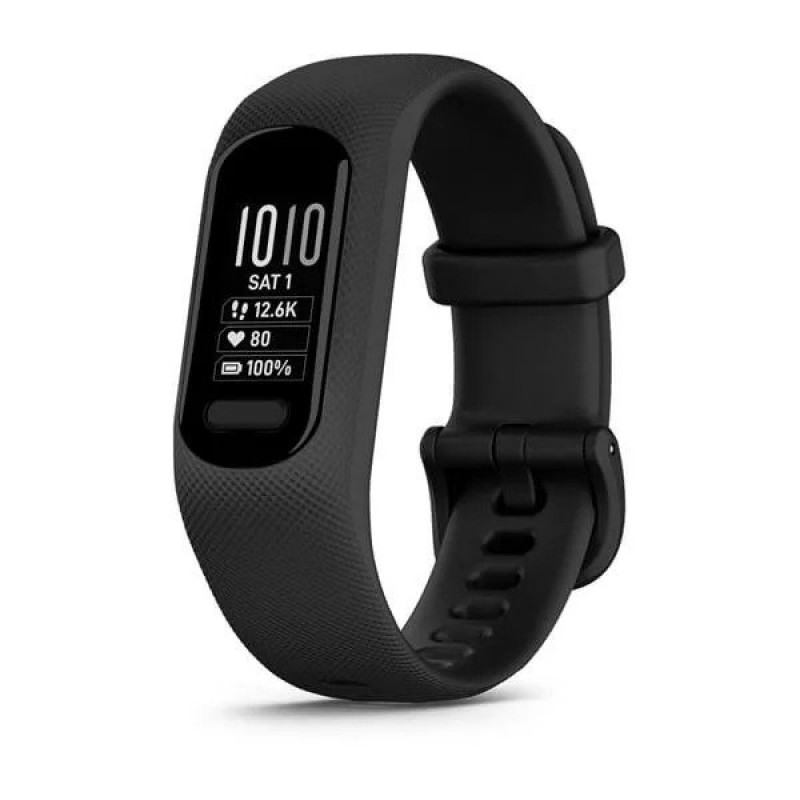
Introduction to the Garmin Vivosmart 4 Fitness Tracker
The Garmin Vivosmart 4 fitness tracker is a slim, lightweight activity band designed for users who want essential health tracking in a comfortable, everyday wearable. It stands out for blending advanced wellness features with a minimalist design, making it a strong choice for users who prefer a discreet tracker over a bulky smartwatch. The Garmin Vivosmart 4 fitness tracker is especially appealing to people focused on step counting, heart rate monitoring, sleep tracking, stress tracking, and body energy insights throughout the day.
One of its biggest advantages is the inclusion of Garmin’s Pulse Ox sensor, which tracks blood oxygen saturation during sleep or all day depending on settings. It also offers Body Battery energy monitoring, which helps users understand when to push harder or rest. With smartphone notifications, activity tracking, auto goal suggestions, and swim-friendly water resistance, this fitness band works well for daily wear, workouts, and health-conscious routines.
This model is a practical fit for beginners, casual exercisers, office workers, and wellness-focused users who want more than basic step tracking without paying for a premium smartwatch. The Garmin Vivosmart 4 fitness tracker typically falls in the budget-to-midrange price range, with availability often found through major online retailers and select electronics stores, depending on color and size. For shoppers comparing compact trackers, it offers a compelling balance of style, battery life, and health features.
Specifications of the Garmin Vivosmart 4 Fitness Tracker
- Display: Monochrome OLED touchscreen with 48 x 128 pixel resolution for quick viewing of stats and notifications.
- Battery life: Up to 7 days under typical use, though Pulse Ox sleep tracking can reduce runtime.
- Sensors: Wrist-based heart rate monitor, accelerometer, barometric altimeter, ambient light sensor, and Pulse Ox sensor.
- Connectivity: Bluetooth Smart and ANT+ for pairing with smartphones and compatible gym equipment.
- Water rating: Swim-compatible and suitable for everyday water exposure and pool sessions.
- Dimensions: Small/medium and large sizes available for a more personalized fit.
- Weight: Very lightweight design that makes it comfortable for 24/7 wear.
- Compatibility: Works with Android and iOS devices through Garmin’s companion app.
- Key features: Step tracking, sleep monitoring, stress tracking, Body Battery, calorie estimates, notifications, and activity reminders.
- Comparison with similar products: Compared with basic fitness bands, it offers better wellness insights; compared with larger smartwatches, it is lighter and simpler, but it does not include built-in GPS.
For users seeking a compact wearable with advanced health tracking, the Garmin Vivosmart 4 fitness tracker delivers a strong feature set in a small package. It is best understood as a wellness band rather than a full-featured smartwatch.
Pros and Cons of the Garmin Vivosmart 4 Fitness Tracker
Pros
- Very slim and comfortable: Ideal for all-day wear, sleep tracking, and users who dislike bulky devices.
- Body Battery and stress tracking: Helps users manage energy levels and recovery more intelligently.
- Pulse Ox support: Adds a useful health metric that many budget bands do not offer.
- Strong battery life: Up to a week on a charge is convenient for busy users.
- Reliable activity tracking: Good for steps, general movement, and routine exercise.
- Good value for health-focused users: Offers more advanced wellness tools than many entry-level competitors.
Cons
- No built-in GPS: Runners and cyclists must rely on connected GPS from a phone.
- Small screen: Notifications and stats are harder to read than on larger fitness trackers or smartwatches.
- Limited smartwatch features: It is not designed for apps, music storage, or deep smart functionality.
- Pulse Ox can affect battery life: More advanced sleep tracking may shorten runtime.
- Best for basic to moderate users: Athletes wanting detailed workout metrics may prefer a GPS watch instead.
Overall, the Garmin Vivosmart 4 fitness tracker is a smart value purchase for wellness tracking, but users who want GPS, a larger display, or richer smartwatch features may be better served by an alternative such as a Garmin Forerunner model or a more advanced smartwatch.
Customer Reviews of the Garmin Vivosmart 4 Fitness Tracker
Customer feedback for the Garmin Vivosmart 4 fitness tracker is generally positive, with many users praising its light weight, comfortable fit, and useful health tools. A common satisfaction rating often falls around 4 out of 5 stars from users who value sleep tracking, heart rate monitoring, and the Body Battery feature. Many buyers describe it as a dependable everyday companion for staying aware of activity levels and recovery.
Common complaints usually focus on the small OLED screen, the lack of built-in GPS, and the fact that some advanced features are less useful for high-intensity athletes. A frequent testimonial theme is that the device works best for people who want a simple, discreet tracker rather than a smartwatch replacement. One typical user sentiment is that it “does the basics very well and feels comfortable enough to wear all day and night.”
Purchase recommendation: choose this model if you want a lightweight fitness band with strong wellness tracking, good battery life, and a clean design. If you need guided running metrics or standalone GPS, consider a GPS-enabled fitness watch instead.
Is the Garmin Vivosmart 4 Fitness Tracker Worth It?
For shoppers searching for a compact health and activity band, the Garmin Vivosmart 4 fitness tracker remains a practical and feature-rich option. It is especially well suited to users who want sleep insights, stress monitoring, heart rate tracking, and a comfortable wearable that disappears on the wrist. If your priority is wellness tracking over advanced sports features, it offers excellent everyday value.
Who Should Buy the Garmin Vivosmart 4?
- Users who want a lightweight fitness tracker for daily wear.
- People focused on sleep, stress, and recovery tracking.
- Beginners who want more insight than a basic step counter.
- Anyone looking for a discreet alternative to a smartwatch.
Faqs
How do I set up the Garmin Vivosmart 4 fitness tracker for the first time?
Why is my Garmin Vivosmart 4 fitness tracker not syncing with Garmin Connect?
What do the stress, Body Battery, and sleep tracking features on the Garmin Vivosmart 4 fitness tracker actually mean?
Is the Garmin Vivosmart 4 fitness tracker compatible with iPhone and Android phones?
How accurate is heart rate monitoring on the Garmin Vivosmart 4 fitness tracker during workouts?
What should I do if the Garmin Vivosmart 4 fitness tracker battery drains too quickly?
How do I clean and maintain the Garmin Vivosmart 4 fitness tracker to keep it working properly?
Can I customize notifications and activity alerts on the Garmin Vivosmart 4 fitness tracker?
More garmin manuals
- Garmin Fenix 5-5S-5X Plus GPS watch User Manual
- Setup: Garmin Index-Bpm Blood Pressure Monitor User Manual
- Garmin Varia Rearview Radar RTL510 User Manual
- Garmin Series 4 Vivofit Fitness Tracker User Manual
- Garmin Varia Bike Lights HL 500 User Manual
- Setup: Garmin 55 Series Drivesmart GPS Navigator User Manual
Leave a Comment