
Setup: Garmin 55 Series Drivesmart GPS Navigator User Manual
Content
Garmin DriveSmart 55 Series Product Manual: A Smart GPS Navigator for Everyday Driving
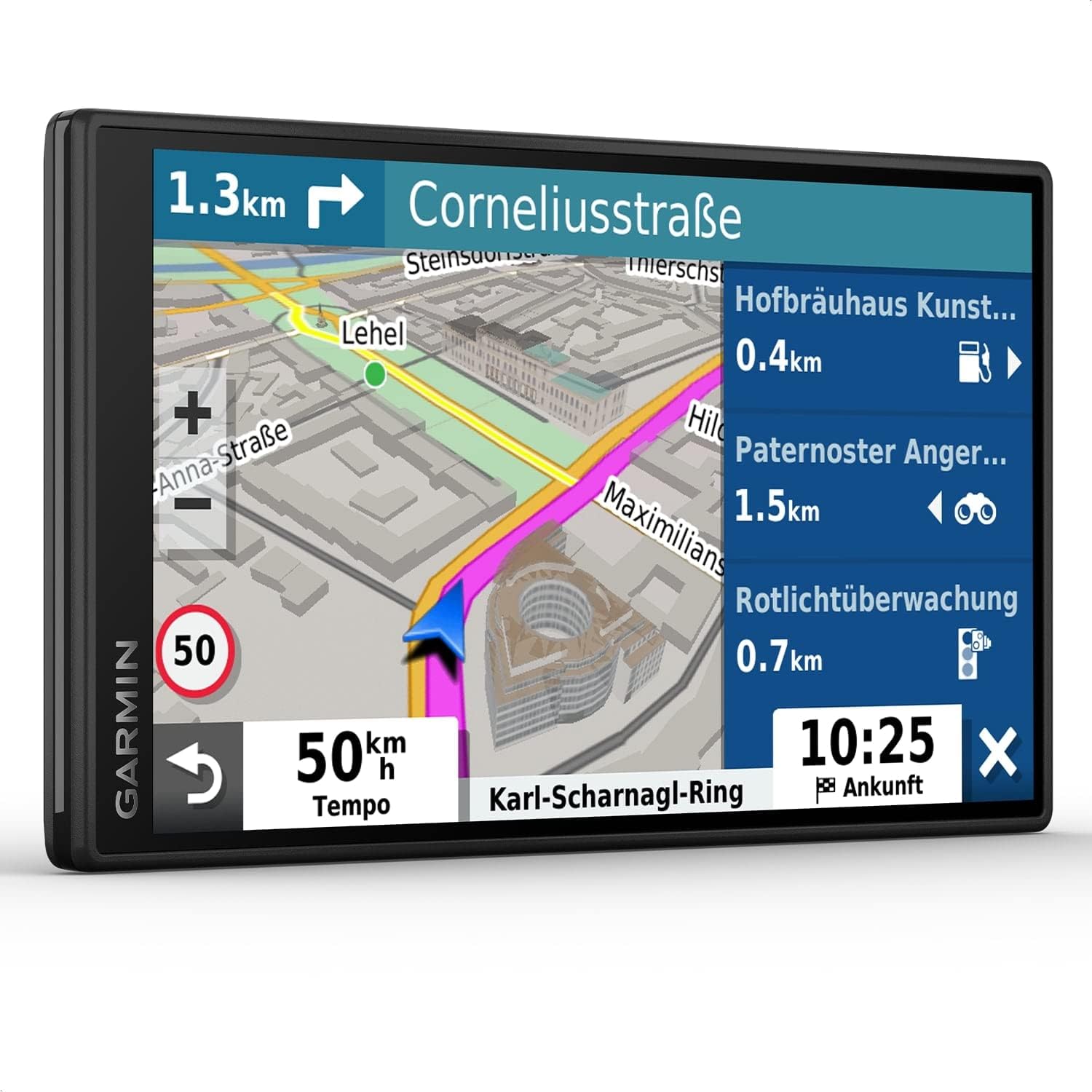
The Garmin DriveSmart 55 Series Drivesmart is a compact, feature-rich GPS navigator designed for drivers who want reliable turn-by-turn guidance without depending entirely on a smartphone. With a 5.5-inch edge-to-edge touchscreen, voice-assisted navigation, live traffic support, Wi‑Fi updates, and Garmin’s driver alerts, it delivers a practical in-car navigation experience that feels modern and easy to use. The Garmin DriveSmart 55 Series Drivesmart is especially useful for commuters, road-trippers, rideshare drivers, delivery drivers, and anyone traveling through areas with weak mobile reception.
One of its biggest advantages is the combination of a sharp HD display and helpful connected features such as Bluetooth hands-free calling, smart notifications, live weather, and points of interest. It also includes familiar Garmin tools like Real Directions and route guidance that uses recognizable landmarks, which makes driving instructions easier to follow than generic text-only prompts. For many users, that balance of simplicity and smart features is the main reason to choose this model over a basic dashboard GPS.
As of current market listings, the estimated price range for the Garmin DriveSmart 55 Series Drivesmart typically falls around $170 to $260 depending on version, bundle, and region. Availability is generally through major electronics retailers and online marketplaces, though stock can vary because this is an older model still sold through remaining inventory and bundle configurations.
Specifications for Garmin DriveSmart 55 Series Drivesmart
- Display: 5.5-inch widescreen touchscreen with 1280 x 720 HD resolution.
- Dimensions: Approximately 5.4 x 0.7 x 3.0 inches, making it compact for dashboard use.
- Weight: Around 150.5 g, light enough for easy mounting and removal.
- Connectivity: Bluetooth, Wi‑Fi, and USB for syncing, updates, and pairing.
- Navigation features: Garmin Real Directions, lane guidance, junction view, driver alerts, speed camera warnings, and POI support.
- Smart features: Hands-free calling, voice command support, smart notifications, live traffic, live weather, and parking assistance.
- Storage: Common configurations include 16 GB internal storage with microSD expansion support.
- Battery life: Up to about 1 hour in portable use, so it is best used while connected to vehicle power.
Compared with smaller entry-level GPS units, the Garmin DriveSmart 55 Series Drivesmart offers a larger, higher-resolution display and more connected features. Against newer siblings like the DriveSmart 66, it remains competitive in usability but may offer fewer recent software refinements and modern hardware extras.
Pros and Cons of Garmin DriveSmart 55 Series Drivesmart
Pros
- Clear HD display: The 5.5-inch 1280 x 720 screen is easy to read at a glance, even in bright daylight.
- Helpful driver tools: Lane guidance, junction views, and landmark-based directions reduce missed turns and stress in dense traffic.
- Smart connectivity: Bluetooth and Wi‑Fi make it easier to update maps and use hands-free calling.
- Strong value for frequent drivers: It offers more practical navigation features than many basic GPS models at a reasonable price.
- Good for offline navigation: Useful in areas with poor mobile signal, where phone maps may be unreliable.
Cons
- Short battery life: The internal battery is limited and is not ideal for extended use away from the car.
- Older platform: Compared with newer Garmin models, the interface and hardware are less advanced.
- Price varies by bundle: Traffic accessories and region-specific map packages can make shopping confusing.
- Alternative options may be better for heavy users: Newer DriveSmart versions may be preferable if you want the latest updates and features.
Overall, the Garmin DriveSmart 55 Series Drivesmart is a solid value for drivers who want dependable guidance, but buyers who need longer battery life or more premium hardware should compare it with newer Garmin alternatives before purchasing.
Customer Reviews and User Feedback on Garmin DriveSmart 55
Customer feedback for the Garmin DriveSmart 55 Series Drivesmart is generally positive, with ratings commonly landing around 4.4 to 4.6 out of 5 stars across major retailers. Many users praise the bright screen, accurate routing, and easy setup, especially for road trips and everyday commuting.
- Typical praise: “The screen is large enough to read quickly, and the directions are clear and dependable.”
- Common complaint: “The battery does not last very long, so it really needs to stay plugged in.”
- Frequent positive note: “Live traffic and voice guidance make city driving much easier.”
- Frequent issue: “It feels more like a proven classic than a brand-new premium device.”
Most buyers recommend the Garmin DriveSmart 55 Series Drivesmart for drivers who want a dependable dedicated GPS rather than a phone-based navigation app. It is a strong choice for users who value clear directions, offline reliability, and simple daily usability.
Faqs
How do I set up garmin 55 Series Drivesmart for the first time?
Why is my garmin 55 Series Drivesmart not finding GPS signal quickly?
How do I update maps and software on garmin 55 Series Drivesmart?
What should I do if garmin 55 Series Drivesmart is freezing or running slowly?
Which smartphones are compatible with garmin 55 Series Drivesmart features?
How do I improve voice command accuracy on garmin 55 Series Drivesmart?
What features make garmin 55 Series Drivesmart useful for daily commuting?
How should I clean and care for garmin 55 Series Drivesmart to keep it working well?
More garmin manuals
Leave a Comment