
Garmin Forerunner-Series Smart Watch User Manual
Content
Garmin Forerunner-Series Smart Watch: Complete Product Manual and Buyer’s Guide
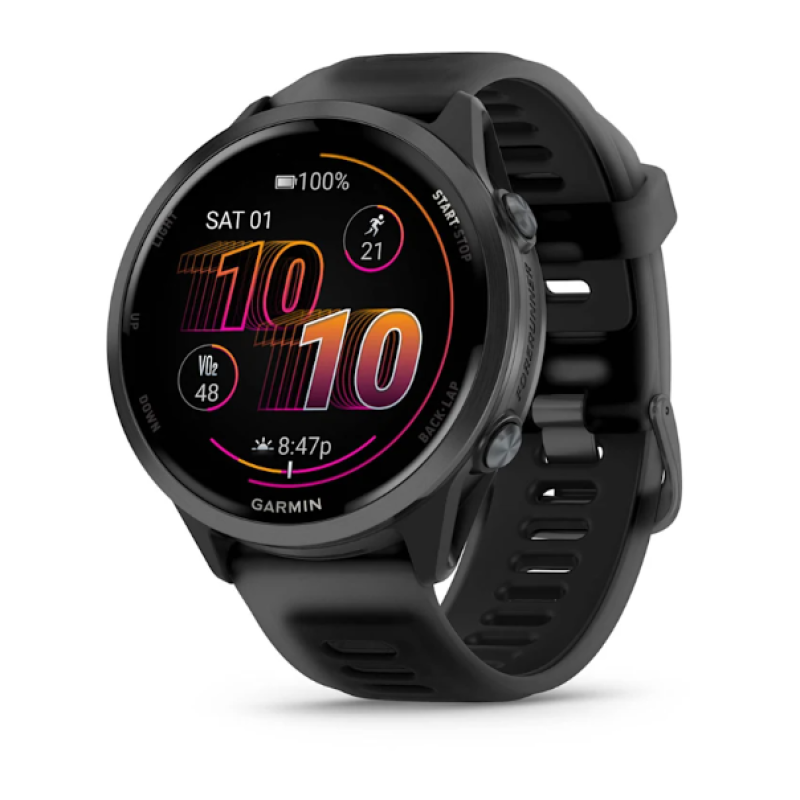
The Garmin Forerunner-Series Smart Watch is a purpose-built GPS running watch designed for athletes who want accurate training data, reliable battery life, and advanced performance tools in a lightweight wearable. It is especially popular with runners, triathletes, cyclists, and fitness-focused users who need more than a basic smartwatch. Across the Forerunner lineup, Garmin combines multi-band GPS, wrist-based heart rate tracking, training readiness insights, pace guidance, race prediction tools, and smart notifications in a device that stays comfortable during long workouts and all-day wear.
One of the biggest advantages of the Garmin Forerunner-Series Smart Watch is its balance of sport-focused features and everyday usability. Depending on the model, users can get AMOLED displays, music storage, Garmin Pay, advanced triathlon modes, recovery tracking, and multi-GNSS satellite support. The newer Forerunner models also emphasize brighter displays, improved sensors, and broader training metrics for serious runners who want actionable insights rather than generic activity tracking.
This series is ideal for beginners choosing their first GPS running watch, as well as experienced endurance athletes upgrading from older wearables. Common use cases include marathon training, interval workouts, gym sessions, outdoor navigation, and race-day pacing. In 2026, prices in the Forerunner family generally range from around $249.99 for entry-level models to roughly $749.99 for premium versions, with availability through Garmin and major electronics retailers depending on region and stock.
Specifications for Garmin Forerunner-Series Smart Watch
- Display: Many current models use AMOLED touchscreens, with sizes around 1.2 to 1.4 inches for clear visibility in bright outdoor conditions.
- GPS: Multi-band GPS and multi-GNSS support improve route accuracy, pace stability, and tracking in cities or wooded areas.
- Battery life: Battery performance varies by model, with smartwatch mode ranging from about 11 to 23 days and GPS mode from about 18 to 31 hours on select models.
- Training features: Includes pace alerts, interval workouts, race prediction, Training Readiness, ClimbPro, PacePro, and Garmin Coach support on many models.
- Health tracking: Offers heart rate monitoring, sleep analysis, stress tracking, recovery insights, and body battery-style energy metrics on supported models.
- Build quality: Lightweight fiber-reinforced polymer cases, silicone bands, and water resistance up to 5 ATM are common across the lineup.
- Storage: Entry models may include 4 GB, while higher-tier versions can offer 8 GB or 32 GB for maps and music.
- Comparison: Compared with lifestyle smartwatches, the Garmin Forerunner-Series Smart Watch delivers stronger athletic tracking, better GPS accuracy, and deeper training analytics, while premium competitors often focus more on app ecosystems and general smart features.
For buyers comparing models, the Forerunner 55 is the simplest running option, the Forerunner 165 and 265 add AMOLED screens and stronger training tools, and the Forerunner 965 targets advanced athletes who want premium navigation and longer battery life.
Troubleshooting the Garmin Forerunner-Series Smart Watch
If your Garmin Forerunner-Series Smart Watch will not charge, first check the cable connection, clean the charging contacts, and confirm the power source is working. If GPS takes too long to lock, move to an open outdoor area, update satellite data, and allow the watch to sync with Garmin Connect before the next workout. If the touchscreen is unresponsive, restart the watch and verify that the screen is clean and dry.
- Bluetooth pairing issues: Remove the watch from your phone’s Bluetooth list, restart both devices, and pair again through Garmin Connect.
- Sync failures: Open Garmin Connect, force a sync, then update firmware if the device remains out of date.
- Error or update freeze: Perform a soft reset first. If the device remains stuck, follow Garmin’s restore instructions for your model.
- Battery draining too fast: Lower brightness, disable unused sensors, reduce notifications, and use power-saving GPS settings when possible.
Preventive care includes regular software updates, careful cleaning after sweaty workouts, and storing the watch away from extreme heat. Garmin typically offers limited warranty coverage, online troubleshooting, knowledge-base support, and regional customer service channels. For help, use Garmin Support through the official website, the Garmin Connect app help section, or the local support phone number listed for your country.
Pros and Cons of the Garmin Forerunner-Series Smart Watch
Pros
- Excellent GPS accuracy for running, cycling, and outdoor training.
- Strong battery life compared with many smartwatch alternatives.
- Training-focused metrics help users improve pace, endurance, and recovery.
- Lightweight design makes long sessions more comfortable.
- Useful for beginners and advanced athletes alike.
- Good value for money in the midrange models such as the Garmin Forerunner-Series Smart Watch lineup with AMOLED displays and multi-band GPS.
Cons
- Less app variety than some full-featured lifestyle smartwatches.
- Premium models can be expensive for casual users.
- Navigation and advanced metrics may feel overwhelming at first.
- Touchscreen performance can be less convenient during intense workouts in rain or sweat.
- Some alternatives offer richer smartwatch experiences, but usually with weaker sports tracking.
Overall, the series is a strong choice for athletes who prioritize training performance over entertainment features.
Customer Reviews of the Garmin Forerunner-Series Smart Watch
Many users rate the Garmin Forerunner-Series Smart Watch highly, often around 4.5 out of 5 stars for workout accuracy, comfort, and battery performance. Positive reviews frequently praise the reliable GPS, detailed running metrics, and lightweight feel during long races or daily training. One common testimonial theme is that the watch helps runners pace workouts more intelligently and recover better between sessions.
Common complaints usually mention the learning curve, limited third-party apps, and higher prices on advanced models. Some buyers also want brighter music controls or simpler menus. Despite those concerns, most customers recommend the Forerunner line to runners, triathletes, and anyone seeking a serious fitness smartwatch rather than a general-purpose wearable.
Should You Buy the Garmin Forerunner-Series Smart Watch?
If your priority is training accuracy, durable battery life, and advanced running features, the Garmin Forerunner-Series Smart Watch is one of the strongest options available. It delivers a focused experience built for performance, making it ideal for anyone who wants a dependable running watch with real coaching value.
Faqs
How do I set up garmin Forerunner-Series Smart Watch for the first time?
Why is my garmin Forerunner-Series Smart Watch not connecting to Bluetooth or Garmin Connect?
How accurate is GPS on garmin Forerunner-Series Smart Watch during running and cycling?
Which smartphones and apps work best with garmin Forerunner-Series Smart Watch?
How can I extend the battery life of my garmin Forerunner-Series Smart Watch?
What should I do if garmin Forerunner-Series Smart Watch is not recording heart rate correctly?
How do I customize workout modes and data screens on garmin Forerunner-Series Smart Watch?
How should I clean and maintain garmin Forerunner-Series Smart Watch for long-term use?
More garmin manuals
Leave a Comment