
Garmin Vivoactive-3 Smart Watch User Manual
Content
Garmin Vivoactive-3 Smartwatch Review and Manual
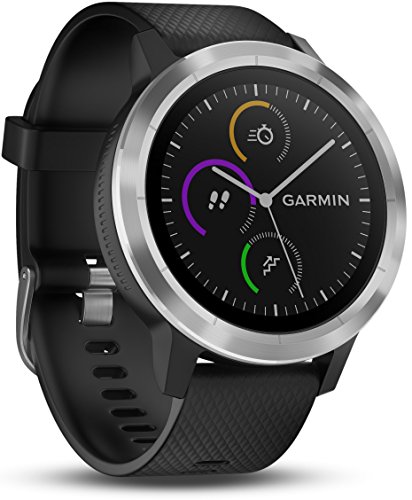
Introduction: Why the Garmin Vivoactive-3 Smartwatch Still Matters
The Garmin Vivoactive-3 Smart Watch is a versatile fitness-focused smartwatch built for users who want reliable health tracking, everyday smart features, and strong sports performance in one device. It blends GPS-powered activity tracking with a responsive touchscreen, making it a practical choice for runners, gym users, cyclists, swimmers, and anyone who wants a smartwatch that can handle both workouts and daily wear.
One of its biggest strengths is its balance between sport functionality and smart convenience. The watch includes built-in GPS, wrist-based heart rate monitoring, stress tracking, VO2 max estimates, Garmin Pay support on compatible regions and banks, and access to downloadable watch faces and apps through Garmin’s ecosystem. Its 1.2-inch color display is easy to read, and the lightweight 43g design keeps it comfortable during long training sessions and all-day use.
The Garmin Vivoactive-3 Smartwatch is especially appealing for active users who do not want a bulky sports watch or a complicated setup. It is useful for indoor and outdoor workouts, commute tracking, sleep monitoring, and everyday notifications. It also supports music controls, smartphone syncing, and a broad range of activity profiles, making it a solid all-rounder for fitness-oriented buyers.
At launch, the estimated price range was roughly $249.99 to $329.99 depending on color and trim, while current availability is generally limited to remaining retail stock and resale markets. For shoppers comparing older Garmin fitness watches, the Vivoactive 3 often stands out as a budget-friendly alternative to newer premium models while still delivering dependable core features.
Specifications: Garmin Vivoactive-3 Smart Watch Technical Details
- Display: 1.2-inch round touchscreen with 240 x 240 resolution
- Weight: About 43g for comfortable all-day wear
- Dimensions: 43.4 x 43.4 x 11.7 mm
- Battery life: Up to 7 days in smartwatch mode and up to 13 hours in GPS mode
- Water resistance: 5 ATM, suitable for swimming and shower use
- Connectivity: Bluetooth and ANT+ support
- GNSS support: GPS and GLONASS for improved outdoor tracking
- Health features: Wrist heart rate, calorie burn, steps, floors climbed, stress monitoring, and VO2 max estimates
- Smart features: Notifications, music controls, Garmin Connect IQ app support, and Garmin Pay in supported regions
- Build: Stainless steel bezel with durable polymer body and silicone strap options
Performance-wise, the Garmin Vivoactive-3 Smart Watch delivers reliable everyday accuracy for fitness tracking and strong battery life for a smartwatch in its class. Compared with similar models, it sits between basic fitness bands and more advanced multisport watches. It offers more training tools than many lifestyle smartwatches, but it is less advanced than newer Garmin models with deeper training analytics, larger displays, and newer sensors.
Pros and Cons of the Garmin Vivoactive-3 Smart Watch
Pros
- Excellent all-around fitness tracking for running, walking, cycling, gym sessions, and swimming
- Built-in GPS and GLONASS provide dependable outdoor route tracking without carrying a phone
- Lightweight 43g design makes it comfortable for long workouts and daily wear
- Up to 7 days of battery life offers strong value for regular users
- Garmin ecosystem support adds watch faces, widgets, and third-party apps
- Useful smart features such as notifications, music control, and contactless payment support in compatible regions
Cons
- Smaller display and older interface feel less modern than newer Garmin smartwatches
- No advanced training features found on premium multisport watches
- Touchscreen navigation can feel slower than newer models with improved responsiveness
- Some users may prefer newer models with better battery optimization and upgraded hardware
- Availability can be inconsistent because the model is older and no longer widely stocked
For value for money, the Garmin Vivoactive-3 Smart Watch remains attractive if found at a good discount. It is a strong alternative to basic smartwatches, but buyers seeking the newest display technology, faster performance, or more advanced fitness metrics may want to compare it with newer Garmin Vivoactive or Forerunner models.
Customer Reviews: What Users Say About the Garmin Vivoactive-3 Smart Watch
Typical user feedback rates the Garmin Vivoactive-3 Smart Watch around 4 out of 5 stars overall for fitness performance and battery life. Many customers praise its comfortable fit, accurate GPS tracking, and dependable heart rate monitoring during everyday exercise.
- “Great for running and gym workouts; battery lasts much longer than my old smartwatch.”
- “Easy to wear all day, and the sleep tracking plus stress features are genuinely useful.”
- “Love the sports modes and Garmin Connect app, but the interface feels a bit dated now.”
Common complaints include occasional touchscreen sluggishness, a less premium feel compared with newer models, and limited smartwatch polish. Even so, many users still recommend it for people who care more about fitness tracking than flashy extras. It is a smart buy for budget-conscious athletes, but buyers wanting the latest Garmin experience should consider newer alternatives.
Final Verdict: Who Should Buy the Garmin Vivoactive-3 Smart Watch?
The Garmin Vivoactive-3 Smart Watch is best suited for users who want a dependable GPS smartwatch with strong fitness tracking, solid battery life, and a comfortable design. It is especially useful for runners, cyclists, swimmers, and active professionals who want a simple yet capable wearable for both exercise and daily notifications.
If your priority is value, fitness accuracy, and an easy-to-use Garmin smartwatch, the Garmin Vivoactive-3 Smart Watch remains a worthwhile option. If you want the newest features, larger display technology, or more advanced training metrics, a newer Garmin model may be a better long-term choice.
Faqs
How do I set up garmin Vivoactive-3 Smart Watch for the first time without missing key settings?
Why is my garmin Vivoactive-3 Smart Watch not syncing with Garmin Connect, and how can I fix it?
What features of garmin Vivoactive-3 Smart Watch are most useful for fitness tracking and daily use?
How do I improve battery life on garmin Vivoactive-3 Smart Watch during heavy GPS and notification use?
Can garmin Vivoactive-3 Smart Watch work with both Android and iPhone devices?
What should I do if the garmin Vivoactive-3 Smart Watch touchscreen is unresponsive or lagging?
How do I clean and maintain garmin Vivoactive-3 Smart Watch to keep sensors accurate?
How can I customize the garmin Vivoactive-3 Smart Watch to match my workouts and daily routine?
More garmin manuals
- Garmin LILY-2 Series Smartwatch User Manual
- How to Use: Garmin Dash Cam™ Mini User Manual
- Garmin RV-785 Camper User Manual
- How to Use: Garmin Vívofit 3 Wireless Fitness Band User Manual
- Garmin Forerunner-Series Smart Watch User Manual
- How to Use: Garmin Vívoactive 5 Health and Fitness GPS Smartwatch User Manual
Leave a Comment