
Garmin RV-785 Camper User Manual
Content
Garmin RV-785 Camper Product Manual: Overview, Specs, Pros, and User Feedback
Introduction
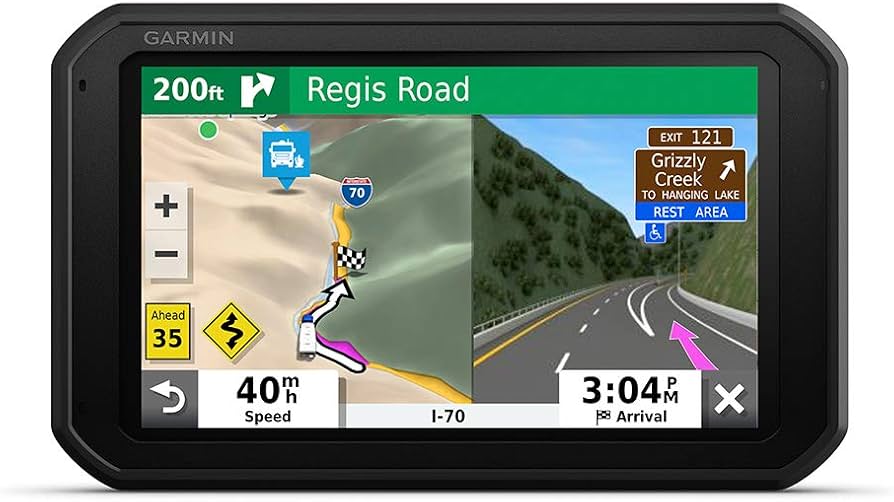
The garmin RV-785 CAMPER is a dedicated RV navigation system built for motorhomes, towables, and long-distance road trips. It combines a large 6.95-inch touchscreen with RV-specific routing tools, voice-activated navigation, and built-in connectivity options designed to make travel safer and less stressful. For drivers who need more than a standard car GPS, this model stands out because it can account for vehicle dimensions and route preferences, helping reduce the risk of tight turns, low clearances, and restricted roads.
This GPS navigator is especially useful for full-time RV owners, weekend campers, and travelers towing trailers who want turn-by-turn guidance tailored to their rig. The device also supports Bluetooth, Wi-Fi, and Garmin’s ecosystem features, making it easy to update maps, sync trip data, and manage travel information. In real-world use, the garmin RV-785 CAMPER is valued for its clear display, custom routing, and practical RV travel alerts, which help users navigate unfamiliar highways and campground access roads with greater confidence.
Pricing typically falls in the mid-to-premium range for RV GPS devices, with availability often depending on region, bundle, and seller. A typical estimated price range is around $300 to $450, though refurbished or older-stock units may cost less while accessory bundles may cost more. For buyers comparing RV navigation systems, it remains a strong option if they want a feature-rich camper GPS with specialized routing and travel planning support.
Specifications
- Display: 6.95-inch color touchscreen with 1024 x 600 resolution for easy map reading.
- Battery: Rechargeable lithium-ion battery with up to about 2 hours of runtime in portable use.
- Connectivity: Bluetooth, Wi-Fi, and wireless support for updates and device pairing.
- Power input: Maximum DC 5 V, 2 A.
- Operating temperature: -10°C to 55°C, suitable for travel in a wide range of climates.
- Charging temperature: 0°C to 45°C when using vehicle power.
- Mounting: Magnetic mount with vehicle suction cup hardware in many bundles.
- Map and routing focus: RV and camper profile support for custom routes based on vehicle size and travel preferences.
- Storage: microSD support for map data and related functions in supported configurations.
- Comparison: Compared with standard car GPS units, the RV-785 is more specialized; compared with newer premium RV models, it may have a smaller display and fewer advanced smart features.
Performance is best described as reliable for navigation and trip guidance rather than entertainment-heavy use. The screen is large enough for dashboard mounting, and the route planning tools are more relevant to RV owners than general-purpose sat nav devices. For buyers who want a camper GPS with dedicated RV routing, it remains competitive despite newer alternatives offering larger screens or more modern interface improvements.
Pros & Cons
Pros
- RV-focused routing: Helps avoid roads that may be unsuitable for large vehicles, which is a major advantage for motorhomes and towables.
- Clear display: The 6.95-inch touchscreen is easy to read at a glance during highway travel.
- Useful travel tools: Voice guidance, wireless connectivity, and RV-specific navigation features improve day-to-day usability.
- Practical for long trips: Works well for road trips, campground hopping, and route planning across unfamiliar areas.
- Good value for RV owners: Offers strong specialization for the price, especially when compared with basic GPS units.
Cons
- Battery life is limited: About 2 hours of portable use means it is best used with continuous vehicle power.
- Older hardware design: Newer RV navigators may offer larger screens, faster interfaces, or more modern software.
- Not ideal for casual users: Buyers who do not need RV-specific routing may find a smartphone navigation app more convenient.
- Accessory dependence: Some power and mounting features depend on included or optional accessories.
Overall, the garmin RV-785 CAMPER offers strong value for RV travelers who want dependable navigation with vehicle-aware routing. It is less attractive if you want the latest premium interface or the biggest display, but it remains a solid alternative to generic GPS devices and basic smartphone navigation.
Customer Reviews
User feedback for the garmin RV-785 CAMPER is generally positive, with many owners rating it around 4 out of 5 stars. Praise often centers on the RV routing features, bright screen, and confidence it provides when navigating unfamiliar routes. One common style of testimonial is: “The custom RV routing saved us from roads that would have been a problem for our rig.”
Frequent complaints include the shorter battery life, the learning curve for setting up rig dimensions, and the fact that newer models may feel more advanced. Some users also mention that map updates and accessory setup take time, especially for first-time owners.
For buyers who travel regularly with a motorhome, fifth wheel, or camper trailer, this device is usually recommended. It is best suited to users who want a dedicated RV GPS rather than a general-purpose navigator. If RV-safe routing is the top priority, the garmin RV-785 CAMPER remains a worthwhile purchase.
Faqs
How do I set up garmin RV-785 CAMPER for the first time in my RV?
What should I do if garmin RV-785 CAMPER is not finding my RV route correctly?
Which garmin RV-785 CAMPER features are most useful for long-distance camper travel?
Can garmin RV-785 CAMPER work with a backup camera or other Garmin accessories?
Why does garmin RV-785 CAMPER freeze, lag, or restart unexpectedly?
How can I update maps and software on garmin RV-785 CAMPER without losing my settings?
What is the best way to optimize garmin RV-785 CAMPER for better GPS accuracy?
How should I maintain and care for garmin RV-785 CAMPER during frequent road use?
More garmin manuals
Leave a Comment