
Setup: Garmin Index-Bpm Blood Pressure Monitor User Manual
Content
Garmin Index-Bpm Blood Pressure Monitor: Complete Product Manual
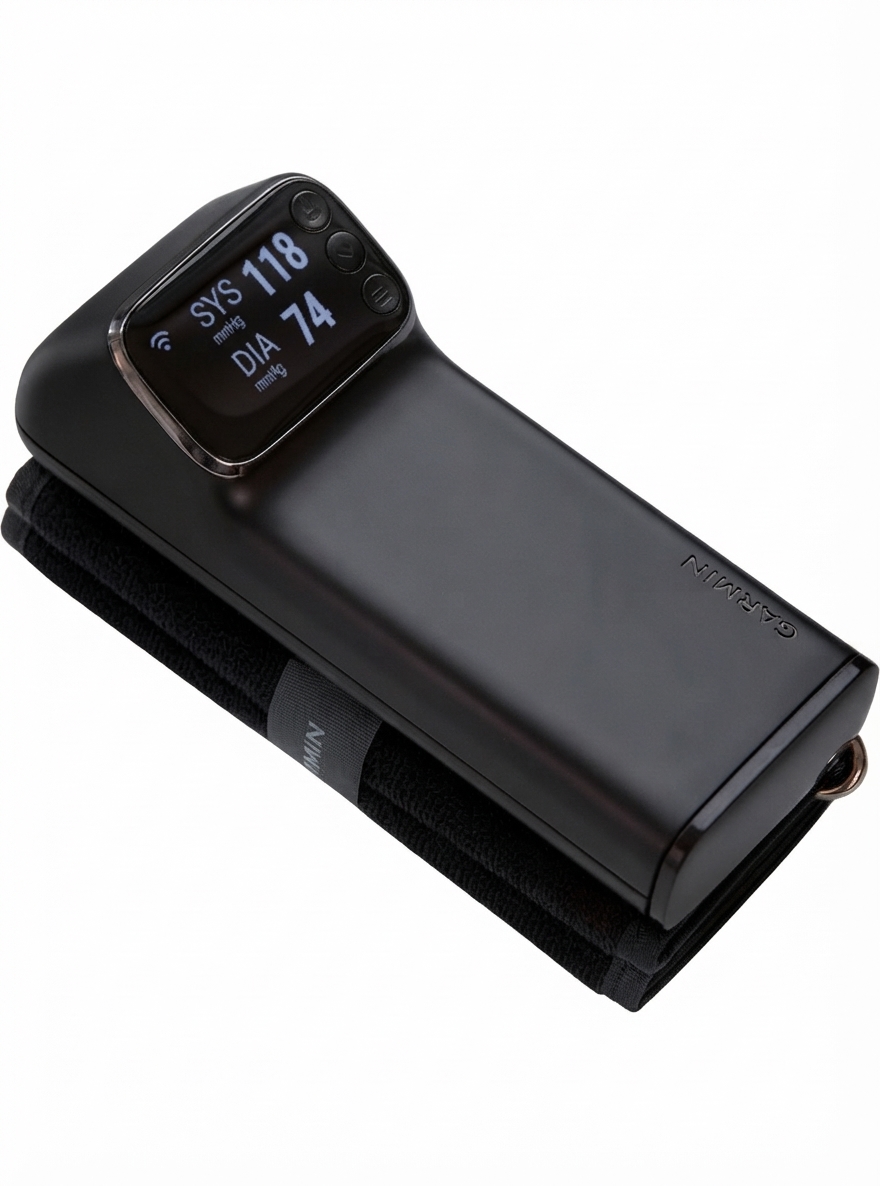
Introduction to the Garmin Index-Bpm Blood Pressure Monitor
The Garmin Index-Bpm Blood Pressure Monitor is a smart, connected upper-arm blood pressure monitor designed for users who want easy home tracking and seamless data synchronization with the Garmin Connect ecosystem. It is built for people managing long-term heart health, fitness-focused users who want a fuller picture of their wellness, and households that prefer a simple digital monitor with automatic logging. The device captures systolic and diastolic blood pressure readings and stores them in a connected app, making it easier to monitor patterns over time rather than relying on isolated measurements.
One of the biggest advantages of the Garmin Index-Bpm Blood Pressure Monitor is its integration with Garmin Connect, which helps centralize health data alongside activity, sleep, and other wellness metrics. This makes it especially appealing for Garmin watch owners and anyone who wants blood pressure tracking in the same app they already use. The monitor also includes a built-in display, so readings can be checked directly on the device without opening the app.
As of current market listings, the estimated price range is around $149.99 in the U.S. and roughly €159.99 to €179.99 in parts of Europe, depending on retailer and region. Availability is generally through Garmin and authorized resellers, though stock can vary by country. For voice-search style queries, the short answer is: it is a smart, FDA-cleared blood pressure monitor for home use with connected health tracking.
Key Features and Setup Overview
- Upper-arm blood pressure monitoring for home use
- Automatic syncing with Garmin Connect
- Built-in display for on-device viewing
- Designed for recurring wellness and hypertension tracking
- Suitable for users who prefer digital logs over paper records
Troubleshooting the Garmin Index-Bpm Blood Pressure Monitor
Common issues with the Garmin Index-Bpm Blood Pressure Monitor usually relate to cuff placement, inflation, connectivity, or software updates. If you see error code E1, the device did not detect a measurement; remove the cuff, let the monitor power down, then try again with the cuff positioned correctly. E2 means the cuff did not inflate properly or may have a leak, so check the hose, cuff seal, and arm placement. E3 indicates an incorrect measurement, which often happens when the arm is moving or the cuff is too loose. E7, E9, and X are connection or update-related errors, usually solved by retrying the sync, checking Wi‑Fi, or repeating setup.
Preventive steps can reduce most errors: keep the cuff snug, sit still with your arm at heart level, use fresh batteries when the battery indicator is low, and make sure the device is within range of your network during setup. If the monitor repeatedly times out, give it a full restart and try again in a stable environment.
The product includes a limited one-year warranty, and repaired or replaced units typically carry a 90-day warranty or the remainder of the original warranty period, whichever is longer. For support, Garmin directs users to its official support channel, and in the United States customer service is available at 1-800-800-1020.
Common Error Codes and Quick Fixes
- E1: No measurement detected; reposition the cuff and try again.
- E2: Cuff leak or inflation problem; inspect the cuff and connections.
- E3: Incorrect measurement; keep still and repeat the reading.
- E7: Connection timeout; verify Wi‑Fi or Garmin Connect pairing.
- E9: Software update failed; restart and reattempt the update.
- X: Upload or setup timeout; retry the upload after restarting the device.
Pros and Cons of the Garmin Index-Bpm Blood Pressure Monitor
Pros
- Seamless Garmin Connect integration makes long-term blood pressure tracking convenient.
- Built-in display allows quick checks without opening a phone app.
- Useful for users already invested in Garmin health and fitness devices.
- Good choice for organized home monitoring, especially for trend tracking.
- Competitively positioned for a smart connected blood pressure monitor.
Cons
- Higher price than basic standalone blood pressure cuffs.
- Best value is strongest for existing Garmin users, not casual buyers.
- Connectivity setup can be frustrating if Wi‑Fi or app pairing is unstable.
- Does not replace medical advice or professional diagnosis.
- Some alternatives offer simpler operation at a lower cost, though without ecosystem syncing.
For value for money, the Garmin Index-Bpm Blood Pressure Monitor makes the most sense if you want app-based tracking and already use Garmin products. If you only need occasional readings, a basic upper-arm monitor may be the better bargain.
Customer Reviews and User Feedback
Typical customer feedback for the Garmin Index-Bpm Blood Pressure Monitor averages around 4 out of 5 stars in sentiment, with praise focused on convenience, clean design, and Garmin Connect syncing. Many users appreciate being able to review readings alongside other health data, especially when monitoring trends over weeks or months.
Common complaints include setup timeouts, connectivity hiccups, and the premium price compared with non-smart alternatives. One frequent testimonial style comment is: “The syncing is the best part; it makes tracking my readings effortless.” Another common sentiment is: “Great device, but the initial pairing took longer than expected.”
Overall, this is a strong recommendation for Garmin ecosystem users, people managing home blood pressure logs, and anyone who values connected health tracking over a budget-first purchase. If you want the easiest experience, make sure your network is stable before setup and keep the cuff properly fitted during every measurement.
Who Should Buy It?
- Garmin watch owners who want unified health data
- Users tracking blood pressure regularly at home
- People who prefer digital trend monitoring over handwritten logs
- Buyers willing to pay more for app integration and convenience
Faqs
How do I set up the Garmin Index-Bpm Blood Pressure Monitor for the first time?
Why won’t my Garmin Index-Bpm Blood Pressure Monitor sync measurements to Garmin Connect?
How should I position the Garmin Index-Bpm Blood Pressure Monitor cuff for accurate readings?
What should I do if the Garmin Index-Bpm Blood Pressure Monitor shows an error code?
Can the Garmin Index-Bpm Blood Pressure Monitor connect to Wi-Fi without Garmin Connect?
How many measurements can I take with the Garmin Index-Bpm Blood Pressure Monitor at once?
What can I do to improve the accuracy of Garmin Index-Bpm Blood Pressure Monitor readings?
How do I maintain and care for the Garmin Index-Bpm Blood Pressure Monitor?
More garmin manuals
Leave a Comment