
Harman Kardon 25-Series Digital Versatile Dics Player User Manual
Content
Harman Kardon 25-Series Digital Versatile Disc Player Overview
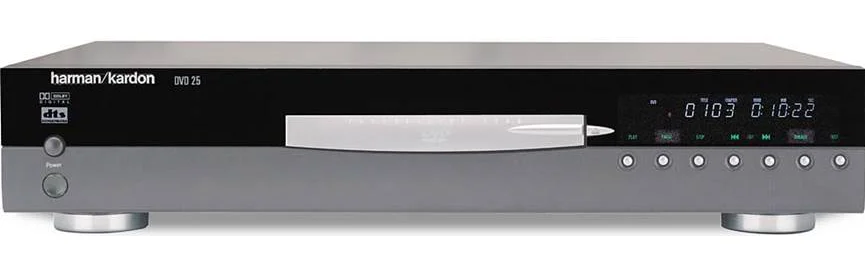
The harman kardon 25-Series Digital Versatile Dics Player is a classic early-2000s DVD player designed for home theater enthusiasts who want clean video playback, solid build quality, and strong audio performance. Often associated with the DVD 25 model line, this progressive-scan DVD player supports DVD, CD, VCD, MP3, CD-R, CD-RW, DVD-R, DVD-RW, DVD+R, and DVD+RW playback, making it a flexible choice for legacy disc collections and music libraries. It also includes both optical and coaxial digital outputs, plus component, S-Video, and composite video connections for compatibility with a wide range of TVs and receivers.
One of the main benefits of the harman kardon 25-Series Digital Versatile Dics Player is its reputation for refined audio output, low distortion, and reliable disc handling. With progressive scan support and high signal-to-noise performance, it was built for users who cared about both picture quality and sound quality. This makes it especially useful for home theater setups, collectors of physical media, and anyone restoring a vintage AV system. Typical original pricing was around the mid-range premium category, roughly $400 to $500 at launch, while current used-market availability varies widely by condition, usually in the budget to moderate range depending on seller and region. It remains a practical option for buyers who want a sturdy legacy DVD player with audiophile-friendly features.
Pros and Cons of the Harman Kardon DVD 25-Series Player
Pros
- Excellent audio performance: The player is known for clean analog output, strong signal-to-noise characteristics, and low distortion, which helps music and movie soundtracks feel detailed and controlled.
- Progressive scan video: Better than standard interlaced DVD output for compatible displays, especially in older home theater systems.
- Wide disc compatibility: Supports DVD, CD, MP3, VCD, and several recordable formats, making it useful for mixed media libraries.
- Good connection options: Includes component video, S-Video, composite, and digital audio outputs for flexible integration.
- Solid value on the used market: For buyers who need a dependable legacy player, it can be more affordable than modern specialty units.
Cons
- Older technology: It does not support Blu-ray, DVD-Audio, or SACD, so it is limited compared with newer universal players.
- Availability is used-only: New units are generally unavailable, so condition and seller reliability matter.
- May require maintenance: As a vintage disc player, tray mechanisms, lasers, and remote controls can show age-related issues.
- Not ideal for modern 4K systems: Best suited for standard-definition DVD viewing rather than current ultra-high-definition setups.
For buyers comparing alternatives, the harman kardon 25-Series Digital Versatile Dics Player offers better legacy-audio credibility than many generic DVD players, but a newer universal player may be a stronger choice if you need broader format support.
Customer Reviews and Common User Feedback
Owner feedback for the harman kardon 25-Series Digital Versatile Dics Player is generally positive, with many users praising its sturdy construction, warm sound quality, and dependable playback. Average user impressions often cluster around 4 out of 5 stars for value and audio performance, especially among home theater hobbyists and collectors. One frequent compliment is that it “sounds better than expected for a DVD player,” particularly when connected through digital outputs to a quality receiver.
Common complaints focus on age-related wear, including occasional tray loading issues, remote-control limitations, and the lack of support for newer disc formats. Some users also note that it is not the best fit for modern flat-panel displays without appropriate scaling. Buyers usually recommend it for vintage AV setups, secondary rooms, and collectors who want a reliable disc player with strong playback quality. It is less attractive for users who need streaming, 4K video, or cutting-edge format support.
Frequently Asked Questions About the Harman Kardon 25-Series DVD Player
What makes this DVD player stand out?
Its standout features are progressive scan video, strong audio output, and broad disc compatibility, which make it appealing for legacy home theater systems.
Is it still worth buying today?
Yes, if you need a dependable used DVD player for DVDs, CDs, and MP3 discs, and you value audio quality over modern features.
What should buyers check before purchasing?
Inspect disc loading, remote operation, digital outputs, and overall cosmetic condition, since these units are typically sold used.
Final Verdict
The harman kardon 25-Series Digital Versatile Dics Player remains a respected legacy DVD player with strong build quality, excellent disc compatibility, and above-average audio performance. It is a smart purchase for collectors, home theater fans, and anyone maintaining a classic AV setup.
Faqs
How do I set up the harman kardon 25-Series Digital Versatile Dics Player for the first time?
Why is my harman kardon 25-Series Digital Versatile Dics Player not reading discs?
What audio and video connections work best with the harman kardon 25-Series Digital Versatile Dics Player?
How do I fix skipped playback or freezing on the harman kardon 25-Series Digital Versatile Dics Player?
Is the harman kardon 25-Series Digital Versatile Dics Player compatible with modern TVs and AV receivers?
How can I improve picture and sound quality on the harman kardon 25-Series Digital Versatile Dics Player?
What maintenance does the harman kardon 25-Series Digital Versatile Dics Player need to stay reliable?
How do I troubleshoot no sound or no picture on the harman kardon 25-Series Digital Versatile Dics Player?
More harman kardon manuals
Leave a Comment