
Harman Kardon BDS-800 Integrated home theater system User Manual
Content
Harman Kardon BDS-800 Integrated Home Theater System: Complete Product Manual
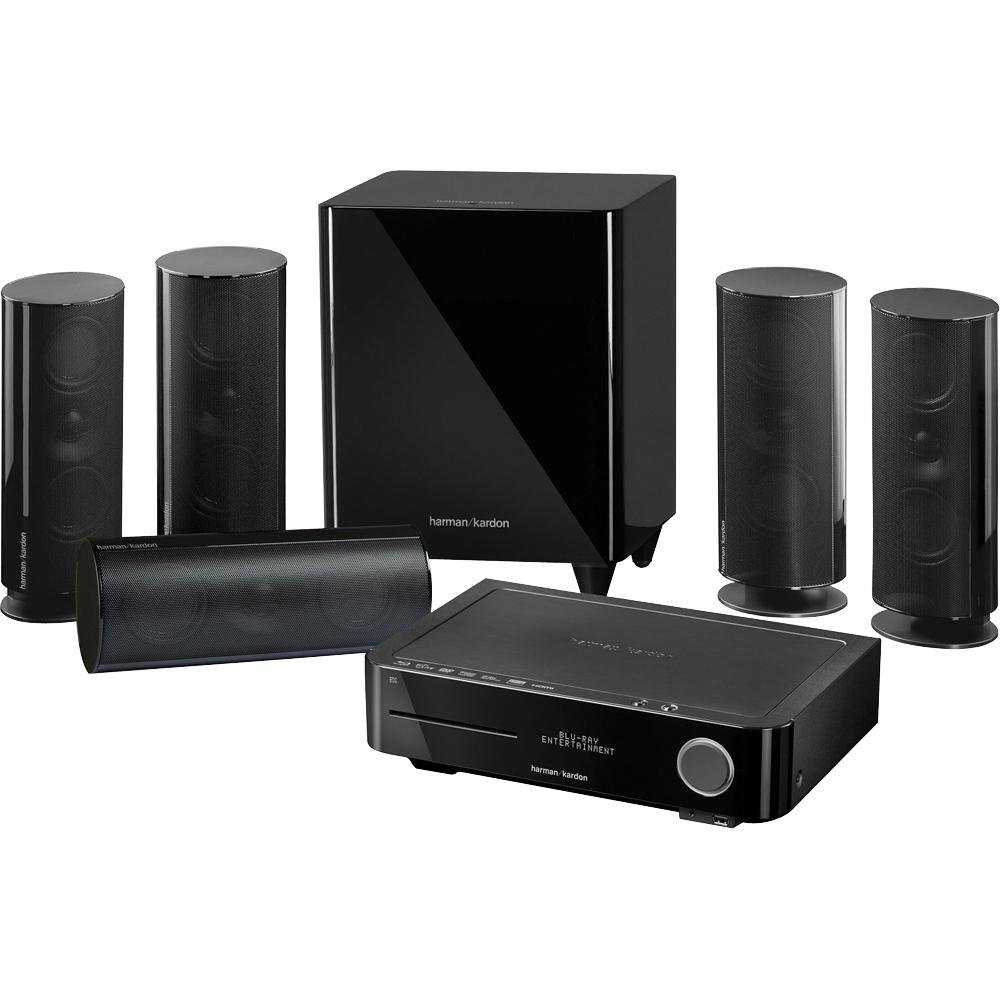
The harman kardon BDS-800 Integrated home theater system is a compact all-in-one entertainment solution designed to bring Blu-ray playback, surround sound, and simple system control into one sleek package. It combines a Blu-ray Disc receiver, FM tuner, integrated amplification, and a matched 5.1 speaker package, making it a strong choice for users who want a cleaner setup without sacrificing cinematic sound. With its 65W-per-channel amplification, Dolby TrueHD and DTS-HD Master Audio support, and HDMI output, the system delivers an impressive balance of power, clarity, and convenience for movies, music, and TV audio.
This integrated home theater system is ideal for apartment owners, home cinema beginners, and anyone who prefers a minimal cable setup over a separate AV receiver and speaker stack. It works well in small to medium-sized living rooms, media rooms, and bedrooms where space efficiency matters. The included satellite speakers and powered subwoofer help create an immersive surround experience without requiring large floorstanding speakers. For users searching for a straightforward Blu-ray home theater system with premium branding and polished design, the harman kardon BDS-800 Integrated home theater system remains a notable option.
At launch, the system was positioned in the premium compact home theater category, with a typical estimated price range of about $1,000 to $1,500 depending on retailer, region, and included speaker package. Availability today is mostly limited to resale, refurbished, or used-market listings rather than new retail stock. Buyers looking for similar modern alternatives should compare it with newer soundbar-based systems or compact AV receiver bundles if HDMI input flexibility and current streaming features are priorities.
Specifications: Harman Kardon BDS-800 Detailed Technical Features
- System type: 5.1-channel integrated home theater system with Blu-ray Disc receiver
- Amplifier output: 65W per channel, 20Hz to 20kHz, into 6 ohms
- Frequency response: 20Hz to 20kHz
- Signal-to-noise ratio: -90dB A-weighted
- HDMI: 1 HDMI output with version 1.3a support and Deep Colour capability
- Audio formats: Dolby Digital, Dolby Digital Plus, Dolby TrueHD, DTS Digital, DTS-HD High Resolution Audio, DTS-HD Master Audio, PCM, MP3, WMA
- Connectivity: Optical and coaxial digital inputs, stereo line inputs, Ethernet, USB, FM tuner
- Speakers: Four satellite speakers, one center speaker, one powered subwoofer
- Subwoofer power: 200W powered subwoofer with 8-inch driver
- Main unit size: Compact desktop-style chassis for easy placement
- Power requirement: 110–240V AC, 50/60Hz
Compared with a typical budget Blu-ray home theater package, the BDS-800 offers stronger amplification, better finish quality, and higher-end codec support. Against a modern AV receiver system, it is simpler to install but less flexible because it lacks the expandability and multiple HDMI inputs found on newer receivers.
Troubleshooting Guide for the BDS-800 Home Theater System
If the system does not power on, check the mains connection, power strip, and wall outlet first. A blank display can also indicate standby mode, so confirm the unit is fully switched on. If there is no sound, verify speaker wiring, input selection, and volume levels. For HDMI picture problems, reseat the HDMI cable and confirm the TV is set to the correct input.
- No audio: Check speaker polarity, mute status, and source settings.
- No Blu-ray playback: Clean the disc, confirm region compatibility, and test a known good disc.
- HDMI handshake issue: Power cycle the TV and system, then reconnect the HDMI cable.
- Subwoofer not working: Verify power, placement, and low-frequency settings.
- Remote not responding: Replace batteries and remove obstructions between remote and main unit.
Common error messages on older disc-based systems usually relate to disc compatibility, region coding, or unreadable media rather than a hardware fault. Preventive care includes keeping ventilation clear, updating setup settings carefully, and using quality HDMI and speaker cables. Warranty coverage depends on the seller and region, since many units are now out of original manufacturer warranty. For support, use Harman Kardon customer service channels, the product manual, or an authorized service center; if purchasing used, confirm seller return terms before buying.
Pros and Cons of the Harman Kardon BDS-800 Integrated Home Theater System
Pros
- Compact all-in-one design reduces clutter and simplifies setup.
- Strong 65W-per-channel amplification delivers clear, room-filling sound.
- Supports advanced audio formats like Dolby TrueHD and DTS-HD Master Audio.
- Includes a powered subwoofer for better low-end impact in movies and music.
- Elegant build quality makes it suitable for living rooms and media spaces.
Cons
- Limited HDMI flexibility compared with modern AV receivers.
- Older platform lacks current streaming and smart-TV features.
- Availability is mostly restricted to used or refurbished units.
- No 3D playback support on many configurations.
- Not as expandable as a separate receiver-and-speaker setup.
Value for money depends on the buyer’s goals. For users who want a compact Blu-ray home theater with premium sound and simple installation, the system still offers appeal. For buyers who need multiple HDMI inputs, app-based streaming, or future upgrade paths, a newer AV receiver package or premium soundbar system may be a better alternative.
Customer Reviews: What Buyers Say About the BDS-800
Customer feedback for the harman kardon BDS-800 Integrated home theater system is generally positive, with many users praising its sleek design, clean sound, and easy setup. Typical ratings fall around 4 out of 5 stars from owners who value convenience and brand reputation. One common testimonial is that the system “sounds far bigger than it looks,” especially in small rooms.
Frequent complaints include limited HDMI inputs, aging disc-player features, and the lack of newer streaming support. Some users also note that replacement parts can be harder to find because the model is older. Buyers who mainly want a compact cinematic system for Blu-ray playback and TV audio usually recommend it, while users seeking modern smart-home integration often look elsewhere.
Faqs
How do I set up the harman kardon BDS-800 Integrated home theater system for the first time?
What should I do if the harman kardon BDS-800 Integrated home theater system has no sound?
Which TVs and devices are compatible with the harman kardon BDS-800 Integrated home theater system?
How can I improve surround sound performance on the harman kardon BDS-800 Integrated home theater system?
Why does the harman kardon BDS-800 Integrated home theater system keep losing HDMI signal?
How do I update settings on the harman kardon BDS-800 Integrated home theater system after moving to a new room?
What maintenance does the harman kardon BDS-800 Integrated home theater system need to stay in good condition?
Can I connect a soundbar or wireless speakers to the harman kardon BDS-800 Integrated home theater system?
More harman kardon manuals
Leave a Comment