
Harman Kardon SB26 Bluetooth Soundbar with Subwoofer User Manual
Content
Harman Kardon SB26 Bluetooth Soundbar with Subwoofer: Overview, Features, and Buying Guide
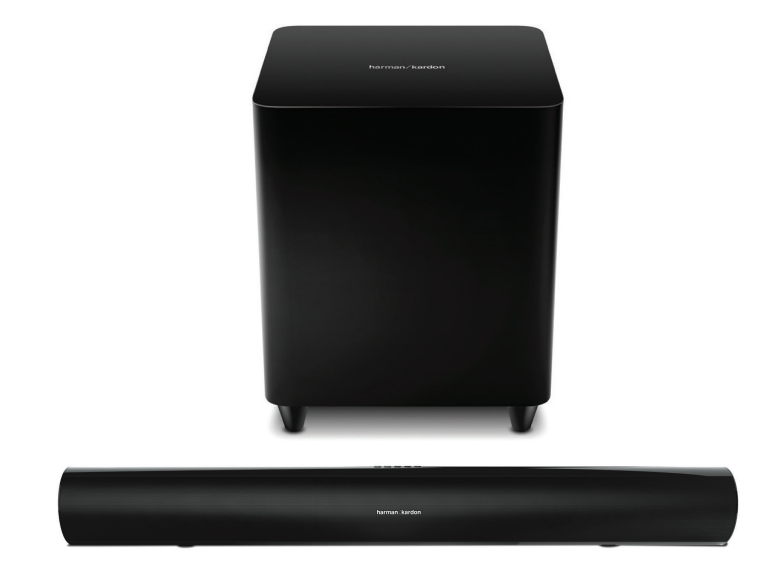
The harman kardon SB26 Bluetooth Soundbar with Subwoofer is a premium 2.1-channel home audio system designed for users who want a cleaner, more powerful alternative to standard TV speakers. With a long, low-profile soundbar and a dedicated wireless subwoofer, it delivers a balanced mix of clear dialogue, detailed mids, and deep bass for movies, music, and everyday TV viewing. The system is built around a soundbar with dual 3-inch midrange drivers and 1-inch dome tweeters per channel, plus a 10-inch wireless subwoofer that adds real low-end impact for action scenes and bass-heavy playlists.
This model is especially well suited for small to medium living rooms, bedrooms, and apartment setups where a full surround system may be unnecessary or too complex. Bluetooth connectivity makes it easy to stream music from a smartphone, tablet, or laptop without cables, while HDMI, optical, and auxiliary inputs support flexible TV and media player connections. Many users appreciate the simple setup, compact design, and the brand’s signature focus on refined sound rather than exaggerated bass. The system’s frequency response of 38Hz to 22kHz helps it cover both dialogue and bass with solid range for everyday home entertainment.
As a legacy product, the Harman Kardon SB26 may not be as widely stocked as newer soundbars, but it is still found through select retailers, refurbished listings, and resale markets. Typical pricing varies by condition and seller, with used or refurbished units often appearing in the mid-range category rather than premium-new pricing. For buyers looking for a stylish Bluetooth soundbar with subwoofer performance, the harman kardon SB26 Bluetooth Soundbar with Subwoofer remains a practical option that combines elegant design, easy wireless streaming, and room-filling audio.
Pros and Cons of the Harman Kardon SB26 Bluetooth Soundbar with Subwoofer
Pros
- Strong sound for movies and music: The 2.1-channel layout and 10-inch wireless subwoofer produce fuller sound than basic TV speakers, especially for dialogue, sound effects, and bass.
- Bluetooth streaming convenience: Wireless playback from phones and tablets makes it easy to use as a music speaker as well as a TV sound upgrade.
- Clean, premium design: The slim soundbar and matching subwoofer fit well in modern living spaces and home theater setups.
- Useful connectivity: HDMI, optical, and auxiliary options make it compatible with many TVs and media sources.
- Good value on the used market: For shoppers who want a branded home audio upgrade without paying for a new Dolby Atmos system, it can offer strong value for money.
Cons
- No modern surround sound features: It is a basic non-surround soundbar, so it cannot match newer multi-channel or Dolby Atmos alternatives.
- Older model limitations: Availability is limited, and some buyers may prefer newer soundbars with voice assistants, app control, or HDMI eARC.
- Best for smaller rooms: While powerful enough for many spaces, larger rooms may need a more advanced system with wider sound dispersion.
- Value depends on price: It is a smart buy if priced reasonably, but not if it costs close to newer feature-rich soundbars from Samsung, Sony, or JBL.
Customer Reviews and User Feedback
User feedback for the harman kardon SB26 Bluetooth Soundbar with Subwoofer is generally positive, with many owners giving it around 4 to 4.5 out of 5 stars for sound quality, design, and easy setup. Common praise focuses on the clear midrange, strong bass from the wireless subwoofer, and the way it improves TV audio without requiring complicated installation. One typical testimonial is, “The sound is rich and balanced, and the subwoofer adds real impact for movies.”
Frequent complaints usually involve the fact that it is an older product, so buyers may have difficulty finding a new unit, and some people note that it lacks the advanced features found in newer Bluetooth soundbars. A few users also mention that the bass can feel too strong in smaller rooms if not adjusted properly. Most reviewers recommend it to buyers who value sound quality and simplicity over smart features. For anyone shopping on the used or refurbished market, the harman kardon SB26 Bluetooth Soundbar with Subwoofer is often viewed as a solid purchase when the price is fair and all components are included.
Technical Specifications at a Glance
- Soundbar configuration: 2.1-channel system
- Soundbar drivers: Two 3-inch midrange drivers and one 1-inch dome tweeter per channel
- Soundbar amplifier power: 2 x 30W
- Wireless subwoofer: 10-inch ported design
- Subwoofer amplifier power: 100W
- Frequency response: 38Hz to 22kHz
- Soundbar dimensions: 110 mm x 920 mm x 89 mm
- Subwoofer dimensions: 365 mm x 320 mm x 320 mm
- Wireless streaming: Bluetooth supported
Who Should Buy the Harman Kardon SB26?
This soundbar is a good fit for users who want a simple home theater upgrade with clear sound, wireless bass, and Bluetooth music playback. It is ideal for apartments, bedrooms, compact living rooms, and anyone replacing weak built-in TV speakers. Buyers who want modern features such as voice control, app integration, or immersive surround formats may prefer a newer model, but those looking for a classic Bluetooth soundbar with subwoofer performance will still find solid everyday value here.
Faqs
How do I set up the harman kardon SB26 Bluetooth Soundbar with Subwoofer for the first time?
Why is my harman kardon SB26 Bluetooth Soundbar with Subwoofer not producing sound from the TV?
How do I pair a phone or tablet with the harman kardon SB26 Bluetooth Soundbar with Subwoofer?
What should I do if the SB26 subwoofer is not connecting wirelessly?
Which TV connections work best with the harman kardon SB26 Bluetooth Soundbar with Subwoofer?
How can I get the best bass and surround sound performance from the SB26?
Why does the harman kardon SB26 Bluetooth Soundbar with Subwoofer keep cutting out during playback?
How should I clean and maintain the harman kardon SB26 Bluetooth Soundbar with Subwoofer?
More harman kardon manuals
Leave a Comment