
Hh Electronics HPX Series Active Loudspeakers User Manual
Content
hh electronics HPX Series Active Loudspeakers Overview
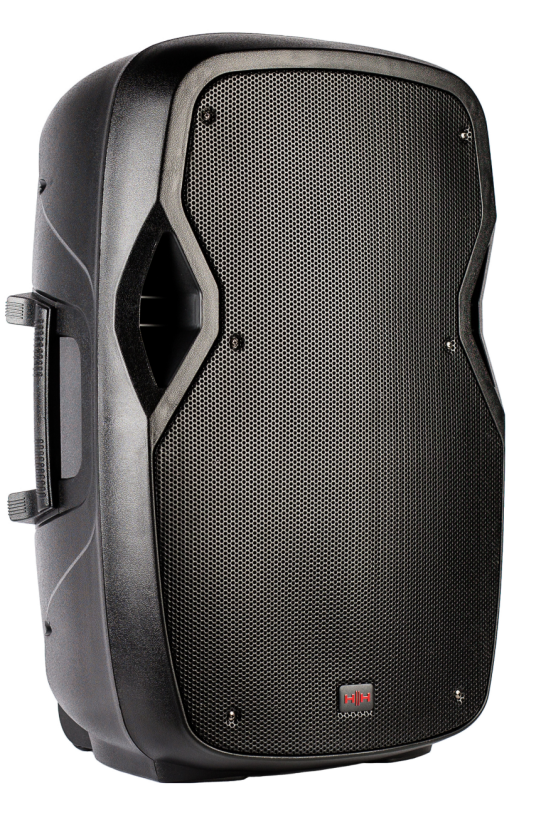
The hh electronics HPX Series Active Loudspeakers are compact, powered PA speakers designed for mobile DJs, small venues, rehearsal spaces, churches, and public address applications. Built around a rugged molded cabinet and simple onboard controls, the range is aimed at users who need reliable sound reinforcement without the complexity of external amplifiers. The series is especially attractive for users looking for an affordable active speaker solution that is easy to carry, quick to set up, and flexible enough for speech, music playback, and live performance use.
The lineup includes multiple models, with the HPX-108 and HPX-112 standing out as popular options. The HPX-108 features an 8-inch woofer and a 1-inch compression driver, while the HPX-112 steps up to a 12-inch woofer for greater output and fuller low-end response. Key benefits include balanced XLR/quarter-inch combo inputs, balanced XLR output for linking speakers, and straightforward tone shaping with volume, bass, and treble controls. The cabinets also include a monitor angle and pole socket, making them suitable for floor monitoring or stand-mounted use.
In terms of pricing, the hh electronics HPX Series Active Loudspeakers generally sit in the budget to mid-range category, with typical retail pricing varying by model and region. The HPX-108 is often positioned as an entry-level option for smaller audiences, while larger models such as the HPX-115 are priced higher and suited to bigger events. Availability is best through specialist audio retailers, PA equipment dealers, and music trade suppliers, with stock varying by model and market.
Technical Specifications and Key Features
- Model range: Active moulded PA speakers, including HPX-108 and HPX-112
- Power output: HPX-108 delivers 300W peak; HPX-112 delivers 800W peak
- Drivers: HPX-108 uses an 8-inch woofer plus 1-inch compression driver
- Coverage: 90° horizontal by 40° vertical dispersion for focused sound projection
- Inputs: Balanced XLR/1/4-inch combi input for microphones, mixers, and line-level sources
- Outputs: Balanced XLR output for linking to additional speakers
- Controls: Volume, bass, and treble adjustment for quick sound tuning
- Indicators: Power and clip LEDs for signal and overload monitoring
- Cabinet: Robust polypropylene enclosure with integrated handles and monitor angle
- Mounting: 35mm pole socket for stand mounting
- Finish: Black cabinet with powder-coated steel grille and acoustic foam backing
Compared with similarly priced active PA speakers, the HPX range emphasizes portability, simple controls, and dependable everyday use rather than advanced DSP features. That makes the hh electronics HPX Series Active Loudspeakers a practical choice for users who value ease of use and solid performance over complex digital processing.
Setup Guide for HH Electronics HPX Active PA Speakers
Start by placing the speaker on a stable surface or mounting it on a 35mm speaker stand. If used as a floor monitor, angle the cabinet toward the performer and keep the rear panel accessible for cable connections. Connect your audio source using the balanced XLR/1/4-inch combo input, then adjust the source output to a moderate level before powering the speaker on.
Next, set the volume to a low level and gradually raise it while testing the input signal. Use the bass and treble controls to match the room acoustics and program material. If you are linking two speakers, run the XLR output from the first unit to the input of the second. For best results, keep signal cables away from power cables to reduce noise and interference.
Safety matters: avoid blocking ventilation areas, do not expose the cabinet to moisture, and never push the input into clipping for long periods. If sound is distorted, lower the source gain first, then the speaker volume. If the power LED does not light, check the mains connection and verify that the outlet is live before troubleshooting further.
Troubleshooting Common Issues with HPX Series Active Loudspeakers
If the speaker does not power on, check the mains cable, wall outlet, and rear-panel power switch. A silent speaker can also be caused by a muted mixer channel, disconnected input cable, or source volume set too low. If the clip LED stays on, reduce the input level immediately to prevent distortion and possible speaker stress.
Common problems and fixes include:
- No sound: Confirm power, input signal, and cable integrity
- Distortion: Lower the mixer output or speaker volume
- Hum or buzz: Use balanced connections and separate audio cables from power leads
- Weak bass: Check placement, orientation, and bass control settings
- Intermittent audio: Inspect plugs, adapters, and cable strain points
There are no widely published error codes for the HPX range, so most faults are diagnosed through LED indicators and signal checks. Preventive care includes keeping connectors clean, storing the speaker in a dry environment, and avoiding prolonged clipping. Warranty terms and support options vary by seller, so buyers should keep proof of purchase and contact the original retailer or HH Audio distributor for service assistance.
Pros and Cons of hh electronics HPX Series Active Loudspeakers
Pros
- Easy to set up, even for first-time PA users
- Compact and lightweight enough for mobile use
- Balanced inputs and outputs support flexible system expansion
- Useful tone controls for quick room correction
- Rugged polypropylene cabinet improves durability for transport
- Good value for money for small events and speech reinforcement
Cons
- Limited onboard processing compared with premium DSP speakers
- HPX-108 may feel underpowered for larger venues
- Sound shaping is basic, with no advanced presets or app control
- Not ideal for users needing deep bass without a subwoofer
For buyers comparing alternatives, the hh electronics HPX Series Active Loudspeakers offer a stronger simplicity-to-price ratio than many feature-heavy competitors. They are best for users who want dependable active speakers rather than advanced digital features, making them a smart option for budget-conscious event setups.
Customer Reviews and User Feedback
User feedback for the HPX range is generally positive, with many owners praising the clarity, portability, and fast setup. Common ratings fall around 4 out of 5 stars, especially among buyers using the speakers for small gigs, speech, rehearsal rooms, and portable DJ rigs. Customers often highlight the compact size and practical controls as major strengths.
Typical praise includes comments such as, “Great sound for the size and very easy to move,” and “Perfect for small events where simple, reliable audio matters.” Common complaints focus on limited low-end output from the smaller model and the lack of advanced DSP features. For most buyers seeking an affordable powered PA speaker, the HPX-108 is recommended for compact applications, while larger models are better suited to users needing more headroom and fuller sound.
Faqs
How do I set up hh electronics HPX Series Active Loudspeakers for the first time?
What should I do if my hh electronics HPX Series Active Loudspeakers has no sound?
Can hh electronics HPX Series Active Loudspeakers be used as a floor monitor?
What devices are compatible with hh electronics HPX Series Active Loudspeakers?
Why is my hh electronics HPX Series Active Loudspeakers distorting at higher volumes?
How can I get better sound quality from hh electronics HPX Series Active Loudspeakers in a small venue?
How do I maintain and clean hh electronics HPX Series Active Loudspeakers safely?
What does the clip light on hh electronics HPX Series Active Loudspeakers mean?
More hh electronics manuals
- Hh Electronics SP26 Speaker Processor User Manual
- Hh Electronics MZ-Series Zone Amplifiers MZ-140D
- Hh Electronics Tessen Passive PA Cabinet User Manual
- Hh Electronics Tessen Install Range Active Cabinets User Manual
- Installation: Hh Electronics MZ Series High Range Amplifiers User Manual
- Hh Electronics System-2 Active PA System S2-212 User Manual
Leave a Comment