
Hh Electronics MZ-Series Zone Amplifiers MZ-140D
Content
hh electronics MZ-Series Zone Amplifiers MZ-140D: Product Overview and Buying Guide
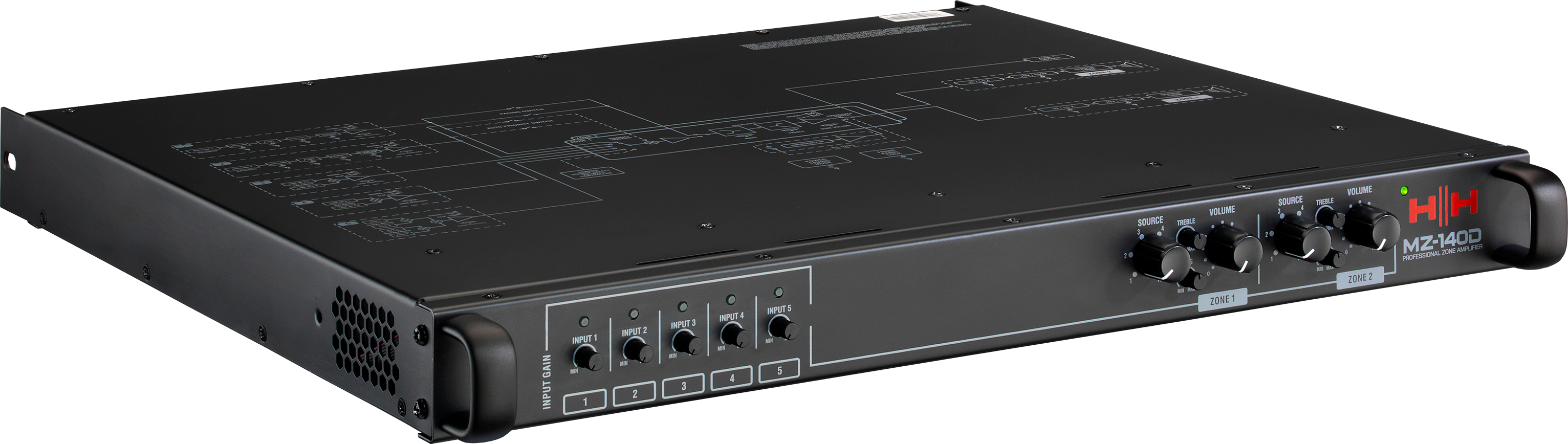
The hh electronics MZ-Series Zone Amplifiers MZ-140D is a compact, rack-mountable two-zone power amplifier designed for background music, paging, and distributed audio installations. It combines two independent 140W RMS Class D amplifier channels with flexible input routing, making it a practical choice for restaurants, retail spaces, schools, offices, hospitality venues, and houses of worship. Each zone can be configured for 70V/100V systems or low-impedance speaker loads down to 4 ohms, giving installers the flexibility to support both commercial and mixed-use audio setups.
One of the biggest advantages of the hh electronics MZ-Series Zone Amplifiers MZ-140D is its easy-to-use front panel layout. Users get per-zone volume, source selection, and two-band EQ adjustment, plus gain trim controls for the inputs. The unit also supports dual microphone inputs with priority behavior, which is especially useful for paging and announcements. With its 1U form factor, universal 100-240V power supply, and remote volume control option, the MZ-140D is built for straightforward installation and dependable day-to-day operation.
Estimated pricing typically falls in the mid-range commercial audio category, often around the high hundreds in USD or GBP depending on the region and dealer. Availability is generally through pro audio retailers, AV integrators, and commercial sound suppliers. For buyers looking for a zone amplifier that balances power, routing flexibility, and compact design, this model stands out as a strong value-oriented solution.
Technical Specifications for hh electronics MZ-Series Zone Amplifiers MZ-140D
- Amplifier type: Two-zone matrix power amplifier with input routing
- Power output: 2 x 140W RMS
- Speaker support: 70V, 100V, or minimum 4 ohm impedance per zone
- Inputs: 5 flexible audio input channels
- Input options: XLR/6.3mm combi inputs, balanced Euroblock, stereo AUX, and stereo RCA
- Controls: Independent zone volume, source select, bass and treble EQ, and input gain trim
- Mic features: Dual microphone inputs with auto or manual priority modes
- Frequency response: 20 Hz to 20 kHz in low-impedance mode, 80 Hz to 20 kHz in high-impedance mode
- Signal-to-noise ratio: Greater than 110 dB
- THD+N: Less than 0.01% at 0 dBu input, mid volume
- Power consumption: 17W idle, 150W typical, 200W max, 0.4W standby
- Form factor: Compact 1U rack-mount design
- Power input: Universal 100-240V AC, 50/60Hz
Compared with similar zone amplifiers, the MZ-140D offers a strong blend of output power, zone separation, and flexible routing in a compact chassis. It is especially competitive against other 2-zone commercial amplifiers that lack independent EQ and broader input options.
Step-by-Step Setup Guide for hh electronics MZ-Series Zone Amplifiers MZ-140D
Start by mounting the amplifier in a ventilated 19-inch rack with enough clearance for airflow. Before wiring, confirm that all speakers match the selected output mode for each zone, whether 70V, 100V, or low impedance. Use the appropriate Euroblock connectors for speaker outputs and follow polarity carefully to avoid phase issues or reduced output performance.
Next, connect your sources. Balanced microphones can be plugged into the combi/XLR inputs, while line-level devices can use the Euroblock, stereo AUX, or RCA inputs. Set the input gain trims to a low position before powering on, then raise them gradually while testing each source. Select the desired source for each zone and adjust the volume and EQ to suit the room.
If remote volume control is required, connect the compatible control module using standard Ethernet cable. Always power down the amplifier before making wiring changes, and never exceed the recommended speaker load. If there is no sound, check source selection, mute settings, cable polarity, and zone routing first.
Troubleshooting hh electronics MZ-Series Zone Amplifiers MZ-140D: Common Problems and Fixes
- No audio output: Check that the correct source is selected, the zone volume is raised, and the input gain is not set too low.
- Distorted sound: Lower the input gain, reduce source output level, and verify that the speaker load matches the selected output mode.
- Weak bass or harsh highs: Reset the EQ controls to a neutral position and re-tune gradually.
- Microphone priority not working: Confirm that the mic input is active and that the auto/manual priority mode is configured correctly.
- Overheating or shutdown behavior: Improve ventilation, reduce load demand, and ensure the rack is not overpacked.
There are no widely published error codes for general end-user troubleshooting, so most issues are handled through signal checking, wiring verification, and load inspection. Preventive maintenance includes keeping vents clear, using correctly rated speaker lines, and labeling all source and zone connections. Warranty and support are typically handled through authorized HH Electronics dealers and pro audio distributors. For help, contact the retailer or local AV integrator who supplied the unit, or use the official HH Electronics support channel listed by the seller.
Pros and Cons of hh electronics MZ-Series Zone Amplifiers MZ-140D
Pros
- Flexible zone design: Two independent zones make it ideal for multi-room audio and paging.
- Strong power output: 140W RMS per zone is suitable for many commercial installations.
- Versatile speaker support: Works with 70V, 100V, and low-impedance systems.
- Useful front-panel control: Volume, EQ, and source selection are easy to manage.
- Compact installation footprint: The 1U chassis saves rack space.
- Good value for money: Offers commercial-grade features without the complexity of a larger matrix system.
Cons
- Limited to two zones: Not ideal for larger properties that need more output areas.
- No advanced network audio platform: Less suitable for AV-over-IP or software-managed systems.
- Setup requires care: Misconfigured speaker loads can lead to performance issues.
- Best for fixed installs: Less flexible than modular multi-zone processors for expansion.
Against alternatives, the hh electronics MZ-Series Zone Amplifiers MZ-140D is a smart choice when you need reliable distributed audio with simple hands-on control. It is especially attractive for budget-conscious buyers who want solid performance without moving into a more expensive digital amplifier ecosystem.
Customer Reviews of hh electronics MZ-Series Zone Amplifiers MZ-140D
Typical user feedback for the MZ-140D trends positive, with many buyers praising its clean sound, compact size, and easy integration into small commercial systems. A common theme in reviews is appreciation for the independent zone controls and the ability to switch between high-impedance and low-impedance configurations. Overall ratings for this type of amplifier often land around 4.5 out of 5 stars from installers and venue operators who value reliability over flashy features.
Frequent complaints usually focus on the learning curve for first-time setup, especially when wiring microphones, speakers, and source routing correctly. A typical testimonial would sound like this: “Great sound, simple controls, and perfect for our café’s background music and paging setup.” Another common comment is: “The unit is powerful for its size, but you need to plan the speaker loads properly.” For buyers comparing commercial zone amplifiers, this model is best recommended for small to medium venues that need dependable day-to-day performance.
Faqs
How do I set up hh electronics MZ-Series Zone Amplifiers MZ-140D for the first time?
What speaker types are compatible with hh electronics MZ-Series Zone Amplifiers MZ-140D?
Why is one zone on hh electronics MZ-Series Zone Amplifiers MZ-140D quieter than the other?
How do I use the microphone inputs on hh electronics MZ-Series Zone Amplifiers MZ-140D?
What should I do if hh electronics MZ-Series Zone Amplifiers MZ-140D is not producing sound?
How can I optimize sound quality on hh electronics MZ-Series Zone Amplifiers MZ-140D?
Can hh electronics MZ-Series Zone Amplifiers MZ-140D be expanded with remote volume control?
How should I maintain hh electronics MZ-Series Zone Amplifiers MZ-140D for long-term reliability?
Tags
More hh electronics manuals
- Hh Electronics HPX Series Active Loudspeakers User Manual
- Hh Electronics Tessen Install Range Active Cabinets User Manual
- Hh Electronics SP26 Speaker Processor User Manual
- Hh Electronics System-2 Active PA System S2-212 User Manual
- Hh Electronics Tessen Passive PA Cabinet User Manual
- Hh Electronics MZ-Series Wall Controller C2-EU User Manual
Leave a Comment