
Hh Electronics MZ-Series Wall Controller C2-EU User Manual
Content
hh electronics MZ-Series Wall Controller C2-EU Overview
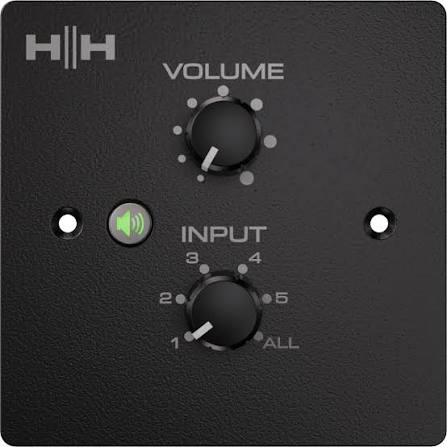
The hh electronics MZ-Series Wall Controller C2-EU is a compact wall-mounted volume controller and source selector designed for HH MZ-series multi-zone audio systems. It is built for installers, commercial venues, and home-integrated audio setups that need simple local control over music, volume, and zone selection from a single wall plate. With a clean EU-format design, rotary controls, and a quick mute function, the controller makes everyday audio management straightforward for users who do not want to access the main amplifier.
This model is especially useful in restaurants, retail stores, offices, hospitality spaces, classrooms, and residential installations where different zones need independent control. One of its main strengths is the use of standard Cat5e cabling and RJ45 connections, which helps simplify installation and reduce labor time. The controller can also be daisy-chained, allowing multiple wall controllers to work together in larger systems. For installers searching for a reliable zone controller, the hh electronics MZ-Series Wall Controller C2-EU offers a practical balance of usability, flexibility, and clean integration.
Estimated pricing typically falls in the budget-to-midrange installer-accessory category, often around the equivalent of £75 to £100 depending on region, retailer, and finish. Availability is generally tied to HH Audio distributors and pro-audio retailers, with EU black and white versions commonly listed alongside US-format variants.
Technical Specifications and Key Features
The hh electronics MZ-Series Wall Controller C2-EU is designed for zone volume control and source selection in MZ-series systems. It emphasizes simple operation, structured cabling, and dependable wall-mounted performance.
- System type: wall volume controller with source select
- Connection: RJ45 LAN connector using standard Cat5e cabling
- Input and expansion: one RJ45 input plus one RJ45 output for daisy-chain linking
- Controls: rotary volume, source selection, mute switch, and zone select DIP switch
- Mounting format: EU wall plate version
- Front plate size: 86 x 86 mm
- Minimum installation depth: 36 mm
- Unit dimensions: 86 x 86 x 44 mm
- Weight: approximately 0.147 kg
- Color options: black and white versions available
- Compatible use: remote control for MZ-series zone amplifiers and multi-zone installations
Compared with basic in-wall volume controls, this model adds source selection and multi-zone assignment, making it more versatile for commercial AV use. Against premium touchscreen controllers, it is simpler, more affordable, and easier to install, though it lacks advanced automation and display feedback.
Setup Guide for hh electronics MZ-Series Wall Controller C2-EU
Installation is straightforward for qualified AV installers. Begin by confirming compatibility with the HH MZ-series amplifier or zone system, then prepare a standard square EU pattress box with at least 36 mm depth. Use shielded Cat5e or higher cable and connect the controller to the amplifier’s remote port using the RJ45 interface.
- Mount the controller into the wall box before tightening the faceplate screws.
- Set the rear DIP switches to assign the desired zone or zones.
- Connect the first RJ45 port to the amplifier remote output.
- If linking more controllers, connect the second RJ45 port to the next wall controller in the chain.
- Power on the system and test volume, source selection, and mute behavior.
For safety, disconnect power before wiring, avoid over-tightening screws, and do not run the controller cable alongside high-voltage mains wiring. If the unit does not respond, check the RJ45 termination, DIP switch settings, and amplifier compatibility first. A failed mute or source response is usually caused by incorrect zoning setup or cabling issues rather than a defective controller.
Troubleshooting the hh electronics MZ-Series Wall Controller C2-EU
Most issues with the hh electronics MZ-Series Wall Controller C2-EU are related to wiring, zoning configuration, or system compatibility. If the controller has no effect on volume or source, verify that the RJ45 cable is fully seated and that the amplifier remote port is enabled for wall control.
- No response: check Cat5e continuity, connector seating, and amplifier remote input settings.
- Wrong zone control: confirm the DIP switch zone assignment.
- Mute function not working: inspect the system routing and restart the amplifier if needed.
- Source selection inactive: ensure the connected MZ amplifier supports remote source switching.
- Intermittent control: replace damaged cables and avoid mixed-quality patch leads.
Error codes are typically generated by the amplifier rather than the wall controller itself, so troubleshooting usually starts at the main MZ unit. Preventive care includes using quality shielded cable, keeping cable runs tidy, and labeling zones during installation. Warranty terms depend on the reseller and region, so support is usually handled through the HH distributor or authorized dealer network. For help, contact the retailer that supplied the unit or the official HH Audio support channel listed by the distributor.
Pros and Cons of the hh electronics MZ-Series Wall Controller C2-EU
Pros
- Simple wall-mounted volume and source control for everyday users
- Easy installation with standard Cat5e and RJ45 connections
- Supports daisy-chain layouts for multi-controller systems
- Compact EU plate design fits standard wall boxes
- Mute switch adds quick local control in commercial spaces
- Good value for multi-zone installations that do not need a touchscreen
Cons
- Requires compatible HH MZ-series amplification
- Limited to physical rotary control, with no display or app integration
- Installation still requires proper zoning setup and wiring skill
- Less feature-rich than smart wall panels or networked controllers
Overall, the hh electronics MZ-Series Wall Controller C2-EU delivers solid value for installers who want dependable, low-complexity zone control. It is a better fit than premium digital panels for projects that prioritize reliability, ease of use, and lower cost over advanced automation.
Customer Reviews and Real-World Feedback
Users generally rate the controller well for ease of use and clean installation, with typical feedback in the 4 to 4.5 out of 5 star range. Installers praise the straightforward Cat5e wiring and the fact that it blends neatly into commercial interiors. One common comment is that “it does exactly what a wall controller should do without adding complexity.”
Positive reviews often mention the responsive rotary volume control, useful mute switch, and reliable zone selection. Common complaints focus on the need for correct amplifier compatibility and the lack of advanced digital features. Buyers who want simple local control for a multi-zone audio system usually recommend it, while users seeking app control or displays often prefer more advanced alternatives. For most commercial audio projects, the hh electronics MZ-Series Wall Controller C2-EU is viewed as a practical and dependable choice.
Faqs
How do I set up the hh electronics MZ-Series Wall Controller C2-EU for the first time?
What wiring and box requirements does the hh electronics MZ-Series Wall Controller C2-EU need?
Why is my hh electronics MZ-Series Wall Controller C2-EU not controlling the volume or source properly?
How do I assign the hh electronics MZ-Series Wall Controller C2-EU to the correct zone?
Can the hh electronics MZ-Series Wall Controller C2-EU control more than one zone or work with multiple controllers?
What features does the hh electronics MZ-Series Wall Controller C2-EU offer for daily use?
Which amplifiers are compatible with the hh electronics MZ-Series Wall Controller C2-EU?
How should I maintain and clean the hh electronics MZ-Series Wall Controller C2-EU?
More hh electronics manuals
- Hh Electronics System-2 Active PA System S2-212 User Manual
- Hh Electronics Tensor Active Subwoofer TRS-1800 User Manual
- Hh Electronics Tessen Install Range Active Cabinets User Manual
- Hh Electronics Vector Active Speaker System VRE-8AG2 User Manual
- Hh Electronics MZ-Series Zone Amplifiers MZ-140D
- Hh Electronics HPX Series Active Loudspeakers User Manual
Leave a Comment