
Hisense 100L5F 4K Ultra Short Throw Laser TV User Manual
Content
Hisense 100L5F 4K Ultra Short Throw Laser TV: Complete Product Manual
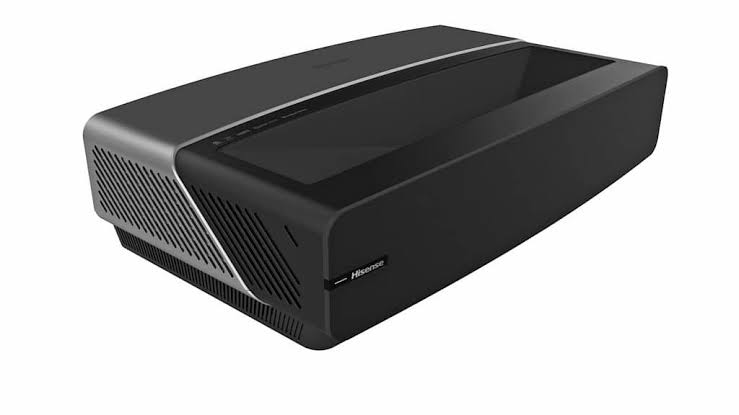
Introduction to the Hisense 100L5F 4K Ultra Short Throw Laser TV
The Hisense 100L5F 4K Ultra Short Throw Laser TV is designed to deliver a true big-screen home theater experience without the complexity of a traditional projector setup. Built around a 100-inch display and ultra short throw laser technology, it projects a bright, sharp, and immersive picture from just a short distance from the wall. This makes it an excellent choice for living rooms, media rooms, apartments, and dedicated entertainment spaces where a large TV would be impractical. The hisense 100L5F 4K Ultra Short Throw Laser TV combines 4K resolution, HDR support, built-in smart features, and a supplied ambient light rejecting screen to create a premium all-in-one viewing solution.
Key benefits include 4K Ultra HD resolution, strong color performance, wide connectivity, and low installation complexity compared with ceiling-mounted projectors. It is especially appealing to movie lovers, sports fans, gamers, and families who want a cinematic display with easy day-to-day use. The system is also well-suited for streaming apps, console gaming, and cable or satellite integration thanks to multiple HDMI inputs and wireless connectivity. Typical availability depends on region and retailer, but the estimated price range is generally in the premium home theater category, often around $2,500 to $4,000 depending on condition, bundle contents, and market availability. For buyers seeking a large-format alternative to an oversized TV, the hisense 100L5F 4K Ultra Short Throw Laser TV remains a compelling option.
Specifications for Hisense 100L5F 4K Ultra Short Throw Laser TV
- Display size: 100-inch diagonal screen
- Resolution: 3840 x 2160 4K Ultra HD
- Display technology: DLP laser TV system
- Light source: Laser plus phosphor color filter
- Color performance: DCI-P3 wide color gamut, rated above 95%
- HDR support: HDR-compatible for improved contrast and highlight detail
- Refresh rate: 60 Hz
- Audio power: 2 x 15 W built-in speakers
- Connectivity: 4 HDMI ports, 2 USB ports, 1 LAN port, 1 digital audio output, RF input, and left/right audio output
- Wireless: Dual-band built-in wireless connectivity
- Power supply: 120 V, 60 Hz
- Power consumption: Approximately 348 W
- Dimensions: About 21.5 x 6.2 x 13.6 inches for the laser unit
- Weight: About 24.3 lbs for the main unit
In benchmark-style use, the 100L5F emphasizes color accuracy, large-screen immersion, and convenient placement over maximum brightness in fully sunlit rooms. Compared with many standard 4K projectors, its ultra short throw design and included screen simplify setup and reduce shadows. Against premium laser TV alternatives, it is competitive on screen size and ease of use, though some newer models may offer higher brightness, advanced HDR processing, or updated smart platforms. The hisense 100L5F 4K Ultra Short Throw Laser TV is best viewed as a strong value-oriented laser TV system rather than a flagship cinema projector.
Setup Guide for Ultra Short Throw Laser TV Installation
Start by placing the main laser unit on a stable TV stand directly below the screen location. The ultra short throw design requires very precise positioning, so center the unit carefully and keep it level. Next, mount or assemble the included 100-inch screen according to the guide, making sure the surface is flat and tensioned properly. Once the screen is in place, adjust the laser TV distance until the image fills the screen evenly.
Connect power, then attach your devices using HDMI for streaming boxes, consoles, or receivers. Use HDMI ARC if you want to send audio to a compatible soundbar or AV system. After power-on, follow the on-screen setup to choose language, connect to Wi-Fi, and sign in to your smart TV account. Pair Bluetooth accessories if supported in your region and test all inputs before final placement. If the picture looks crooked or oversized, recheck alignment and projector height before changing digital settings. Keep ventilation space around the unit, avoid direct sunlight on the screen, and never block airflow openings. If the image appears dim or uneven, confirm that the room lighting is appropriate and that the screen is installed on the correct side facing the projector.
Troubleshooting Hisense 100L5F Common Problems
If the picture is blurry, first clean the screen gently and verify that the main unit is aligned squarely with the screen. If the image is too large or too small, move the laser unit slightly rather than relying only on digital correction. If no signal appears, confirm the HDMI cable is securely connected and that the correct source is selected. For audio problems, check whether the TV speakers, soundbar, or external receiver is set as the active output device.
Common issues include wireless connection drops, app loading failures, and HDMI handshake problems. Restart the system, refresh the network connection, or switch to a different HDMI port if a device is not recognized. If you see a warning related to temperature or ventilation, turn the system off and allow it to cool before resuming use. Preventive care includes keeping dust away from vents, using high-quality HDMI 2.0 cables, and avoiding repeated power interruptions. Warranty coverage and support options vary by region, so users should consult their retailer, regional Hisense support channel, or the product documentation included with the unit for service help, replacement parts, and diagnostics.
Pros and Cons of the Hisense 100L5F
Pros
- Huge 100-inch screen delivers a true cinematic viewing experience.
- Ultra short throw design is easier to install than a traditional projector.
- 4K resolution and HDR support improve detail and contrast.
- Wide color gamut helps create vivid, natural-looking images.
- Multiple HDMI ports make it easy to connect game consoles and streaming devices.
- Included screen adds strong overall value for a laser TV package.
Cons
- Brightness is good for normal rooms but not ideal for very bright daylight environments.
- Requires careful alignment for best image quality.
- Built-in speakers are useful, but most buyers will still want a soundbar or surround system.
- Smaller than some newer competitors in smart platform speed and feature depth.
- Premium pricing may be high for casual TV viewers.
For value for money, the hisense 100L5F 4K Ultra Short Throw Laser TV is attractive if the goal is to replace both a television and a projector with one large-format system. Compared with conventional 85-inch TVs, it offers a bigger cinematic image, while compared with high-end laser rivals, it often remains more affordable.
Customer Reviews of the Hisense 100L5F
Customer feedback is generally positive, with many buyers rating the system around 4 out of 5 stars for picture size and home theater impact. Praise commonly focuses on the huge screen, easy placement, and excellent movie night performance. One typical comment is: “The image feels like a real theater, and setup was simpler than expected.” Another frequent compliment is the sharp 4K detail and rich color when used in a dim room.
Common complaints include the need for precise alignment, the desire for stronger built-in audio, and brightness limitations in rooms with strong ambient light. Some users also mention that smart TV navigation can feel slower than newer platforms. Overall, the hisense 100L5F 4K Ultra Short Throw Laser TV is recommended for buyers who want a large-screen premium experience and are willing to pair it with a good sound system for the best results.
Faqs
How do I set up the hisense 100L5F 4K Ultra Short Throw Laser TV for the first time without ruining image alignment?
What screen and room conditions work best for the hisense 100L5F 4K Ultra Short Throw Laser TV?
Why is my hisense 100L5F 4K Ultra Short Throw Laser TV image blurry or not fully sharp?
Which devices are compatible with the hisense 100L5F 4K Ultra Short Throw Laser TV for gaming and streaming?
How can I improve motion clarity and reduce lag on the hisense 100L5F 4K Ultra Short Throw Laser TV?
What should I do if the hisense 100L5F 4K Ultra Short Throw Laser TV keeps disconnecting from Wi‑Fi?
How do I connect a soundbar or home theater system to the hisense 100L5F 4K Ultra Short Throw Laser TV?
How should I clean and maintain the hisense 100L5F 4K Ultra Short Throw Laser TV and screen?
More hisense manuals
Leave a Comment