
Hisense HD QLED Smart TV 32A5Q User Manual
Content
Hisense HD QLED Smart TV 32A5Q: Overview, Features, and Buying Guide
Introduction
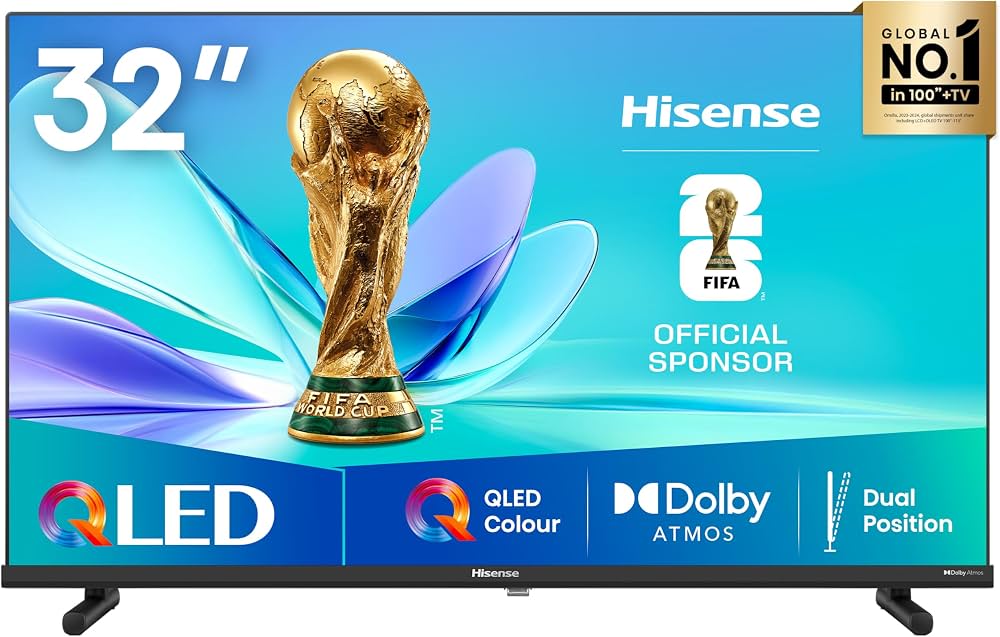
The hisense HD QLED Smart TV 32A5Q is a compact 32-inch smart television designed for bedrooms, small living rooms, kitchens, dorms, and second-TV setups. It combines QLED picture technology with Full HD resolution to deliver sharper detail, richer color, and better contrast than a typical entry-level LED TV in the same size class. For users who want a practical smart TV with modern streaming support, this model offers a balanced mix of picture quality, connectivity, and ease of use.
One of the biggest advantages of the hisense HD QLED Smart TV 32A5Q is its combination of a 60 Hz panel, HDR support, and built-in smart features powered by the VIDAA platform. This makes it suitable for everyday entertainment such as Netflix-style streaming, catch-up TV, YouTube, console gaming, and antenna or satellite reception. Its wide viewing angle also helps when the screen is shared by multiple people in a room. For many buyers, the TV stands out as a strong value-for-money option because it delivers QLED color performance in a compact and affordable form factor.
Estimated pricing typically falls in the budget-to-midrange category for a 32-inch QLED smart TV, usually around the lower-cost segment compared with larger premium models. Availability is generally good through major electronics retailers, online marketplaces, and regional Hisense distributors, though stock can vary by country and season. If you want a compact smart television with modern features and simple day-to-day operation, the hisense HD QLED Smart TV 32A5Q is a practical choice.
Specifications
- Screen size: 32 inches / 80 cm
- Resolution: Full HD 1920 x 1080
- Display technology: QLED with Direct LED backlighting
- Refresh rate: 60 Hz
- Viewing angle: 178° for wider side viewing
- Contrast ratio: 1200:1
- Response time: 10 ms
- HDR support: HDR10 and HLG compatibility on select retail listings
- Smart TV platform: VIDAA
- Connectivity: Wi-Fi, Ethernet, 2 HDMI inputs, 1 USB port, optical audio output, antenna and satellite inputs
- Tuner support: DVB-T/T2, DVB-C, DVB-S/S2 depending on market version
- Audio: Stereo speakers with Dolby Atmos support on some variants
- Mounting: VESA compatible, commonly 100 x 200 mm
- Energy class: Varies by region, often listed in the efficient compact-TV range
Compared with standard 32-inch HD Ready TVs, this model offers a noticeable upgrade in sharpness thanks to its Full HD panel. Compared with larger Hisense QLED televisions, it is more compact and more affordable, though it naturally offers fewer premium gaming and cinematic features.
Setup Guide
Setting up the hisense HD QLED Smart TV 32A5Q is straightforward and usually takes only a few minutes. Start by placing the television on a stable surface or mounting it on a compatible wall bracket. Make sure the ventilation openings are not blocked and keep the set away from heat sources, moisture, and direct sunlight.
- Attach the stand legs or mount the TV using the correct VESA bracket.
- Connect the power cable and press the power button on the remote or TV.
- Follow the on-screen setup wizard to choose language, region, time zone, and network settings.
- Connect to Wi-Fi or Ethernet for streaming and app updates.
- Pair external devices such as a set-top box, soundbar, game console, or USB drive through the available ports.
- Scan for terrestrial, cable, or satellite channels if you use an antenna or tuner connection.
If the TV does not detect Wi-Fi, restart the router and move the television closer to the access point during setup. For HDMI devices, use a certified HDMI cable and select the correct source input from the home menu. Avoid over-tightening screws when mounting, and always disconnect the TV from power before attaching accessories.
Troubleshooting
Most issues with the hisense HD QLED Smart TV 32A5Q are easy to fix at home. If the screen is blank, check the power cord, remote batteries, and source selection before assuming a hardware fault. If there is no sound, verify volume settings, mute status, and audio output mode. For streaming problems, test the internet connection and restart the router.
- No picture: Confirm the TV is on, the correct input is selected, and the source device is powered.
- No sound: Increase volume, disable mute, and check whether audio is routed to a soundbar or headphones.
- Wi-Fi not connecting: Reboot the router, re-enter the password, and move closer to the network.
- Remote not responding: Replace the batteries and remove any objects blocking the sensor.
- Apps freezing: Restart the TV and update the system software if available.
If an on-screen error appears, note the message exactly and restart the device before trying again. Prevent issues by keeping firmware updated, using surge protection, and avoiding blocked ventilation. Warranty coverage usually depends on the retailer and region, so keep your proof of purchase. For help, contact the local Hisense support center or the store where the TV was purchased.
Pros & Cons
Pros
- QLED panel improves color vibrancy compared with basic LED TVs.
- Full HD resolution is ideal for a 32-inch screen and gives crisp text and TV content.
- Compact size works well in bedrooms, kitchens, and small apartments.
- Smart TV platform provides easy access to apps and streaming services.
- Good connectivity for consoles, tuners, and external storage.
- Strong value for money for buyers who want QLED at a lower price point.
Cons
- 60 Hz refresh rate is fine for everyday use but not ideal for demanding gaming.
- 32-inch size may feel too small for a main living room television.
- Some market versions offer only one USB port, which can limit accessories.
- Audio performance is adequate for casual viewing but may benefit from a soundbar.
Compared with similar compact smart TVs, the hisense HD QLED Smart TV 32A5Q is most attractive for buyers who want better color quality without paying for a larger premium model. It is especially appealing for users focused on streaming, broadcast TV, and general home entertainment rather than advanced gaming or cinema-grade performance.
Customer Reviews
Typical customer feedback for the hisense HD QLED Smart TV 32A5Q is positive, with many users giving it around 4 out of 5 stars for picture quality, ease of setup, and everyday value. Buyers often praise the sharp Full HD image, compact design, and bright colors for the price.
Common complaints usually mention that the built-in speakers are serviceable but not exceptional, and some users want more ports or a larger screen size. A frequent testimonial theme is that it performs very well as a bedroom or secondary TV. Many reviewers recommend it to shoppers who want a modern smart TV under a modest budget and do not need premium gaming features.
Final Verdict
The hisense HD QLED Smart TV 32A5Q is a well-rounded compact smart television with strong everyday performance, appealing color quality, and practical features. It is a smart buy for users who want a reliable Full HD QLED TV for streaming, casual viewing, and small-space entertainment.
Faqs
How do I set up the hisense HD QLED Smart TV 32A5Q for the first time?
Why is my hisense HD QLED Smart TV 32A5Q not connecting to Wi-Fi?
What picture settings give the best viewing quality on hisense HD QLED Smart TV 32A5Q?
Which devices and ports are compatible with the hisense HD QLED Smart TV 32A5Q?
How can I fix sound problems on the hisense HD QLED Smart TV 32A5Q?
Does the hisense HD QLED Smart TV 32A5Q support streaming apps and screen mirroring?
How do I improve gaming performance on hisense HD QLED Smart TV 32A5Q?
What is the best way to clean and maintain the hisense HD QLED Smart TV 32A5Q?
More hisense manuals
- Hisense 55U7NQ Mini-LED 4K Ultra HD Smart TV User Manual
- Hisense Bar Refigerator RS17DR1SS User Manual
- Hisense Dehumidifier DH3S802BW2 User Manual
- Hisense T850XG 2 Slices Toaster User Manual
- Hisense HWF3S7514W2 Front Loader Washing Machine User Manual
- Hisense 100L5F 4K Ultra Short Throw Laser TV User Manual
Leave a Comment