
Setup: Honeywell Air Purifier HPA600 User Manual
Content
Honeywell Air Purifier HPA600
Introduction
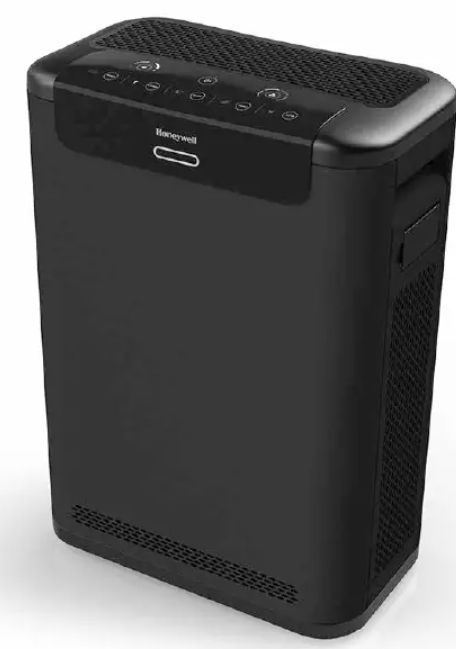
The Honeywell Air Purifier HPA600 is a premium air cleaning solution designed for professional and home environments seeking powerful, reliable air purification. This advanced True HEPA air purifier captures up to 99.97% of microscopic airborne particles as small as 0.3 microns, including dust, pollen, pet dander, smoke, and mold spores, making it ideal for allergy and asthma sufferers. Its state-of-the-art particle and VOC sensors continuously monitor indoor air quality, providing real-time feedback through an intuitive LED indicator. The purifier automatically adjusts its settings to maintain clean air, combining convenience with superior performance.
Targeted towards individuals needing effective air purification in medium to large rooms (up to 325 sq. ft.), the HPA600 is well-suited for bedrooms, living rooms, offices, and professional spaces. It is particularly beneficial for those sensitive to allergens or concerned about indoor air contaminants such as tobacco smoke or cooking odors. The air purifier features quiet Sleep Mode for nighttime use and easy-to-maintain, long-lasting 3-in-1 HEPA/carbon filters requiring replacement only once a year.
Priced in the higher mid-range category, typically around $600–$750, the Honeywell Air Purifier HPA600 offers a robust alternative to other premium models. It is widely available through online retailers and specialty appliance stores.
Specifications and Features of Honeywell Air Purifier HPA600
- Filtration System: True HEPA filter capturing 99.97% of particles down to 0.3 microns, including an antimicrobial coating to inhibit microbial growth
- 3-in-1 Filter Setup: Pre-filter (washable), True HEPA filter, and an activated carbon filter for odors and VOCs
- Room Coverage: Effective in rooms up to 325 sq. ft., with air circulation up to 4.8 times per hour
- Air Quality Monitoring: Particle and VOC sensors with an LED Air Quality Indicator providing real-time air quality feedback
- Operating Modes: Auto Mode for automatic air quality response, Sleep Mode for quiet, dimmed operation
- Noise Level: Quiet operation optimized for nighttime use
- Filter Replacement: Annual replacement reminder and easy tool-free filter changes using model HRF-Z2 filters
- Dimensions & Weight: Approximate size suited for home and office spaces, durable housing designed for long-term use
- Comparison: Outperforms earlier Honeywell models such as HPA300 in filtration efficiency and sensor technology; comparable to high-end brands like IQAir GC MultiGas in particle capture
HPA600 series
3-IN-1 HEPA FILTER
HOW YOUR AIR PURIFIER WORKS
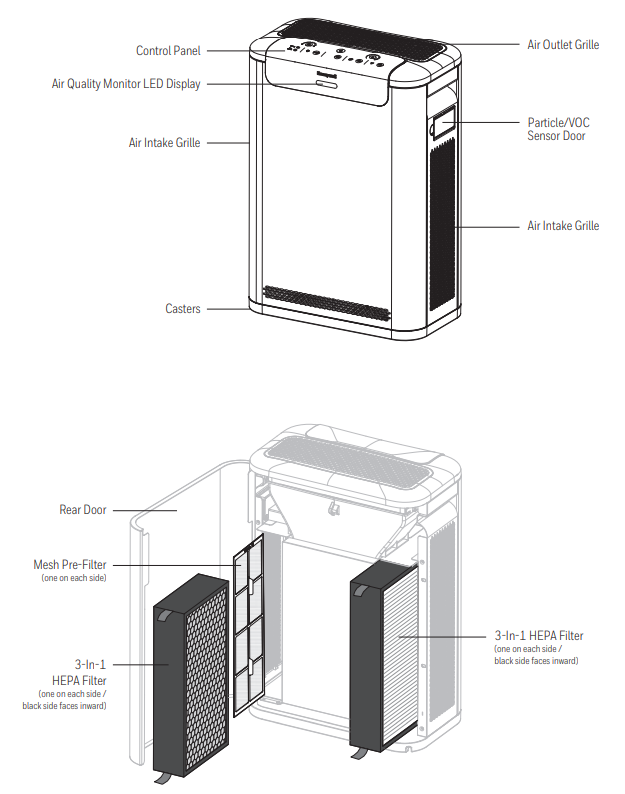
The Honeywell Professional Series™ True HEPA Air Purifier uses a powerful 4 Step Cleaning System to help purify the air that passes through the filters in the unit (Fig. 1).
- Step 1: Washable/Vacuumable Mesh Pre-filters at Air Intake – these filters help to capture larger airborne particles such as pet hair/fur and dust before they reach the HEPA filter. These filters should be removed approximately every 3 months and washed or vacuumed clean.
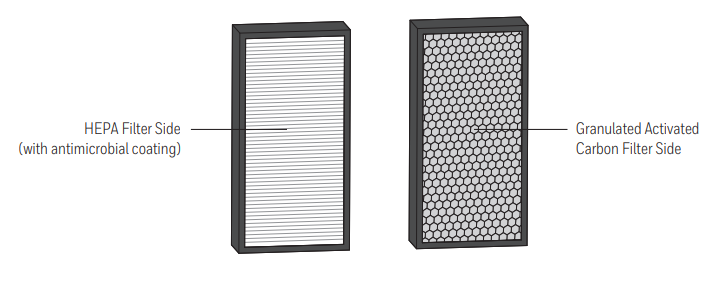
- Step 2: HEPA Filters capture up to 99.97% of airborne particles as small as 0.1 micron
- Step 3: Antimicrobial coating inhibits the growth of bacteria on filters.
- Step 4: Granulated Activated Carbon Filter traps odors and VOCs.
SET-UP
- Select a firm, level, and flat location. For best airflow, locate the unit at least 6 inches from any wall or furniture.
- When operating, large volumes of air are drawn toward the air purifier. Surrounding areas should be cleaned and/or vacuumed frequently to prevent the buildup of dust and other contaminants. This may also help prolong the life of the filters. If the unit is placed on a light-colored carpet, a small mat or rug should be used underneath to prevent staining. This is especially important in homes with contamination from smoking, fireplaces, or where candles are burned.
FIRST TIME USE
There are two 3-in-1 HEPA Filters supplied with your air purifier. These filters provide three stages of cleaning performance: HEPA filter media that help capture up to 99.97% of airborne particles as small as 0.1 micron, antimicrobial coating that inhibits the growth of bacteria on filters, and activated carbon granules that help absorb odors and VOCs. The filters are wrapped to ensure purity, and are labeled to help identify the proper replacement filter (Type Z filters should be replaced 1x/year). Before using your new air purifier, you must remove the wrappers covering the filters.
- Make sure the air purifier is OFF and unplugged.
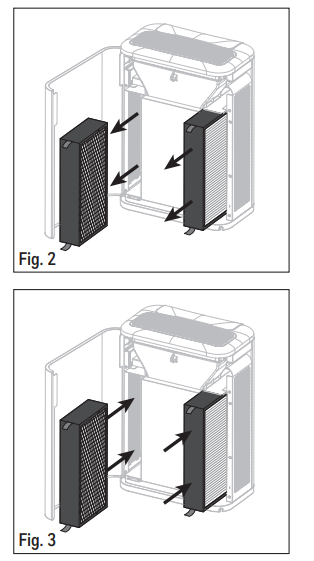
- Open the rear door to remove the filters . Remove the HEPA filters from the two sides of the unit (see Fig. 2).
- Remove the filters from the plastic bags.
- Install the filters into the unit with the red pull tabs facing outward (this will facilitate filter removal later). The side of the filter with the carbon granules (black side) and foam seal should be facing into the purifier housing (see Fig. 3).
- Close the rear door and plug the unit into an outlet. You are now ready to use your new Honeywell Professional Series™ True HEPA Air Purifier.
CLEANING AND STORAGE
- We recommend that you clean the air purifier at least once every 3 months and before extended storage. Use only a dry cloth to wipe the external surfaces of the air purifier.
- DO NOT USE WATER, WAX POLISH, OR ANY CHEMICAL SOLUTION.
- If your Air Purifier will not be used for more than 30 days, we recommend that you:
- Remove the 3-in-1 HEPA Filters from the unit.
- Wrap the Filters in an airtight plastic bag for best storage.
5-YEAR LIMITED WARRANTY
You should first read all instructions before attempting to use this product.
- This 5-year limited warranty applies to the repair or replacement of the product found to be defective in material or workmanship. This warranty does not apply to damage resulting from commercial, abusive, or unreasonable use, or supplemental damage. Defects that are the result of normal wear and tear will not be considered manufacturing defects under this warranty. KAZ IS NOT LIABLE FOR INCIDENTAL OR CONSEQUENTIAL DAMAGES OF ANY NATURE, ANY IMPLIED WARRANTY OF MERCHANTABILITY OR FITNESS FOR A PARTICULAR PURPOSE ON THIS PRODUCT IS LIMITED IN DURATION TO THE DURATION OF THIS WARRANTY. Some jurisdictions do not allow the exclusion or limitation of incidental or consequential damages or limitations on how long an implied warranty lasts, so the above limitations or exclusions may not apply to you. This warranty gives you specific legal rights, and you also may have other rights which vary from jurisdiction to jurisdiction. This warranty applies only to the original purchaser of this product from the original date of purchase.
- At its option, Kaz will repair or replace this product if it is found to be defective in material or workmanship.
- This warranty does not cover damage resulting from any unauthorized attempts to repair or from any use not in accordance with the instruction manual.
- This warranty does not cover the HEPA filters or pre-filters except for material or workmanship defects.
Troubleshooting Honeywell Air Purifier HPA600: Common Issues and Fixes
- Air Purifier Not Turning On: Ensure the unit is plugged in and the power switch is on; check the outlet and reset if necessary.
- Filter Replacement Light On: Replace the 3-in-1 filter (HRF-Z2) to maintain optimal performance; filters typically last one year.
- Unit Running Noisily: Clean or vacuum the washable pre-filter; ensure the unit is placed on a flat, stable surface.
- LED Air Quality Indicator Shows Poor Air Continuously: Verify room ventilation; consider running the purifier in Auto Mode to adjust settings automatically.
- Error Codes: Consult the user manual for specific error indications; most issues relate to filter status or sensor blockage.
- Preventive Measures: Regularly clean the pre-filter every 2–4 weeks, avoid placing the unit near strong chemical sources, and maintain proper airflow around the purifier.
- Warranty and Support: Honeywell offers a limited warranty (usually 1-2 years) and customer support via their website and authorized dealers for replacement parts and technical assistance.
Pros & Cons of Honeywell Air Purifier HPA600
- Pros:
- Exceptional filtration with True HEPA and antimicrobial coating, capturing 99.97% of microscopic particles
- Advanced air quality sensors with real-time LED feedback and automatic mode adjustments
- Long-lasting, easy-to-replace filters with an annual replacement interval and no tools required
- Quiet Sleep Mode is ideal for nighttime operation without disturbance
- Robust build quality suited for both home and professional environments
- Cons:
- Higher price point compared to basic air purifiers, making it an investment for quality-focused users
- A bulkier size may require ample space in smaller rooms
- Replacement filters can be relatively expensive
- Lacks smart home connectivity features found in some competing models
Customer Reviews and User Feedback on Honeywell Air Purifier HPA600
Users consistently praise the Honeywell Air Purifier HPA600 for its powerful filtration performance and quiet operation. Many appreciate how effectively it removes allergens, smoke, and odors from medium to large rooms, with frequent mentions of improved breathing and allergy symptom relief. The automatic sensor-driven adjustment feature receives positive feedback for convenience. Filter replacement reminders and easy maintenance are also highly rated.
Common complaints include the unit's higher cost and occasional difficulty finding replacement filters at local stores. Some users note the size requires a dedicated space. Overall, the product maintains a strong average rating of around 4.5 out of 5 stars, with frequent recommendations for allergy sufferers and those seeking advanced air purification solutions.
Faqs
How do I set up the honeywell Air Purifier HPA600 for the first time?
What should I do if my honeywell Air Purifier HPA600 does not turn on?
How do I reset the Check Filter indicator on the honeywell Air Purifier HPA600?
Can the honeywell Air Purifier HPA600 be used in large rooms or offices?
How often should I clean and replace the filters in the honeywell Air Purifier HPA600?
What is the best way to clean the particle and VOC sensors on the honeywell Air Purifier HPA600?
Why is there no air coming out of my honeywell Air Purifier HPA600 even though it’s turned on?
Can I leave the honeywell Air Purifier HPA600 running continuously, and how do I optimize its performance?
More honeywell manuals
- Setup: Honeywell Hpa100 Series Air Purifier User Manual
- Honeywell T6 Pro Smart Thermostat TH6220WF2006 User Guide
- Setup: Honeywell Quietclean Air Purifiers HFD-010 Series User Manual
- Honeywell Cool Mist Humidifier HUL570 User Guide
- Setup: Honeywell F50F and F300E Electronic Air Cleaners User Manual
- How to Fix: Honeywell C-Wire Adapter User Guide
Leave a Comment