
Setup: Honeywell F50F and F300E Electronic Air Cleaners User Manual
Content
Honeywell F50F and F300E Electronic Air Cleaners
Introduction
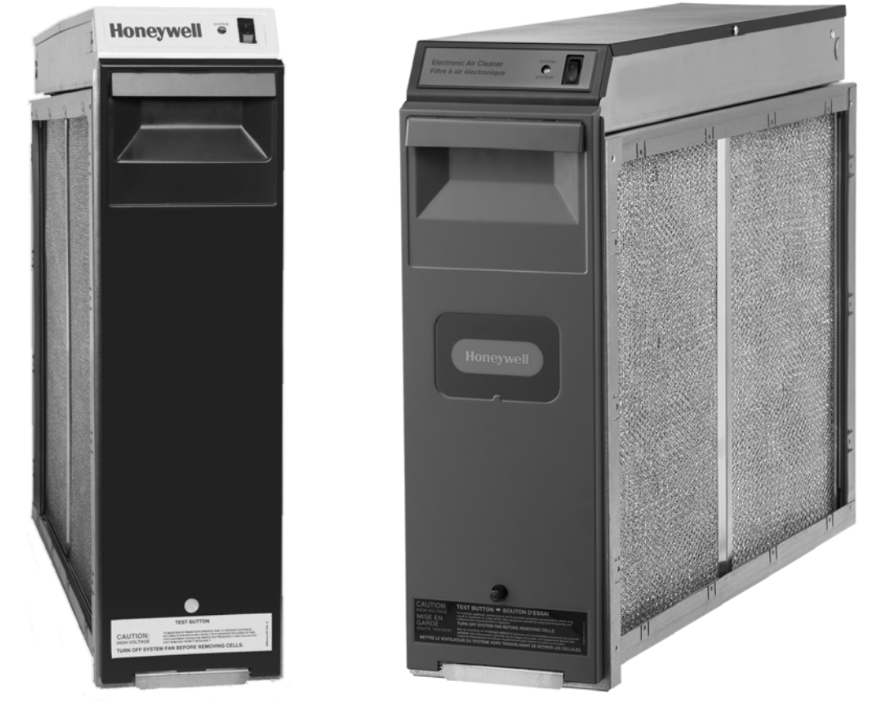
The Honeywell F50F and F300E Electronic Air Cleaners are advanced air purification systems designed to significantly improve indoor air quality by capturing up to 98% of airborne particles. These air cleaners are ideal for homeowners and businesses seeking efficient filtration for forced warm air heating and cooling systems, including gas, oil, and electric furnaces and air conditioners. Their ability to remove dust, pollen, smoke, and allergens makes them suitable for allergy sufferers and environments requiring cleaner air.
Key benefits of these models include low power consumption—operating at less than 40 watts—robust filtration through dual-cell technology, and optional media postfilters for enhanced purification. The units come in various sizes to fit most duct dimensions, with user-friendly maintenance features such as washable prefilters and cells. The F300E model supports an optional Air Cleaner Monitor to alert users to cleaning and filter replacement, ensuring peak performance.
Designed for residential and light commercial use, these air cleaners integrate seamlessly with existing HVAC systems, operating quietly and continuously to maintain healthier indoor environments. Pricing typically ranges from $300 to $600, depending on size and installation complexity, readily available through authorized Honeywell dealers and HVAC suppliers.
Technical Specifications and Performance Features of Honeywell F50F and F300E Electronic Air Cleaners
- Compatibility: Fits most forced warm air furnaces and air conditioning systems
- Available Sizes: Multiple sizes to accommodate airflows from 1000 to 2000 cubic feet per minute (cfm)
- Voltage: Solid-state power supply operates at 120 Vac, providing approximately 4075 Vdc collector voltage
- Filtration Efficiency: Up to 98% particle capture efficiency, with fractional efficiencies per ASHRAE Standard 52.2-1999
- E1 (0.3–1.0 micron): Up to 81% with postfilter
- E2 (1.0–3.0 micron): Up to 93% with postfilter
- E3 (3.0–10 micron): Up to 99% with postfilter
- Power Consumption: Approximately 33 watts (two-cell model)
- Prefilter and Collector Cells: Washable and reusable for cost-efficient maintenance
- Optional Features: Media postfilters (MERV 13 rated), W8600F Air Cleaner Monitor for maintenance alerts
- Pressure Drop: Low pressure drop to preserve HVAC system efficiency
- Ozone Emission: Minimal ozone generation, approximately 0.005 to 0.010 ppm
- Unique Selling Point: Honeywell's UltraClean Coil Guarantee protects HVAC coils from dirt buildup when installed properly
Compared to similar electronic air cleaners, the Honeywell F50F and F300E models offer superior energy efficiency, integrated maintenance monitoring, and higher particle removal rates, making them a competitive choice for clean air solutions.
OPERATING YOUR ELECTRONIC AIR CLEANER
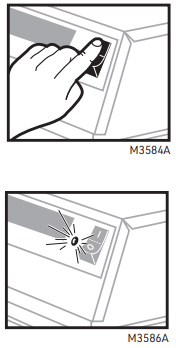
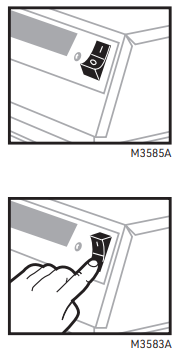
- Turn the On-Off switch on the power box to On.
- NOTE: Set the switch to 1 for O and set the switch to O for Off.
- The air cleaner now operates whenever your furnace/air conditioning system fan operates. For maximum air cleaning benefit and cleaner air conditioner coils, leave the air cleaner switch turned on at all times and the thermostat fan switch set to On. Of course, continuous fan operation adds to your electric bill each month. Check your equipment for the amount of electricity needed to run your System fan.
- When the fan and air cleaner come on, the neon indicator lights.
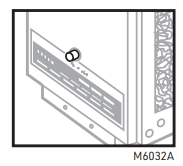
- You may hear a snapping (electrical arcing) sound occasionally as the air cleaner operates. This is usually caused by a larger dust particle that causes a high-voltage discharge. The snapping sound means that your air cleaner is working as it should. To hear the snapping sound, momentarily press the test button near the bottom of the door. Use the test button any time you want to prove air cleaner operation.
- The switch remains in the On position to keep the air cleaner running.
- When the fan and air cleaner stop, the neon light goes off. The air cleaner is off until the heating or air conditioning and fan start again.
- If you do not want the air cleaner to run, set the On-Off switch to Off to turn off the air cleaner. Your furnace and air conditioner continue to operate normally, but without the added benefit of air cleaning. Normally, this switch should be turned to On at all times.
GETTING THE MOST FROM YOUR ELECTRONIC AIR CLEANER
- Run the electronic air cleaner as much as possible
- For greatest efficiency, the air cleaner should run all the time. To do this, set the Fan switch on your thermostat to On, and make sure the air cleaner is turned on. The fan and air cleaner run even when the furnace or air conditioner is off.
- NOTE: A manual fan switch may be built into the furnace
or furnace fan controller. - The air cleaner uses less power than a 40-watt light bulb (two-cell model—33 watts; single-cell model—22 watts). Many believe that the added cost is more than offset by the added benefits of full-time air cleaning and full-time air circulation. And you may feel that the room temperature stays more even when the fan is always on.
- Even if your thermostat does not have a Fan On position, you can obtain maximum available air cleaning benefit by making sure the air cleaner is always turned to On so it operates whenever the furnace or air conditioner is on.
- Keep the cell(s) and prefilter(s) clean
- Although the air cleaner is designed to be efficient over a wide range of cell dirt loading conditions, regular cleaning is your best assurance of consistent performance. Also, a very dirty prefilter and cell reduce air flow and, in turn, this reduces the efficiency of the furnace or air conditioner.
- Replace the postfilter regularly.
- A high-efficiency postfilter is sometimes installed in the air cleaner. This filter increases the efficiency of the air cleaner and should be changed every six months of usage. If you have a humidifier
- All Resideo whole-house humidifiers can be used in a system with the Resideo Electronic Air Cleaner without any additional filters or system modification.
- If your system includes an atomizing humidifier, you may want to install a standard furnace filter between the humidifier and the air cleaner. This filter would keep the humidifier spray mineral deposits from collecting on the air cleaner. This filter should be checked regularly and changed when it shows signs of mineral or dirt buildup. If you do not install a filter, you will probably need to wash the cell(s) and prefilter(s) more often to remove the mineral buildup.
- If an ultrasonic room humidifier is used often, especially if filled with tap (undistilled) water, the cell(s) and prefilter(s) require more frequent washing. A white residue accumulates on the cell(s) from the minerals in the water. This residue may also contribute to "white dust.” See About lint or 'white dust” section for more information.
HOW ELECTRONIC AIR CLEANING WORKS
A word about particle size
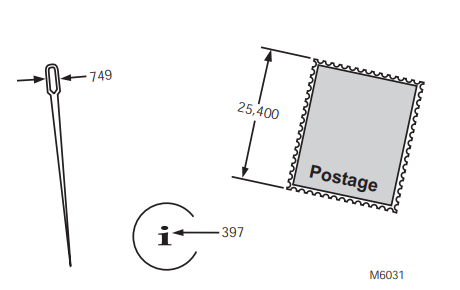
The particles removed by the electronic air cleaner tend to be very small—less than ten microns. But what is a ten-micron particle? The eye of an average-sized sewing needle is about 750 microns across, and the dot in the i in the word micron is about 400 microns. Generally, particles smaller than ten microns can be seen only with a microscope, except in very large concentrations, such as a puff of smoke. Your electronic air cleaner can remove even smaller particles that can be seen only with an electron microscope.
Although particles one micron and smaller make up only about 20 percent of the total weight of particles in unfiltered air, they account for over 99 percent of the number of particles.
Because they are so tiny, these particles tend to remain suspended in the air unless they collide with a solid surface. Then they attach by molecular adhesion and stick like glue, staining walls and furniture, and coating your air conditioning coils. And of course, some of these particles can cause allergic reactions or simply make the environment less pleasant.
How the electronic air cleaner works
First, large particles (lint, hair) are caught by the prefilter(s). Then, as the dirty air passes through the intense high voltage electric field surrounding the ionizer wires, all particles, even the smallest particles down to 0.3 micron, are given an electric charge. The air then passes into the collector, where the alternate parallel plates are charged positive and negative, creating a uniform electrostatic field. Since opposites attract, the charged particles stick to the collector plates, having an opposite electric charge. The precharged postfilter continues to remove small particles from the air. The air leaving the air cleaner contains very few particles.
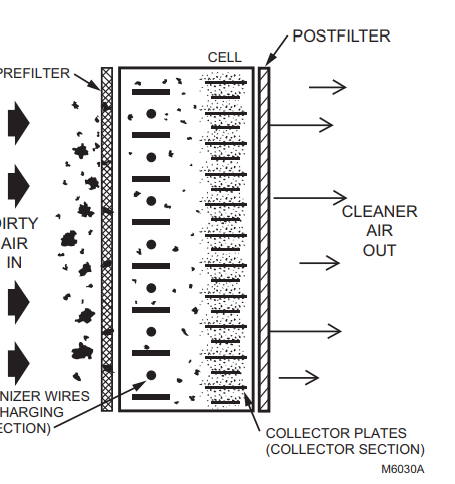
Each time the air circulates through the heating/air conditioning system and air cleaner, more particles are removed. These particles are generated by normal household activities and also enter the house from outside. That is the reason we recommend that you use the air cleaner as much as possible.
Electronic air cleaner vs standard furnace filter
- The regular furnace filter collects mainly large, visible particles that reach the filter. Its main purpose is to protect the furnace and air conditioner blower. The electronic air cleaner collects these large particles plus many of the smaller, mostly invisible particles. Its purpose is to reduce indoor air pollution as well as to protect the blower, air conditioning coils, and heat exchanger.
Ozone and the electronic air cleaner
- Electronic air cleaners generate a very small amount of ozone, about 0.005 to 0.010 parts per million (ppm). The amount is highest when the air cleaner is new.
- The average person can detect the odor of ozone in concentrations as low as 0.003 to 0.010 ppm. The U.S. Food and Drug Administration, and Health and Welfare Canada recommend that indoor ozone concentration should not exceed 0.050 ppm. As a comparison, the outdoor ozone level in major cities is sometimes higher than 0.100 ppm.
- If desired, the ozone generated by the air cleaner can be reduced by asking your dealer to:
- Install an activated carbon filter downstream of the air cleaner, or
- Adjust the air cleaner power supply to reduce ozone production. This adjustment reduces ozone production by about 20-25 percent, but also reduces air cleaning efficiency by about seven to ten percent.
About lint or “white dust"
White dust is made up of particles that settle out of the air before they get to the return air duct. You can help prevent this white dust from settling by running your fan constantly and:
- Be sure the return registers are not blocked with furniture.
- Be sure the discharge ducts are clean (best done before installing the air cleaner).
- Be sure your clothes dryer is vented to the outside and is not plugged.
- If you have new rugs or drapes or new woolen blankets, be aware that the lint from these items will reduce with age.
- In new or remodeled homes, plaster dust or paint pigment may contribute to white dust, but it will reduce with time.
- Use of a humidifier may contribute to white dust, especially if filled with undistilled water.
BEFORE YOU CALL FOR SERVICE
The electronic air cleaner doesn't seem to be working
- Make sure the furnace or air conditioner blower is running.
- Make sure the access door is firmly closed and latched. If the door is not closed properly, an interlock keeps the air cleaner off.
Arcing (snapping) seems too frequent.
- If the electronic cell(s) are wet from washing, turn the air cleaner off for two to three hours.
- Check the cell(s) for broken ionizer wires or bent plates. Repair if necessary.
- Wash cell(s) and prefilter(s) if dirty.
The neon light on the air cleaner does not come on
- Make sure the furnace or air conditioner fan is running.
- Make sure the access door is firmly closed.
- Make sure the On-Off switch is in the On position.
- On models without the Solid State Performance Indicator, if the electronic cell(s) are wet, check again in two to three hours.
You smell ozone and find it objectionable
Call your heating and air conditioning dealer.
RESIDEO 10 YEAR UltraClean COIL GUARANTEE™
Send to:
Resideo 10 Year UltraClean Coil Guarantee Customer Care, MN10-1461 1885 Douglas Drive North Golden Valley, MN 55422
Guarantee
If you properly maintain your new Resideo Electronic Air Cleaner (EAC), Resideo guarantees that if your indoor coil requires cleaning within the next 10 years, Resideo will pay to have it professionally cleaned by a qualified contractor:
- 75% of the cost (up to $150) when installed with a Resideo Coil Irradiation Ultraviolet Air Treatment System or
- 50% of the cost (up to $100) if a Resideo EAC is installed without a Resideo Coil Irradiation Ultraviolet Air Treatment System).
- The UltraClean Coil Guarantee™ applies to any Resideo Electronic Air Cleaner properly installed with a heat pump, air conditioner, or high efficiency furnace that is: brand new, less than one year old; or more than one year old with the indoor coil professionally cleaned by a qualified contractor before installation.
- Proper maintenance on the EAC means: keep the power switch in the On position, periodically verify power operation, and wash electronic cells periodically as specified in this Owner’s Guide.
- Proper maintenance on the Electronic Air Cleaner means: periodically clean the lamp glass and replace UV lamps as specified in the Owner’s Guide.
How to register your guarantee
The UltraClean Coil Guarantee™ begins the day you move into your new home, or the day the Air Cleaner is installed. To register your guarantee, complete the Registration Card in the back of this Owner’s Guide and enclose:
- Proof of purchase of a Resideo duct-mounted Electronic Air Cleaner and Coil Irradiation Ultraviolet Air Treatment System.
- Proof of purchase of a new heating/cooling system within the last year, or…
- Proof of professional coil cleaning services on existing equipment.
- If your home is new and invoices are not available, simply complete the form.
LIMITED FIVE-YEAR WARRANTY
- Resideo warrants this product, excluding battery, to be free from defects in workmanship or materials, under normal use and service, for a period of five (5) years from the date of first purchase by the original purchaser. If at any time during the warranty period the product is determined to be defective due to workmanship or materials, Resideo shall repair or replace it (at Resideo's option).
- If the product is defective,
- return it, with a bill of sale or other dated proof of purchase, to the place from which you purchased it; or
- call Resideo Customer Care at 1-800-468-1502. Customer Care will make the determination whether the product should be returned to the following address: Resideo Return Goods, 1985 Douglas Dr. N., Golden Valley, MN 55422, or whether a replacement product can be sent to you.
- This warranty does not cover removal or reinstallation costs. This warranty shall not apply if it is shown by Resideo that the defect was caused by damage that occurred while the product was in the possession of a consumer.
- Resideo's sole responsibility shall be to repair or replace the product within the terms stated above. RESIDEO SHALL NOT BE LIABLE FOR ANY LOSS OR DAMAGE OF ANY KIND, INCLUDING ANY INCIDENTAL OR CONSEQUENTIAL DAMAGES RESULTING, DIRECTLY OR INDIRECTLY, FROM ANY BREACH OF ANY WARRANTY, EXPRESS OR IMPLIED, OR ANY OTHER FAILURE OF THIS PRODUCT.
- Some states do not allow the exclusion or limitation of incidental or consequential damages, so this limitation may not apply to you.
- THIS WARRANTY IS THE ONLY EXPRESS WARRANTY RESIDEO MAKES ON THIS PRODUCT. THE DURATION OF ANY IMPLIED WARRANTIES, INCLUDING THE WARRANTIES OF MERCHANTABILITY AND FITNESS FOR A PARTICULAR PURPOSE, IS HEREBY LIMITED TO THE FIVE-YEAR DURATION OF THIS WARRANTY.
- Some states do not allow limitations on how long an implied warranty lasts, so the above limitation may not apply to you.
- This warranty gives you specific legal rights, and you may have other rights which vary from state to state. If you have any questions concerning this warranty, please write Resideo Customer Care, 1985 Douglas Dr, Golden Valley, MN 55422,, or call 1-800-468-1502.
- Warranty Registration
- Register your warranty online
- Resideo Customer Care
- MN10-1461
- 1885 Douglas Dr N
- Golden Valley, MN 55422
CLEANING PREFILTER(S), CELL(S) AND POSTFILTER(S)
CAUTION
- Sharp edges.
- It can cause personal injury.
- Carefully handle cell(s) or wear protective gloves to avoid cuts from sharp metal edges.
Setting a regular cleaning schedule
To ensure optimum performance from the air cleaner, the prefilter(s) and cell(s) must be cleaned regularly— twice a year with normal use or more frequently with heavy use. Use the wash reminder schedule below to help establish and maintain a regular cleaning schedule. Mount the wash reminder schedule in a convenient location.
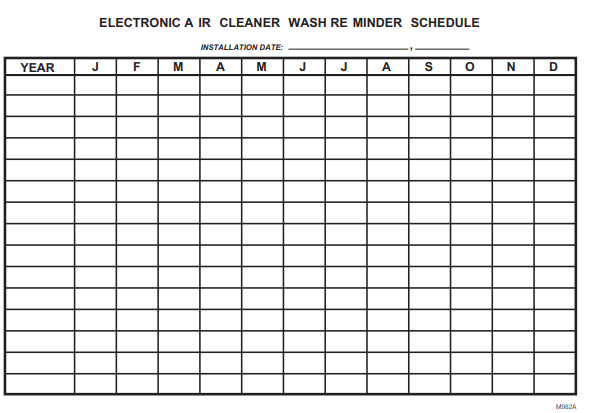
NOTE: You may let the heating or air conditioning system operate normally while the cell(s) are being washed. Simply turn off the air cleaner switch.
Cleaning your Prefilter
- The quickest and easiest way to clean your prefilter is to use the brush attachment of your vacuum cleaner to vacuum the lint off the dirty side of the prefilter. Greasy dirt may require soaking the prefilter in a tub or rinsing with the garden hose. Do not wash the prefilter in the dishwasher or car wash
- The prefilter should be cleaned every 6 months or more frequently with heavy use. This will keep the prefilter clean of air-choking lint that can make your system work harder.
Vacuum the prefilter with a brush attachment, rinse it with a hose, or soak it in a tub. Do not wash the prefilter(s) in the dishwasher or car wash.
Cleaning your Cells
- A quick cleaning of the cells can be done by simply wiping down the ionizer wires with a damp cloth. This will help boost the efficiency of the air cleaner between full cleaning cycles. This quick clean can be done every time the prefilters are cleaned.
- A full cleaning of the cells will return the air cleaner to its peak efficiency. An easy way to wash the cells is in a tub of hot, soapy water. Just soak the cells until the water cools, agitate, and rinse. For details on cleaning cells, see below for Washing the cell(s) in a tub or Washing the cell(s) in your automatic dish-washer.
- Because the efficiency of the air cleaner remains high even as it loads up with dirt, a full cleaning of the cells can be put off for yearly maintenance,ce and a quick cleaning can be done more often. Those wishing to renew to peak efficiency or with heavier use may want to wash more frequently.
Troubleshooting Common Issues with Honeywell F50F and F300E Electronic Air Cleaners
- Air Cleaner Not Powering On: Check power supply and On-Off switch; verify circuit breaker is not tripped.
- Neon Indicator Not Lit or Flickering: Cells may be wet or dirty; allow drying or clean cells and prefilters.
- Reduced Airflow or HVAC Performance: Inspect and clean prefilters and collector cells; replace the posthe tfilter if clogged.
- Arcing Noise: Normal when cells are wet; turn off the unit until dry. Persistent arcing may require service inspection.
Error Codes: The F300E model paired with the Air Cleaner Monitor provides maintenance alerts but does not display specific error codes.
Preventive Measures: Establish a regular cleaning schedule—twice per year with normal use—and replace media postfilters every six months to maintain optimal filtration.
Warranty and Support: Honeywell offers a standard warranty against defects in materials and workmanship under normal use. For assistance, contact Honeywell Customer Care at their official support channels.
Pros and Cons of Honeywell F50F and F300E Electronic Air Cleaners
- Pros:
- High filtration efficiency captures particles down to 0.3 microns, improving indoor air quality.
- Energy-efficient operation consumes less than 40 watts, reducing electricity costs.
- Washable prefilters and collector cells reduce replacement costs and environmental impact.
- Optional postfilters and air cleaner monitors enhance performance and maintenance awareness.
- Compatible with a wide range of HVAC systems and duct sizes for flexible installation.
- Honeywell’s UltraClean Coil Guarantee offers additional protection for HVAC components.
- Cons:
- Initial investment cost is higher than basic media filters, with prices ranging from $300 to $600.
- Requires periodic maintenance , including cleaning of cells and prefilters, which may be overlooked by some users.
- Potential for minor ozone generation, though within safe limits, which may concern sensitive individuals.
- Some users report occasional arcing noise during startup or after cleaning.
- Not suitable as a standalone unit; requires integration with the VAC system for operation.
Overall, the Honeywell F50F and F300E electronic air cleaners offer excellent value for money for users prioritizing air quality and HVAC protection, especially when compared with traditional filters lacking electronic charge technology.
Customer Reviews and Feedback on Honeywell F50F and F300E Electronic Air Cleaners
Users consistently praise the Honeywell F50F and F300E for their high efficiency in reducing dust, allergens, and smoke particles, with many reporting noticeable improvements in indoor air quality and HVAC system cleanliness. The low energy consumption and washable components receive positive remarks for cost-effectiveness and sustainability.
Common complaints focus on the need for regular maintenance, with some customers finding the cleaning process cumbersome. A few users mention the faint arcing sound when the unit starts or if cells are wet, though this is generally considered normal operation. The optional air cleaner monitor is appreciated for helping maintain performance.
Average star ratings hover around 4 to 4.5 stars out of 5, reflecting overall satisfaction. Many reviewers recommend these models, particularly for allergy sufferers and households with pets or smokers. Purchase recommendations highlight the importance of professional installation to ensure correct setup and maximize benefits.
Faqs
How do I properly set up honeywell F50F and F300E Electronic Air Cleaners for first-time use?
What should I do if my honeywell F50F and F300E Electronic Air Cleaners are not producing the neon light or making arcing sounds?
How do I clean and maintain the cells and prefilters in honeywell F50F and F300E Electronic Air Cleaners?
Are honeywell F50F and F300E Electronic Air Cleaners compatible with standard HVAC systems and thermostats?
What are the key features of honeywell F50F and F300E Electronic Air Cleaners that optimize air cleaning performance?
How often should I perform maintenance on honeywell F50F and F300E Electronic Air Cleaners to ensure optimal performance?
Can I install a washable prefilter model 203372 on my honeywell F50F and F300E Electronic Air Cleaners, and how do I do it?
What troubleshooting steps can I take if the honeywell F50F and F300E Electronic Air Cleaners stop working despite the fan running continuously?
More honeywell manuals
- Setup: Honeywell Media Air Cleaners User Manual
- Setup: Honeywell Quietclean Air Purifiers HFD-010 Series User Manual
- Pairing & Setup: Honeywell Plug-In Wireless Doorbell Instruction Guide
- Setup: Honeywell Hpa100 Series Air Purifier User Manual
- Pairing & Setup: Honeywell Portable Wireless Doorbell RDWL311A2000 User Manual
- Setup: Honeywell Air Purifier HPA600 User Manual
Leave a Comment