
Pairing & Setup: Honeywell Plug-In Wireless Doorbell Instruction Guide
Content
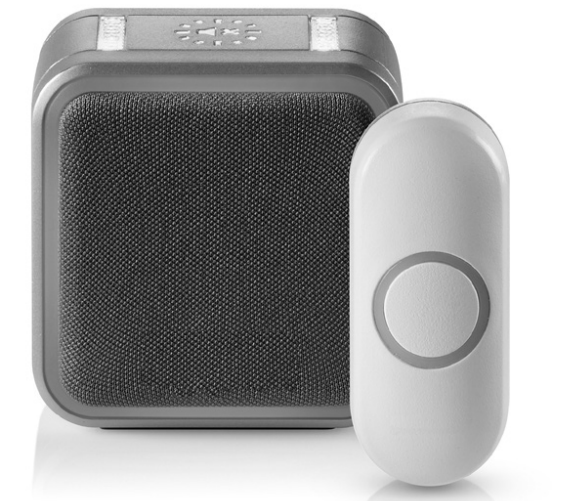
Honeywell Plug-In Wireless Doorbell
Introduction
The Honeywell Plug-In Wireless Doorbell is a modern, reliable solution for homes and offices seeking a hassle-free way to stay alert to visitors. Designed for easy installation and versatile use, this doorbell offers a wireless range of up to 150 meters (250 feet), making it ideal for large homes, apartments, and even outdoor spaces. With a sound level of up to 84 dB, customizable melodies, and visual alerts like halo lights and strobe options, the Honeywell Plug-In Wireless Doorbell ensures you never miss a guest, even in noisy environments.
Key benefits include plug-in convenience (no battery replacements), weather-resistant push buttons, and compatibility with multiple accessories such as motion sensors and door contacts. The device is perfect for families, elderly users, and anyone who values both style and functionality. With a sleek design and a price range typically between $60 and $85, the Honeywell Plug-In Wireless Doorbell is widely available at major retailers and online stores.
Specifications: Honeywell Plug-In Wireless Doorbell
- Wireless Range: Up to 150 meters (250 feet) in an open field
- Sound Level: Adjustable up to 84 dB
- Power Source: Plug-in (no batteries required)
- Push Button Battery: CR2032 (included)
- Connectivity: Honeywell ActivLink™, 868 MHz
- Alert Options: 6 melodies, 7 halo light colors, LED strobe
- Mounting: Wall-mounted or portable
- Weather Resistance: The Push button is weather-resistant
- Accessories: Supports up to 4–6 transmitters (push buttons, sensors)
- Dimensions: Doorbell: 4.33 x 2.75 x 1.67 in; Push Button: 3.25 x 1.25 in
- Operating Temperature: -5°C to 40°C
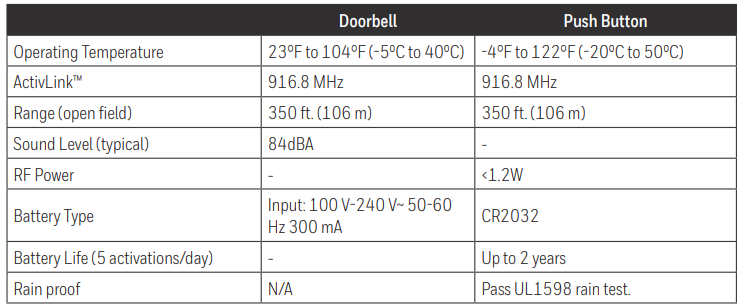
Compared to similar models, the Honeywell Plug-In Wireless Doorbell stands out for its plug-in design, extended range, and customizable alerts, making it a top choice for users seeking reliability and ease of use.
Preparation
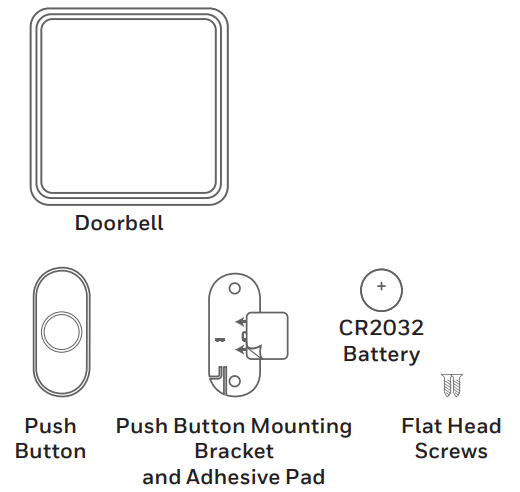
In the box you will find
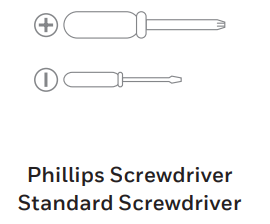
To install, you will need
Power-up
- Choose an outlet location that is not near a heat source, where the doorbell will be easy to see and hear, and plug in the doorbell.
- Open the push button battery cover and install the CR2032 battery.
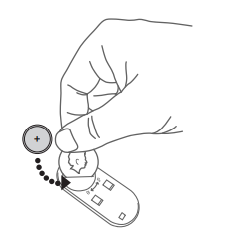
Setup Guide: Honeywell Plug-In Wireless Doorbell
Setting up your Honeywell Plug-In Wireless Doorbell is quick and straightforward:
- Plug the doorbell into any standard outlet.
- Mount the push button near your entrance using the included screws and wall anchors.
- Press and hold the Setting button on the doorbell for three seconds to enter pairing mode.
- Within 20 seconds, press the push button to complete pairing.
- Customize melodies and light alerts using the doorbell’s control panel.
For additional accessories, repeat the pairing process. Ensure the push button is within range and the battery is installed. If pairing fails, reset both devices and try again. Always follow local electrical safety guidelines and avoid installing in wet or high-moisture areas.
Install Push Button
- Mount the push button bracket in the desired location. n Use the screws – OR– Use the adhesive backing. If using the adhesive backing, clean the surface first.
- Snap the push button onto the mounting bracket.
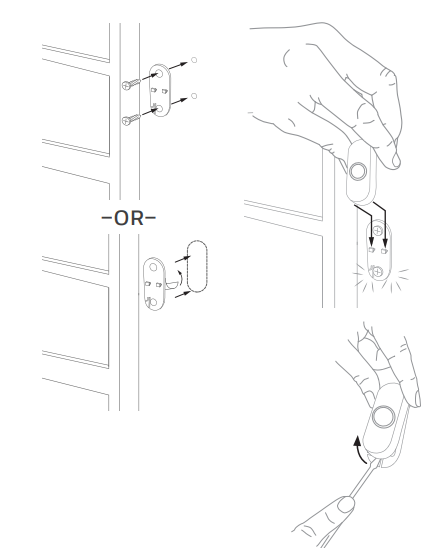
Note: If you need to remove the push button, use a small screwdriver to release the tab.
Maintenance
Your doorbell and push button require no maintenance except to periodically change the battery.
If using the correct battery, its life should be approximately:
- Up to 2 years for the push button; replace wia with a CR2032 lithium battery
Low Battery Notification
When the push button batteries are low, two beeps sounds are heard after the normal tune.
Reset
This process removes all pairings, including the push button that came with this doorbell:
- Unplug the doorbell.
- Press and hold the Setting button, and plug the doorbell back in at the same time.
- The halo light will circle, and the doorbell will return to its factory default settings.
Precautions and warnings
CAUTION: Before operating, make sure that the product components have not been damaged, have not been exposed to water or high temperatures.
Troubleshooting: Honeywell Plug-In Wireless Doorbell
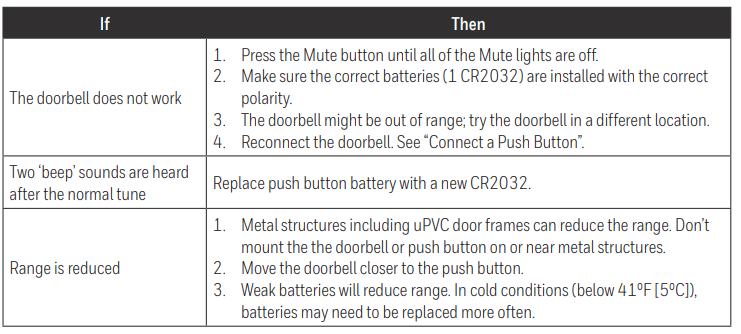
Common issues and solutions:
- No sound: Check volume settings and ensure the doorbell is plugged in.
- Push button not working: Replace the CR2032 battery and ensure it’s within range.
- Intermittent alerts: Move the doorbell closer to the push button or reduce interference.
- LED not lighting: Check for loose connections or reset the device.
Preventive measures include regular battery checks and keeping the device clean. The Honeywell Plug-In Wireless Doorbell comes with a 1-year warranty. For support, visit the official Honeywell Home website or contact customer service.
1-year limited warranty
Resideo warrants this product, excluding battery, to be free from defects in workmanship or materials, under normal use and service, for a period of one (1) year from the date of first purchase by the original purchaser. If at any time during the warranty period the product is determined to be defective due to workmanship or materials, Resideo shall repair or replace it (at Resideo’s option).
If the product is defective,
Pros & Cons: Honeywell Plug-In Wireless Doorbell
- Pros:
- No battery replacements needed
- Easy plug-in installation
- Customizable alerts and melodies
- Weather-resistant push button
- Supports multiple accessories
- Cons:
- Limited to indoor outlets
- Push push-button battery may need occasional replacement
- Higher price compared to basic models
The Honeywell Plug-In Wireless Doorbell offers excellent value for money, especially for users who prioritize reliability and customization over basic functionality.
Customer Reviews: Honeywell Plug-In Wireless Doorbell
Customers consistently rate the Honeywell Plug-In Wireless Doorbell 4.5 out of 5 stars. Praises include its loud, clear sound, easy setup, and stylish design. Common complaints mention the need to occasionally replace the push-button battery and the limited range in multi-story homes. Many users recommend it for families and elderly individuals who need reliable alerts. Frequent mentions highlight the customizable melodies and visual alerts as standout features.
Faqs
How do I set up my Honeywell Plug-In Wireless Doorbell for the first time?
Why isn’t my Honeywell Plug-In Wireless Doorbell responding to the push button?
Can I connect multiple push buttons to my Honeywell Plug-In Wireless Doorbell?
How do I change the chime sound on my Honeywell Plug-In Wireless Doorbell?
Is the Honeywell Plug-In Wireless Doorbell compatible with other smart home devices?
How do I maintain and care for my Honeywell Plug-In Wireless Doorbell?
What should I do if the Halo light on my Honeywell Plug-In Wireless Doorbell isn’t working?
Can I use rechargeable batteries in my Honeywell Plug-In Wireless Doorbell push button?
More honeywell manuals
- Pairing & Setup: Honeywell Portable Wireless Doorbell RDWL311A2000 User Manual
- Setup: Honeywell Media Air Cleaners User Manual
- Pairing : Honeywell Portable Wireless Doorbell RDWL917AX2000 User Manual
- Setup: Honeywell F50F and F300E Electronic Air Cleaners User Manual
- Setup: Honeywell C1 Wi-Fi Security Camera CHC8080W User Manual
- Setup: Honeywell Quietclean Air Purifiers HFD-010 Series User Manual
Leave a Comment