
Pairing & Setup: Honeywell Portable Wireless Doorbell RDWL311A2000 User Manual
Content
Honeywell Portable Wireless Doorbell RDWL311A2000
Introduction
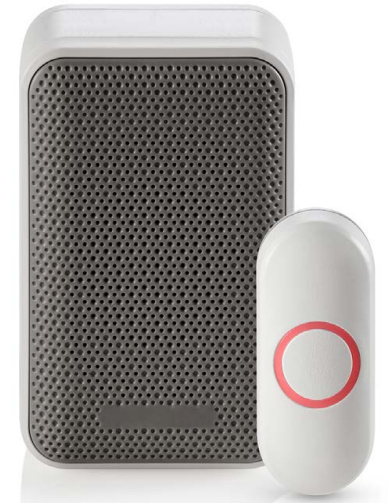
The Honeywell Portable Wireless Doorbell RDWL311A2000 is a versatile and reliable wireless doorbell designed for easy installation and enhanced home convenience. Ideal for homeowners, renters, and small business owners, this device brings the flexibility of wireless technology combined with portability, allowing placement on a wall or shelf without complicated wiring.
Key benefits include a robust wireless range of up to 250 feet, four selectable melodies, and a weather-resistant illuminated push button that provides visible feedback. Its portable design suits various use cases, from residential front doors to offices and workshops, ensuring visitors are promptly and pleasantly announced.
Priced competitively in the range of approximately $30 to $50, the RDWL311A2000 is widely available through online retailers and home improvement stores. The product appeals especially to users seeking an easy-to-install, battery-powered doorbell solution without sacrificing sound quality or reliability.
Specifications of Honeywell Portable Wireless Doorbell RDWL311A2000
- Model Number: RDWL311A2000
- Brand: Honeywell Home
- Wireless Frequency: 916.8 MHz Honeywell ActivLink™ technology
- Operating Range: Up to 250 feet (76 meters) in an open field
- Sound Level: 80 dBA with 4 selectable tunes
- Power Source: Doorbell unit requires 4 x AA alkaline batteries (not included); Push button uses 1 x CR2032 battery (included)
- Dimensions (Doorbell): 4.33" H x 2.75" W x 1.67" D
- Push Button: Illuminated, weather-resistant, surface-mountable with LED halo feedback
- Battery Life: Up to 2 years of typical use for doorbell batteries
- Connectivity: Can connect up to 4 transmitters, including push buttons and awareness devices
- Weight: Approximately 8 ounces
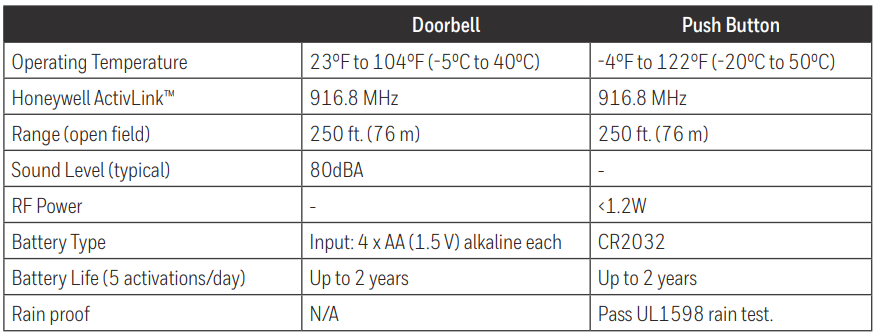
Compared to similar wireless doorbells, the RDWL311A2000 offers a competitive range and sound clarity, plus the advantage of portability and multi-transmitter connectivity, which many basic models lack.
Preparation
In the box you will find
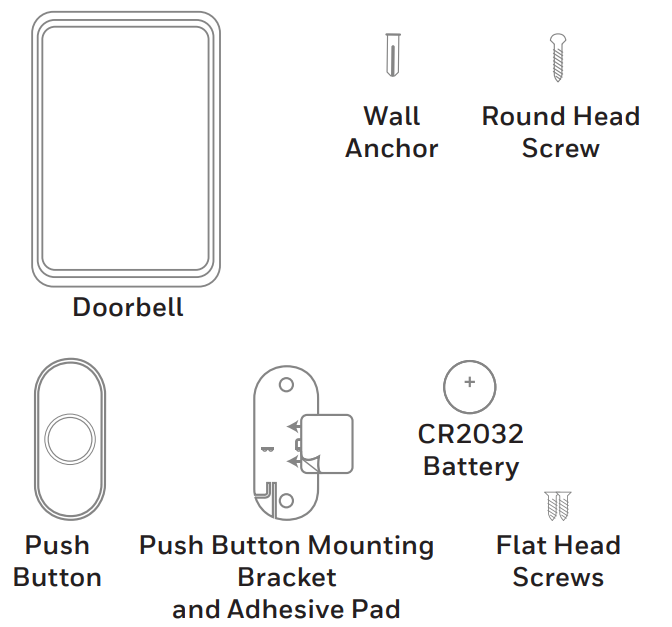
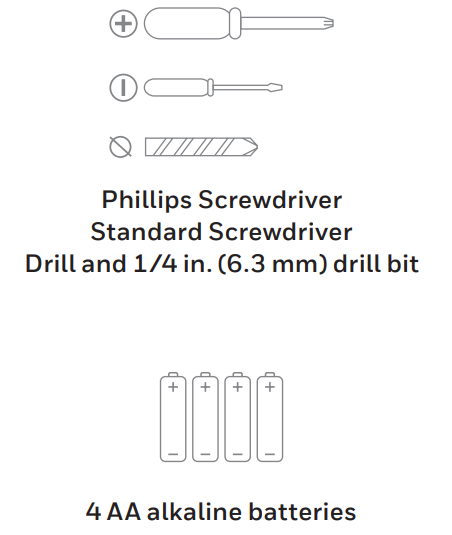
To install,, you will need
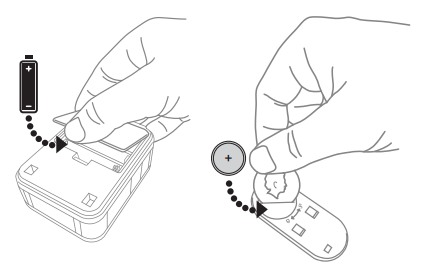
Install Batteries
- Open the battery cover and install 4 AA alkaline batteries.
- Open the battery cover and install the CR2032 battery.
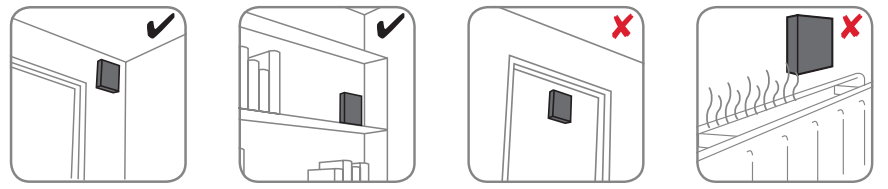
Installation
Choose a location that is not near a heat source or on something that moves (like a door). For non-mounting locations, choose a place where the doorbell will be easy to hear.
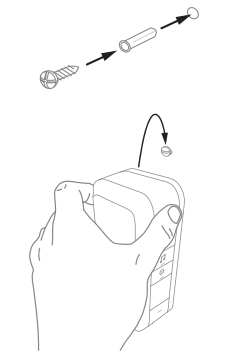
Install Doorbell
If you are not mounting the doorbell to the wall, place it where you want it.
- Mount the screen to the wall using the supplied anchor if necessary. Leave 2 mm of the screw sticking out from the wall.
Drill 1/4 inch (6.3 mm) holes for the anchor. - Hang the doorbell on the screw.
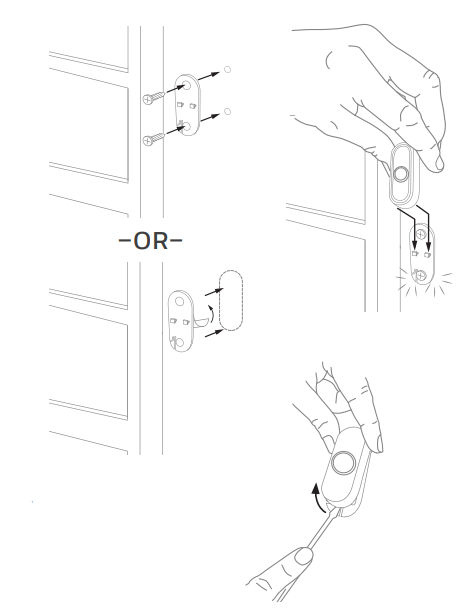
Install Push Button
- Mount the push button bracket in the desired location.
Use the screws– OR– Use the adhesive backing. If using the adhesive backing, clean the surface first. - Snap the push button onto the mounting bracket.
Setup Guide for Honeywell Portable Wireless Doorbell RDWL311A2000
- Unpack all components: doorbell unit, push button with battery, mounting brackets, screws, and wall anchors.
- Install 4 AA batteries into the doorbell unit (not included) and verify the push button has its CR2032 battery pre-installed.
- Mount the push button near your door using the provided mounting bracket and screws or adhesive pad for surface mounting.
- Place or mount the doorbell unit indoors within 250 feet of the push button for optimal range.
- The push button is pre-programmed to the doorbell; if pairing is needed, press and hold the doorbell’s “learn” button and then press the push button once to connect.
- Select your preferred tune from the four available using the doorbell’s tune selector switch.
Safety Precautions: Use only recommended battery types, avoid exposure of the push button to extreme weather beyond its rating, and follow mounting instructions carefully to prevent damage.
Maintenance
Your doorbell and push button require no maintenance except to periodically change the batteries.
If using the correct batteries, battery life should be approximately:
- Up to 2 years for the doorbell; replace with 4 AA alkaline batteries
- Up to 2 years for the push button; replace with a CR2032 lithium battery
Low Battery Notification
When the doorbell batteries are low, the LED on the side turns on.
When the push button batteries are low, two beeps sounds are heard after the normal tune.
Reset
This process removes all pairings, including the push button that came with this doorbell:
- Remove the doorbell battery.
- Press and hold the Setting button, and replace the battery at the same time.
- The doorbell will beep several times rapidly, and return to its factory default settings.
Troubleshooting Honeywell Portable Wireless Doorbell RDWL311A2000
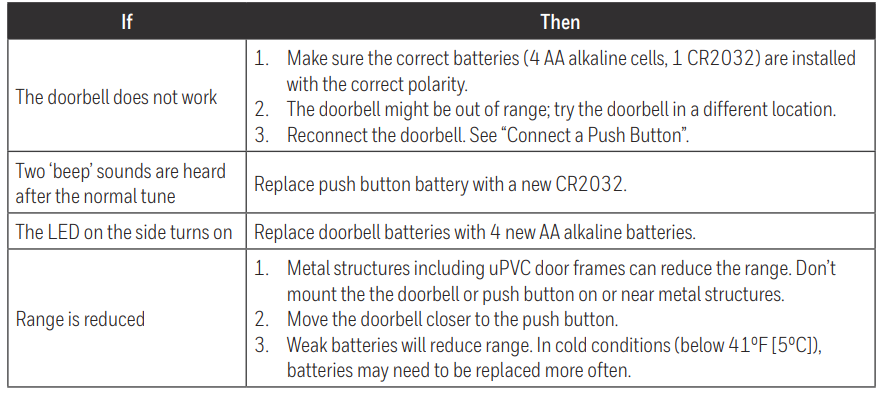
- No Sound from Doorbell: Check doorbell batteries; replace 4 AA batteries if low. Verify push button battery (CR2032) is installed and functional.
- Push Button LED Does Not Light: Replace CR2032 battery; ensure correct polarity.
- Doorbell Does Not Respond to Push Button: Re-pair the devices by pressing the doorbell’s learn button, then pressing the push button once.
- Intermittent Sound or Weak Volume: Reduce distance or remove remote obstacle between the transmitter and the push button; check for interference from other 900 MHz devices.
- Error Codes: The RDWL311A2000 does not display error codes but uses LED feedback on the push button for activation status.
- Troubleshooting tips: If the doorbell does not sound, check battery installation, ensure the devices are within range, and re-pair if necessary. Avoid placing the doorbell near metal objects that may cause interference.
Preventive measures include regular battery replacement every 1-2 years, keeping the push button clean, and installing the doorbell away from metal barriers.
Honeywell offers a limited warranty and customer support accessible via their official website and support hotline for further assistance.
Pros & Cons of Honeywell Portable Wireless Doorbell RDWL311A2000
Pros:
- Easy Installation: Wireless and battery powered, no wiring needed.
- Strong Wireless Range: Up to 250 feet, suitable for most home layouts.
- Multiple Tune Options: Four melodies allow customization.
- Portable Design: Can be placed on a table or wall-mounted.
- Weather-Resistant Push Button: Durable for outdoor use with illuminated LED feedback.
- Expandable: Supports up to 4 transmitters for multiple entry points.
Cons:
- Batteries Not Included: Requires purchasing 4 AA batteries separately for the doorbell.
- No Volume Control: Fixed sound level may be too loud or soft for some users.
- Basic Features: Lacks advanced options like smartphone integration or adjustable chime volume.
Overall, the RDWL311A2000 offers excellent value for its price point, especially compared to wired or higher-end smart doorbells. It is best suited for users seeking a simple, reliable wireless doorbell without complex features.
Customer Reviews of Honeywell Portable Wireless Doorbell RDWL311A2000
Users generally praise the Honeywell Portable Wireless Doorbell RDWL311A2000 for its easy setup, clear sound quality, and reliable wireless range. Many reviews highlight satisfaction with the illuminated push button's visibility and weather resistance. Common complaints include the need to buy doorbell batteries separately and the lack of volume adjustment.
Typical star ratings average around 4 out of 5, with users recommending the product for small homes or offices. Frequent positive feedback notes the device’s portability and multi-transmitter connectivity as key advantages. Some users report minor issues with pairing, resolved by following the setup guide carefully.
Faqs
How do I set up the honeywell Portable Wireless Doorbell RDWL311A2000 for the first time?
What should I do if my honeywell Portable Wireless Doorbell RDWL311A2000 is not ringing when the button is pressed?
Can I connect multiple push buttons to one honeywell Portable Wireless Doorbell RDWL311A2000?
How do I change the chime sound on my honeywell Portable Wireless Doorbell RDWL311A2000?
Is the honeywell Portable Wireless Doorbell RDWL311A2000 compatible with other honeywell doorbell systems?
How do I mount the honeywell Portable Wireless Doorbell RDWL311A2000 without drilling?
How often should I replace the batteries in my honeywell Portable Wireless Doorbell RDWL311A2000?
What is the wireless range of the honeywell Portable Wireless Doorbell RDWL311A2000?
More honeywell manuals
- Pairing : Honeywell Portable Wireless Doorbell RDWL917AX2000 User Manual
- Pairing & Setup: Honeywell Plug-In Wireless Doorbell Instruction Guide
- Setup: Honeywell C1 Wi-Fi Security Camera CHC8080W User Manual
- Setup: Honeywell Media Air Cleaners User Manual
- Setup & Pairing: Honeywell T9 Smart Thermostat with Smart Room Sensor User Manual
- Setup: Honeywell F50F and F300E Electronic Air Cleaners User Manual
Leave a Comment