
Pairing : Honeywell Portable Wireless Doorbell RDWL917AX2000 User Manual
Content
Honeywell Portable Wireless Doorbell RDWL917AX2000
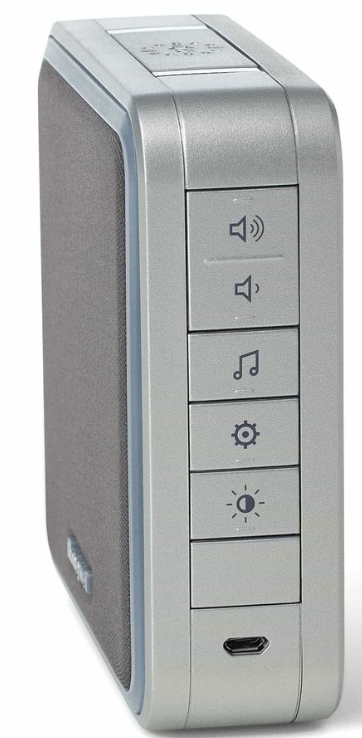
Introduction to the Honeywell Series 9 Wireless Doorbell
The Honeywell Portable Wireless Doorbell RDWL917AX2000 represents a modern solution for home security and convenience, offering homeowners a flexible alternative to traditional wired doorbells. This portable wireless doorbell combines innovative design with practical functionality, making it an ideal choice for renters, homeowners, and anyone seeking a hassle-free doorbell solution without professional installation.
The Honeywell Series 9 doorbell stands out in the wireless doorbell market with its impressive 450-foot wireless range, allowing you to place the receiver unit anywhere in your home—from the basement to the backyard, or even far away from sleeping areas. The device features an illuminated halo light with seven color options and LED strobe alerts that activate when the doorbell is pressed, providing both audible and visual notifications. With customizable sound options including 11 pre-installed tunes and the ability to download your own MP3 files via USB, this portable wireless doorbell adapts to your personal preferences and lifestyle.
Designed for modern households, the Honeywell Portable Wireless Doorbell RDWL917AX2000 appeals to homeowners seeking convenience, renters needing temporary solutions, and those with hearing impairments who benefit from visual alerts. The device typically retails between $40-$60 and is widely available through major retailers, including Home Depot, Lowe's, and the Honeywell Store. Its market-leading 5-year battery life and robust 100-meter audible range make it a practical investment for any home requiring reliable doorbell functionality without complex installation procedures.
Technical Specifications
Doorbell Unit Specifications:
- Model Number: RDWL917AX2000
- Dimensions: 8.5 inches (H) x 5.91 inches (W) x 2.76 inches (D)
- Operating Temperature: 23°F to 104°F (-5°C to 40°C)
- Wireless Range: 450 feet (137 meters) in an open field
- Sound Level: 84 dBA typical output, adjustable up to 90 decibels
- Radio Frequency: Honeywell ActivLink 916.8 MHz
- Power Source: 4 x LR14 (C) alkaline batteries (1.5V each)
- Battery Life: Up to 5 years with typical use (5 activations per day)
- Number of Tunes: 11 pre-installed customizable options
- Custom Sound Support: MP3 files via included USB cord
- Halo Light Colors: 7 selectable color options
- LED Strobe Alerts: Visual notification system
- Maximum Accessories: Can connect up to 6 wireless accessories
- Compatible Accessories: Push buttons, window/door sensors, motion sensors
Push Button Specifications:
- Dimensions: 2.75 inches (H) x 1.875 inches (W) x 0.625 inches (D)
- Operating Temperature: -4°F to 122°F (-20°C to 50°C)
- Battery Type: CR2032 (included)
- Battery Voltage: 3V
- Wireless Range: 450 feet (137 meters)
- RF Power: Less than 1.2W
- Design: Illuminated halo LED feedback
- Material: Weather-resistant plastic
- Mounting: Surface mount with included bracket and adhesive pad
- Wireless Compatibility: "E" push-button compatible
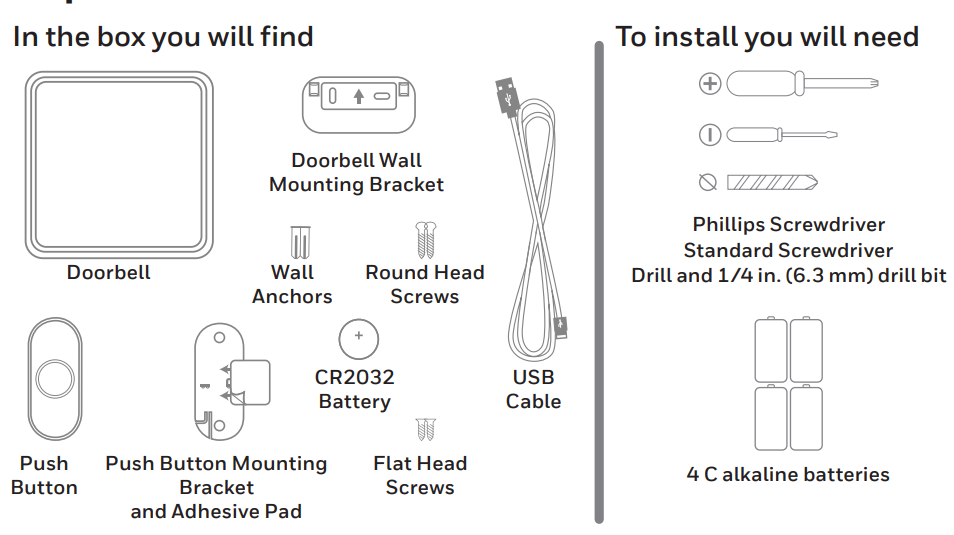
Package Contents:
- Portable wireless doorbell receiver unit
- Illuminated push button transmitter
- Doorbell wall mounting bracket
- Push button mounting bracket with adhesive pad
- CR2032 battery for push button (pre-installed)
- USB cable for custom MP3 downloads
- Wall anchors and mounting screws (round head and flat head)
- Installation guide and user manual
Preparation
Install Batteries
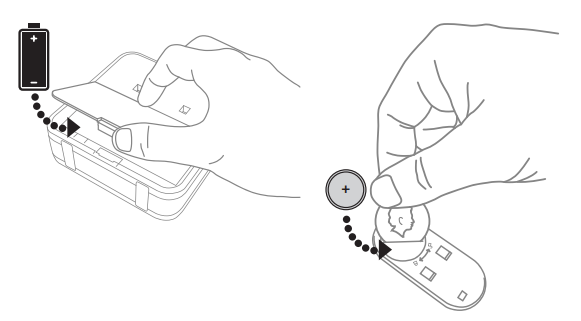
- Open the battery cover and install 4 C alkaline batteries.
- Open the battery cover and install the CR2032 battery.
Installation
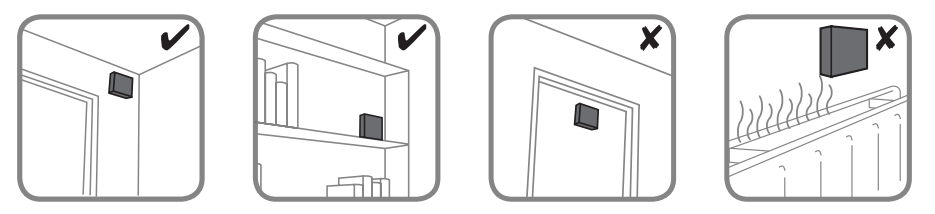
Choose a location that is not near a heat source or on something that moves (like a door). For non-mounting locations, choose a place where the doorbell will be easy to see and hear.
Install Doorbell
If you are not mounting the doorbell to the wall, place it where you want it.
- Screw the doorbell wall mounting bracket to the wall using the included screws and anchors (if necessary).
- Hang the doorbell on the mounting bracket.
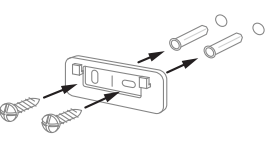
Drill 1/4 inch (6.3 mm) holes for the anchors
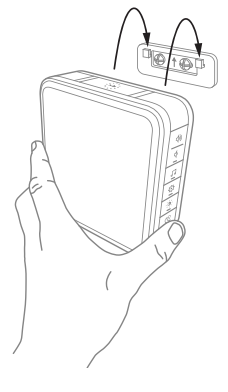
Install Push Button
- Mount the push button bracket in the desired location.
Use the screws
–OR–
Use the adhesive backing. If using the adhesive backing, clean the surface first. - Snap the push button onto the mounting bracket.t
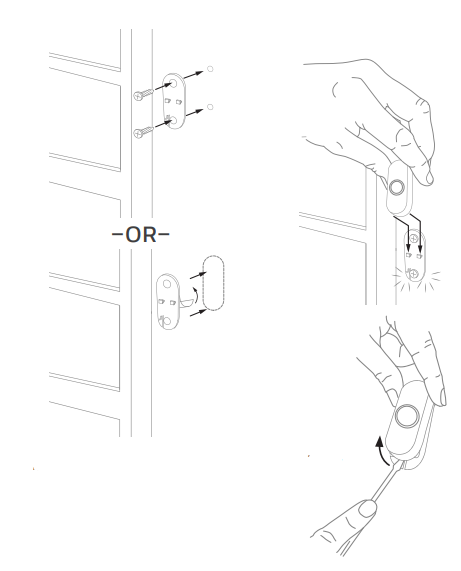
Note: If you need to remove the push button, use a small screwdriver to release the tab.
Maintenance
- Your doorbell and push button require no maintenance except to periodically change the batteries.
- If using the correct batteries, battery life should be approximately:
- Up to 5 years for the doorbell; replace with 4 C alkaline batteries
- Up to 2 years for the push button; replace with a CR2032 lithium battery
Low Battery Notification
- When doorbell batteries are low, ow the bottom edge of the halo light flashes yellow every 6 seconds until batteries are replaced. When the push button batteries are low, two beeps sounds are heard after the normal tune.
Troubleshooting Common Issues
Doorbell Does Not Ring When the Push Button Is Pressed:
If your Honeywell Portable Wireless Doorbell RDWL917AX2000 fails to activate when the push button is pressed, first verify that the doorbell receiver has fresh batteries installed and is powered on. Check the push button's CR2032 battery by replacing it with a new one. Ensure both units are within the 450-foot wireless range and that no large metal objects or electronic equipment are blocking the signal between the transmitter and receiver. If the problem persists, re-pair the push button by holding the Setting button for three seconds and pressing the push button within 20 seconds as described in the setup guide.
Poor Wireless Range or Intermittent Connection:
The advertised 450-foot range applies to open field conditions. Indoor range typically measures 100-150 feet, depending on wall materials and construction. Move the receiver closer to the push button location or relocate it to a more central position in your home. Avoid placing the doorbell near microwave ovens, cordless phones, Wi-Fi routers, or other 2.4GHz devices that may cause interference on the 916.8 MHz frequency. Ensure no large metal filing cabinets or appliances block the direct line of sight between units.
Weak Sound Output or Halo Light Not Illuminating:
Replace the C batteries in the doorbell receiver, as low battery voltage reduces both sound output and LED brightness. Verify that the volume control is not set to the minimum position. If the halo light fails to illuminate but sound activates normally, the LED may require replacement—contact Honeywell support for service options. Ensure the doorbell unit is not in sleep mode by checking the mode settings.
Cannot Connect Additional Accessories:
The Honeywell Portable Wireless Doorbell RDWL917AX2000 supports up to 6 wireless accessories,s including additional push buttons, door sensors, and motion sensors. If you attempt to connect more than six devices, the doorbell will emit two warning beeps. Remove any unnecessary accessories or consider using a second doorbell unit for additional coverage.
Custom MP3 Files Not Playing:
Ensure your MP3 file is in standard MP3 format and properly transferred to the designated folder on the doorbell via USB connection. Verify the file size does not exceed the device memory capacity. Try using a different MP3 file to determine if the issue relates to specific file formats or corruption. Reconnect the USB cable and attempt the transfer again.
Warranty and Support:
The Honeywell Portable Wireless Doorbell RDWL917AX2000 includes a 1-year manufacturer's warranty covering defects in materials and workmanship. Contact Honeywell Home customer support through their official website or call their support hotline for technical assistance, warranty claims, or replacement parts. Major retailers, including Home Depot and Lowe's, offer 90-day return policies for unopened or defective units.
Advantages and Disadvantages
Key Advantages:
- Extended Battery Life: Market-leading 5-year battery life with typical use reduces maintenance requirements and replacement costs compared to competing wireless doorbell models
- Impressive Wireless Range: 450-foot wireless range in an open field allows flexible placement throughout your home, basement, or outdoor areas
- Customizable Sound Options: 11 pre-installed tunes plus the ability to download custom MP3 files via USB provides personalization unavailable on basic doorbell models
- Visual Alert System: Illuminated halo with 7 color options and LED strobe lights benefits hearing-impaired users and provides alerts in noisy environments
- Portable Design: No wiring or professional installation required, making it ideal for renters and those seeking temporary solutions
- Multiple Accessory Support: Can connect up to 6 wireless accessories, es including additional push buttons, motion sensors, and door/window contacts
- Adjustable Volume Control: Sound output ranges from silent (visual alerts only) to 90 decibels, adapting to various time-of-day needs
Notable Disadvantages:
- Battery Replacement Requirement: Doorbell receiver requires 4 C batteries (not included with purchase), representing an ongoing expense
- Indoor Range Limitations: While advertised at 450 feet, actual indoor range typically measures 100-150 feet,eet depending on wall materials and construction
- No Video Capability: Unlike modern video doorbells, this model provides no camera or visual identification of visitors
- Limited Smart Home Integration: Lacks connectivity with popular smart home platforms like Amazon Alexa or Google Home
- Weather Resistance Concerns: While the push button is weather-resistant, outdoor durability in extreme conditions remains limited
- No Smartphone Notifications: Provides no app-based alerts or remote notifications when away from home
Value Assessment:
The Honeywell Portable Wireless Doorbell RDWL917AX2000 delivers excellent value for budget-conscious consumers seeking a reliable, straightforward doorbell solution without complex installation. At the $40-$60 price point, it competes favorably against basic wired doorbells and other portable wireless options, though premium smart video doorbells command higher prices for advanced features. The exceptional 5-year battery life and customizable features justify the investment for homeowners and renters alike.
Customer Reviews and User Feedback
Overall Satisfaction:
Users consistently praise the Honeywell Portable Wireless Doorbell RDWL917AX2000 for its ease of installation, reliable performance, and impressive battery longevity. Customers appreciate the flexible placement options and the ability to move the receiver to different rooms without rewiring. The customizable tunes and visual alert features receive particular acclaim from users with hearing difficulties or those living in noisy environments.
Commonly Praised Features:
The extended 5-year battery life stands out as a major selling point, with users noting the cost savings compared to replacing batteries frequently in competitor models. The 450-foot wireless range enables practical placement options that customers value highly. The illuminated halo light and LED strobe alerts provide effective notifications, and the ability to download custom MP3 files adds personalization that basic doorbell models cannot match.
Frequently Mentioned Concerns:
Some users report that indoor wireless range falls short of the advertised 450 feet, particularly in homes with dense wall construction or metal framing. A few customers mention difficulty with the initial push-button pairing, though following the manual instructions resolves most issues. Users occasionally note that the C batteries required for the receiver unit are not included, requiring a separate purchase at setup.
Recommended Use Cases:
Customers highly recommend the Honeywell Portable Wireless Doorbell RDWL917AX2000 for apartment dwellers and renters unable to install traditional wired doorbells. Families with young children appreciate moving the receiver away from sleeping areas, while individuals with hearing impairments particularly value the visual alert system. The device suits anyone seeking a reliable, maintenance-free doorbell solution without smartphone dependency or complex smart home integration requirements.
```
Faqs
How do I set up the honeywell Portable Wireless Doorbell RDWL917AX2000 for the first time?
What should I do if my honeywell Portable Wireless Doorbell RDWL917AX2000 is not ringing when the button is pressed?
Can I connect multiple push buttons to the honeywell Portable Wireless Doorbell RDWL917AX2000?
How do I change the ringtone on my honeywell Portable Wireless Doorbell RDWL917AX2000?
Is the honeywell Portable Wireless Doorbell RDWL917AX2000 compatible with other Honeywell devices?
How do I adjust the volume and light settings on the honeywell Portable Wireless Doorbell RDWL917AX2000?
How often should I replace the batteries in the honeywell Portable Wireless Doorbell RDWL917AX2000?
What is the wireless range of the honeywell Portable Wireless Doorbell RDWL917AX2000?
More honeywell manuals
- Setup: Honeywell C1 Wi-Fi Security Camera CHC8080W User Manual
- Pairing & Setup: Honeywell Portable Wireless Doorbell RDWL311A2000 User Manual
- Setup & Pairing: Honeywell T9 Smart Thermostat with Smart Room Sensor User Manual
- Pairing & Setup: Honeywell Plug-In Wireless Doorbell Instruction Guide
- Pairing: Honeywell T5+ Smart Programmable Thermostat User Manual
- Setup: Honeywell Media Air Cleaners User Manual
Leave a Comment