
Setup: Honeywell C1 Wi-Fi Security Camera CHC8080W User Manual
Content
Honeywell C1 Wi-Fi Security Camera CHC8080W
Introduction
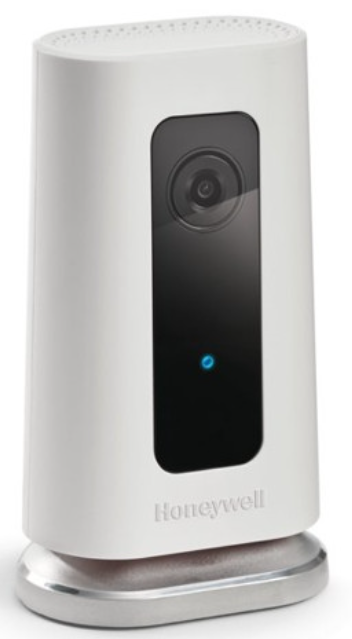
The Honeywell C1 Wi-Fi Security Camera CHC8080W is a smart, indoor security solution designed for modern homes and small businesses. With its sleek, compact design and powerful features, this camera offers peace of mind whether you're at home or away. The C1 delivers crisp 720p HD video at 30 frames per second, ensuring clear footage day and night. Its ultra-wide 135-degree viewing angle covers more of your space, reducing blind spots and the need for multiple cameras.
Key benefits include intelligent motion and sound detection, two-way audio, and real-time alerts for smoke or carbon monoxide alarms. The camera supports both local SD card storage and free rolling cloud storage, so you never miss a moment. With geofencing, the C1 can automatically arm or disarm based on your smartphone’s location. The Honeywell C1 Wi-Fi Security Camera CHC8080W is ideal for monitoring pets, children, or home security, and is easy to set up for users of all technical levels.
Priced competitively in the $100–$150 range, the C1 is widely available through major retailers and online stores, making it an accessible choice for anyone seeking reliable, smart indoor surveillance.
Specifications of the Honeywell C1 Wi-Fi Security Camera CHC8080W
- Video Resolution: 720p HD at 30fps
- Viewing Angle: 135 degrees (ultra-wide)
- Night Vision: Up to 16.5 feet
- Audio: Built-in microphone and speaker for two-way talk
- Storage: 8GB SD card included; free rolling 24-hour cloud storage
- Connectivity: Wi-Fi (2.4GHz), no battery required (wired power)
- Detection Features: Motion, sound, smoke/CO alarm alerts
- Smart Features: Geofencing, customizable detection zones, 5x digital zoom
- Encryption: 256-bit end-to-end encryption
- Compatibility: Works with the Lyric app (iOS and Android)
Compared to similar indoor cameras, the Honeywell C1 Wi-Fi Security Camera CHC8080W stands out with its intelligent alarm detection, wide-angle lens, and robust privacy features.
Installation
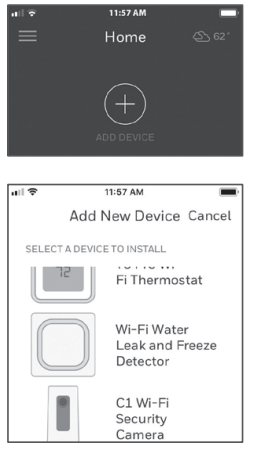
Launch the Honeywell Home app
- Launch the Honeywell Home app.
- Create an account (if necessary), or sign in to your
Honewell Home account. Tap ADD DEVICE or the plus sign. - Select the C1 Wi-Fi Camera to install, then follow the instructions in the Honeywell Home app to name the camera and its location.
Download the Honeywell Home app.
Note: Have your Wi-Fi password available and confirm your router communicates at 2.4 GHz before installation.- Make sure Bluetooth is enabled on your mobile device.
- Search for Honeywell Home in the App Store or Google Play.
- Download the Honeywell Home app

Connect the power cord
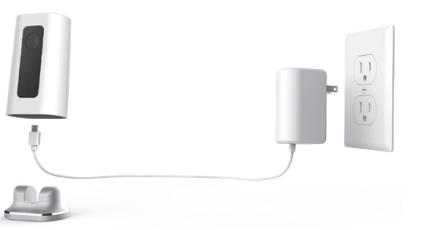
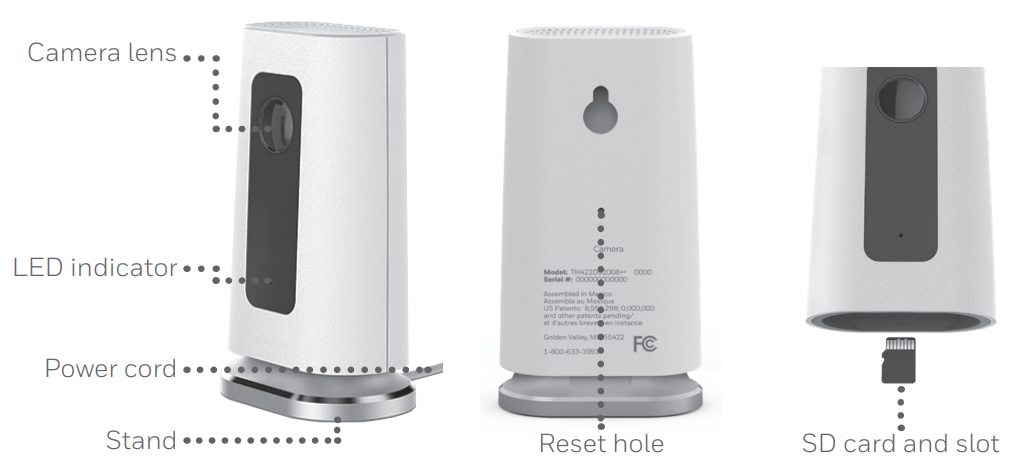
- Remove the camera base and plug the power cord’s USB end into the camera.
- Reinsert the camera base and plug the camera into a power outlet.
- Wait until the LED on the camera blinks blue (about 1 minute), then tap NEXT.
Note: If the LED turns solid red, it means the connection mode timed out. Unplug the camera and plug it back in
Connect
Connect to a mobile device
- Enable Bluetooth on your mobile device.
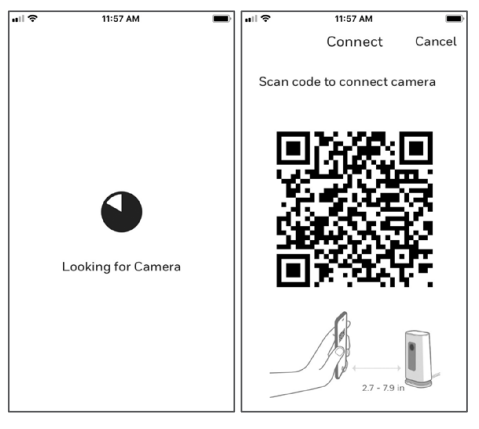
- The app will look for the camera.
- For one camera, it will connect automatically.
- For more than one camera, the app will prompt you to select one camera at a time. Each camera has a unique MAC ID printed on the back. Use that ID to select the camera you want to connect.
- A QR code will display in the app. To connect your camera to the app, hold the QR code approximately 3-8 inches (7-20 cm) from the camera lens.
- The camera LED turns purple and the camera beeps.
Connect to Wi-Fi
Note: Be sure you are on the same Wi-Fi network you wish to connect your camera to.
- Choose your Wi-Fi network from the list.
Tap NEXT. - Enter your Wi-Fi password, if necessary.
Tap DONE.
Note: The camera will beep during some steps in this process..
Operation
Remove/replace the stand
The stand is connected to the camera by a magnet. If you want to remove the stand to hang the camera on the wall or replace the SD card, simply pull the stand off of the camera. To replace, just snap it back on the camera.
Honeywell Home app experience
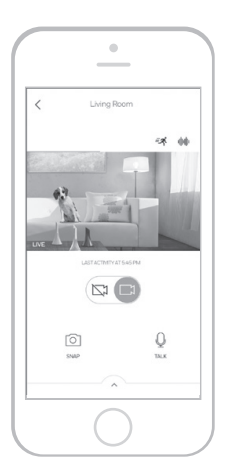
When you launch the application, your Home screen is displayed.
All of your devices (cameras, thermostats, water leak detectors, etc.) are displayed. Select a camera from the list to view live video from that camera.
Testing smoke/CO alarm detection
- If your smoke or carbon monoxide alarm goes off and your camera is on, it will send you an alert that a smoke or CO alarm has been detected.
- To test this feature, press and hold the Test button on your smoke/CO detector for at least 5 seconds or 3 cycles of the detector’s alarm. A shorter test might not trigger a sound event.
Camera overview
Troubleshooting the Honeywell C1 Wi-Fi Security Camera CHC8080W
Common issues include Wi-Fi disconnection, delayed alerts, or blurry video. If the camera won’t connect, ensure your Wi-Fi is 2.4GHz and the password is correct. For delayed alerts, check your app notifications and internet speed. Blurry video may be due to dirty lenses or poor lighting—clean the lens and adjust the camera angle.
Preventive measures include regular firmware updates and keeping the camera lens clean. The Honeywell C1 Wi-Fi Security Camera CHC8080W comes with a standard one-year warranty. For further assistance, contact Honeywell customer support via their official website or phone support.
Pros & Cons of the Honeywell C1 Wi-Fi Security Camera CHC8080W
Pros
- Easy setup and user-friendly app
- Wide 135-degree viewing angle
- Intelligent smoke/CO alarm detection
- Two-way audio and night vision
- Free cloud storage and local SD card backup
- Strong privacy and encryption features
Cons
- Only 720p resolution (not 1080p)
- Wi-Fi must be 2.4GHz only
- Cloud storage is limited to 24 hours
- Indoor use only
The Honeywell C1 Wi-Fi Security Camera CHC8080W offers excellent value for money, especially for those prioritizing smart alerts and privacy.
Customer Reviews for the Honeywell C1 Wi-Fi Security Camera CHC8080W
Users consistently rate the Honeywell C1 Wi-Fi Security Camera CHC8080W 4.3–4.6 stars. Many praise its easy installation, reliable alerts, and clear video quality. Common complaints include the 720p resolution and occasional Wi-Fi connectivity issues. Customers appreciate the two-way audio and smoke/CO detection, calling it a “great value for the price.” Most recommend it for indoor monitoring and pet owners. Frequently mentioned issues are the need for a strong Wi-Fi signal and the limited cloud storage duration.
Faqs
How do I set up the honeywell C1 Wi-Fi Security Camera CHC8080W for the first time?
What should I do if my honeywell C1 Wi-Fi Security Camera CHC8080W won’t connect to Wi-Fi?
Can I use the honeywell C1 Wi-Fi Security Camera CHC8080W with geofencing?
How do I adjust motion detection sensitivity on the honeywell C1 Wi-Fi Security Camera CHC8080W?
Does the honeywell C1 Wi-Fi Security Camera CHC8080W support night vision?
What are the Wi-Fi requirements for the honeywell C1 Wi-Fi Security Camera CHC8080W?
How do I troubleshoot a solid red LED on my honeywell C1 Wi-Fi Security Camera CHC8080W?
How often should I clean and maintain the honeywell C1 Wi-Fi Security Camera CHC8080W?
More honeywell manuals
- Setup & Pairing: Honeywell T9 Smart Thermostat with Smart Room Sensor User Manual
- Pairing : Honeywell Portable Wireless Doorbell RDWL917AX2000 User Manual
- Pairing: Honeywell T5+ Smart Programmable Thermostat User Manual
- Pairing & Setup: Honeywell Portable Wireless Doorbell RDWL311A2000 User Manual
- Setup: Honeywell T4 Pro Programmable Thermostat User Manual
- Pairing & Setup: Honeywell Plug-In Wireless Doorbell Instruction Guide
Leave a Comment