
Honeywell WS8B2WB-U Wall Module User Manual
Content
Honeywell WS8B2WB-U Wall Module: Complete Product Manual and Buyer Guide
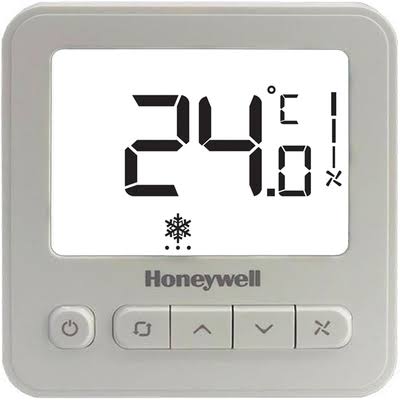
The Honeywell WS8B2WB-U Wall Module is a compact fan coil thermostat designed for precise indoor temperature control in residential, commercial, and hospitality HVAC systems. Built for 2-pipe fan coil applications, it combines a large backlit LCD, selectable manual or automatic fan speed control, and straightforward wall-mounted operation in a clean white finish. For users who want dependable comfort management without complex programming, the Honeywell WS8B2WB-U Wall Module offers a practical balance of simplicity, performance, and value.
This wall module is commonly used in apartments, offices, hotel rooms, clinics, and light commercial buildings where stable temperature control and fan coil efficiency matter. Its main strengths include wide voltage compatibility, anti-freeze protection, intuitive operation, and a clear display that shows room temperature and setpoint information in real time. The device is especially useful in HVAC retrofit projects and new installations that require a reliable fan coil controller with minimal maintenance.
Estimated pricing typically falls in the budget-to-midrange category, often around $25 to $50 depending on region, seller, and order volume. Availability is generally good through HVAC distributors, building automation suppliers, and online industrial resellers. If you are comparing the honeywell WS8B2WB-U Wall Module with other wall thermostats, its biggest advantage is its focused fan coil functionality rather than broad smart-home features.
Technical Specifications for Honeywell WS8B2WB-U Wall Module
- Product type: Wall module thermostat for fan coil units
- Application: 2-pipe HVAC systems
- Operating voltage: 100–240 VAC, 50/60 Hz
- Fan control: Manual or automatic selectable fan speed
- Display: Large LCD with backlight for easy readability
- Temperature set range: 10°C to 30°C
- Temperature display range: -10°C to 50°C
- Operating temperature: -30°C to 60°C
- Humidity range: 5% to 90% RH, non-condensing
- Protection rating: IP20
- Load capacity: Resistive fan unit 3A, valve 2A; inductive fan unit 1A, valve 0.6A
- Color: White
- Functionality: Cooling and heating control with anti-freeze protection
- Dimensions: Commonly supplied in a standard wall-mount format for 86-style junction boxes
Compared with basic mechanical fan coil controls, the honeywell WS8B2WB-U Wall Module provides better temperature visibility, more precise control, and a cleaner user interface. Against more advanced smart thermostats, it is simpler but often more dependable in commercial HVAC environments where dedicated fan coil operation is the priority.
Setup Guide: How to Install and Configure the Honeywell WS8B2WB-U Wall Module
Before installation, confirm that the power supply matches the unit’s voltage requirements and that the system is a compatible 2-pipe fan coil setup. Mount the wall module on an interior wall in a well-ventilated location, ideally around 1.5 meters above the floor and away from direct sunlight, drafts, or heat sources.
- Turn off mains power before starting any wiring work.
- Remove the front cover carefully and identify the wiring terminals.
- Connect fan, valve, and power lines according to the HVAC system diagram.
- Secure the module to the wall box and reinstall the cover.
- Restore power and verify that the LCD activates properly.
- Set the desired temperature and choose manual or automatic fan mode.
For best results, test the fan speeds and valve response after installation. If the display is blank, recheck the supply voltage and terminal connections. If the unit behaves erratically, ensure that the wiring is not reversed and that the load ratings are within specification. Never install the thermostat in damp locations or expose it to unsafe electrical conditions.
Troubleshooting Honeywell WS8B2WB-U Wall Module Problems
Most issues with the honeywell WS8B2WB-U Wall Module are caused by wiring faults, incompatible fan coil setup, or improper installation height. If the unit does not power on, verify that the incoming voltage is between 100 and 240 VAC and that the circuit is live. If the fan does not respond, confirm the speed wires and valve connections are correctly seated.
- Blank display: Check mains power, fuse status, and terminal tightness.
- Fan runs continuously: Confirm mode settings and inspect control wiring.
- Temperature mismatch: Relocate the unit away from heat sources or sunlight.
- No valve response: Test load compatibility and inspect valve actuator wiring.
- Frozen or unresponsive controls: Reset power and recheck internal connections.
No common digital error codes are widely documented for this model, so most troubleshooting is based on symptom checking rather than code lookup. Preventive maintenance includes periodic inspection of terminals, keeping the unit clean, and ensuring the HVAC system remains within load limits. For warranty or service support, contact the original seller, local Honeywell HVAC distributor, or the building automation contractor that supplied the unit. Keep your invoice and model number handy when requesting help.
Pros and Cons of the Honeywell WS8B2WB-U Wall Module
Pros
- Simple and intuitive operation for daily temperature control
- Large backlit LCD improves visibility in low-light rooms
- Supports manual and automatic fan speed control
- Works well in 2-pipe fan coil applications
- Wide voltage range adds installation flexibility
- Good value for money for HVAC retrofit and replacement jobs
Cons
- Not a smart thermostat and lacks app-based control
- Limited to fan coil use rather than universal HVAC systems
- IP20 protection means it is not suitable for exposed damp environments
- No advanced scheduling or Wi-Fi connectivity
- Best suited for users who need reliability more than automation
In value-for-money terms, this model is strong for facilities that want a dependable wall-mounted fan coil controller without paying for smart-home features. Compared with alternatives such as programmable digital thermostats, it wins on simplicity; compared with Wi-Fi models, it loses on remote access but often gains on ease of use and installation consistency.
Customer Reviews: What Users Say About the Honeywell WS8B2WB-U Wall Module
Average user sentiment is generally positive, with many buyers rating the honeywell WS8B2WB-U Wall Module around 4.3 out of 5 stars. Customers frequently praise the clear display, stable temperature control, and straightforward installation in fan coil environments.
- “Easy to use and reliable.” Users like the simple interface and quick response from the fan coil system.
- “Perfect for hotel rooms and offices.” Reviewers value its clean look and dependable daily operation.
- “Could use smart features.” The most common complaint is the lack of Wi-Fi, app control, and scheduling.
- “Great replacement thermostat.” Many buyers recommend it for retrofit projects and replacements of older wall modules.
Customers who need a basic, professional-grade wall module usually recommend it, while users expecting smart-home connectivity often prefer a connected thermostat instead. Frequently mentioned issues include compatibility checks, wiring confusion during installation, and the absence of advanced automation.
Faqs
How do I set up the honeywell WS8B2WB-U Wall Module for the first time?
What should I do if my honeywell WS8B2WB-U Wall Module is not responding or the display is blank?
Is the honeywell WS8B2WB-U Wall Module compatible with all fan coil units?
How does the honeywell WS8B2WB-U Wall Module control temperature and fan speed?
Why is my honeywell WS8B2WB-U Wall Module showing the wrong temperature reading?
What are the key features of the honeywell WS8B2WB-U Wall Module that improve daily use?
How can I optimize performance of the honeywell WS8B2WB-U Wall Module in a fan coil system?
How should I maintain and clean the honeywell WS8B2WB-U Wall Module?
More honeywell manuals
- Installation: Honeywell HFS-D Duct Smoke Detector Instruction Manual
- Honeywell X-618 Public Address and Voice Alarm System User Manual
- Honeywell RTH8500 Wi-Fi Series Thermostat User Manual
- Honeywell Pro TH3000 Series Non-Programmable Thermostat User Manual
- Honeywell SmartVFD HVAC & SmartDrive Electronic Motor Controller User Manual
- Honeywell TC500A Commercial Thermostat User Manual
Leave a Comment