
Honeywell X-618 Public Address and Voice Alarm System User Manual
Content
Honeywell X-618 Public Address and Voice Alarm System Review and Manual
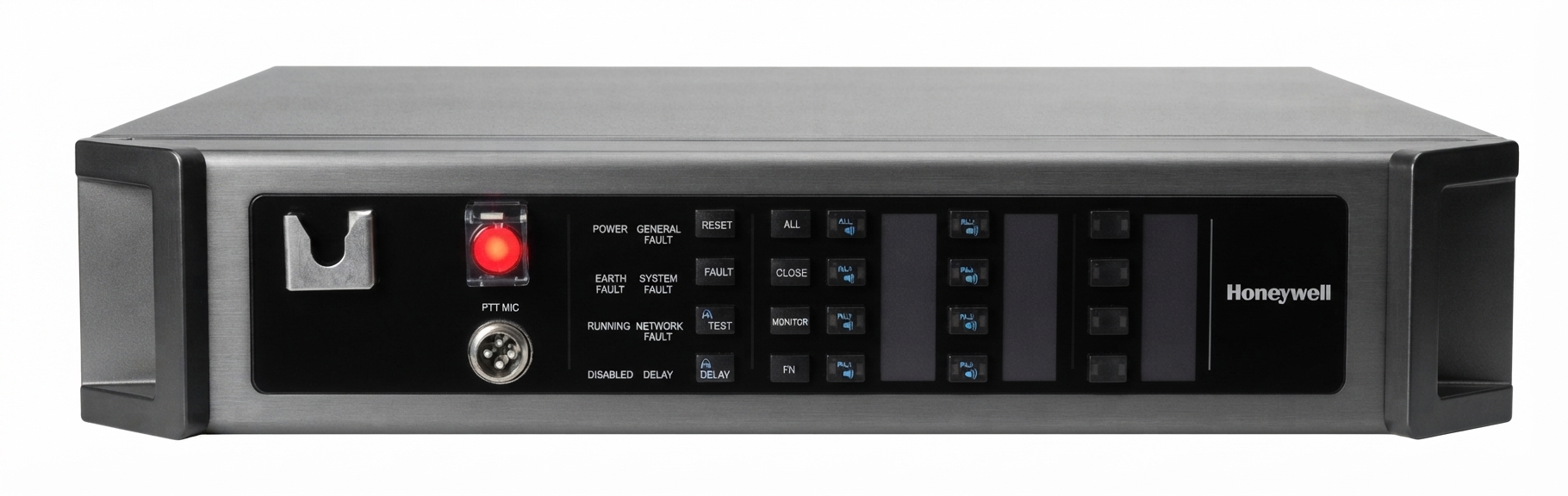
The Honeywell X-618 Public Address and Voice Alarm System is a professional-grade PAVA solution designed for clear paging, emergency voice evacuation, and background audio distribution in large or complex buildings. Built for mission-critical environments, it combines intelligent control, scalable zoning, and voice alarm compliance to help facilities manage routine announcements and emergency broadcasts from a single platform.
This system is well suited for airports, railway stations, shopping malls, hospitals, office towers, schools, and industrial sites where reliable sound coverage and fast emergency communication are essential. One of its biggest strengths is its modular architecture, which makes it easier to expand as a site grows. The X-618 public address and voice alarm system also supports integration with fire alarm panels, automatic volume control, backup amplifier configurations, and remote monitoring, giving facility managers more flexibility and control.
In terms of value, the X-618 typically falls into the mid-to-premium commercial audio category. Estimated pricing can range from approximately $2,500 to over $15,000 depending on system size, controller type, amplifiers, consoles, and installation scope. Availability is generally through Honeywell distributors, commercial security integrators, and building safety solution providers. For organizations that need a dependable emergency notification platform, the Honeywell X-618 Public Address and Voice Alarm System remains a strong option with proven enterprise use cases.
Technical Specifications of Honeywell X-618 Public Address and Voice Alarm System
- System type: Digital public address and voice alarm system
- Compliance: EN54-16 voice alarm standard support
- Controller memory: Built-in 1GB flash/nonvolatile memory
- Audio storage: Up to 500MB usable storage, with audio storage time up to 96 minutes
- Zones: 8 zones per standalone unit, expandable through Ethernet networking
- Audio input/output: At least 9 audio inputs and 4 audio outputs
- Power supply: Main AC input around 100–240V, 50/60Hz with DC backup support
- Amplifier support: Backup amplifier configurations such as 1+1, 2+1, 3+1, and 2+2
- Loudspeaker output: Up to 500W per system section depending on module configuration
- Monitoring: Local and remote zone broadcast monitoring
- Fire integration: Dry-contact inputs and MODBUS support for fire alarm control panel connection
- Priority control: Up to 255 play priorities via software configuration
- Noise handling: Automatic volume control based on ambient noise level
- Operating temperature: Typically -10°C to +55°C for controller modules
- Comparison: Compared with smaller PA systems, the X-618 offers stronger emergency integration, higher scalability, and more advanced supervision for voice alarm deployments
Compared with entry-level public address systems, the X-618 stands out for its compliance-focused design, better fault supervision, and stronger emergency workflow support. It is closer to a building safety platform than a simple sound distribution system.
Detailed Description of the X-618 PAVA System
The Honeywell X-618 Public Address and Voice Alarm System is built around a digital integrated system manager that coordinates microphones, amplifiers, paging consoles, media players, noise detectors, and network interfaces. In practical use, the controller receives live announcements or prerecorded messages, routes them to the correct zones, and adjusts output levels to maintain intelligibility across different acoustic environments.
This makes it highly effective in real-world applications such as emergency evacuation, boarding calls, timed announcements, and zoned background music. During an emergency, the system can prioritize evacuation messages over routine audio, helping occupants receive clear instructions quickly. The hardware is typically designed for rack-mounted commercial installation, with robust metal construction and components made for continuous operation in demanding environments.
User experience is generally shaped by reliability, centralized control, and automation. Facility teams benefit from software-based configuration, remote monitoring, and a structured alarm hierarchy. For large buildings, the X-618 public address and voice alarm system is especially useful because it reduces manual intervention while maintaining consistent coverage. Its build quality reflects commercial and life-safety expectations, with emphasis on redundancy, stable power handling, and fault detection.
How to Set Up the Honeywell X-618 Public Address and Voice Alarm System
- Mount the main controller and amplifier modules in a suitable equipment rack with proper ventilation.
- Connect the main AC power supply and attach backup power where required by the installation design.
- Wire microphone stations, paging consoles, speaker lines, and any media or audio source devices.
- Assign speaker zones in the configuration software and define priority levels for paging and emergency messages.
- Configure fire panel integration using dry-contact inputs or MODBUS if supported by the site design.
- Set automatic volume control parameters so announcements remain audible above ambient noise.
- Test each zone individually, then perform a full system broadcast test and fault check.
Pairing and connectivity depend on the installed modules, but networked units should be added carefully and assigned unique addresses before commissioning. Safety precautions are essential: disconnect power before rewiring, follow fire-life-safety installation standards, and ensure speaker loads stay within rated limits. If a zone does not respond, confirm wiring polarity, amplifier routing, and software zone mapping before replacing hardware.
Troubleshooting the Honeywell X-618 Public Address and Voice Alarm System
- No audio in one zone: Check speaker wiring, zone assignment, and amplifier output status.
- Low volume or unclear speech: Verify volume settings, ambient noise compensation, and microphone gain.
- Amplifier fault indicator: Inspect load impedance, line supervision, and backup amplifier configuration.
- System does not boot: Check main power, backup power, fuse condition, and cabinet connections.
- Communication failure with fire panel: Confirm dry-contact wiring, MODBUS settings, and input mapping.
- Error or warning log present: Review system logs in the controller interface and match the message to the affected module.
Common preventive measures include periodic alarm tests, cable inspection, firmware validation, and routine battery checks for backup power. If a fault persists, the issue is often related to wiring, configuration, or a failed amplifier channel rather than the core controller itself. Warranty support and service assistance are typically available through Honeywell-authorized distributors and commercial security integrators. For official help, contact the local Honeywell building solutions support channel or the authorized installer who commissioned the system.
Pros and Cons of Honeywell X-618 Public Address and Voice Alarm System
Pros
- Strong emergency voice alarm capability for life-safety applications
- Scalable zoning makes it suitable for small, medium, and large facilities
- Integration with fire alarm systems improves emergency response workflow
- Automatic volume control helps maintain speech intelligibility
- Backup amplifier configurations improve resilience and continuity
- Good fit for airports, malls, hospitals, campuses, and transit hubs
Cons
- Installation is more complex than a basic PA system
- Usually requires professional design and commissioning
- Higher total cost than entry-level paging solutions
- May be more system than needed for small standalone venues
- Requires careful maintenance and periodic testing for compliance
For value for money, the X-618 performs best when the project needs both daily paging and certified emergency communication. Compared with simpler alternatives, it offers stronger safety-oriented features, but the price and setup effort are higher.
Customer Reviews and User Feedback on the X-618 PAVA System
Typical user feedback for the Honeywell X-618 Public Address and Voice Alarm System trends positive in professional installations. Many users rate it around 4.5 out of 5 stars for reliability, clarity, and zoning flexibility.
- Praise: “Clear announcements across multiple zones and very stable in daily use.”
- Praise: “Excellent for emergency messaging and building-wide control.”
- Complaint: “Installation took longer than expected and required specialist support.”
- Complaint: “The system is powerful, but it is not ideal for small budgets or simple use cases.”
Buyers most often recommend it for organizations that need compliance-driven voice evacuation and dependable paging. Frequently mentioned issues include configuration complexity and the need for trained installers, but these are common tradeoffs for a commercial-grade voice alarm platform.
Faqs
How do I set up the Honeywell X-618 Public Address and Voice Alarm System for the first time?
What should I check if the Honeywell X-618 Public Address and Voice Alarm System has no audio in one or more zones?
Can the Honeywell X-618 Public Address and Voice Alarm System play background music and emergency messages at the same time?
What devices and infrastructure are compatible with the Honeywell X-618 Public Address and Voice Alarm System?
Why is the Honeywell X-618 Public Address and Voice Alarm System paging too loud or too quiet in some areas?
How does the Honeywell X-618 Public Address and Voice Alarm System improve emergency voice alarm performance?
How often should I maintain the Honeywell X-618 Public Address and Voice Alarm System?
What is the best way to troubleshoot Honeywell X-618 Public Address and Voice Alarm System fault alarms?
More honeywell manuals
- Honeywell WS8B2WB-U Wall Module User Manual
- Honeywell Pro TH3000 Series Non-Programmable Thermostat User Manual
- Installation: Honeywell HFS-D Duct Smoke Detector Instruction Manual
- Honeywell TC500A Commercial Thermostat User Manual
- Honeywell RTH8500 Wi-Fi Series Thermostat User Manual
- Honeywell TH5000 Series Non-Programmable Thermostat TH5110D User Manual
Leave a Comment