
Honeywell TC500A Commercial Thermostat User Manual
Content
Honeywell TC500A Commercial Thermostat Manual
Introduction
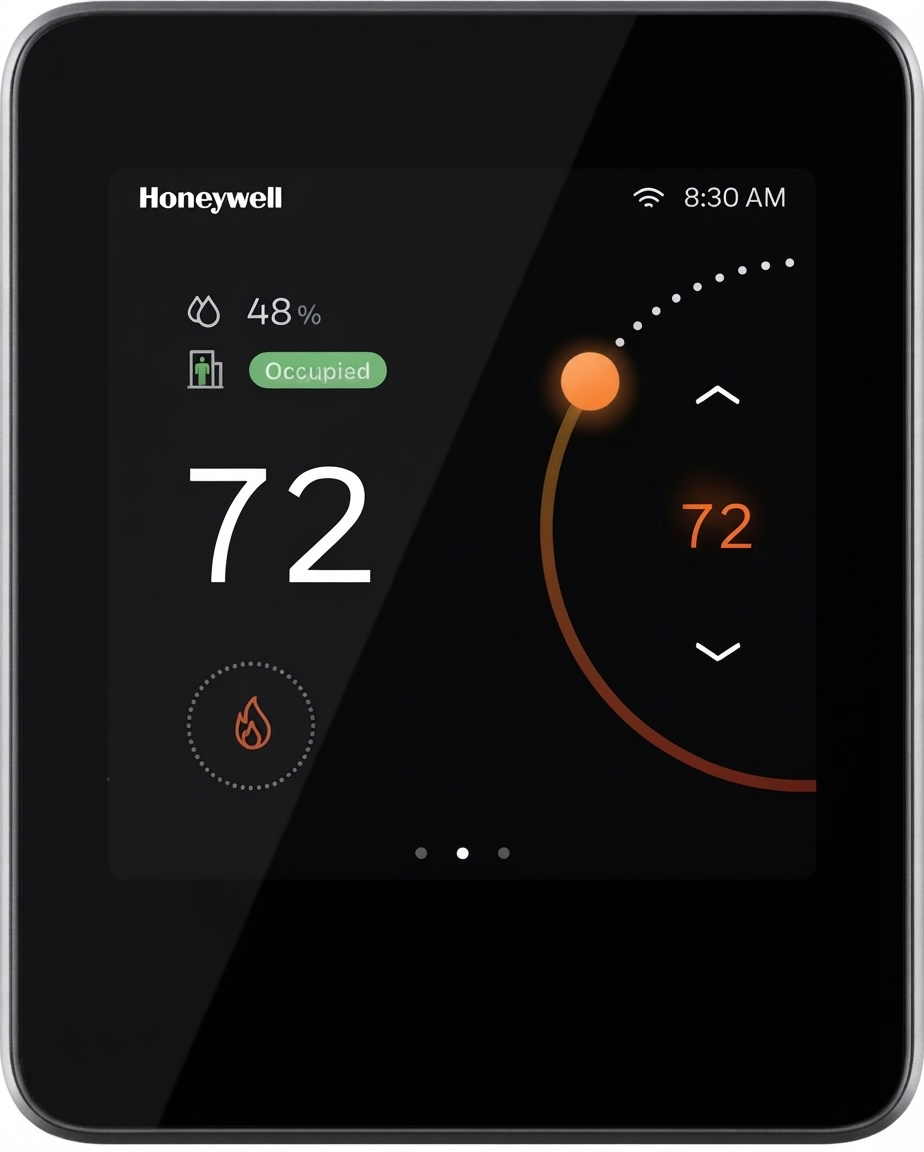
The Honeywell TC500A Commercial Thermostat is a connected, configurable commercial thermostat designed for modern building HVAC control. Built for offices, retail spaces, schools, hospitality properties, and light commercial facilities, it supports advanced temperature management with a clear touchscreen interface, flexible scheduling, and system monitoring features that help improve comfort and energy efficiency.
This commercial thermostat is especially well suited for RTU and AHU applications, including 5H/3C heat pump setups, 3H/4C conventional systems, and select FCU applications. Its embedded economizer functionality and Delta-T monitoring make it a strong choice for facilities that want better energy savings and code-compliant operation without sacrificing occupant comfort. The device is also designed for commercial building environments where reliability, network connectivity, and easy configuration matter.
One of the main advantages of the Honeywell TC500A Commercial Thermostat is its advanced 4-inch touchscreen display, which offers a clean user experience for both installers and building operators. It uses 24VAC power and supports a wide operating range, making it a practical replacement or upgrade option for many existing systems. Typical pricing varies by seller and configuration, but the expected range is roughly $150 to $480, with commercial distributors often pricing it around the mid-$300s. Availability is generally good through commercial HVAC suppliers, building automation channels, and online marketplaces.
Specifications
- Power supply: 24VAC, 50/60Hz, with a working voltage range of 20–30VAC.
- Display: 4-inch diagonal TFT touchscreen with 480 x 480 resolution.
- Power consumption: Up to 8.5VA at 24VAC with display on.
- Minimum load: 4VA with outputs off.
- Maximum load: 96VA with all outputs on.
- Sensor compatibility: Supports 10K NTC type II, 10K NTC type III, and 20K NTC sensors.
- Input and output support: Includes analog input, digital input, and 0–10V output capability for commercial HVAC control.
- Temperature accuracy: Approximately ±1°F in the most common comfort range, with broader accuracy across wider operating conditions.
- Operating conditions: 32°F to 122°F ambient operating temperature and 10% to 90% relative humidity, non-condensing.
- Protection class: IP20 for indoor commercial installation.
- Application support: Works with RTU, AHU, heat pump, conventional, and select fan coil applications.
Compared with basic commercial thermostats, the Honeywell TC500A Commercial Thermostat offers more advanced connectivity, better display quality, and more flexible building-system integration. Compared with simpler programmable models, it is better suited for facilities that need monitoring, scheduling, and energy-saving features in one device.
Troubleshooting Common Honeywell TC500A Issues
If the thermostat does not power on, first verify that the 24VAC transformer is supplying power and that wiring connections are secure. Confirm the system is within the supported 20–30VAC range and that the transformer is a properly rated class-2 unit.
- Blank screen: Check the power source, transformer output, and terminal wiring.
- Unresponsive touchscreen: Restart the unit by removing power briefly, then restore power and test again.
- Incorrect temperature readings: Confirm the correct sensor type is selected and that the sensor is mounted away from direct sunlight, supply air, or heat sources.
- HVAC equipment not responding: Verify relay wiring, system configuration, and staging settings.
- Network or connectivity issues: Check building network settings, controller enrollment, and account permissions if remote access is enabled.
For preventive maintenance, inspect wiring during seasonal service, keep vents and the display clean, and verify sensor placement after any remodel or HVAC change. If the unit shows an error code, consult the installer or user guide for the matching fault description and confirm the system configuration before replacing parts. Honeywell typically supports commercial products through its building automation and HVAC channels, with documentation and technical assistance available through authorized distributors and Honeywell building support. If local support is needed, contact the installer, the supplier that sold the unit, or Honeywell Building Automation customer support through the official commercial channel.
Pros and Cons of the Honeywell TC500A Commercial Thermostat
Pros
- Advanced commercial-grade control for RTU, AHU, and select FCU applications.
- Bright 4-inch touchscreen makes setup and daily use easier than older button-based thermostats.
- Energy-focused features such as economizer support and Delta-T monitoring help reduce operating costs.
- Flexible sensor and input/output compatibility supports more installation scenarios.
- Good value for buildings that need more than a basic programmable thermostat.
Cons
- Requires proper commercial HVAC knowledge for setup and configuration.
- Higher price than standard residential or entry-level commercial thermostats.
- Installation may take longer in older systems with nonstandard wiring.
- Some features are more useful in larger facilities than in small single-zone spaces.
For organizations comparing the TC500A against simpler alternatives, the extra cost is justified when energy management, scheduling, and system visibility matter. For basic single-zone comfort control, a lower-cost thermostat may be sufficient.
Customer Reviews and User Feedback
Overall customer sentiment for the Honeywell TC500A Commercial Thermostat is positive, especially from users who value commercial HVAC control and a modern touchscreen interface. Many users rate it around 4.3 out of 5 stars for performance, flexibility, and ease of viewing schedules and settings.
- Praise: “The touchscreen is easy to navigate, and the energy-saving features are a major improvement over our older thermostat.”
- Praise: “Installation was straightforward for our HVAC contractor, and the system has been reliable after setup.”
- Complaint: “It is more expensive than expected, especially for smaller properties.”
- Complaint: “Advanced settings can be confusing without the installer guide.”
Buyers who need a commercial thermostat for offices, managed properties, or multi-zone HVAC systems generally recommend it. Users looking for a simple low-cost thermostat often prefer a less advanced model. Commonly mentioned issues include configuration complexity and the need for professional installation, but most reviews agree that the product delivers strong long-term value in commercial environments.
Faqs
How do I set up the Honeywell TC500A Commercial Thermostat for the first time in a commercial building?
What should I check if the Honeywell TC500A Commercial Thermostat is not controlling heating or cooling correctly?
Which HVAC systems are compatible with the Honeywell TC500A Commercial Thermostat?
How do I program schedules on the Honeywell TC500A Commercial Thermostat to save energy in an office?
Why does the Honeywell TC500A Commercial Thermostat show a temperature that does not match the room?
How can I troubleshoot wiring issues on the Honeywell TC500A Commercial Thermostat after installation?
What features make the Honeywell TC500A Commercial Thermostat useful for commercial energy management?
How should I clean and maintain the Honeywell TC500A Commercial Thermostat for long-term reliability?
More honeywell manuals
- Honeywell Pro TH3000 Series Non-Programmable Thermostat User Manual
- Honeywell TH5000 Series Non-Programmable Thermostat TH5110D User Manual
- Honeywell X-618 Public Address and Voice Alarm System User Manual
- Honeywell HM700A1000 Electrode Steam Humidifier User Manual
- Honeywell WS8B2WB-U Wall Module User Manual
- Honeywell HE300 Humidifier User Manual
Leave a Comment