
Honeywell TH5000 Series Non-Programmable Thermostat TH5110D User Manual
Content
Honeywell TH5000 Series Non-Programmable Thermostat TH5110D Manual
Introduction
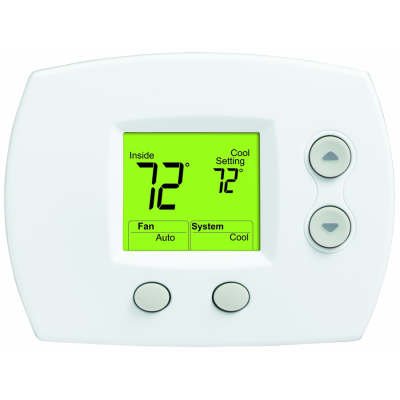
The honeywell TH5000 Series Non-Programmable Thermostat TH5110D is a straightforward, reliable wall thermostat designed for users who want simple, accurate temperature control without the complexity of scheduling. Built for 1 heat/1 cool systems, it is a strong fit for homes, rental properties, offices, and light commercial spaces where consistent comfort matters more than advanced programming. Its large digital display, easy-to-use controls, and clear system indicators make daily operation simple for beginners and practical for HVAC professionals alike.
One of the biggest advantages of the honeywell TH5000 Series Non-Programmable Thermostat TH5110D is its balance of usability and performance. It supports common low-voltage systems and offers features such as automatic changeover, fan auto/on control, and a backlit display on many versions. The design is especially appealing for users replacing older thermostats with a modern digital model that does not require app connectivity or programming routines. This makes it ideal for homeowners who prefer a set-it-and-forget-it approach, landlords who need dependable controls, and anyone looking for a thermostat with a clear interface.
Estimated pricing for the honeywell TH5000 Series Non-Programmable Thermostat TH5110D typically falls in the budget-to-mid-range category, often around $40 to $90 depending on the seller, model variant, and whether it is sold new, refurbished, or as part of HVAC supply inventory. Availability remains fairly common through HVAC distributors, home improvement retailers, and online marketplaces. For buyers seeking a dependable non-programmable thermostat with strong compatibility and simple operation, this model remains a practical and cost-effective choice.
Troubleshooting Honeywell TH5110D Thermostat Problems
If the thermostat display is blank, first check the circuit breaker, ensure the heating or cooling power switch is on, confirm the furnace door is fully closed, and replace the batteries with fresh AAA cells if the model uses battery power. If the system will not start, verify that the thermostat is set to Heat or Cool as needed, then confirm the set temperature is above or below the room temperature depending on the mode. A common delay is normal, so allow up to five minutes for the HVAC system to respond before assuming there is a fault.
Common error-style symptoms on the honeywell TH5000 Series Non-Programmable Thermostat TH5110D usually appear as system indicators rather than numeric error codes. For example, “Heat On” flashing or not appearing may indicate the thermostat is calling for heat but the furnace is not responding. If the problem continues, inspect wiring connections, system power, air handler switches, and furnace access panels. Preventive maintenance includes changing batteries regularly, keeping the thermostat clean, avoiding blocked airflow near the unit, and testing the system before extreme weather arrives.
Honeywell-backed support for this thermostat typically includes a limited five-year warranty against defects in materials and workmanship, excluding batteries. For assistance, users can contact Honeywell Customer Relations at 1-800-468-1502 or visit the Honeywell Home support website. If the thermostat still fails after basic checks, a licensed HVAC contractor can verify wiring, transformer power, and system compatibility.
Pros and Cons of the Honeywell TH5000 Series Non-Programmable Thermostat TH5110D
Pros
- Simple operation with non-programmable controls, ideal for users who want manual temperature adjustment only.
- Clear digital display and intuitive buttons make it easy to use in homes, rentals, and offices.
- Compatible with common 1 heat/1 cool systems, making it a practical replacement thermostat.
- Reliable value for money, especially when compared with smart thermostats that require Wi-Fi or app setup.
- Useful features such as fan auto/on and automatic changeover improve everyday comfort.
Cons
- No scheduling, learning, or remote app control, which may disappoint users wanting smart-home features.
- Best suited for basic HVAC systems, so it is not the right choice for more advanced multi-stage setups.
- Some buyers may prefer a programmable model if they want better energy-saving automation.
- Compared with newer smart thermostats, it offers fewer convenience and monitoring features.
Overall, the honeywell TH5000 Series Non-Programmable Thermostat TH5110D delivers strong value for users who prioritize simplicity, durability, and dependable temperature control over advanced automation.
Customer Reviews and User Feedback
Customer feedback on the honeywell TH5000 Series Non-Programmable Thermostat TH5110D is generally positive, with many users giving it around 4 out of 5 stars for ease of use and reliable performance. Buyers frequently praise the large display, straightforward installation, and clear controls. One common testimonial is that it “does exactly what a thermostat should do without unnecessary complications.”
Common complaints usually focus on the lack of programmable features and the absence of smart-home connectivity. Some users also mention that installation can be confusing if their HVAC wiring is older or nonstandard. Despite this, the model is often recommended for homeowners who want a no-frills replacement thermostat. For best results, it is a smart purchase for anyone needing a durable, easy-to-read digital thermostat for a basic heating and cooling system.
Quick Buyer Summary
- Best for: Basic home, rental, and office temperature control
- System type: 1 heat / 1 cool low-voltage systems
- Key benefit: Simple non-programmable operation
- Price range: Budget to mid-range
- Overall rating: 4/5 for ease of use and value
Faqs
How do I set up the honeywell TH5000 Series Non-Programmable Thermostat TH5110D for the first time?
What HVAC systems are compatible with the honeywell TH5000 Series Non-Programmable Thermostat TH5110D?
Why is my honeywell TH5000 Series Non-Programmable Thermostat TH5110D not turning on the heat or air conditioning?
What does the backlit display on the honeywell TH5000 Series Non-Programmable Thermostat TH5110D show?
Does the honeywell TH5000 Series Non-Programmable Thermostat TH5110D have compressor protection?
How do I replace the batteries in the honeywell TH5000 Series Non-Programmable Thermostat TH5110D?
Why is the honeywell TH5000 Series Non-Programmable Thermostat TH5110D showing the wrong temperature or reacting too slowly?
How should I clean and maintain the honeywell TH5000 Series Non-Programmable Thermostat TH5110D?
More honeywell manuals
- Honeywell TC500A Commercial Thermostat User Manual
- Honeywell HM700A1000 Electrode Steam Humidifier User Manual
- Honeywell Pro TH3000 Series Non-Programmable Thermostat User Manual
- Honeywell HE300 Humidifier User Manual
- Honeywell X-618 Public Address and Voice Alarm System User Manual
- Honeywell HE105 Bypass Humidifier User Manual
Leave a Comment