
Usage & Setup: Iflytek Smart Recorder Pro SR502 User Manual
Content
iFlytek Smart Recorder Pro SR502
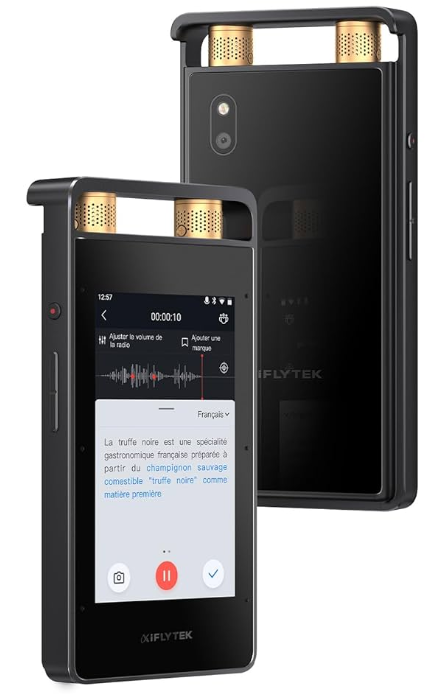
Introduction
The iFlytek Smart Recorder Pro SR502 is a next-generation, AI-powered voice recorder designed for professionals, students, and content creators who demand exceptional audio quality, real-time transcription, and seamless operation in any environment. This device stands out with its advanced noise reduction, multilingual transcription, and versatile recording modes, making it a top choice for lectures, meetings, interviews, and conferences\
Key benefits include crystal-clear 24-bit/192kHz audio capture, intelligent voice recognition, and a vibrant 3.5-inch touchscreen for intuitive navigation. The SR502 features dual storage (32GB internal + 5GB cloud), long battery life (2500mAh), and supports video recording with real-time subtitles—setting a new standard for smart voice recorders\
Target users include academics, journalists, business professionals, and anyone needing reliable, high-fidelity audio documentation. The device is compact, portable, and built for both in-person and remote scenarios. The estimated price range for the iFlytek Smart Recorder Pro SR502 is $200–$300, and it is available through major online retailers and the official iFlytek store\ Availability may vary by region, so check local distributors for the latest updates.
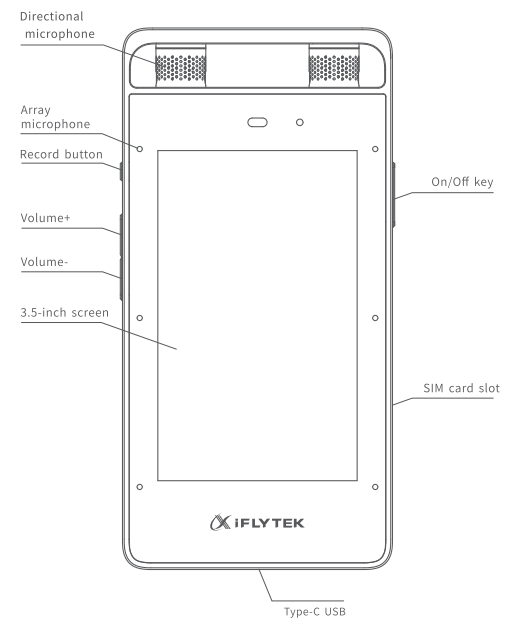
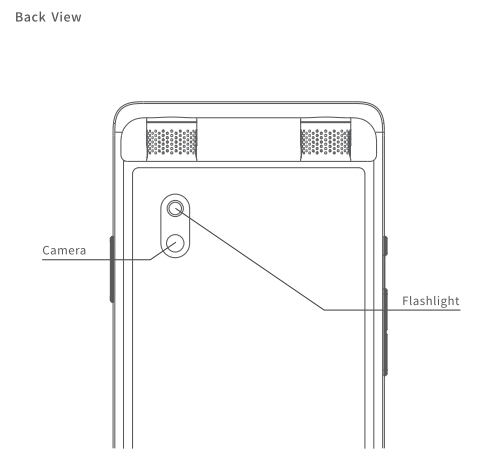
product accessories
Boot
LoLong-presshe the on/off key to start the machine and enter the b<>Ot mode.
User Terms of Use
These End User Terms of Use (this "Agreement" forms a binding agreement between (Synlan Technology Pte. Ltd. ] ("IFLYTEK", "we", "us" or "our") and you, you or yours,, and governs your access to and use of the Device Software. Please read this Agreement carefully and ensure you understand and agree to its terms.
By accepting this Agreement or using the Device and Software, you acknowledge and agree that you have read, understood, and agree to be bound by this Agreement. If you do not agree to the terms of this Agreement,, you may not use the Device or Software.
Applicability
- This Agreement applies to the FLYTEK operating system and software, including official language packs, collectivelysoftwar.
- In this Agreement, "Device" means the (IFLYTEK Smart Recorder Pro) and other accessories and hardware components provided by iFLYTEK.
- The Software is owned by iFLYTEX and licensed, not sold. To you. Under this Agreement, IFLYTEK grants you the right to install and use the Software on your device for your personal use, so long as you comply with all the terms off thiAgreementtt (License")
- All Intellectual Property Rights available on and/or through the Device and software trial if are owned by the licensor or subject to license by licensors. Other than expressly granted under this Agreement, you do not acquire any rights, title, or interest in or to the FLYTEK IP. IFLYTEK reserves and shall retain its entire right, title, and interest in and to the FLYTEK IP (iincluding ncludithe Software), and all rights not expressly granted to the User.
- trademarks, service marks. Trade names and or logos used and displayed on the Hardware and Software (the "Trademarks") are registered and unregistered trademarks of iFLYTEK and others. Nothing on the Software should bbe construed assas granting, by implication or otherwise, any licence or right to use any..
Trademarks displayed on and the Hardware or Software, without the prior written permission or right of the otner applicaote trademark owner. - Updates
- 1IFLYTEK may release new Software or updates to the Software from time to time on its website or other iFLYTEX-authorised source. " Update. You are advised to regularly check Irlylen's website for updates, and install such updates to ensure that your device operates in an optimum manner.
- Genuine copies of the SoftwaYouou may only install official Software or Updates from FLYTEK or iFLYTEK.AApprovedsources on your Device. Your License to the Software shall automatically be voided and terminated, and you shall be deemed to be in breach of this Agreement.ItIf you install any software or updates other than the official software or Updates from FLYTEK or iFLYTEK-approved sources on your Device.
- For the avoidance of doubt, updating or upgrading non-genuine software with Updates from iFLYTEK or IFLYTEK-approved sources does not mmake your updatedupgraded version genuine.
- You shall be solely responsible for, and shall not hold IFLYTEK liable for, any losses or damages that may be incurred or arising from your installation of non-genuine software or updates on your Device or use of non-genuine sosoftwarepdatesstes with your Device, howsoever caused.
Third-PartyParty Software and Technology
- The Software may incorporate or contain third-party software or technology, including software or technology that iss subject to "open source" orfree softwarere" licenses (collectively "Open Source Materials"). By using the Softwa you ou acknowledge and agree that;
- (All Open Source Materials are owned by third parties ("Third Parties") and licensed to IFLYTEK;
- (b) There is no agency, partnership, joint venture, employee-employer, principal-agent, or orfranchisor-franchiseee relationship between FLYTEK and any Third Parties. IFLYTEK has no control over such Third Parties; iFLYTEK makes no representations or warranties of any kind with respect to any Third Parties or Open Source Materials, notwithstanding that access by you to any Open Source Materials is provided by iFLYTEK. Without limitation to the foregoing, IFLYTEK specifically disclaims all implied warranty, iincludingimplieded warranty of merchantability, of performance, of satisfactory quality, of Materials.
- (d) The use of Open Source Materials incorporated or contained within the Software is subject to additional terms that may be imposed by the thThird Partieses, which may be made available to you by iFLYTEK in the form of a "Software License Agreement. "License Agreement Source Licenotherwiseise ("Third Party Terms"). IFLYTEK will make such Third Party Terms available to you as an attachment to this Agreement or within the folders of the installation package for the Software or other reasonable means. You shall use Open Source Materials in compliance with applicable Third Party Terms, andbreach of such Third Party Terms shall be deemed a bresch of this Agreement;(el|FLYTEK shall not be liable for, and you shall release IFLYTEK from any liabilities, losses or damages that may be incurred by you, or any claims orlawsuits brought against you by any Third Parties, from the use of any Open Source Materials or breach of any Third Party Terms (including alleged breaches).
User Restrictions
- iFLYTEK reserves all rights not expressly granted under this Agreement. This Agreement does not give you any right to, and you may not:
- (aUsee the Software separately from the Device;
- (b)install or use the Software on any device other than Devices manufactured by iFLYTEK or iFLYTEK-approved sources;
- (c) tamper or modify the Device;
- (d)Use the Device with any accessories (including batteries) other than the original accessories from FLYTEK or iFLYTEK-approved sources;
- (e)rent, lease, lend, sell, resell, sublicense, assign, distribute, publish, lease, or otherwise make available the Software to any third party;
- (f)work around technical restrictions or limitations in the Software;
- (g) reverse engineer, decompile, disassemble, or otherwise attempt to derive or gain access to the source code or infrastructure of the Software or any part thereof; or
- (removeve, delete, al,,ter or obscure any trademarks or any copyright, trademark, p, patent or other Intellectual Property Rights notices from the Software.
Warranty and Disclaimer
- Subject to the terms of this Agreement, FLYTEK warrants that the Device and Software will perform substantially as described in the matethat accompanyompany the Device and Software ("Limited Warranty"). This Warranty ccommencesfrom the date you first use the Device, and lasts for [iinsertduration] ("Warranty Period"). Any Updates that you may receive Wwithin the WarrantyPeriod are also covered by the Limited Warranty, for the remainder of the Warranty Period.
- To the fullest extent permitted by applicable laws, the Software is provided by IFLYTEK on an “as is,” and "as available" basis, with all faults. Save as to the Limited Warranty, FLYTEK expressly disclaims all other warranties, representations, and conditions of any kind, whether express, implied, statutory or otherwise, with respect to the Device or Software and/or the results thatmay (or may not) be achieved by the use of the Device or Software, including without limitation to all warranties of availability, merchantability, third-partyrights, title, satisfactory quality, fitness for a particular purpose, non. infringement, accuracy, timelines,s or effectiveness, compliance with lawsand any warranties arising from a course of dealing or usage or trade
- lIfiFLYTEK breaches its Limited Warranty, it will, at its sole election, either
- repair or replace the Device and Software at no charge, or
- accept return of the Device for a refund of the amount paid by you, if any. These are your sole and exclusive remedies for iFLYTEK's breach of Limited Warranty
- FLYTEK shall not be in breach of the Limited Warranty, and shall not be held responsible or liable for any damage to the Device or Software,are your inability to use the Device or Software, and any losses or damages you may suffer as a result, where your inability to use the Device or Software is due in part or in whole to any of the following
- Your use of, or attempt to use, the Device or Software in breach of this Agreement;
- yYournon-compliance with the User Restrictions as set out in this Agreement or reasonable instructions by FLYTEK in relation to the use of the Device or Software; Yourr failure to install any critical Update, if it any Update was not properly installed;
- Failure of the Device as a result of fair wear and tear beyond the Warranty Period:
- any circumstance not within a party's reasonable control, including, without limitation: it firestorm, lightning, flood, drought, earthquak,e or, other natural disaster or other similar acts of God;|
- epidemic or pandemic (including the ongoing COVID-19 pandemic);(ii)terrorist attack, civil war, civil commotion or riots, war, threat of or preparation for war, armed cconflict imposition of sanctions, embargo, or breaking off of diplomatic relations; ivany law or any action taken by a governmental authority,including, withoutt limitation to changes to law, imposing an export or import restrictio quotata or prohibition, or failing to grant a necessary licence or consent: viexplosion of accident: on
- any labour or trade dispute, strikes, industrial action, or lockouts:
- changes in laws or o, orders or requirements of a court or other governmental authority
- failure of the internet, telecommunication network rk, power grid failure; or
- any other reasons not caused by or attributable to iFLYTEK, or beyond ¡ iFLYTEK" 'scontroll.
Except for any repair, replacement , or refund that iFLYTEK may provide in accordance with this Agreement, in no event shall iFLYTEK be liable to you for:
- (a)any damage to your Device;
- (b)any loss of earnings, revenue, profits, sales, contracts, business opportunity, business or anticipated savings:
- (c)any loss of goodwill or loss of reputation;
- (d)any loss or corruption of your data or Recordings; or
- (e) any incidental, consequential, exemplary, special, punitive, multiple, pure economic loss or other indirect losses,w hether based upon warranty, contract, tort, statute, strict liability or otherwise, even if iFLYTEK has been advised of the possibility of such damages or losses ,a rising out of, resulting from or relating in any way to: (a)your use or inability to use the Device or Software; or (b)any other matter relating to the Device or Software. 7.6In no event shall iFLYTEK's aggregate liability arising out of or related to this Agreement or your use (or inability to use) of the Device or Softwarexceed e the amount of monies paid by you for the Device or Software, or SGD 10, you acquired the Device or Software for no charge).
GOVERNING LAW AND DISPUTE RESOLUTION
- This Agreement shall be governed by and construed under the laws of the
Republic of Singapore.
- Parties agree that if a dispute arises under, out of, or in connection with this Agreement, including any question regarding theexistence validity,e, validity or termination of this Agreement, they shall in good faith try to settle by mediation bymediation administered by the Singapore Mediation Centre.
- Ifent that the parties fail to resolve a dispute even after mediation, the dispute shall be referred to and finally resolved by arbitration administered by the Singapore International Arbitration Centre in accordance with the arbitration rules of the Singapore International Arbitration Center for the time being in force, which rules are deemed incorporated by reference to this provision. The seat of the arbitration shall be Singapore. The Tribunal shall consist of one arbitrator.
- The language of the arbitration shall be English.
Specifications
- Audio Quality: 24-bit/192kHz high-fidelity recording with intelligent noise reduction
- Microphones: 2 directional + 6 omnidirectional mics for superior long-distance and multi-speaker capture
- Display: 3.5-inch HD color touchscreen for easy playback and navigation
- Storage: 32GB internal + 5GB cloud (3 years), 2GB RAM
- Battery: 2500mAh, supports extended recording sessions
- Processor: Quad-core for smooth multitasking and transcription
- Operating System: Android 8.1
- Camera: 8MP rear camera for video recording with real-time subtitles
- Connectivity: Type-C charging, Wi-Fi, Bluetooth, 4G (SIM card support)
- Languages: Real-time transcription in 8 languages: English, Chinese, Japanese, Korean, French, Hungarian, German, Spanish
- Recording Modes: 4 preset modes for meetings, lectures, interviews, and speeches
Compared to similar devices like the SR302, the SR502 offers a larger screen, more advanced noise reduction, video capabilities, and enhanced transcription features, making it a superior choice for demanding users[4][5].
Setup Guide
- Unbox and Charge: Remove the iFlytek Smart Recorder Pro SR502 from its packaging and charge fully using the included Type-C cable[4].
- Power On: Press and hold the power button to start the device. Follow the on-screen prompts to select the language and region.
- Connectivity: Connect to Wi-Fi or insert a SIM card for 4G access. Pair Bluetooth devices if needed[7].
- Initial Setup: Navigate to Settings to configure Wi-Fi, Bluetooth, notifications, and system preferences. Enable cloud sync if desired[7].
- Recording Modes: Choose from Meeting, Lecture, Interview, or Speech modes based on your scenario. Adjust microphone sensitivity and noise reduction settings for optimal results[2].
- Test Recording: Perform a test recording to ensure audio clarity and check transcription accuracy.
Troubleshooting Tips: If the device doesn’t power on, ensure it’s charged. If Wi-Fi/Bluetooth fails, restart the device. For transcription errors, check language settings and microphone placement.
Safety: Avoid exposing the recorder to extreme temperatures or moisture. Use only approved charging accessories.
Troubleshooting
Common Problems & Solutions
- Device Not Powering On: Charge fully and try again. If unresolved, contact support.
- Poor Audio Quality: Ensure microphones are unobstructed. Adjust noise reduction settings.
- Transcription Errors: Verify language settings. Re-record in a quieter environment if necessary.
- Connectivity Issues: Restart the device and router. Re-pair Bluetooth devices.
- Storage Full: Transfer files to a computer or cloud, then delete the rROMdevice.
Preventive Measures
Regularly update the device firmware. Back up important recordings. Handle with care to avoid physical damage.
Warranty & Support
The iFlytek Smart Recorder Pro SR502 comes with a standard manufacturer’s warranty. For assistance, visit the official iFlytek support page or contact customer service via email[5].
Pros & Cons
Advantages
- Superior Audio Quality: 24-bit/192kHz recording with advanced noise reduction for crisp, clear sound
- Real-Time Multilingual Transcription: Supports 8 languages, ideal for international users.
- Versatile Recording Modes: Tailored settings for meetings, lectures, interviews, and speeches
- Large Touchscreen & Intuitive UI: Easy navigation and playback on a vibrant 3.5-inch display
- Long Battery Life: 2500mAh battery ensures all-day use
- Dual Storage: 32GB internal + 5GB cloud for ample file management
Disadvantages
- Price: Higher cost compared to basic voice recorders.
- Size: Slightly bulkier than ultra-compact models, though still portable.
- Learning Curve: Advanced features may require initial setup time.
- Cloud Storage Limit: 5GB cloud storage may be insufficient for heavy users.
Value for Money: The iFlytek Smart Recorder Pro SR502 delivers exceptional value for professionals needing reliable, feature-rich recording and transcription. Alternatives like the SR302 offer fewer features at a lower price, but the SR502’s advanced capabilities justify the investment for demanding us. ers
Customer Reviews
Users consistently praise the iFlytek Smart Recorder Pro SR502 for its outstanding audio clarity, effective noise reduction, and accurate real-time transcription—even in noisy environments[2][3]. The large touchscreen and intuitive interface receive positive feedback for ease of use, while the long battery life and dual storage options are highlighted as major advantages[4].
Common complaints include the higher price point and the initial learning curve for accessing all advanced features. Some users note that cloud storage could be more generous. Star ratings average 4.5 out of 5, with many recommending the device for academic, professional, and journalistic use[3]. Testimonials emphasize its reliability during lectures and interviews, with several users stating it has become an essential tool for their work.
For those seeking a top-tier smart voice recorder with transcription, the iFlytek Smart Recorder Pro SR502 is a highly recommended purchase, though budget-conscious buyers may want to consider simpler models.
Faqs
How do I set up the iflytek Smart Recorder Pro SR502 for the first time?
What should I do if my iflytek Smart Recorder Pro SR502 is not working properly?
Can I use the iflytek Smart Recorder Pro SR502 with my Android or iOS devices?
How often should I maintain the iflytek Smart Recorder Pro SR502?
What are the key features that make the iflytek Smart Recorder Pro SR502 different?
How do I optimize the recording quality on the iflytek Smart Recorder Pro SR502?
Can I use the iflytek Smart Recorder Pro SR502 in noisy environments?
How do I transfer recordings from the iflytek Smart Recorder Pro SR502 to my computer?
Tags
More iflytek manuals
Leave a Comment