
How to Setup: Ivation Digital Ozone Air Purifier With HEPA Filter User Guide
Content
Innovation Digital Ozone Air Purifier With HEPA Filter
Introduction
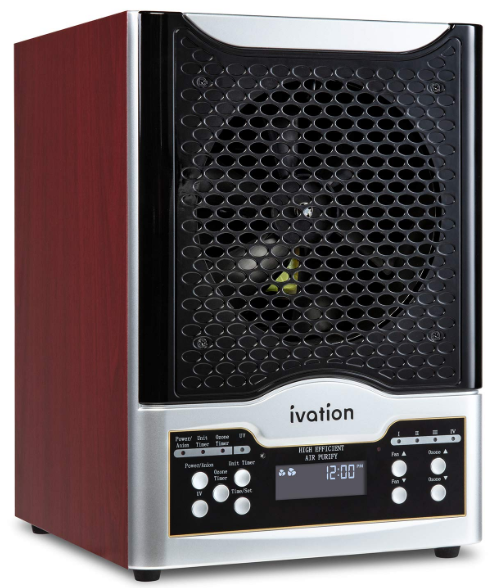
The ivation Digital Ozone Air Purifier With HEPA Filter is a cutting-edge air purification device designed to improve indoor air quality by effectively removing harmful particles, allergens, and odors. This purifier features a combination of advanced HEPA filtration and ozone technology, offering a comprehensive solution for eliminating airborne contaminants such as dust, pollen, pet dander, smoke, and volatile organic compounds (VOCs). With digital controls and a sleek, compact design, it suits various living and work environments, including homes, offices, and small commercial spaces.
Key benefits include superior filtration capacity with a True HEPA filter that captures 99.97% of particles as small as 0.3 microns, alongside ozone generation to neutralize stubborn odors and bacteria. Its quiet operation, multiple fan speed settings, and timer function enhance user convenience. The device is particularly beneficial for allergy sufferers, asthma patients, and individuals seeking relief from indoor pollutants or smoke.
Priced competitively in the mid-range segment (typically between $100 to $150), the ivation Digital Ozone Air Purifier With HEPA Filter is widely available through online retailers and specialty electronics stores. This price point offers excellent value considering its dual purification technology and durable construction, making it an attractive choice for budget-conscious consumers looking for effective air quality management.
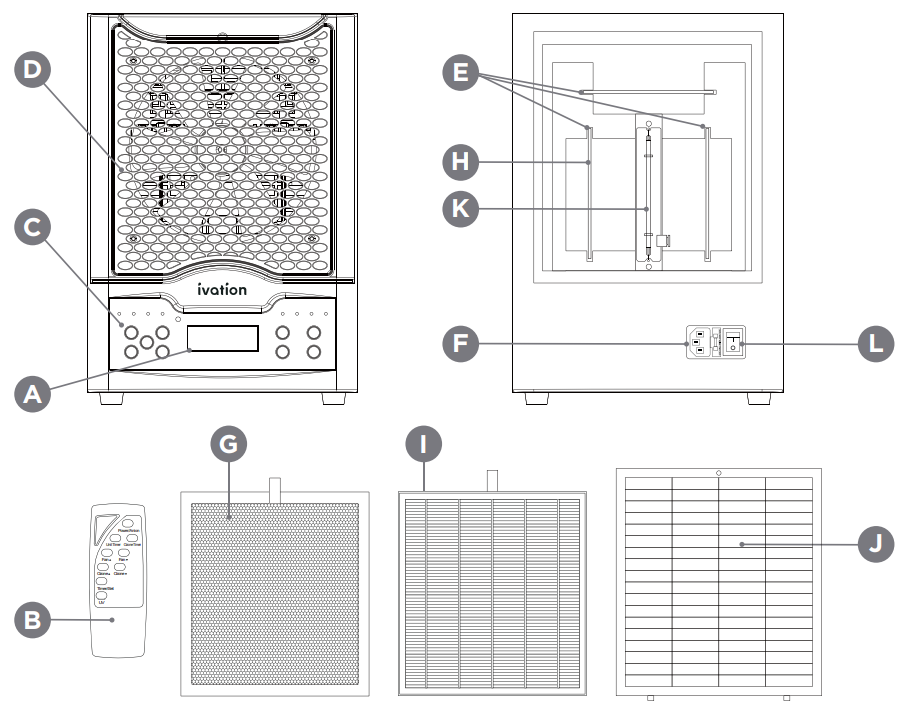
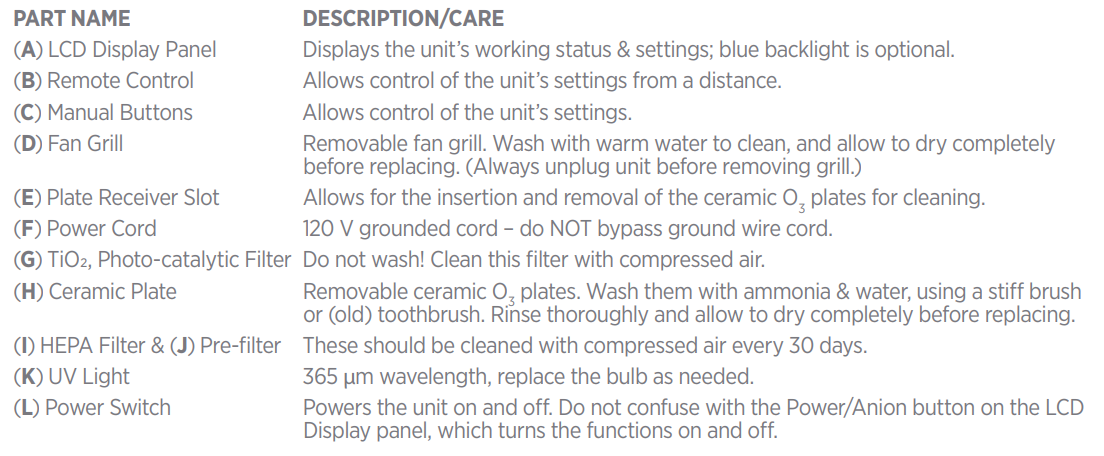
PRODUCT OVERVIEW
- NOTE: The controls for the negative ion generator are separate from the controls for the ozone. Negative ions will be created around the clock to reduce dust and other particulates.
- When you stand in front of the unit, the ionizer will create a slight charge. If you come in contact with another person or a metal object, you may experience a static electric discharge. You know, like when you scoot around the carpet wearing socks and touch a doorknob, or poke your siblings.
HOW DOES IT WORK?
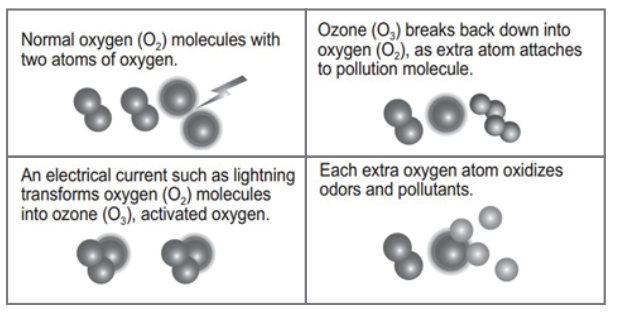
- Nature creates ozone (O3) as a natural air cleaner in several ways, usually involving an ordinary oxygen (O2) molecule and some form of electrical charge (like lightning or static electricity in the air). The electrical current transforms an ordinary O2 molecule into an O3 molecule. If you’ve taken a walk after a thunderstorm and experienced the fresh, clean smell in the air, you’ve experienced the after-effects of ozone at work in
the environment. - The Ivation Digital Ozone Air Purifier with HEPA Filter creates O3 via a special process that utilizes an electrical current and the oxygen in the room. The ozone then sanitizes the air in your room by breaking down odors, microorganisms, and other pollutants at their source.
- During the air sterilization process, no one can be present in the room, because ozone is not safe for humans or animals to inhale. The ozone air purifier includes a timer for your safety and convenience. Once the timer runs out, the device will deactivate automatically. After about an hour, the ozone reverts back to normal oxygen, and the room will be safe for you to re-enter. Breathe deep, knowing the air in your room is fresh and clean.
USING THE OZONE AIR PURIFIER
- Turn on the power switch on the back of the unit, and then press the Power /Anion button on the front panel.
- Press the Fan or Fan B button to adjust the fan speed. There are four levels which will be reflected on the thLCLCD.se. These buttons are also used to set/adjust the hour when setting or adjusting the time.
- Press the Ozone or Ozone tons to adjust the level of ozone to be generated. There are four levels. (See the chart below for recommended settings for the area to be purified.) These buttons are also used to set/adjust the minutes when setting or adjusting the time. Pros & Cons of the Innovation Digital Ozone Air Purifier With HEPA Filter
- Press the UV button to activate the UV lamp, which works in conjunction with the TiO2 photo-catalytic filter. Always keep this turned on. You will know that the UV feature is currently activated by the blue UV indicator light on the front of the unit, located above the Unit Timer button.
- The Anion (or Ionization) feature controls the production and dispersal of negative ions. You will know that this feature is currently activated by the red Power/Anion indicator light on the front of the unit above the Power/Anion button. The Anion feature is activated by default when the unit is turned on, and it remains on while the unit is in operation.
- Use the Time/Set button to set/adjust the unit’s clock, as well as the optional Unit and Ozone Timers, both of which are described in detail in the following sections with the instructions for setting them. Regardless of whether you use the optional Ozone Timer with the Unit Timer or not, you should ensure that the time on your air purifier is properly set.

CARE AND MAINTENANCE
Remove and wash the ceramic O3 plates once every 30 days. When the purifier no longer produces enough ozone to be effective, you should replace the ceramic plates. We recommend replacing the ceramic plates once every 1-3 years for optimal performance, but depending on the environment where you are using your air purifier, it may take more or less time for them to wear out.
To clean each plate:
- Turn the unit OFF via the power button and the power switch at the rear. Wait for the fan to stop spinning and then unplug it from the outlet.
- Remove all the filters preceding the plates from the rear of the unit by unscrewing the black knob that holds the rear cover in place.
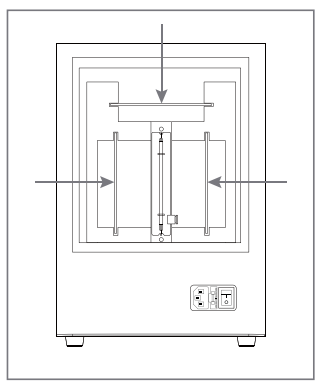
- Pull each ozone plate gently, but firmly, toward you and out of the unit.
- Wash the plate carefully, with warm water applied to both sides of the plate to rinse it well. If you prefer to use clear ammonia, you can do a mixture of warm water and ammonia (a 50/50 mixture is best) and allow the plate to soak in the mixture for about 10-15 minutes.
- Gently scrub with a stiff brush if you notice any deposits not coming off with just the water rinse. Be careful not to drop the plate or scrub off the silicon.
- Clean both the metal screen and the ceramic tile of the plate.
- Rinse the plate with water and allow it to dry completely before replacing it. If you have one available, you may use a hair dryer to gently dry the plate.
- Replace the ceramic plate, making sure it is fully inserted and seated securely in place.
- Reassemble the unit and plug it into a properly grounded electrical outlet, and turn it on.
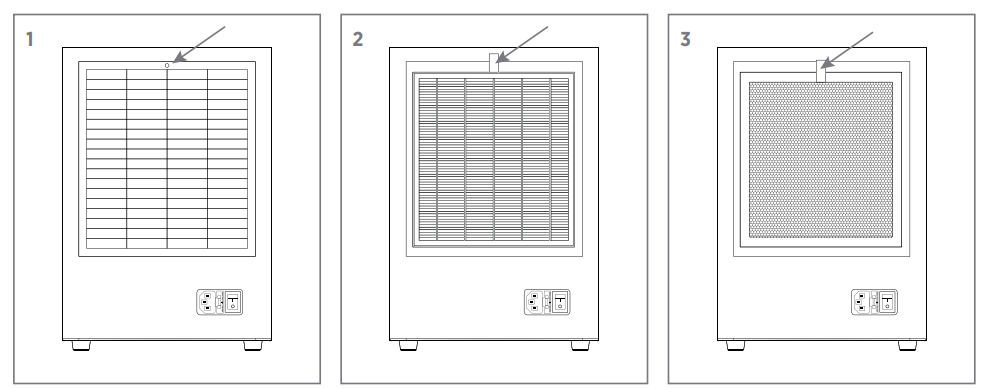
To clean the needlepoint ionizer:
- Turn the unit OFF via the power button and the power switch at the rear. Wait for the fan to stop spinning and then unplug it from the outlet.
- Remove the fan grill cover from the front of the device by pulling it straight toward you. You may need to use your fingernails or a flat object to get between the grill cover and the cabinet.
- You can locate the needle-point ionizer easily by looking in front of the fan for two pieces of metallic wire.
- Take a Q-tip or cotton swab dipped in isopropyl alcohol and use those to gently clean away any dust that may have accumulated on the needle points.
- While you have the fan grill cover off the unit, you may use a damp cloth to gently wipe clean the fan blade clean, and rinse the fan grill cover with warm water. Make sure the grill cover is completely dry before reassembling the unit.
To clean the HEPA filter and prefilter:
- Turn the unit OFF via the power button and the power switch at the rear. Wait for the fan to stop spinning and then unplug it from the outlet.
- Remove the black knob holding the back cover in place, and then remove the HEPA filter and pre-filter.
- Use a can of compressed air to clean both filters. Every 90 days, wash the pre-filter in warm water and allow it to dry completely before replacing.
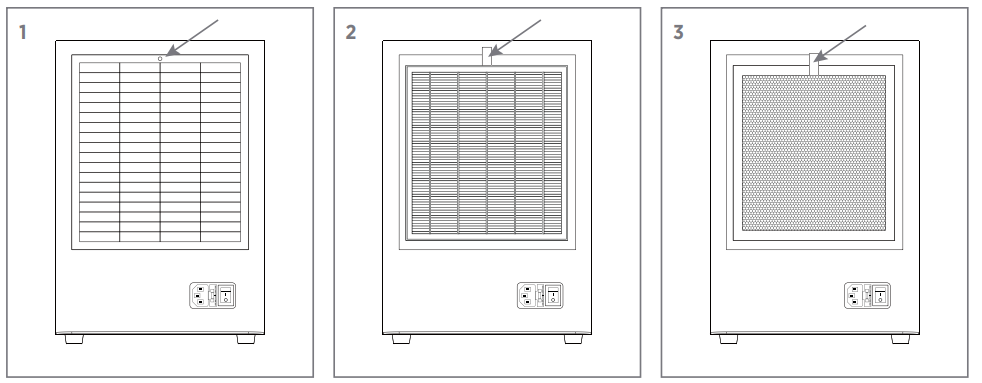
TROUBLESHOOTING
If you experience issues with your device, please check the following:
NOTE: Always make sure the unit is turned OFF via the power switch at the rear before opening the back panel to remove any filters or ozone plates for maintenance, cleaning, or replacement.
- Make sure the unit is plugged in properly and turned on via the ON/OFF switch on the back.
- Make sure the wall outlet to which the power cable is connected is an active outlet that is working properly.
- Make sure that the ozone plates are clean and dry without any cracks. Ozone plates generally need to be cleaned about once a month. Environmental factors such as pet dander, cigarette smoke, etc., can affect the duration of ozone output. It’s optimal to replace the ozone plates once every six months. Clean or change your ozone plates more often if ozone output is weak.
- Make sure that the air filter on the back is clean. The air filter is removable and washable. Do not use heat to dry the air filter, as this could damage it.
- Make sure the fuse is installed properly and in good condition.
- To replace the fuse, pull the fuse holder gently toward you from its slot next to the power cord socket. Remove the old fuse and replace it with the new one. One spare fuse is included with the unit itself. The fuse type is 1A, 250V, 1.25" (31.75mm).
- Make sure that the ozone air purifier is properly plugged into a grounded outlet to avoid
the potential for electrical shock, and also to ensure proper functionality. - Check the plate alignments to make sure each ceramic plate has been inserted fully and correctly. Then, check to make sure the metal wings are making full contact with the plates on either side. If the wings are not making contact, take out the plates and gently push the metal wings slightly further inward (toward each other) using your fingers. Then, replace the plates to make sure the wings are making solid contact.
- If the fan is still not operating, and/or there is no buzzing sound when the device is in operation, immediately call Ivation customer service at 1-866-849-3049.
SPECIFICATIONS
- Rated Voltage: 110V
- Rated Frequency: 60Hz
- Rated Wattage: 48W
Pros
- Effective Filtration: Combines a True HEPA filter with ozone technology to address both particulate matter and odors.
- Digital Controls: Easy-to-use touchscreen or button interface for adjusting fan speeds, timer settings, and ozone levels.
- Quiet Operation: Low noise levels make it suitable for bedrooms and offices.
- Energy Efficient: Consumes minimal power during operation, supporting sustainable use.
- Compact & Stylish Design: Fits well in various room sizes without occupying much space.
Cons
- Ozone Caution: Ozone generation, while effective for odor removal, may not be suitable for sensitive individuals or continuous use in small, unventilated spaces.
- Filter Replacement Cost: HEPA filters require periodic replacement, which adds to maintenance expenses.
- No Smart Connectivity: Lacks Wi-Fi or app integration common in some modern air purifiers.
- Limited Coverage Area: Best suited for small to medium rooms; larger spaces may require multiple units.
Compared to competitors in the same price range, this purifier offers a unique dual purification approach but falls short on smart features. Its value for money is strong, given the proven effectiveness of HEPA filtration combined with ozone odor neutralization.
Customer Reviews of ivation Digital Ozone Air Purifier With HEPA Filter
Customers generally praise the ivation Digital Ozone Air Purifier With HEPA Filter for its noticeable improvement in air freshness and reduction of allergens. Many users highlight its quiet operation and easy-to-use digital controls as major positives, giving it an average rating of 4 out of 5 stars.
Common compliments include the efficient removal of pet odors and smoke, making it a popular choice for households with pets and smokers. On the downside, some users report concerns about ozone smells during higher ozone settings, recommending cautious use, especially around children or sensitive individuals.
Several reviews note the importance of timely filter changes to maintain peak performance. Overall, the product receives strong recommendations for allergy relief and odor control, with advice to use ozone settings moderately.
Faqs
How do I set up the ivation Digital Ozone Air Purifier With HEPA Filter for the first time?
What should I do if my ivation Digital Ozone Air Purifier With HEPA Filter stops running after 2-3 minutes?
Can I control the ivation Digital Ozone Air Purifier With HEPA Filter remotely?
What are the main features of the ivation Digital Ozone Air Purifier With HEPA Filter that improve air quality?
How often should I clean and maintain the ivation Digital Ozone Air Purifier With HEPA Filter?
Is the ivation Digital Ozone Air Purifier With HEPA Filter safe to use around pets and children?
What room size is recommended for the ivation Digital Ozone Air Purifier With HEPA Filter to operate effectively?
How can I optimize the performance of the ivation Digital Ozone Air Purifier With HEPA Filter in my home?
More ivation manuals
Leave a Comment