
Pairing: Jaybird Vista 2 Earbuds User Manual
Content
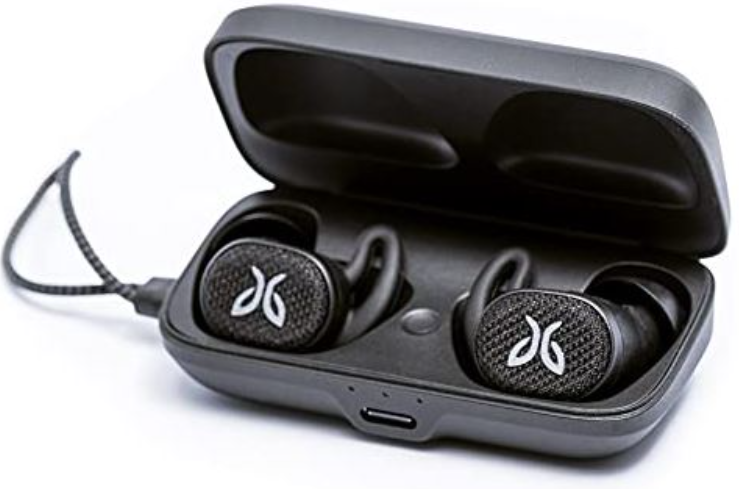
Jaybird Vista 2 Earbuds
Introduction
The Jaybird Vista 2 Earbuds are premium true wireless earbuds designed for active users seeking high-performance audio combined with rugged durability. These earbuds stand out with their military-grade toughness, featuring an IP68 rating for water and dust resistance, making them ideal for outdoor adventures, sports, and intense training sessions. Their lightweight and ergonomic design ensures a comfortable fit for extended wear during running, cycling, or gym workouts.
Key benefits include advanced active noise cancellation (ANC), customizable sound profiles via the Jaybird app, and seamless Bluetooth 5.0 connectivity with AAC codec support for crisp, clear audio. The earbuds deliver up to 8 hours of playtime per charge, extended to 24 hours with the compact wireless charging case. Features like in-ear detection for automatic music pausing and SurroundSense ambient awareness enhance usability and safety during activities.
Targeted primarily at athletes, fitness enthusiasts, and outdoor lovers, the Vista 2 combines exceptional sound, durability, and smart features suited for dynamic environments. They also appeal to everyday users seeking reliable wireless earbuds with premium sound and smart controls. Retailing around $200, the Jaybird Vista 2 earbuds are widely available through official stores and authorized online retailers, offering strong competition to other sport-focused earbuds in the market.
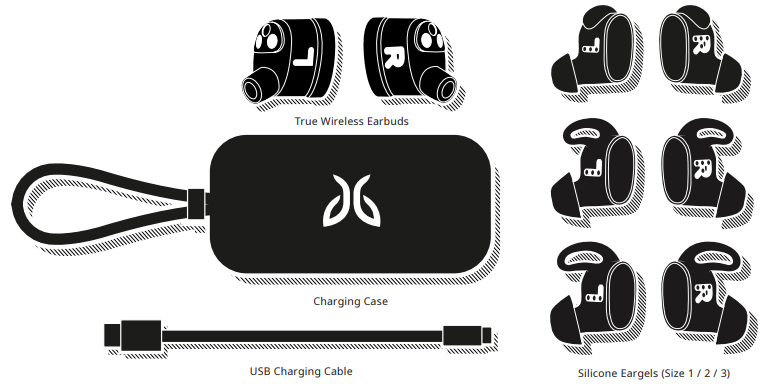
IN THE BOX
Specifications of Jaybird Vista 2 Earbuds
- Design & Build: True wireless in-ear style with wingtip stabilizers; ultra-lightweight earbuds (5.4g without eargels); compact charging case (74.6mm x 38.5mm x 25mm, 42.8g)
- Water & Dust Resistance: IP68 certified earbuds (submersible, dustproof); charging case rated IP54 for splash resistance
- Battery Life: 8 hours continuous playback plus 16 hours additional via wireless charging case; rapid charge feature included
- Audio Performance: 6mm drivers; frequency response 20Hz–20kHz; passive and active noise cancellation; distortion <3%; speaker sensitivity 103.5dB ±1.5dB
- Connectivity: Bluetooth 5.0 with SBC & AAC codecs; wireless range approx. 10 meters (33 feet); supports single-earbud operation
- Smart Features: Active Noise Cancellation (ANC), SurroundSense ambient mode, in-ear detection auto-pause/play, customizable EQ via Jaybird app
- Microphone: Digital MEMS omnidirectional mic with noise and wind reduction for clear calls
- Compatibility: Works with iOS and Android devices; supports voice assistants like Google Assistant and Siri
- Bluetooth Version: 5.0
- Codec: SBC, AAC
- Profile: Handsfree, A2DP, AVCRP, SPP
- Effective Range: 10 meters (30 feet)
- Play Time: 8 Hrs*
- Power: Bluetooth headset: 5.0V , 1A
- Charging Time: 2 Hrs
- Quick Charge: 5 Min = 1 Hr play time
- Dimensions: 20.3 (W) x 15.3 (D) x 17.9(H) mm earbud size / 74 (W) x 36.4 (D) x 24.5(H) mm case size
- Weight:
- Earbuds: Approx 4.8 g (without eargels). Case: approx. 32g (without earbuds)
Compared to competitors such as the Bose Sport Earbuds and Jabra Elite Active 75t, the Jaybird Vista 2 offers superior waterproofing (IP68 vs. IP57) and a smaller, more pocket-friendly charging case, though ANC performance is moderate when used outdoors during vigorous activity.
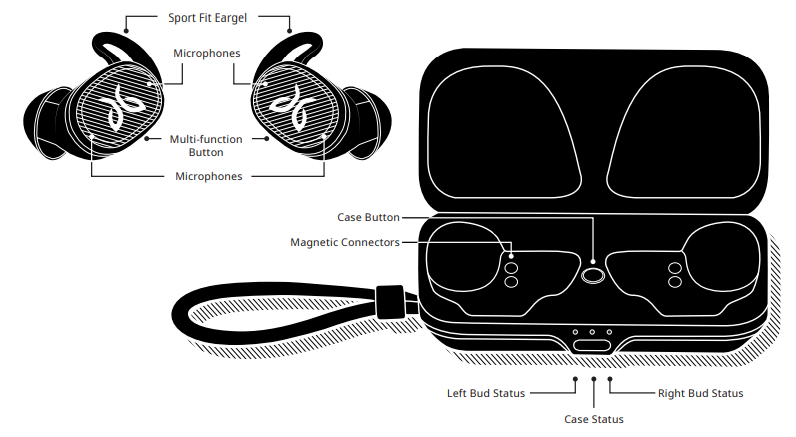
PRODUCT OVERVIEW
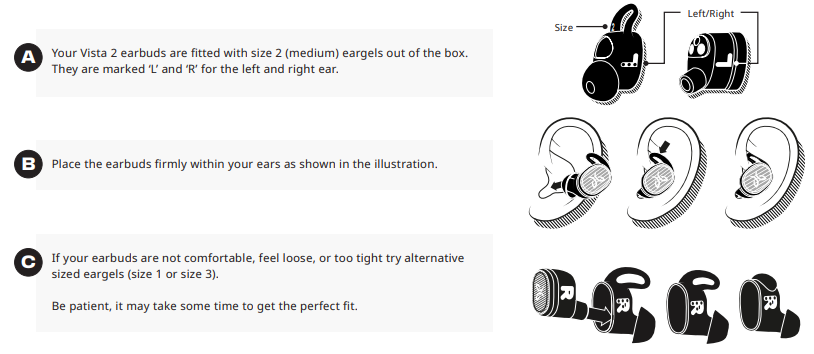
FIT
For an assisted fit setup, please download the Jaybird App or visit www.jaybirdsport.com/support/vista2
CHARGING
EARBUDS
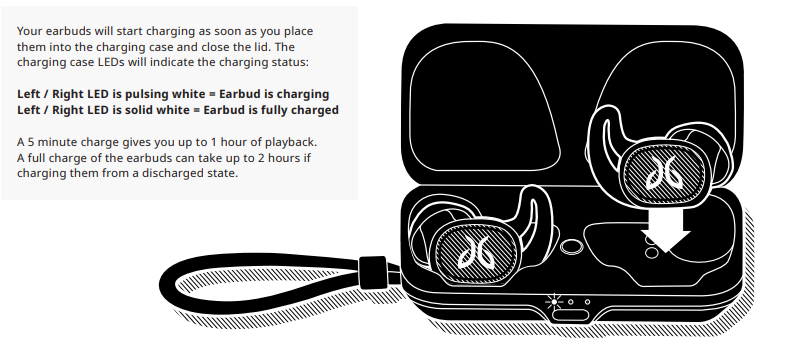
Jaybird Vista 2 offers you up to 8 hours of playback when fully charged. The charging case gives you two additional recharge cycles or 16 hours of additional playback.
CHARGING
CASE
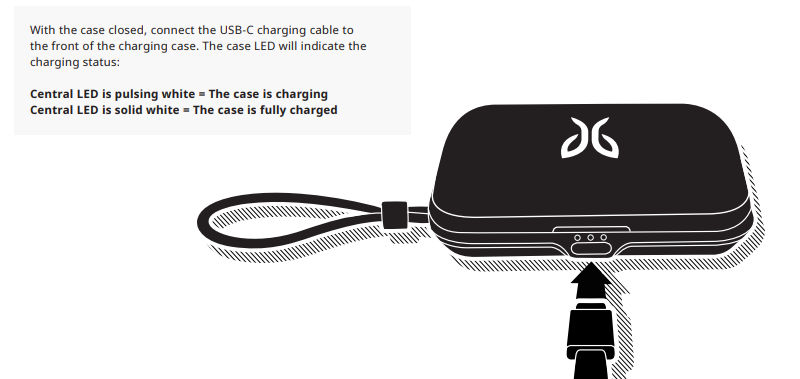
It takes about 3 hours from a fully discharged state to charge your case.
WIRELESS CHARGING
CASE
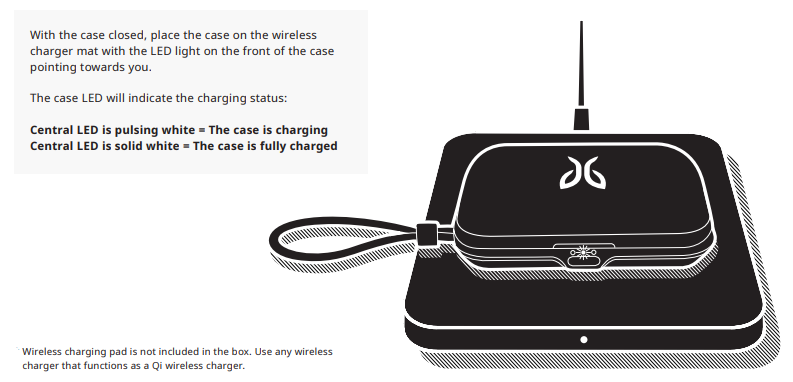
It takes about 4 hours from a fully discharged state to charge your case.
PAIRING
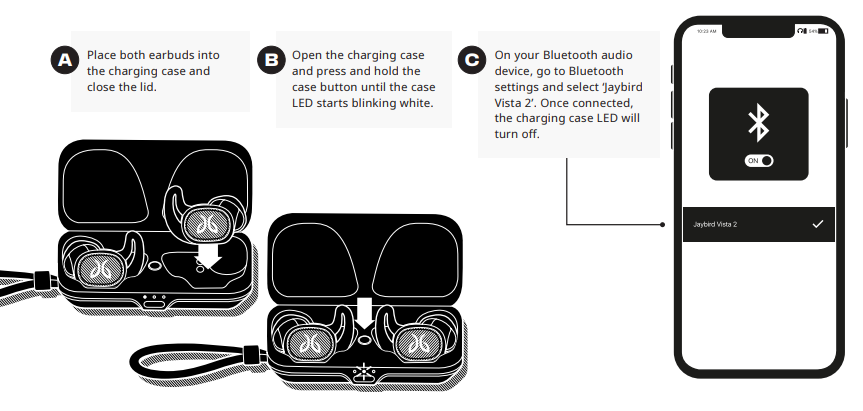
To pair to a Bluetooth audio device,, follow the steps below
SMARTWATCHES
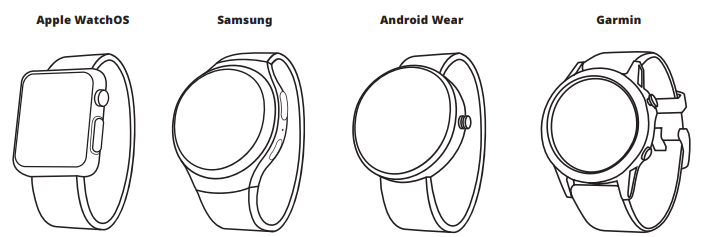
With the right smartwatch, you can leave your phone at home. Just sync music to your smartwatch and pair the Vista 2 to your smartwatch. Use your smartwatch's user manual for instructions on how to pair a Bluetooth device.
LISTEN RESPONSIBLY
- Avoid excessive volume levels and prolonged periods of listening. Prolonged listening at excessive volume levels may cause permanent hearing disability.
- Do not use around road traffic.
CARE AND MAINTENANCE
- Clean eargels regularly of dirt and wax buildup. To clean, remove eargels from earbuds, then gently wipe away dust and oil with a dry cloth, and/or use warm water and mild soap to remove buildup. Rinse and completely dry before reattaching.
- Before charging, ensure the earbuds and the charge case contact are completely dry of sweat and water.
- Video instructions at jaybirdsport.com/support/vista2
Troubleshooting Jaybird Vista 2 Earbuds
- Issue: Earbuds won’t pair or connect
Solution: Ensure Bluetooth is enabled on your device; reset earbuds by placing them in the case and holding the button for 10 seconds; reconnect via the Jaybird app. - Issue: One earbud has no sound
Solution: Charge both earbuds fully; clean earbud contacts and ensure no debris; try re-pairing; if it persists, reset earbuds. - Issue: Active Noise Cancellation (ANC) is not working properly
Solution: Update firmware via the Jaybird app; ensure proper ear tip fit; disable and re-enable ANC; avoid heavy wind conditions, as these can affect ANC effectiveness. - Issue: Battery drains quickly
Solution: Disable ANC if not needed; lower volume; keep firmware updated; store earbuds in charging case when not in use. - Error Codes & Fixes: No specific error codes reported; general reset and app firmware updates resolve most issues.
- Preventive Measures: Regularly clean earbuds and charging contacts; avoid exposure to excessive dust or impact; charge with the supplied cable only.
Jaybird provides a 1-year warranty covering manufacturing defects. For support, users can contact Jaybird customer service through their official website or via authorized retailers.
- Soft reset: If your earbuds are not responding, place your Vista 2 in the charging case, close the lid,, and plug the case into a o charger.
This will turn your earbuds off and perform a soft reset. Factory reset: If that does not resolve your problem, we recommend resetting your earbuds to their original factory settings.
Before starting this process,, please FORGET or REMOVE your Vista 2 device from the Bluetooth menu on all your connected audio devices.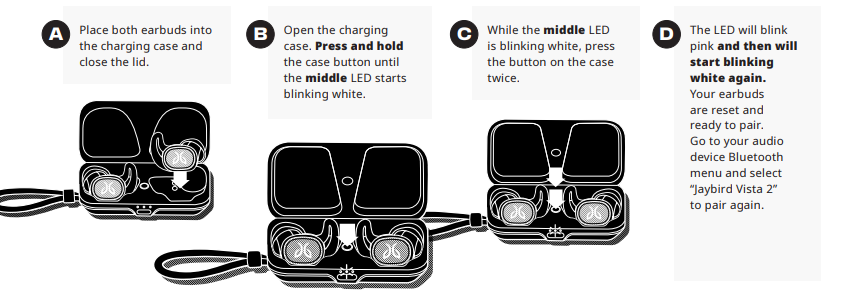
- Hard reset: If the battery has enough charge but the device does not turn on and you don’t hear any tones, press and hold the earbud button for 20 seconds and then release. Put the earbud back in the case, wait for 5 seconds, then take the earbud out of the case.
WARRANTY, WARNINGS & SAFETY
Full warranty, care & maintenance details at: jaybirdsport.com/warranty
WARNING: Due to the isolating characteristics of these earbuds, do not use while driving, riding a bike, or where vehicular traffic is present,
or in any other activity where failure to hear surrounding sounds could be dangerous. Use of these earbuds at excessive volumes may cause permanent hearing damage. Always turn the volume down before use. Take caution in regards to inserting objects into the ear canal; use at your own risk. Do not wear the device while it is connected to a power source driven from the main 110V or 220V lines.
WATERPROOF
Your Jaybird Vista 2 earbuds feature an IP68 dust and waterproof rating. Vista 2 earbuds are designed to handle rain, mud, and outdoor adventures. Jaybird earbuds are not designed for swimming, showering,, or exposure to pool or ocean water. In case of exposure to salted or chlorinated water, rinse the earbuds gently with fresh water and air dry before use. The Vista 2 charging case features an IP54 rating; it is designed to handle rain and splashing but not submersion into water. Please ensure your earbuds are completely dry before charging.
EARGEL CLEANING
Keeping your Jaybird earbuds eargels clean is essential for safe, hygienic use.
IMPORTANT: DO NOT attempt to clean the eartips without first removing them from the earbuds.
- Firmly grip the eargel with one hand and the earbud with the other. Carefully remove the eargel from the earbud.
- Use warm water and mild soap on a damp cloth to remove dirt and earwax from the eargel. Do NOT use harsh cleaning agents.
- Rinse and completely earbuds before re-placing them back on your ears. Carefully push the eargel back onto the earbuds.
Pros & Cons of Jaybird Vista 2 Earbuds
- Pros:
- Exceptional ruggedness with IP68 waterproof and military-grade shock resistance
- Compact, lightweight design, comfortable for long wear and active use
- Strong battery life with a convenient wireless charging case
- Customizable sound with advanced EQ settings in the Jaybird app
- Useful smart features, including in-ear detection and SurroundSense awareness
- Cons:
- Active Noise Cancellation effectiveness is limited during high-motion outdoor activities like running or cycling.
- ANC and SurroundSense features may drain the battery faster
- Price point is higher than some competitors without significant ANC improvement
- Occasional connection drops are reported in crowded Bluetooth environments
Overall, the Jaybird Vista 2 Earbuds offer excellent value for users prioritizing durability and sound customization, though those seeking top-tier ANC may consider alternatives like the Bose QuietComfort Earbuds.
Customer Reviews of Jaybird Vista 2 Earbuds
Users commonly praise the Jaybird Vista 2 earbuds for their comfortable fit and resilient build quality, especially appreciating their performance during running and workouts. Many highlight the convenience of wireless charging and the app’s flexible EQ options that allow tailoring audio to personal preferences. Typical ratings average around 4.3 out of 5 stars.
Some frequent complaints include the ANC’s limited effectiveness in outdoor windy conditions and occasional Bluetooth connection issues during intense activities. However, buyers recommend these earbuds for those who value ruggedness and solid audio over premium noise cancellation.
Testimonials emphasize the earbuds’ suitability for active lifestyles and note the “Find my earbuds” feature as a helpful addition for preventing loss.
Faqs
How do I pair my jaybird Vista 2 Earbuds with a new device?
What should I do if my jaybird Vista 2 Earbuds won't connect or have pairing issues?
How do I customize sound settings and controls on my jaybird Vista 2 Earbuds?
Are jaybird Vista 2 Earbuds waterproof, and how should I care for them after exposure to water?
How do I find the best fit with jaybird Vista 2 Earbuds for maximum comfort and sound quality?
What is the battery life of jaybird Vista 2 Earbuds, and how do I check the charging status?
Can I use jaybird Vista 2 Earbuds with Windows or Mac computers, and what are the steps?
How do I use the 'Find My Buds' feature on jaybird Vista 2 Earbuds if I misplace them?
More jaybird manuals
Leave a Comment