
Pairing & Setup: Jaybird X4 Wireless Headphones User Manual
Content
Jaybird X4 Wireless Headphones
Introduction
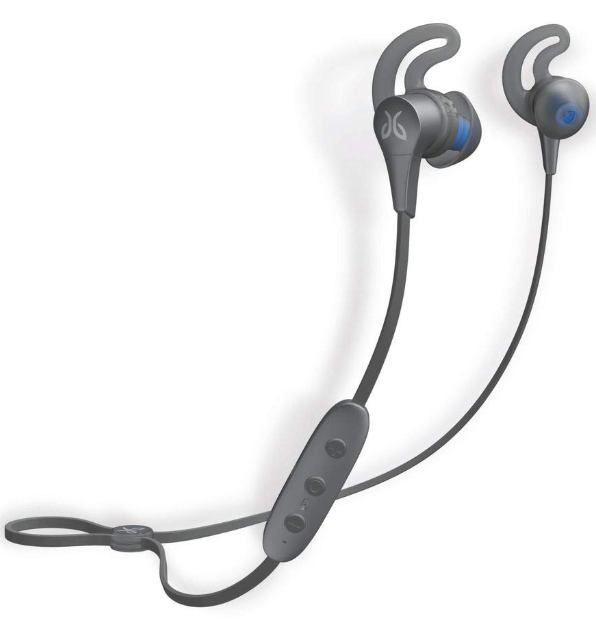
Designed for athletes and active lifestyles, the Jaybird X4 Wireless Headphones are a top-tier choice for anyone seeking reliable, high-performance audio on the move. These Bluetooth sport earbuds combine rugged durability with premium sound, making them ideal for runners, gym enthusiasts, and outdoor adventurers who demand both comfort and functionality. The Jaybird X4 stands out with its fully waterproof (IPX7) and sweatproof design, ensuring they can handle intense workouts and unpredictable weather without skipping a beat.
Key benefits include an impressive 8 hours of wireless playtime on a single charge, a secure and customizable fit with multiple ear tips and fin sizes, and Comply Ultra foam tips for enhanced comfort and noise isolation. The Jaybird app allows users to personalize their sound profile with a custom EQ, saving settings directly to the earbuds for consistent audio across devices. Built-in microphone and controls let you manage calls and music without reaching for your phone, while integrated voice assistant support adds convenience for hands-free operation.
The Jaybird X4 Wireless Headphones are targeted at fitness-focused users who need headphones that stay put during vigorous activity, deliver clear sound, and withstand the elements. They are also versatile enough for casual listening and daily commutes. Available at major retailers, the Jaybird X4 typically retails in the $100–$150 range, offering strong value for its feature set and build quality. Whether you're training for a marathon or just want a dependable pair of wireless earbuds, the Jaybird X4 delivers a compelling mix of performance, comfort, and durability.
Jaybird X4 Wireless Headphones – Detailed Specifications
- Bluetooth Version: 4.1 with multipoint support
- Audio Codecs: AAC, SBC, Modified SBC
- Profiles: Handsfree, Headset, A2DP, AVCRP, SPP
- Battery Life: Up to 8 hours of playback (actual life may vary with usage and EQ settings)
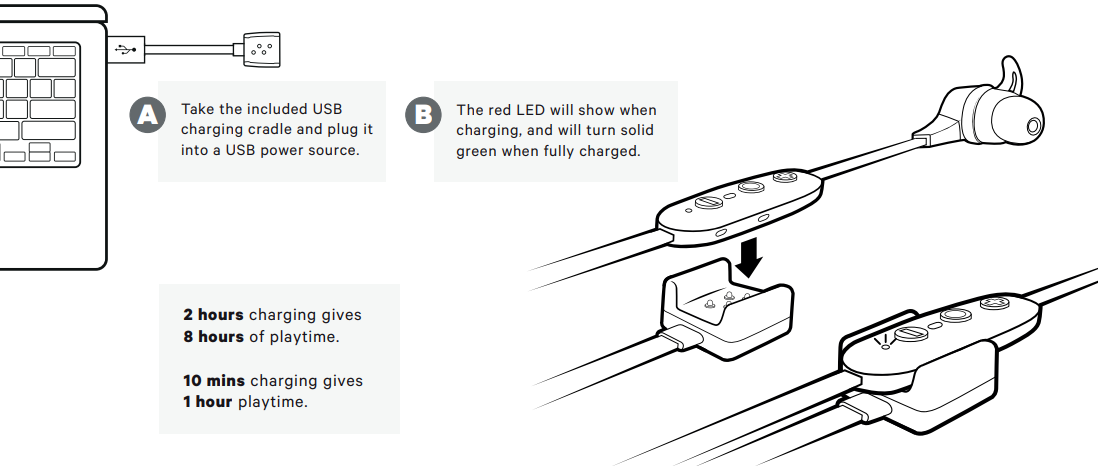
- Charging Time: Approximately 2 hours for a full charge; 10 minutes of charging provides 1 hour of playback
- Water Resistance: IPX7 certified – fully waterproof and sweatproof
- Earbud Size: 13 x 24 mm
- Cord Length: 490 mm
- Weight: Approx. 14.7 g (without fins and tips)
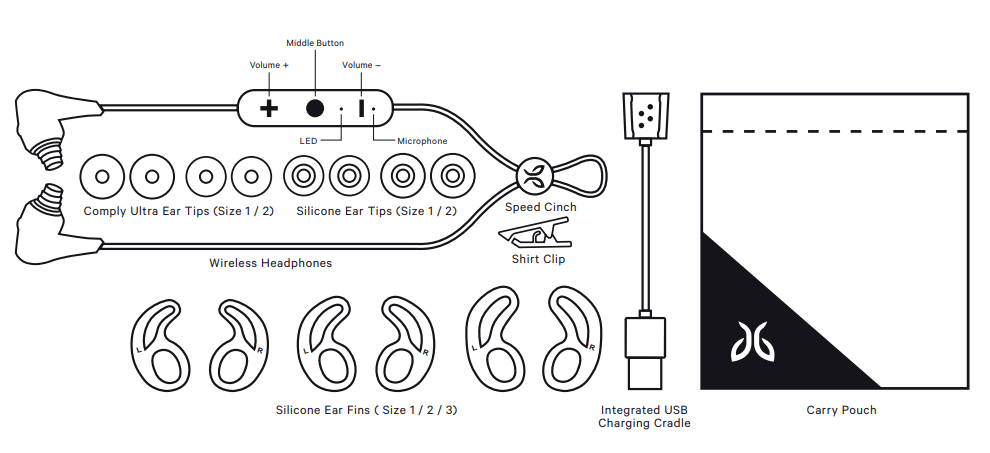
- Included Accessories: Four pairs of ear tips, three pairs of ear fins, proprietary USB charging cable, carrying pouch
- Controls: In-line microphone, music playback, call management, voice assistant support
- Compatibility: iOS, Android, and other Bluetooth-enabled devices
- Warranty: 12 months
Performance & Comparison: The Jaybird X4 offers robust sound quality with customizable EQ, deep but balanced bass, and clear mids and highs—especially impressive for sports headphones in this price range. While battery life is solid, competitors like the Jaybird Tarah Pro offer longer playback (up to 13 hours), and the JBL Everest 110 provides nine hours, but the X4’s quick charge feature helps bridge the gap[3][6]. The secure fit and waterproofing give the X4 an edge for active users over many rivals.
IN THE BOX
CHARGING/BATTERY STATUS
We recommend you charge your earbuds through any 5V 500mA USB power source. Wall/car adapters/chargers that supply more than 5.5 volts will damage your Jaybird earbuds and should not be used.
CHARGING/BATTERY STATUS
PAIRING
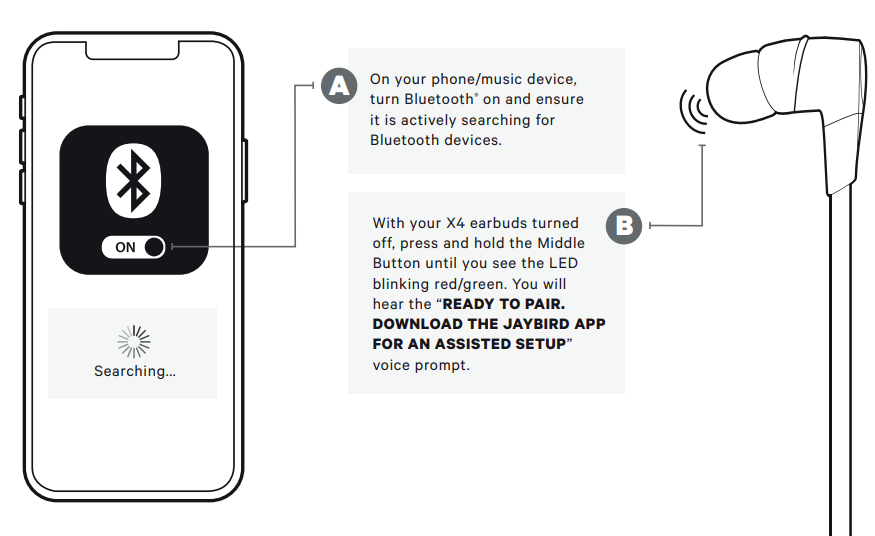
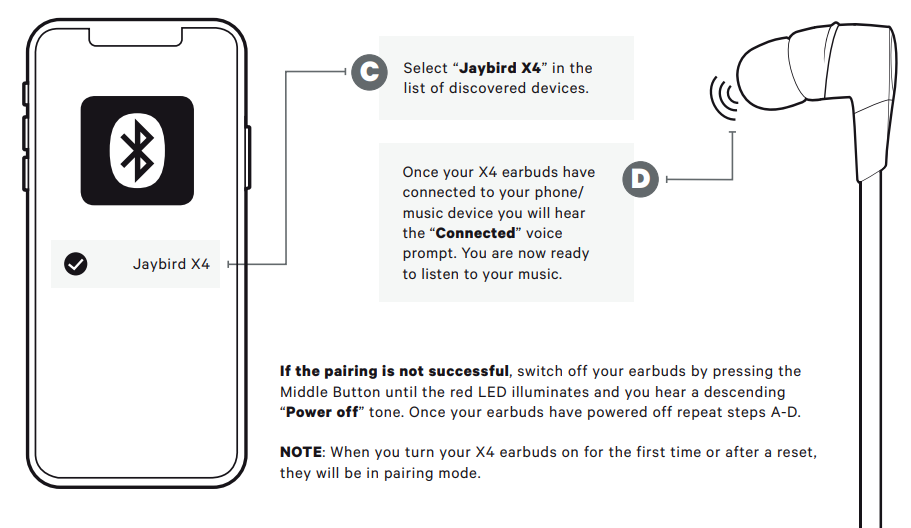
Troubleshooting Jaybird X4 Wireless Headphones
Soft reset: If your earbuds are not responding, put your X4 in the charge cradle and connect the USB charging cable to a power source. This will turn your earbuds off and perform a soft reset.
Factory reset: If this does not resolve your problem,m we recommend resetting your earbuds to their original factory settings. Before starting this process, ss please “FORGET” or “REMOVE” your X4 device from your Bluetooth list of discovered devices in your phone or music device.
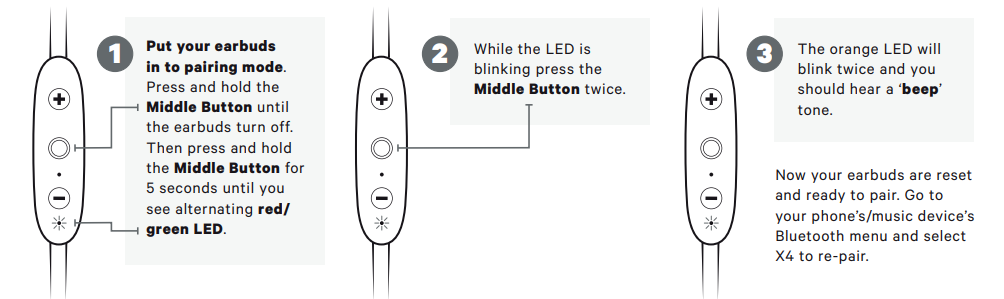
WARRANTY, WARNINGS & SAFETY
- Full warranty, care & maintenance details at: jaybirdsport +1.866.244.3399
- WARNING: Due to the isolating characteristics of these headphones, do not use while driving, riding a bike, or where vehicular traffic is present, or in any other activity where failure to hear surrounding sounds could be dangerous. Use of these headphones at excessive volumes may cause permanent hearing damage. Always turn the volume down before use. Take caution in regards to inserting objects into the ear canal; use at your own risk. Do not wear the device while it is connected to a power source driven from the main 110V or 220V lines.
- Copyright 2018 Logitech. Logitech, Jaybird, and the Jaybird logo are trademarks or registered trademarks of Logitech Europe S.A. and/or its affiliates in the US and other countries. The Bluetooth® word mark and logos
are registered trademarks owned by BluetoothSIG, Inc. Google Play and the Google Play logo are trademarks of Google LLC. Apple, the Apple logo, iPhone, and iPad are trademarks of Apple, Inc. Other trademarks are the property of their respective owners. Any use of such marks by Logitech is under license or with permission.
WATERPROOF
- Your Jaybird X4 earbuds feature an IPX7 waterproof rating. X4 earbuds are designed to handle rain, mud, and outdoor adventures.
- Jaybird headphones are not designed for swimming, showering, or exposure to pool or ocean water. In case of exposure to salted or chlorinated water, rinse the headphones gently with fresh water and air dry before use. The charging cradle is now water-resistant , so please ensure your headphones are completely dry before charging.
EARTIP CLEANING
- Keeping your Jaybird Earbuds eartips clean is essential for safe, hygienic use.
- IMPORTANT: DO NOT attempt to clean the eartips without first removing them from the headphones. Getting the delicate circuitry inside your Jaybird Earbuds wet may cause permanent damage.
CARE AND MAINTENANCE
- Clean eartips regularly of dirt and wax buildup. To clean, remove eartips from earbuds, then gently wipe away dust and oil with a dry cloth, and/or use warm water and mild soap to remove buildup. Rinse and completely dry before reattaching.
- Before charging, ensure earbuds are completely dry of sweat and water.
Pros & Cons of Jaybird X4 Wireless Headphones
Pros
- Durable & Waterproof: IPX7 rating makes them ideal for workouts and outdoor use.
- Secure, Customizable Fit: Multiple ear tips and fins ensure a stable fit during activity.
- Good Sound Quality: Customizable EQ via the Jaybird app delivers balanced audio with punchy bass and clear vocals.
- Quick Charge: 10 minutes of charging provides 1 hour of playback—great for on-the-go users.
- Minimal Sound Leakage: Excellent isolation means you won’t disturb others nearby.
Cons
- Battery Life: Up to 8 hours is decent, but less than some competitors; no auto power-off can lead to accidental drainage.
- Proprietary Charger: Requires carrying a specific cable, which can be inconvenient.
- Microphone Quality: Best in quiet environments; struggles in noisy settings.
- Fit for Small Ears: Some users with smaller ears may find the fit tight or uncomfortable over long periods.
- Price: Slightly higher than some entry-level sports earbuds, but justified by features and build.
Value for Money: The Jaybird X4 Wireless Headphones offer a strong mix of durability, sound quality, and fitness-focused features. While not the cheapest, they represent good value for active users who need reliable performance and customization. Alternatives like the Jaybird Tarah Pro offer longer battery life, and the JBL Everest 110 provides a more budget-friendly option, but the X4 remains a top contender for its balance of features.
Customer Reviews & Testimonials
User feedback for the Jaybird X4 Wireless Headphones is generally positive, with many praising their secure fit, sound quality, and durability during workouts. Comfort receives high marks, though some note that the ear tips can feel large, especially for those with smaller ears. Battery life is considered sufficient for most users, but heavy users may wish for more endurance.
Common praises include the customizable EQ, effective noise isolation, and the ability to stay in place during intense activity. Criticisms often focus on the proprietary charging cable and the lack of auto power-off. Star ratings typically range from 4 to 4.5 out of 5, reflecting strong satisfaction with occasional caveats.
Testimonials: “Love how these stay put during runs—no more adjusting every few minutes.” “Sound is crisp, and the app lets me tweak it just how I like.” “Wish the battery lasted longer, but the quick charge helps.”
Purchase Recommendation: The Jaybird X4 Wireless Headphones are highly recommended for athletes and active listeners who prioritize fit, sound customization, and durability. If battery life is your top concern, consider the Jaybird Tarah Pro; for a more budget-friendly option, look at the JBL Everest 110. However, for most fitness enthusiasts, the X4 hits the sweet spot between performance and price.
Faqs
How do I set up my jaybird X4 Wireless Headphones for the first time?
What should I do if my jaybird X4 Wireless Headphones are not pairing with my phone?
Can I use the jaybird X4 Wireless Headphones with multiple devices at the same time?
How do I customize the sound profile on my jaybird X4 Wireless Headphones?
What are the main controls on the jaybird X4 Wireless Headphones, and how do I use them?
How do I clean and maintain my jaybird X4 Wireless Headphones to ensure longevity?
What battery life can I expect from the jaybird X4 Wireless Headphones, and how do I charge them properly?
Why does my jaybird X4 Wireless Headphones audio cut out or experience connectivity issues during workouts?
More jaybird manuals
Leave a Comment