
Jensen JWM41 Mobile Audio System User Manual
Content
Jensen JWM41 Mobile Audio System Manual
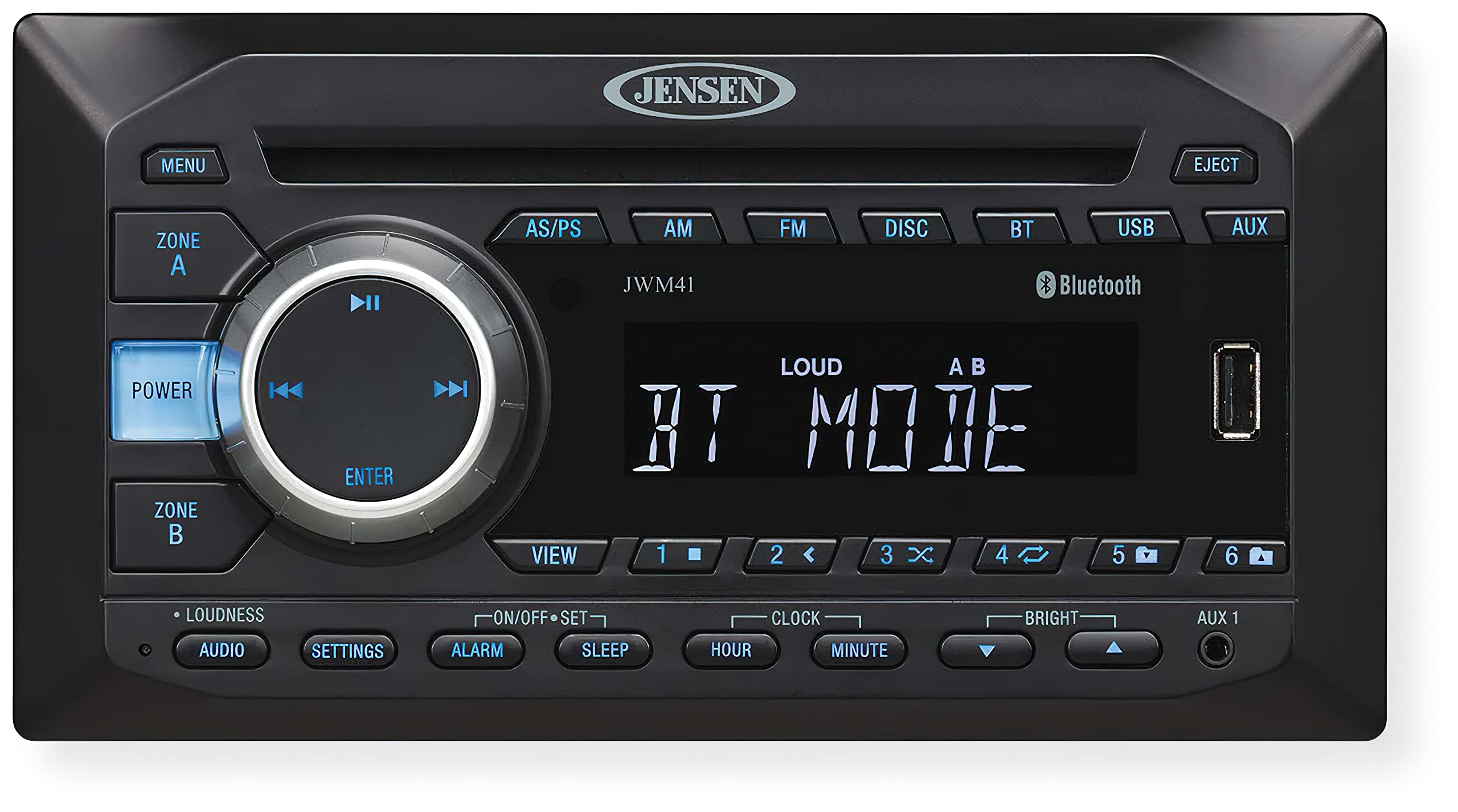
Introduction to the Jensen JWM41 Mobile Audio System
The Jensen JWM41 Mobile Audio System is a compact RV and mobile entertainment stereo designed for owners who want dependable audio, video playback, and simple control in one wall-mount unit. Built for campers, travel trailers, fifth wheels, and motorhomes, the Jensen JWM41 Mobile Audio System combines AM/FM radio, Bluetooth streaming, CD/DVD playback, USB support, and auxiliary connectivity in a space-saving design. It is especially useful for users who want a centralized entertainment hub without installing a full home-style receiver.
One of the biggest advantages of the JWM41 is its practical feature set. It supports two speaker zones with four speaker outputs, making it a strong fit for multi-area RV audio setups. The unit also includes a front AUX input, rear RCA connections, and a composite video output, which adds flexibility for integrating external devices. Bluetooth audio streaming with A2DP and AVRCP support makes wireless playback easy, while the included remote control improves convenience in tight living spaces.
The estimated price range for the Jensen JWM41 Mobile Audio System typically falls around the budget-to-midrange category, often near $170 to $250 depending on retailer, condition, and bundled accessories. Availability is generally strong through RV parts suppliers, camping retailers, and online marketplaces. For buyers comparing RV stereos, the JWM41 stands out as a reliable all-in-one solution for entertainment, daily radio listening, and media playback in mobile environments.
Specifications for Jensen JWM41 Mobile Audio System
- Power output: 6W x 4 channels, with up to 24 watts maximum output.
- Power supply: DC 12 volts, negative ground.
- Operating voltage: 11–16 VDC.
- FM tuner range: 87.5 to 107.9 MHz in the USA.
- AM tuner range: 530 to 1710 kHz in the USA.
- Preset stations: 30 total presets, including 18 FM and 12 AM.
- Audio response: 20–20,000 Hz frequency response.
- Signal-to-noise ratio: 65 dB to 73 dB, depending on measurement reference.
- Speaker configuration: 2 zones with 4 speaker outputs.
- Connectivity: Bluetooth streaming, front USB playback, front AUX input, rear RCA audio input/output, and RCA composite video output.
- Playable formats: CD, CD-R, CD-RW, DVD, MP3, and WMA support.
- Dimensions: approximately 8.25 inches wide, 4.4 inches high, and 6 inches deep.
- Weight: about 1 to 3.7 pounds depending on listing and packaging details.
Compared with similar RV stereo systems, the Jensen JWM41 Mobile Audio System offers a balanced mix of format support and connectivity. It is more versatile than basic Bluetooth-only units, while remaining simpler and more compact than premium multimedia receivers with HDMI or app-based control.
Setup Guide for the Jensen JWM41 Mobile Audio System
Start by turning off vehicle or RV power before installing the unit. Confirm that the mounting cutout matches the radio dimensions and that the wiring harness is compatible with your 12-volt system. Secure the chassis firmly in the wall opening, then connect the speaker wires, power leads, ground wire, and any RCA or video cables as needed.
After wiring, restore power and test the display, tuner, and speaker zones. Use the setup menu to adjust clock settings, audio balance, bass, treble, and fader controls. Pairing a phone is straightforward: activate Bluetooth on your device, search for the stereo, and connect using the visible Jensen pairing name. Once paired, use the controls or remote to manage playback.
For USB playback, insert a compatible drive with MP3 or WMA files in the front port. For DVD or CD use, confirm the disc is clean and properly inserted. If the unit does not power on, check the fuse, 12-volt supply, and ground connection. If Bluetooth fails to connect, delete the pairing on the phone and try again.
Safety precautions matter: avoid installing the unit near moisture, do not overload speakers below the rated impedance, and disconnect power before changing wiring. Use only compatible 4- to 8-ohm speakers and keep ventilation openings clear.
Troubleshooting the Jensen JWM41 Mobile Audio System
Common issues with the Jensen JWM41 Mobile Audio System are usually related to wiring, speaker load, media format, or Bluetooth pairing. If there is no sound, verify that the volume is up, the speaker wires are connected correctly, and mute is disabled. If one speaker zone is silent, inspect the zone wiring and balance settings.
If discs will not play, make sure the disc format is supported and that the disc surface is free of scratches or dust. If USB playback fails, reformat the drive to a compatible file system and confirm the files are MP3 or WMA. If Bluetooth disconnects repeatedly, move the phone closer to the stereo and remove interference from other wireless devices.
Error codes are not commonly highlighted for this model in standard consumer use, so most service steps focus on signal, power, and media checks. Preventive care includes keeping firmware-related issues minimal by using proper power supply ranges, avoiding reverse polarity, and cleaning media before insertion. Inspect the fuse periodically to prevent surprise shutdowns.
Warranty and support are generally handled through ASA Electronics and authorized RV parts dealers. Keep your purchase receipt, serial number, and installation details available when requesting help. For assistance, contact the dealer where you purchased the unit or ASA Electronics customer support through its official support channels.
Pros and Cons of the Jensen JWM41 Mobile Audio System
Pros
- Compact wall-mount design fits RVs, campers, and travel trailers well.
- Bluetooth streaming makes phone playback easy and convenient.
- Supports CD, DVD, USB, AUX, and radio in one system.
- Two speaker zones and four outputs improve multi-area sound control.
- Remote control adds convenience for bedroom or lounge use.
- Good value for buyers who need an all-in-one mobile entertainment system.
Cons
- Power output is modest compared with larger marine or home receivers.
- No advanced app control or HDMI integration on this model.
- Audio quality depends heavily on speaker choice and RV acoustics.
- Best suited for basic to moderate entertainment needs, not premium theater setups.
Overall value for money is strong if the goal is dependable RV audio rather than high-end sound performance. Compared with more expensive alternatives, the JWM41 is easier to install and simpler to operate, but it offers fewer modern features.
Customer Reviews and User Feedback
User feedback for the Jensen JWM41 Mobile Audio System is generally positive, with many buyers giving it around 4 out of 5 stars for its versatility and RV-friendly design. Customers often praise the Bluetooth connection, easy wall-mount installation, and the convenience of having radio, disc playback, and USB support in a single unit.
Common complaints usually involve modest audio power, limited bass performance, and occasional Bluetooth pairing delays. Some users also mention that speaker quality has a big impact on the final sound. Buyers who want a simple replacement stereo for an RV or camper usually recommend it, while users looking for richer sound or advanced multimedia features may want a higher-end alternative.
Typical testimonial style feedback includes comments such as: “Great fit for our fifth wheel,” “Easy to install and use,” and “Works well for basic entertainment.” For most shoppers, the JWM41 is a practical purchase when reliability and format support matter more than premium features.
Faqs
How do I set up jensen JWM41 Mobile Audio System for the first time in an RV or trailer?
What should I check if the jensen JWM41 Mobile Audio System will not power on?
How do I connect Bluetooth on the jensen JWM41 Mobile Audio System and keep the signal stable?
Which speakers are compatible with the jensen JWM41 Mobile Audio System?
Why is my jensen JWM41 Mobile Audio System not reading USB files or playing them correctly?
How can I improve sound quality on the jensen JWM41 Mobile Audio System?
Can the jensen JWM41 Mobile Audio System play DVDs and route video to an external display?
How should I maintain and clean the jensen JWM41 Mobile Audio System for long-term reliability?
Tags
More jensen manuals
Leave a Comment