
Kinesis KB150P-TAC M-Wave Keyboard User Manual
Content
kinesis KB150P-TAC M-Wave Keyboard Review and User Manual
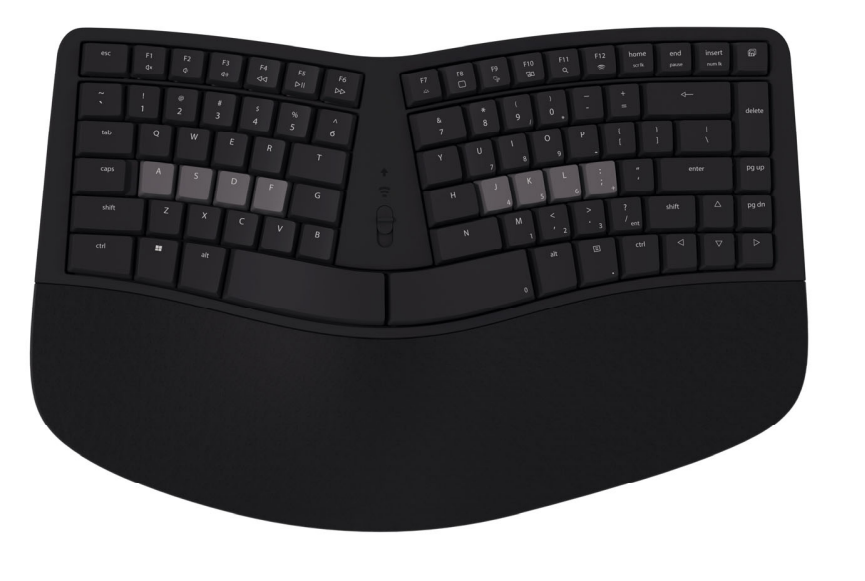
The kinesis KB150P-TAC M-Wave Keyboard is a compact ergonomic mechanical keyboard designed for users who want a more natural typing posture without giving up the feel and responsiveness of low-profile mechanical switches. It combines a fixed split layout, Bluetooth and wired USB connectivity, and a palm-rest-friendly design to help reduce strain during long work sessions. With its tactile Gateron low-profile switches, adjustable tilt options, and 12 hot keys, it targets professionals, programmers, writers, and hybrid office users who split time between desktop and wireless setups.
One of its biggest advantages is versatility. The keyboard supports multiple operating systems, including Windows, macOS, Linux, ChromeOS, Android, and iPadOS, making it a practical choice for users with mixed-device workflows. It also includes backlighting for wired use, programmable keys, and a compact tenkeyless form factor that frees desk space while keeping essential controls within easy reach. The fixed split design is especially appealing to users looking for an ergonomic upgrade from standard straight-layout keyboards.
The estimated price range for the kinesis KB150P-TAC M-Wave Keyboard is typically around $119.95 to about €140 depending on retailer, region, and stock availability. It is commonly sold through ergonomic specialists, office supply stores, and select online retailers, though pricing may vary due to limited distribution and demand in different markets. For anyone seeking a premium ergonomic keyboard with mechanical feedback, wireless convenience, and a refined low-profile typing experience, the KB150P-TAC stands out as a strong mid-to-premium option.
kinesis KB150P-TAC M-Wave Keyboard Specifications and Key Features
- Model: Kinesis KB150P-TAC mWave for PC mechanical keyboard
- Switch type: Gateron low-profile tactile mechanical switches
- Connectivity: Wired USB and Bluetooth wireless
- Wireless range: Up to 30 ft / 9.1 m
- Battery: 2 AA batteries included
- Battery life: Up to 1.5 years depending on use
- Backlighting: Available in wired mode
- Hot keys: 12 dedicated shortcuts for media, search, pairing, screenshots, and desktop navigation
- Layout: Compact split ergonomic design, tenkeyless style
- Dimensions: 387 mm x 241 mm x 45 mm
- Weight: 907 g
- Cable length: 1.83 m
- Warranty: 2 years limited
In real-world use, the keyboard is positioned as a more specialized alternative to standard mechanical office boards and slim wireless keyboards. Compared with conventional flat-layout models, the split ergonomic design improves wrist alignment and may reduce shoulder tension over long typing sessions. Compared with full-size ergonomic keyboards, it is more compact and desk-friendly, though it sacrifices the numeric keypad. The tactile low-profile switches make it feel faster and lighter than many traditional mechanical keyboards while still offering clear key feedback.
Pros and Cons of the Kinesis KB150P-TAC M-Wave Keyboard
Pros
- Ergonomic split layout: Helps support a more natural hand and shoulder position during extended typing.
- Low-profile tactile switches: Offers a responsive feel with less finger travel than standard mechanical switches.
- Dual connectivity: Works well for both wired desk setups and wireless Bluetooth use.
- Compact footprint: Saves desk space while still providing useful hot keys and a palm rest.
- Cross-platform support: Fits users who move between Windows, Mac, mobile devices, and Linux systems.
- Good value for ergonomic enthusiasts: The feature set is strong for the price range, especially if comfort matters more than gaming-focused extras.
Cons
- No full-size layout: Users who rely on a numeric keypad may find the compact form limiting.
- Backlight limitations: Lighting is available in wired mode, which may disappoint wireless users.
- Learning curve: Split layouts can take time to adapt to if you are moving from a standard keyboard.
- Premium pricing: It costs more than many basic wireless mechanical keyboards.
- Best for productivity, not gaming-first buyers: It is optimized for comfort and typing efficiency rather than RGB-heavy gaming features.
Compared with mainstream alternatives, the kinesis KB150P-TAC M-Wave Keyboard offers better ergonomic intent but fewer decorative features. It is a stronger fit than a basic office keyboard for people with wrist fatigue, yet less affordable than entry-level mechanical boards. For users prioritizing long-term typing comfort, the added cost is easier to justify.
Customer Reviews of the Kinesis KB150P-TAC M-Wave Keyboard
Typical user feedback gives the keyboard an average impression of around 4.5 out of 5 stars. Many buyers praise the comfortable split design, the solid low-profile tactile feel, and the convenience of switching between USB and Bluetooth. Reviewers often mention that the keyboard feels sturdy, responsive, and well suited to office productivity, coding, and general everyday work.
Common complaints focus on the adjustment period for the split layout, the lack of a dedicated number pad, and the fact that backlighting is not always available in wireless mode. Some users also note that the premium price makes it less attractive for casual typists. A recurring positive testimonial theme is that once users adapt, the keyboard becomes noticeably easier to type on for long sessions.
Best for: Professionals, remote workers, and ergonomic keyboard buyers who want a compact mechanical board with wireless flexibility. Not ideal for: Users who need a full-size keypad, RGB lighting, or a budget-first option. Overall, the kinesis KB150P-TAC M-Wave Keyboard is frequently recommended for buyers who value comfort, build quality, and a refined typing experience over flashy extras.
Faqs
How do I set up kinesis KB150P-TAC M-Wave Keyboard for the first time on a Windows or macOS computer?
Why is my kinesis KB150P-TAC M-Wave Keyboard not typing after I plug it in?
What features of the kinesis KB150P-TAC M-Wave Keyboard matter most for comfortable daily typing?
Is kinesis KB150P-TAC M-Wave Keyboard compatible with gaming consoles, tablets, and USB-C laptops?
How can I fix sticky keys or inconsistent typing on kinesis KB150P-TAC M-Wave Keyboard?
Can I remap keys or change shortcuts on the kinesis KB150P-TAC M-Wave Keyboard?
How do I optimize the performance of kinesis KB150P-TAC M-Wave Keyboard for faster typing and fewer mistakes?
What is the best way to clean and maintain kinesis KB150P-TAC M-Wave Keyboard for long-term use?
More kinesis manuals
Leave a Comment