
Kinesis ZMK Programming Engine KB360-PRO User Manual
Content
kinesis ZMK Programming Engine KB360-PRO: Complete Product Manual and Buyer Guide
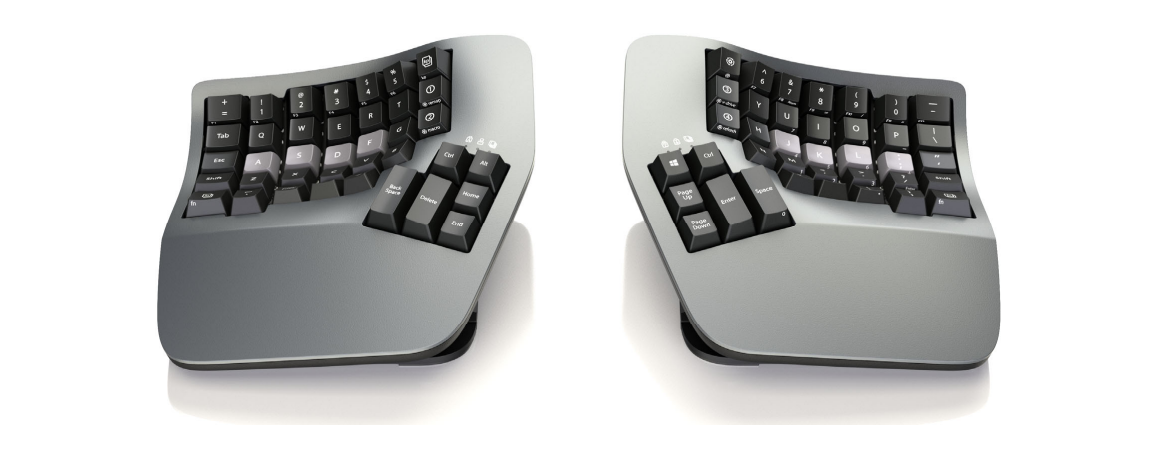
The kinesis ZMK Programming Engine KB360-PRO is Kinesis’s professional-grade split ergonomic keyboard platform built for users who want deep customization, wireless freedom, and a highly refined typing posture. It is designed around the open-source ZMK programming engine, which gives power users access to layers, macros, remapping, and wireless split-keyboard functionality without the limitations of older onboard-programming systems. This makes it especially appealing to programmers, writers, analysts, and remote workers who spend long hours typing and want a keyboard that can adapt to their workflow rather than forcing a fixed layout.
One of the biggest benefits of the kinesis ZMK Programming Engine KB360-PRO is its combination of ergonomic sculpting and modern configurability. The split design helps reduce shoulder strain, while adjustable tenting and a contoured keywell support a more natural hand position. The keyboard also supports Bluetooth connectivity and USB-C wired use, making it practical for multi-device setups and both stationary and mobile workstations. Configuration is handled through Kinesis’s web-based workflow and ZMK firmware tools, which provide advanced control for users who want custom layers, shortcuts, and text macros.
The target audience includes productivity-focused professionals, keyboard enthusiasts, and anyone moving from a standard flat keyboard to a premium ergonomic solution. Typical use cases include coding, content creation, spreadsheets, customer support, and extended writing sessions. Estimated pricing generally falls in the premium range, with common market listings around the mid-hundreds of dollars and MSRP-level pricing reaching the higher end of the ergonomic keyboard category. Availability is typically through Kinesis and authorized resellers, though stock can vary by switch type and region.
Specifications for kinesis ZMK Programming Engine KB360-PRO
- Keyboard type: Split ergonomic mechanical keyboard with contoured keywell design.
- Programming engine: Open-source ZMK firmware for layers, macros, remapping, and wireless split-keyboard support.
- Connectivity: Bluetooth wireless and USB-C wired operation.
- Customization: Web-based configuration workflow for layout changes and basic macros, plus advanced firmware editing for power users.
- Switch options: Common configurations include tactile and quiet linear switch variants depending on model.
- Power: Built-in rechargeable battery with USB-C charging.
- Ergonomics: Adjustable tenting, split spacing, and contoured layout designed to reduce wrist and shoulder strain.
- Compatibility: Windows, macOS, Linux, Chrome-based environments, and Android support through standard input profiles.
- Performance: Low-latency wired performance and stable wireless operation for daily productivity tasks.
- Firmware workflow: GitHub-based configuration and firmware build process for advanced customization.
In comparison with similar ergonomic keyboards, the kinesis ZMK Programming Engine KB360-PRO stands out for its contoured split design and ZMK-powered wireless programming. Compared with conventional split boards, it offers deeper customization and a more premium ergonomic shape, while competing against other high-end ergonomic keyboards by emphasizing a steeper learning curve but stronger long-term flexibility.
Pros and Cons of the kinesis ZMK Programming Engine KB360-PRO
Pros
- Excellent ergonomics: The split contoured layout helps keep hands, arms, and shoulders in a more natural position during long typing sessions.
- Highly programmable: ZMK support makes it ideal for users who want layers, custom shortcuts, and workflow-specific macros.
- Wireless and wired flexibility: Bluetooth support is useful for clean desk setups, while USB-C provides a dependable fallback.
- Premium build and feel: The KB360-PRO feels purpose-built for heavy daily use, not like a generic office accessory.
- Strong value for power users: Although expensive, it can replace multiple devices or software-driven shortcuts for users who rely on efficiency.
Cons
- Steep setup curve: ZMK customization is powerful but more complex than simple plug-and-play keyboards.
- Premium price: The cost is high compared with mainstream mechanical keyboards and many mid-range ergonomic options.
- Not ideal for casual users: People who only want basic typing comfort may find the advanced feature set unnecessary.
- Advanced configuration can take time: Building and testing custom layouts may require patience, especially for first-time users.
For buyers comparing alternatives, this model is best for users who want a premium ergonomic keyboard with deep firmware control rather than a simple office keyboard. In value-for-money terms, it is strongest for professionals who will use its programmability every day.
Customer Reviews for the kinesis ZMK Programming Engine KB360-PRO
User feedback is generally very positive, with many owners giving it around 4.5 out of 5 stars for comfort, typing efficiency, and customization depth. Reviewers frequently praise the contoured split shape, saying it reduces fatigue during long work sessions and makes extended typing feel more sustainable. The ZMK-based layout system also receives strong praise from technical users who want a keyboard that can be tailored to different apps, operating systems, and macros.
Common complaints focus on the learning curve. Some customers note that first-time setup can feel complicated, especially when building custom firmware or migrating from a standard keyboard. A few users also mention that the premium price is hard to justify unless the keyboard will be used heavily every day. A recurring testimonial theme is that the keyboard becomes much more rewarding after the initial setup stage.
Purchase recommendation: Buy it if ergonomic comfort, wireless flexibility, and deep customization matter more than cost. If you want a simple plug-and-play keyboard, a less advanced split ergonomic model may be a better fit.
Frequently Asked Questions About the KB360-PRO
What makes the kinesis ZMK Programming Engine KB360-PRO different?
Its biggest difference is the combination of a contoured split ergonomic layout and the open-source ZMK programming engine, which enables advanced wireless keyboard customization.
Is it good for programming and office work?
Yes. It is especially well suited for coding, writing, and spreadsheet-heavy workflows because layers and macros can reduce repetitive actions.
Is the setup difficult?
Basic use is straightforward, but advanced customization takes time and is best for users comfortable with firmware-based configuration.
Faqs
How do I set up kinesis ZMK Programming Engine KB360-PRO for the first time?
What should I do if kinesis ZMK Programming Engine KB360-PRO is not responding after a firmware change?
Which operating systems work best with kinesis ZMK Programming Engine KB360-PRO?
How do I customize layers and shortcuts on kinesis ZMK Programming Engine KB360-PRO?
Why are some keys on kinesis ZMK Programming Engine KB360-PRO triggering the wrong action?
Can kinesis ZMK Programming Engine KB360-PRO be used wirelessly, and what affects Bluetooth performance?
How can I optimize typing performance on kinesis ZMK Programming Engine KB360-PRO for faster daily use?
How should I maintain and care for kinesis ZMK Programming Engine KB360-PRO to avoid long-term problems?
Tags
More kinesis manuals
Leave a Comment