
Kinesis KB605 Contoured Keyboard User Manual
Content
Kinesis KB605 Contoured Keyboard Overview
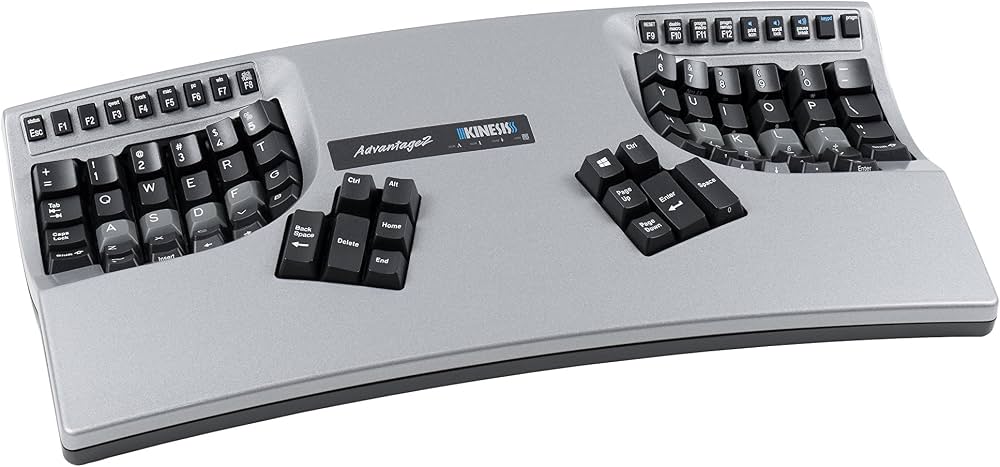
The Kinesis KB605 Contoured Keyboard is a premium ergonomic split keyboard designed to reduce strain, improve typing comfort, and support long-duration productivity work. Built as part of Kinesis’s contoured keyboard family, it uses a sculpted keywell layout that places the hands in a more natural position, making it especially appealing to programmers, writers, data entry professionals, and anyone managing repetitive typing tasks. The KB605 is widely recognized for its low-force mechanical switches, fully programmable SmartSet engine, and durable construction that supports heavy daily use.
Its contoured design helps keep wrists straighter and shoulders more relaxed than a traditional flat keyboard, which can be beneficial for users dealing with discomfort from extended keyboard sessions. The keyboard also supports Windows, Mac, and PC environments, making it a versatile option for mixed-device workspaces. In practical use, the KB605 stands out for its comfort-first layout, onboard customization, and a reputation for long-term reliability.
As of 2026, the estimated price range for the Kinesis KB605 Contoured Keyboard is typically around the mid-$300s to low-$400s depending on the retailer, configuration, and availability. It is sold through specialty keyboard retailers, ergonomic equipment stores, and occasionally resale marketplaces. Availability can vary, since premium ergonomic keyboards often ship in limited batches or through authorized distributors.
Specifications for the Kinesis KB605 Contoured Keyboard
- Model: KB605
- Product family: Contoured keyboard family
- Design: Split, sculpted keywell ergonomic layout
- Switch type: Cherry low-force mechanical switches
- Programming engine: SmartSet onboard programming
- Compatibility: Mac, Windows, and PC switchable
- Build: Hand-assembled in the USA
- Primary use case: High-volume typing, ergonomic workstation use, and advanced keyboard customization
- Performance highlights: Low-force actuation for reduced finger fatigue, support for custom layouts, and onboard macro capability
- Typical benchmark advantage: More natural hand posture and reduced reach compared with conventional flat keyboards
Compared with standard office keyboards, the KB605 offers a more specialized ergonomic experience and stronger customization options. Against similar premium ergonomic models, it is often favored for its deep keywell shape, programmable workflow support, and long-standing reputation among heavy typists and professionals.
Troubleshooting the Kinesis KB605 Contoured Keyboard
If the keyboard is not responding, first check the USB connection, confirm the correct operating system mode, and try a different USB port. If individual keys seem unresponsive, inspect for debris around the keywell and test whether the issue occurs in multiple applications. If macros or remaps are not working, re-save the SmartSet configuration and verify that the correct active layer is selected.
Common user issues include accidental layout changes, repeated keystrokes, and recognition problems after switching computers. In most cases, these are fixed by reconnecting the keyboard, resetting the configuration, or confirming that the host system is not overriding the keyboard profile. Preventive maintenance includes keeping firmware and profiles organized, avoiding liquid exposure, and cleaning the key surfaces regularly.
There are no widely documented hardware error codes for the KB605 in typical consumer use, but setup failures are often tied to profile or USB communication issues. If the keyboard appears malfunctioning, contact Kinesis support for diagnostics, RMA guidance, or warranty assistance. Warranty coverage for Kinesis keyboards is generally limited, with premium Advantage-family models commonly covered for 3 years from purchase. Support is typically available through the manufacturer’s technical support ticket system, with regional repair or return instructions provided after evaluation.
Pros and Cons of the Kinesis KB605 Contoured Keyboard
Pros
- Excellent ergonomic comfort for long typing sessions
- Split contoured design helps reduce wrist twisting and shoulder tension
- Cherry low-force mechanical switches feel precise and responsive
- SmartSet programming supports macros and custom remapping
- Strong choice for programmers, writers, and office power users
- High build quality and durable long-term construction
Cons
- Higher price than standard ergonomic keyboards
- Learning curve for users new to split or contoured layouts
- Larger footprint than compact keyboards
- Not ideal for users who switch frequently between many keyboard styles
For value for money, the KB605 makes the most sense for users who type extensively every day and want a specialized ergonomic solution. Compared with simpler ergonomic alternatives, it is more expensive but also more capable and more comfortable for sustained use.
Customer Reviews of the Kinesis KB605 Contoured Keyboard
Customer feedback for the Kinesis KB605 Contoured Keyboard is generally very positive, with many users rating it around 4.5 out of 5 stars for comfort, durability, and typing performance. Reviewers frequently praise the reduced hand strain, the satisfying mechanical key feel, and the ability to customize layouts for work or gaming-style workflows.
Common complaints focus on the steep learning curve, the premium price, and the fact that the keyboard is not as portable as a traditional model. Some users also mention that the contoured layout takes time to master, but many note that the adaptation period is worth it for long-term comfort. A typical testimonial is that the keyboard “feels natural after a week and dramatically improves all-day typing comfort.”
Overall, the KB605 is recommended for users who want a serious ergonomic upgrade and are willing to invest in a high-end mechanical keyboard. It is especially appealing for professionals who spend hours at a desk and need a reliable, customizable typing platform.
Faqs
How do I set up the kinesis KB605 Contoured Keyboard for the first time?
Why is my kinesis KB605 Contoured Keyboard not being recognized by my computer?
What makes the kinesis KB605 Contoured Keyboard different from a standard keyboard?
Is the kinesis KB605 Contoured Keyboard compatible with Windows, Mac, and Linux?
How can I customize shortcuts and key settings on the kinesis KB605 Contoured Keyboard?
What should I do if a key on my kinesis KB605 Contoured Keyboard feels stuck or unresponsive?
How do I clean and maintain the kinesis KB605 Contoured Keyboard without damaging it?
How can I improve typing comfort and speed on the kinesis KB605 Contoured Keyboard?
Tags
More kinesis manuals
Leave a Comment