
Setup: Levoit Pet Care Air Purifier Core P350 User Manual
Content
levoit Pet Care Air Purifier Core P350

Introduction
The levoit Pet Care Air Purifier Core P350 is a specially designed air purifier that caters to pet owners seeking cleaner, fresher indoor air. Equipped with a robust 3-stage filtration system, this purifier effectively captures pet fur, dander, pollen, dust, and unpleasant odors, making it ideal for homes with furry friends. Its unique Activated Carbon Filter with ARC Formula targets and removes pet-related odors and volatile organic compounds (VOCs), providing a healthier living environment.
Perfect for medium to large rooms up to 1050 sq ft, the Core P350 uses advanced VortexAir Technology to deliver 360° spiral airflow, ensuring comprehensive air circulation and purification. Its quiet operation at noise levels as low as 24dB supports use in bedrooms, living rooms, or kitchens without disruption. The purifier also features a Pet Lock to prevent accidental setting changes and a Check Filter Indicator to remind users when it’s time to replace filters.
Targeted at pet owners and allergy sufferers, this air purifier is versatile enough for everyday use in homes and apartments. Its estimated price range typically falls between $130 and $180, widely available through major retailers like Amazon, Home Depot, and Staples. The Core P350 combines effective air cleaning with ease of use, making it a compelling choice for improving indoor air quality where pets are present.
Specifications and Key Features of the levoit Pet Care Air Purifier Core P350
- Filtration System: 3-stage (Non-woven Pre-Filter, True HEPA Filter capturing 99.97% of particles ≥0.3 microns, Activated Carbon Filter with ARC Formula)
- Coverage Area: Up to 1050 sq ft (1 ACH), with optimal performance in 217 sq ft rooms (4.8 ACH)
- Airflow & CADR: CADR of 141 CFM (240 m³/h), ensuring air changes approx. 4.8–5 times per hour in medium rooms
- Noise Level: Ultra-quiet operation as low as 24 dB in Sleep Mode
- Power Consumption: Rated at 45W
- Dimensions: Approximately 8.7 x 8.7 x 14.2 inches
- Controls: One-touch controls including Fan Speed, Sleep Mode, Timer (2, 4, 6, 8 hours), Pet Lock, Display Off, and Check Filter Indicator
- Special Features: VortexAir 360° spiral airflow, Pet Lock to prevent setting changes, and filter replacement notification
- Warranty: Standard 1-year warranty, extendable to 2 years upon registration
- Comparison: Compared to the Levoit Core 300, the Core P350 offers enhanced pet-specific filtration and a larger room coverage but lacks smart app integration or air quality sensors found in some other models
Package Contents
- 1 x Pet Care True HEPA Air Purifier
- 1 x True HEPA 3-Stage Pet Allergy Filter (Pre-Installed)
- 1 x User Manual
- 1 x Quick Start Guide
GETTING TO KNOW YOUR AIR PURIFIER
- Fan Speed Indicators
- Fan Speed Button
- Sleep Mode Indicator/Button
- Timer Button
- Timer Indicators
- On/Off Button
- Pet Lock Button
- Check Filter Indicator
- Display Off Button
- Air Outlet
- Housing
- Air Inlet
- Power Cord
- Filter Cover
- True HEPA 3-Stage Pet Allergy Filter

GETTING STARTED
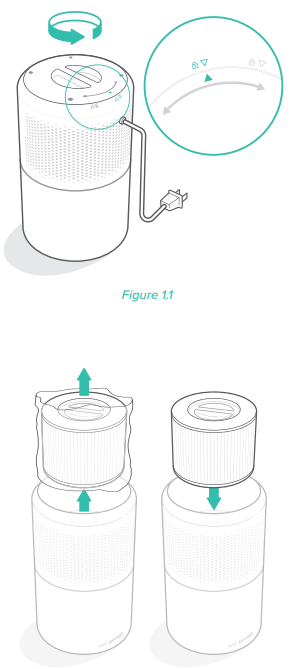
- Flip the air purifier over. Twist the filter cover counterclockwise and remove it.[Figure 1.1]
- Remove the filter from its plastic packaging and place the filter back into the purifier with the handle facing up.[Figure 1.2]
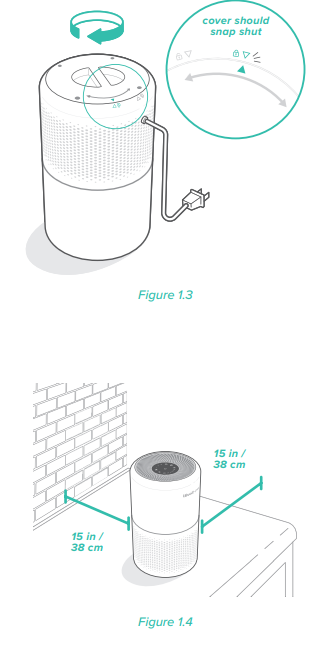
- Replace the filter cover and twist clockwise to lock. [Figure 1.3]
- Place the purifier on a flat, stable surface with the display facing up. Allow at least 15 in / 38 cm of clearance on all sides of the purifier. Keep away from anything that would block air flow, such as curtains.
[Figure 1.4]
USING YOUR PURIFIER
- Plug in and tap
 to turn on the purifier. The fan will start on level I. [Figure 2.1]
 - Optionally, tap
 to change fan speed between I, II, and III.
- Note:
- The indicators are not buttons and cannot be used to change the fan speed.
- The fan speed indicators will light up when active.
- Fan speed III is the loudest, but cleans air the quickest.
- For best results, or to address a specific air quality issue such as smoke, run the air purifier at maximum speed (level III) for 15–20 minutes before using a lower speed.
- To effectively clean air, keep windows and doors closed while the air purifier is on.
- Note:
- Tap to turn off the air purifier.
Memory Function
When the air purifier is plugged in, it will remember its previous fan speed setting.
Note: The air purifier will not remember timers or Sleep Mode.
Sleep Mode
Sleep Mode operates quietly by using the lowest possible fan speed.
Tap to turn Sleep Mode on/off.
Note:
- All indicators will be at half brightness while Sleep Mode is on.
- Tapping & will exit Sleep Mode.
Timer
You can set a timer for 2, 4, 8, or 12 hours.
- Tap
 repeatedly to select a time. The timer will start automatically.
Note:- The indicators are not buttons and cannot be used to select a time.
- The timer indicators will light up blue when active.
- Once the timer has finished, the air purifier will power off.
- To cancel a timer, tap until all timer indicators are off.
Note:- You can change the fan speed at any time while the timer is on. The timer will restart if the time is changed.
Pet Lock
Locking the display prevents settings from being accidentally changed, such as by children or pets. Buttons will not respond when tapped.
- Tap and hold
 for 3 seconds to lock/ unlock the display.
Note: You can turn the display on and off even if the display is locked.
KEEPING THINGS CLEAN
Cleaning the Air Purifier
- Unplug before cleaning.
- Wipe the outside of the air purifier with a soft, dry cloth. If necessary, wipe the housing with a damp cloth, then immediately dry.
- Vacuum the inside of the air purifier.
- Do not clean with abrasive chemicals or flammable cleaning agents.
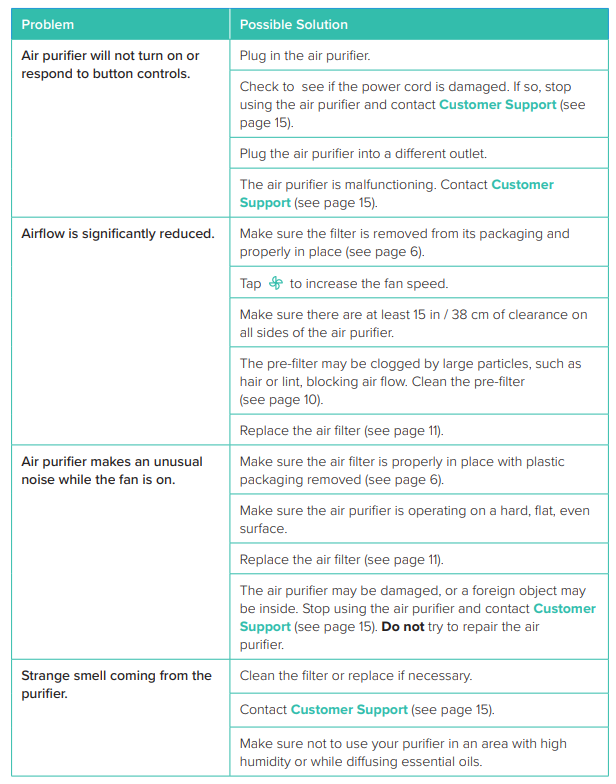
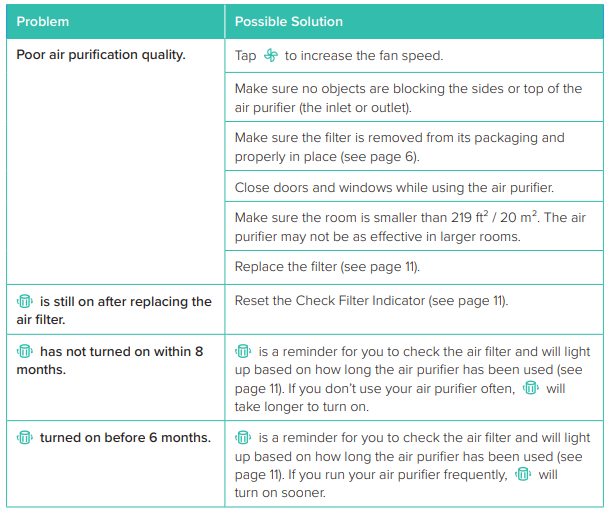
Troubleshooting Guide for the levoit Pet Care Air Purifier Core P350
WARRANTY INFORMATION
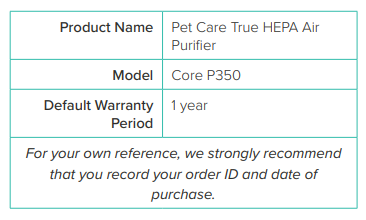
Terms & Policy
Arovast Corporation warrants all products to be of the highest quality in material, craftsmanship, and service, effective from the date of purchase to the end of the warranty period.
Arovast Corporation will replace any product found to be defective due to manufacturer flaws based on eligibility. Refunds are available within the first 30 days of purchase. Refunds are only available to the original purchaser of the product. This warranty extends only to personal use and does not extend to any product that has been used for commercial, rental, or any other use for which the product is not intended. There are no warranties other than the warranties expressly set forth with each product.
This warranty is non-transferable. Arovast Corporation is not responsible in any way for any damages, losses, or inconveniences caused by equipment failure or by user negligence, abuse, or use noncompliant with the user manual or any additional safety or use warnings included in the product packaging and manual.
This warranty does not apply to the following:
- Damage due to abuse, accident, alteration, misuse, tampering, or vandalism.
- Improper or inadequate maintenance.
- Damage in return transit.
- Unsupervised use by children under 18 years of age.
Arovast Corporation and its subsidiaries assume no liability for damage caused by the use of the product other than for its intended use or as instructed in the user manual. Some states do not allow this exclusion or limitation of incidental or consequential losses so the foregoing disclaimer may not apply to you. This warranty gives you specific legal rights and you may also have other rights which may vary from state to state.
ALL EXPRESSED AND IMPLIED WARRANTIES, INCLUDING THE WARRANTY OF MERCHANTABILITY, ARE LIMITED TO THE PERIOD OF THE LIMITED WARRANTY.
Additional 1-Year Warranty
You can extend your 1-year warranty by an additional year. Please fill out all required fields and include your order ID, place of purchase, and purchase date, if applicable.
Defective Products & Returns
If you discover your product is defective within the specified warranty period, please contact Customer Support with a copy of your invoice and order ID. DO NOT dispose of your product before contacting us. Once our Customer Support Team has approved your request, please return the product with a copy of the invoice and order ID.
Pros & Cons of the levoit Pet Care Air Purifier Core P350
Pros
- Effective Pet-Specific Filtration: The specialized 3-stage system captures pet hair, dander, and odors efficiently, improving air quality in pet-friendly homes.
- Wide Room Coverage: Suitable for medium to large rooms up to 1050 sq ft, providing flexible placement options.
- Quiet Operation: Sleep Mode reduces noise to 24dB, ideal for bedrooms and nighttime use.
- User-Friendly Controls: One-touch buttons for quick mode changes and timer settings enhance usability.
- Filter Replacement Alerts: Check Filter Indicator helps maintain optimal performance by timely filter changes.
Cons
- No Smart Features: Lacks air quality sensors, auto mode, or smartphone app integration found in higher-end models.
- Price Point: Priced slightly higher than similar models like the Core 300 without adding smart capabilities.
- Limited Room Size for Maximum Efficiency: While it covers large areas at 1 ACH, optimal performance occurs in smaller rooms (~217 sq ft).
Customer Reviews and Feedback on the levoit Pet Care Air Purifier Core P350
Users commonly praise the levoit Pet Care Air Purifier Core P350 for its effectiveness at removing pet odors and allergens. Many reviewers highlight the quiet operation during Sleep Mode and appreciate the easy-to-use controls and timer settings. The filter replacement indicator is often mentioned as a useful feature to maintain air quality.
Common complaints include the absence of smart features such as real-time air quality monitoring and auto mode, which some users expect at this price point. A few customers note that while the purifier covers large rooms, it performs best in smaller spaces for maximum air changes per hour.
Overall, the product generally earns a solid 4 out of 5 stars, with many recommending it specifically for pet owners seeking reliable air purification without complex technology.
Faqs
How do I set up the levoit Pet Care Air Purifier Core P350 for the first time?
What should I do if the levoit Pet Care Air Purifier Core P350 is not turning on or responding?
How does the Pet Lock feature work on the levoit Pet Care Air Purifier Core P350?
What room size is suitable for the levoit Pet Care Air Purifier Core P350 to ensure optimal performance?
How often should I replace the filter in the levoit Pet Care Air Purifier Core P350?
What maintenance steps are necessary to keep the levoit Pet Care Air Purifier Core P350 running efficiently?
Can I use the levoit Pet Care Air Purifier Core P350 in rooms with high humidity or extreme temperatures?
How do the different fan speed settings and sleep mode enhance the use of the levoit Pet Care Air Purifier Core P350?
More levoit manuals
- Setup & Features: Levoit Classic 42-Inch Smart Tower Fan User Manual
- Setup: Levoit Vital 100 True HEPA Air Purifier User Manual
- Setup & Features: Levoit 36-lnch Tower Fan User Manual
- How to Use: Levoit Smart True HEPA Air Purifier Core 300S User Manual
- Setup & Features: Levoit 42-lnch Tower Fan User Manual
- Setup: Levoit Vital 100S Smart True HEPA Air Purifier User Manual
Leave a Comment