
Setup: Levoit Vital 100S Smart True HEPA Air Purifier User Manual
Content
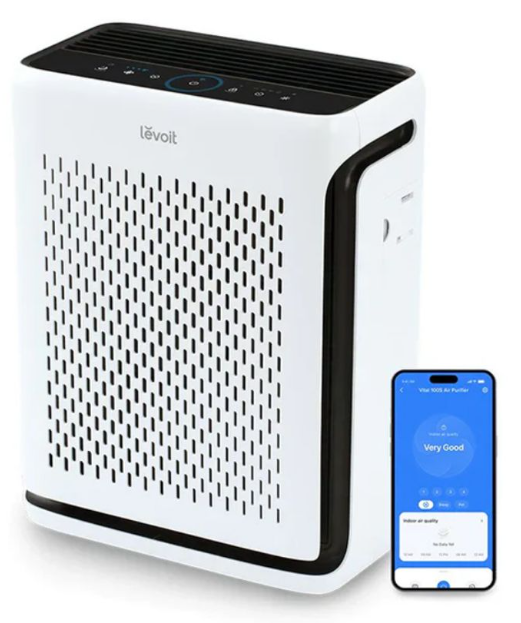
Levoit Vital 100S Smart True HEPA Air Purifier
Introduction
The Levoit Vital 100S Smart True HEPA Air Purifier is a compact yet powerful air cleaning solution designed for medium-sized rooms up to approximately 219 square feet. Combining advanced filtration technology with smart features, this purifier delivers clean, allergen-free air for healthier living environments. Its True HEPA filter captures 99.97% of airborne particles as small as 0.3 microns, including dust, pollen, mold spores, pet dander, smoke, and volatile organic compounds (VOCs). The addition of a high-efficiency activated carbon filter further neutralizes odors and harmful gases, making it ideal for homes, apartments, and offices.
What sets the Vital 100S apart is its integrated AirSight™ Infrared Dust Sensor that continuously monitors air quality in real time and adjusts purification speed automatically. The air quality indicator uses a colored LED ring to provide instant visual feedback, while the unit’s light detection sensor dims panel lights in dark rooms for quieter nighttime operation. Smart connectivity via the Vsync app allows remote control, scheduling, and access to detailed air quality data. These features make it a perfect choice for allergy sufferers, pet owners, and individuals seeking effortless air quality management.
Priced competitively in the mid-range segment, the Levoit Vital 100S usually retails between $130 and $160, depending on the retailer and promotions. It is widely available online and in major appliance and home goods stores. This air purifier blends performance, convenience, and smart technology into a sleek, compact design that fits seamlessly into modern interiors.
Package Contents
- 1 x Smart Air Purifier
- 1 x Washable Pre-Filter (Pre-Installed)
- 1 x True HEPA / Activated Carbon Filter (Pre-Installed)
- 1 x User Manual
- 1 x Quick Start Guide
- 1 x AC Power Adapter
Specifications
- Model: LAP-V102S-WUS
- Power Supply: 24V== 1.5A|
- Rated Power: 35W
- Ideal Room Size: 219 ft? / 20 m?
- This Ideal Room Size is based on 5 air changes per hour (ACH). 548 f2150 m2
- This Ideal Room Size is based on 2 air changes per hour (ACH).
Note: Effective for larger rooms,, but purification will take longer.
- CADR (CFM): 141 CFM / 240 m%/h
- Operating Conditions:
- Temperature: 14°-104°F / -10°-40°C
- Humidity: ≤ 85% RH
- Noise Level: 23-52dB
- Dimensions: 12.8 × 6.4 x 16.1 in / 32.5 × 16.3 x 41 cm
- Weight: 7 lb / 3.4 kg
- Power Adapter:
- Input: 100-240V~ 50/60Hz
- Output: 24V 1.5A
SAFETY INFORMATION
To reduce the risk of fire, electric shock, or other injury, follow all instructions and safety guidelines.
General Safety
- Only use your air purifier as described in this manual.
- Do not use without removing the plastic wrap from the filter. The air purifier will not filter air and may overheat, causing a fire hazard.
- Do not use your air purifier outdoors.
- Keep your air purifier away from water, and wet areas. Never place in water or liquid.
- Do not use in excessively humid areas.
- Keep your air purifier away from heat sources.
- Do not use where combustible gases, vapors, metallic dust, aerosol (spray) products, or fumes from industrial oil are present.
- Keep 5 ft / 1.5 m away from where oxygen is being administered.
- Children should be supervised to ensure that they do not play with the air purifier.
- Do not allow children to play with the plastic packaging. Immediately discard the plastic after unwrapping the filter.
- Do not place anything into any opening on the air purifier.
- Children should be supervised to ensure they do not insert fingers or objects into the vent openings.
- Do not sit or place heavy objects on the air purifier.
- Keep the inside of the air purifier dry. To prevent moisture buildup, avoid placing it in rooms with major temperature changes.
- Always unplug your air purifier before servicing (such as changing the filter).
- Do not use your air purifier if it is damaged or not working correctly, or if the cord or plug is damaged. Do not try to repair it yourself. Contact Customer Support (see page 26).
- WARNING: To reduce the risk of fire or electric shock, do not use this air purifier with any solid-state speed controls (such as a dimmer switch).
- Children should not clean or perform maintenance on the air purifier without supervision.
- This air purifier is not to be used by persons (including children) with reduced physical, sensory, or mental capacities, or a lack of experience and knowledge, unless they have been given supervision or instruction concerning the use of the appliance by a person responsible for their safety.
- Not for commercial use. Household use only.
SAFETY INFORMATION (CONT.)
Power Adapter & Cord
- Keep the air purifier near the outlet it is plugged into.
- Never place the cord near any heat source.
- Do not cover the cord with a rug, carpet, or other covering. Do not place the cord under furniture or appliances.
- Keep the cord out of areas where people walk often. Place the cord where it will not be tripped over.
- This air purifier is only to be used with the power supply adapter provided with the air purifier.
- If the power adapter cord is damaged, it must be replaced by Arovast Corporation or similarly qualified persons in order to avoid an electric or fire hazard. Please contact Customer Support (see page 26).
- This air purifier’s power adapter uses standard North American 120V, 60Hz outlets. If using outside the US or Canada, check for compatibility.
- Unplugging the power adapter will disable remote control of the air purifier and temporarily disconnect the air purifier from VeSync and other third-party apps.
Electromagnetic Fields (EMF)
Your Levoit air purifier complies with all standards regarding electromagnetic fields (EMF). If handled properly and according to the instructions in this user manual, the appliance is safe to use based on scientific evidence available today.
Fetures
GETTING TO KNOW YOUR SMART AIR PURIFIER
- Check Filter Indicator
- Fan Speed Indicators
- Auto Mode Button
- On/Off Button
- Wi-Fi® Indicator
- Display Lock Indicator
- Timer Indicators
- Light Sensor
- Sleep Mode Button
- Fan Speed Button
- Air Quality Indicator
- Display Lock Button
- Timer Button
- Display Off Button
- Front Cover
- Washable Pre-Filter
- True HEPA / Activated Carbon Filter
- AirSight™ Infrared Dust Sensor
- Dust Sensor Cover
- Power Adapter Input
- Power Adapter
CARE & MAINTENANCE
Cleaning the Smart Air Purifier
- Unplug before cleaning.
- Wipe the outside of the air purifier with a soft, dry cloth. If necessary, wipe the housing with a damp cloth, then immediately dry.
- Vacuum the inside of the air purifier.
- Do not clean with abrasive chemicals or flammable cleaning agents.
Check Filter Indicator
will light up as a reminder to check the filter. Depending on how often you use the air purifier, the indicator should turn on after about 9 months. You may not need to change your filter yet, but you should check it when it lights up.
When your air purifier is set up with the VeSync app, you can also check the app to see the remaining filter life. You will also receive a notification from VeSync when it’s time to check your filter.
Note: The VeSync app uses a scientific algorithm to determine your filter life based on air quality, amount of use, and other factors. The filter life percentage is based on 12 hours of daily use.
CARE & MAINTENANCE (CONT.)
Cleaning the Pre-Filter
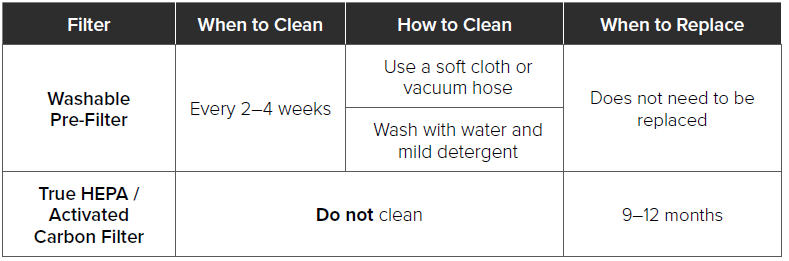
The Washable Pre-Filter should be cleaned every 2–4 weeks to increase efficiency and extend the life of your filter. You can set a reminder in the VeSync app to clean the pre-filter every 2, 3, or 4 weeks. Clean the pre-filter using a soft brush or vacuum hose to remove hair, dust, and large particles. Optionally, you can wash the pre-filter with water and a mild detergent to remove dirt and dust.
Note: Avoid scrubbing, scraping, or vigorously brushing the pre-filter. Do not use abrasive cleaning materials.
CARE & MAINTENANCE (CONT.)
When Should I Replace the Filter?
The True HEPA / Activated Carbon Filter should be replaced every 9 months. You may need to replace your filter earlier or later, depending on how often you use your air purifier. Using your air purifier in an environment with relatively high pollution may mean you will need to replace the filter more often, even if the Check Filter Indicator is off.
You may need to replace your filter if you notice:
- The air purifier does not effectively filter certain odors anymore
- Increased noise when the air purifier is on
- Decreased airflow from the top of the air purifier
- Unusual odors
- The HEPA filter is visibly dusty or discolored after removing the pre-filter. Note:
- To maintain the performance of your air purifier, only use official Levoit filters. For more information, contact Customer Support (see page 26).
- Remember to reset the Check Filter Indicator after replacing the filter (see page 17).
Replacing the Filter
- Unplug the air purifier, then pull the front cover to remove it (see Getting Started, page 7).
- Push the pre-filter’s tabs inward and pull to remove the pre-filter.
- Remove the old filter from the air purifier.
- Clean out any remaining dust or hair inside the air purifier using a vacuum hose. Note: Do not use water or liquids to clean the air purifier.
- Remove the plastic packaging from the new filter and place the filter and pre-filter inside the air purifier (see Getting Started, page 7)
- Replace the front cover.
- Plug in and turn on the air purifier. Reset the Check Filter Indicator (see page 17).
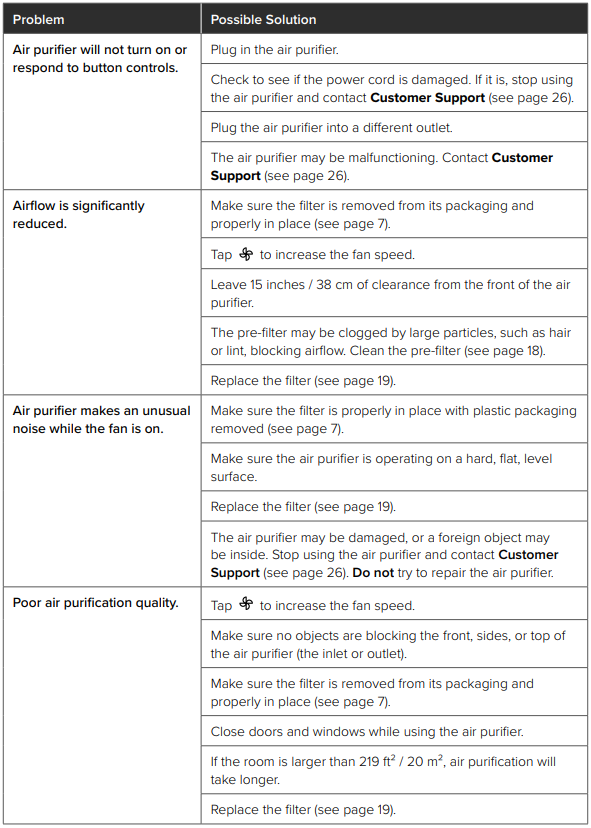
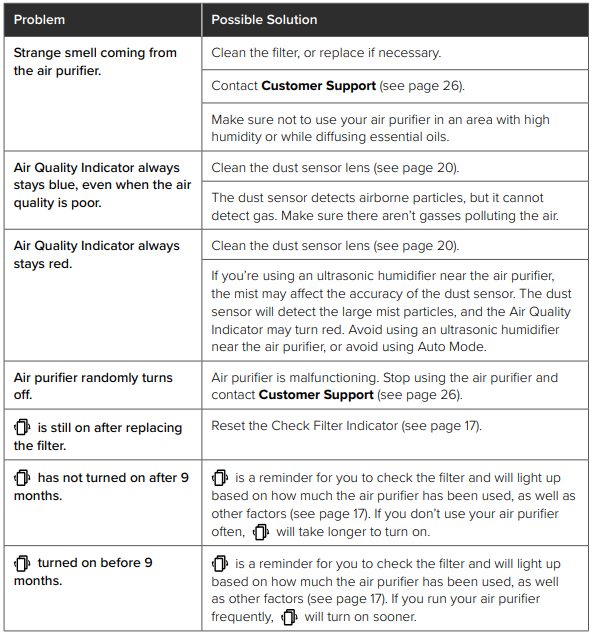
TROUBLESHOOTING
VESYNC APP TROUBLESHOOTING
My smart air purifier isn’t connecting to the VeSync app.
- Make sure your phone has Bluetooth® turned on and is not currently connected to another Bluetooth device.
- During the setup process, you must be on a secure 2.4GHz Wi-Fi® network. Confirm that the network is working correctly.
- Make sure the Wi-Fi password you entered is correct.
- There should be no spaces at the beginning or end of the password.
- Test the password by connecting a different electronic device to the router.
- If you’re manually typing in the SSID and password, double-check that both are entered correctly.
- Try moving your air purifier closer to the router. Your phone should be as close as possible to your air purifier.
- Your router may need to be at a higher location, away from obstructions.
- Make sure your air purifier and router are away from appliances (such as microwave ovens, refrigerators, electronic devices, etc.) to avoid signal interference.
- If you’re using a VPN, make sure it’s turned off while setting up your air purifier.
- Disable portal authentication for your Wi-Fi network. If portal authentication is enabled, the air purifier will not be able to access your Wi-Fi network, and setup will fail.
Note: Portal authentication means that you need to sign in to your Wi-Fi network through a web page before you can use the Internet.
My air purifier is offline.
- Make sure the air purifier is plugged in and has power, then refresh the VeSync menu by swiping down on the screen.
- Make sure your router is connected to the internet and your phone’s network connection is working.
- Delete the offline air purifier from the VeSync app. Swipe left (iOS®) or press and hold (Android™), then tap Delete. Reconfigure the air purifier with the VeSync app.
Note: Power outages, internet outages, or changing Wi-Fi routers may cause the air purifier to go offline.
WARRANTY INFORMATION
- Product Name: Vital 100S Smart True HEPA Air Purifier
- Model; LAP-V102S-WUS
- Date of Purchase
- Order ID
Pros & Cons of the Levoit Vital 100S Smart True HEPA Air Purifier
- Pros:
- Effective Filtration: True HEPA filter captures 99.97% of particles down to 0.3 microns, paired with an activated carbon filter to remove odors and VOCs.
- Smart Air Quality Sensor: The AirSight™ infrared dust sensor provides real-time monitoring and automatic fan speed adjustment for efficient purification.
- Quiet Operation: Runs as low as 23 dB in sleep mode, suitable for bedrooms and offices without disturbing the environment.
- Smartphone App Control: The Vsync app allows remote operation, scheduling, and historical air quality tracking.
- Compact Design: Lightweight (around 10 lbs) and a small footprint make it easy to move and fit into limited spaces.
- Energy Efficient: Consumes about 55 watts, balancing power and efficiency for daily use.
- Cons:
- Sensor Accuracy: The Infrared sensor is slightly less precise than the laser sensors found in more expensive Levoit models (e.g., Core 400S).
- Room Coverage: Ideal for medium rooms up to about 219 sq. ft., which may not suffice for larger spaces.
- Filter Replacement Cost: Replacement filters can add to maintenance expenses over time.
- App Dependency: Some users may find smart app controls less intuitive compared to direct physical controls.
- Price Compared to Basic Models: Slightly higher price than non-smart air purifiers with similar filtration capabilities.
Customer Reviews of the Levoit Vital 100S Smart True HEPA Air Purifier
Customers generally praise the Levoit Vital 100S Smart True HEPA Air Purifier for its simple yet effective air cleaning performance and smart features. Many users report significant improvement in allergies and pet odor reduction, highlighting the activated carbon filter’s effectiveness. The quiet operation during nighttime use is frequently commended, with noise levels low enough not to interfere with sleep. The air quality indicator and app control receive positive feedback for convenience and real-time monitoring.
Common complaints include occasional confusion with the app interface and a desire for broader room coverage. A few users note that the air quality sensor sometimes reacts less precisely compared to higher-end models. Overall, the purifier holds around a 4 to 4.5-star rating from verified buyers, with many recommending it for medium-sized bedrooms, living rooms, or pet areas.
Purchase recommendations emphasize the device’s value for money,y given its blend of smart automation, compact design, and reliable HEPA filtration. Users seeking a balance between advanced features and affordable pricing find the Vital 100S a solid choice.
Faqs
How do I set up the levoit Vital 100S Smart True HEPA Air Purifier for the first time?
What should I do if the levoit Vital 100S Smart True HEPA Air Purifier is not turning on?
How do I clean and maintain the filters in the levoit Vital 100S Smart True HEPA Air Purifier?
Can I use the levoit Vital 100S Smart True HEPA Air Purifier with smart home devices or apps?
What is the ideal room size for the levoit Vital 100S Smart True HEPA Air Purifier?
How often should I replace the filters in the levoit Vital 100S Smart True HEPA Air Purifier?
Why is my levoit Vital 100S Smart True HEPA Air Purifier making noise, and how can I reduce it?
What are the key features that make the levoit Vital 100S Smart True HEPA Air Purifier different from other models?
More levoit manuals
- How to Use: Levoit Smart True HEPA Air Purifier Core 300S User Manual
- Setup: Levoit Console True HEPA Air Purifier LV-H135 User Manual
- Setup: Levoit Vital 100 True HEPA Air Purifier User Manual
- Setup: Levoit Air Purifier Core 300 User Manual
- Setup: Levoit Pet Care Air Purifier Core P350 User Manual
- Specifications: Levoit True HEPA Air Purifier LAP-C601S-WUS
Leave a Comment