
Setup: Levoit Console True HEPA Air Purifier LV-H135 User Manual
Content
Levoit Console True HEPA Air Purifier LV-H135
Introduction
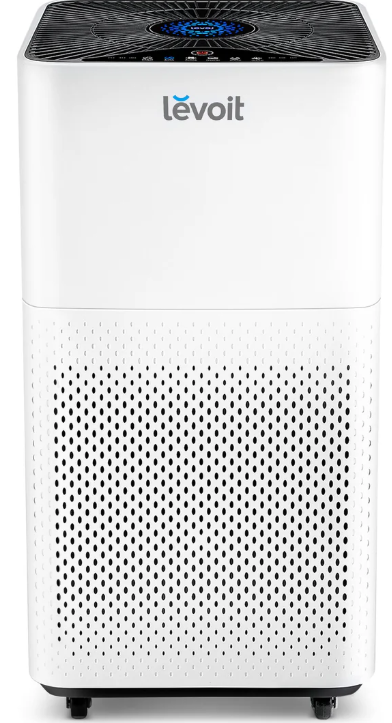
The Levoit Console True HEPA Air Purifier LV-H135 is an advanced air cleaning solution designed to provide healthier indoor air quality for medium to large rooms up to 463 square feet (43 m²). Equipped with a powerful 3-stage filtration system, it effectively captures 99.97% of airborne particles, including dust, pollen, pet dander, mold spores, and smoke, making it ideal for allergy sufferers, pet owners, and those living in urban or wildfire-prone environments. The purifier’s True HEPA filter is complemented by a Nylon pre-filter and a high-efficiency activated carbon filter that also neutralizes odors and harmful gases.
Unique selling points include a built-in air quality indicator with LED color feedback, multiple fan speeds (low, medium, high), a smart auto mode, and a quiet sleep mode operation at noise levels as low as 26 dB. The device also features a large 6-liter water tank for added humidification and aroma diffusion, enhancing air comfort. Its wheeled, compact design allows easy mobility across living rooms, bedrooms, and office spaces.
With a rated power of 38–40W and certifications such as ETL, FCC, and CARB, the LV-H135 combines energy efficiency with safety. This model targets health-conscious consumers seeking reliable, quiet, and user-friendly air purification. The Levoitt Console True HEPA Air Purifier LV-H135 typically retails around $250–$280, readily available through online retailers such as Amazon and Walmart, often with free shipping and warranty support.
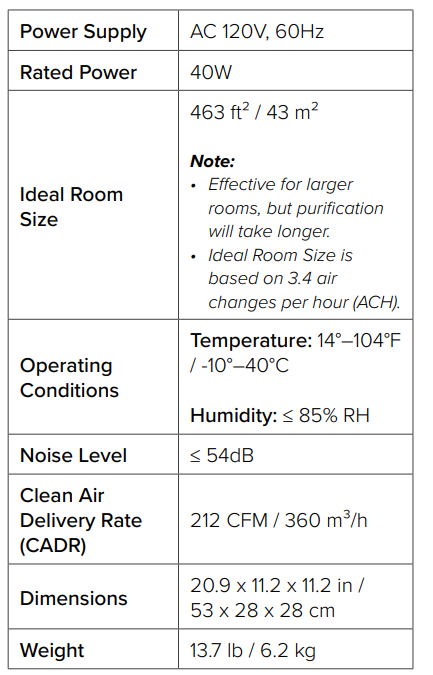
Specifications
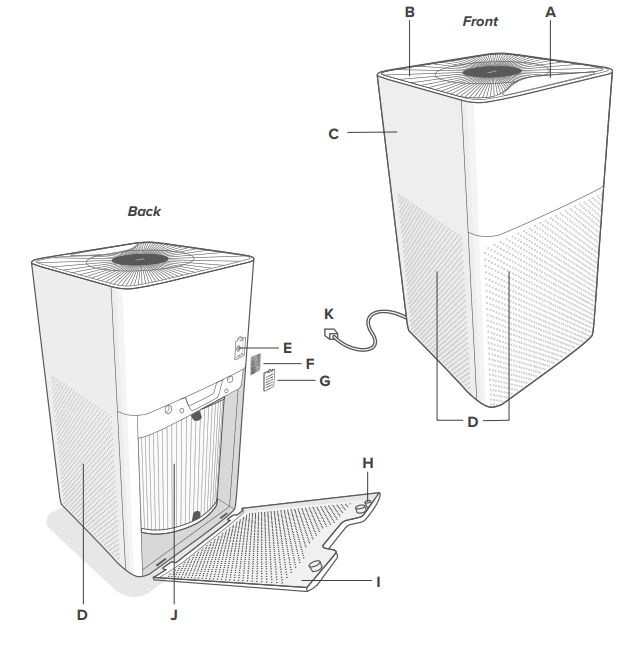
GETTING TO KNOW YOUR AIR PURIFIER
- LED Display
- Air Outlet
- Housing
- Air Intake (Front and Back)
- Air Quality Sensor
- Sensor Cover Sponge
- Sensor Cover
- Safety Trigger
- Filter Cover
- Filter
- Power Cord
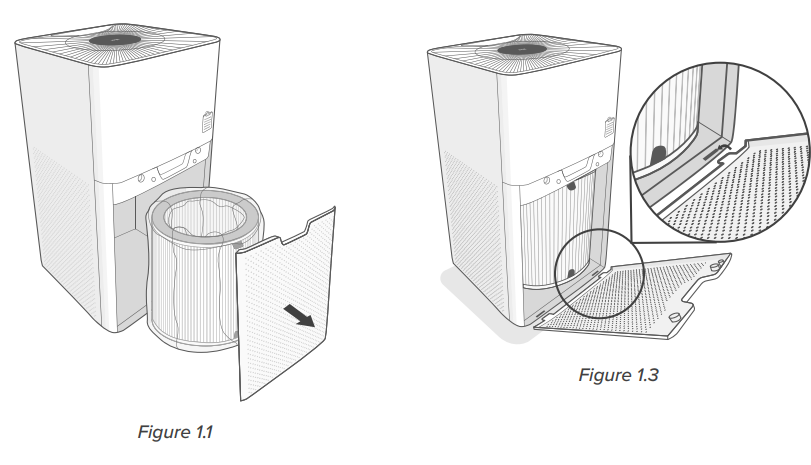
GETTING STARTED
- Pull the handle of the filter cover to open the housing. Remove the filter from the housing. [Figure 1.1]
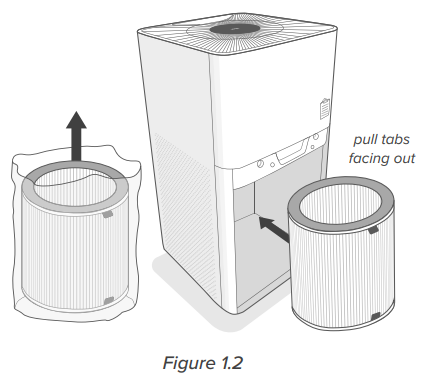
- Remove the filter from its plastic packaging, then reinstall it into the housing. Make sure the pull tabs on the filter are facing out. [Figure 1.2]
- Replace the filter cover by lining up the cover’s feet with the slots on the bottom of the housing. [Figure 1.3]
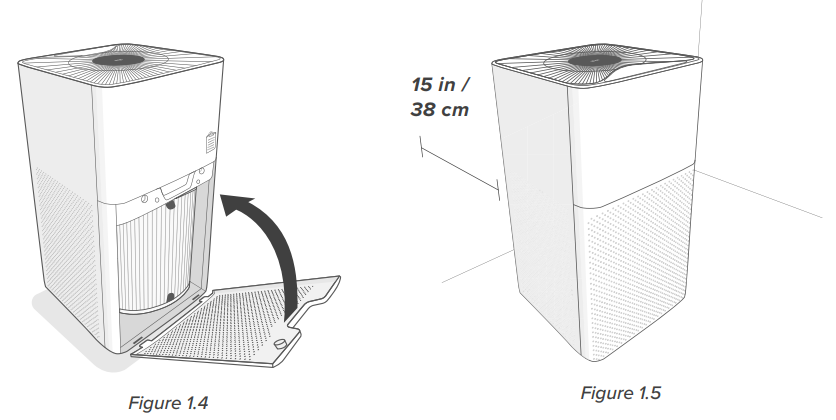
- Push the cover securely closed. [Figure 1.4] The air purifier uses a magnetic safety trigger to make sure that the filter cover is closed. If not properly closed, the air purifier will not turn on.
- Place the air purifier on a hard, flat surface. Leave 15 in / 38 cm of clearance on all sides of the air purifier.[Figure 1.5]
Note: If you are not planning to use the air purifier for a long period of time, we recommend keeping the filter clean by leaving it inside its plastic packaging until it is ready to be used.
CARE & MAINTENANCE
Cleaning the Air Purifier
Note: Do not clean with abrasive chemicals or flammable cleaning agents.
Unplug before cleaning.
- Wipe the outside of the air purifier with a soft, dry cloth. If necessary, wipe the housing with a damp cloth, then immediately dry.
- Vacuum the inside of the air purifier.
Cleaning the Sensor Cover
If the air quality indicator does not seem to be accurate, clean the sensor cover.
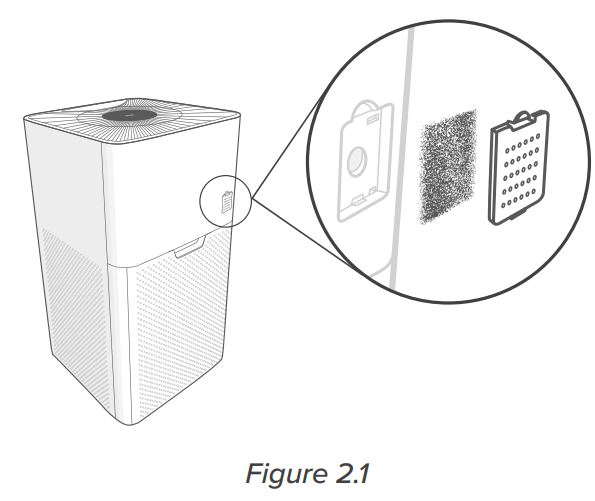
- Remove the sensor cover. [Figure 2.1]
Note: The sensor cover has a sponge inside to protect the air quality sensor from large particles. - Wipe the cover with a dry cloth. Wash the sponge with clean water, then dry it.
- Replace the sponge in the sensor cover, and then replace the sensor cover.
Note: Do not throw away the sponge. If the sponge is not in the sensor cover, the air quality sensor may not work correctly.
Check Filter Indicator will light up as a reminder to check the filter. Depending on how often you use the air purifier, the indicator should turn on within 6–8 months. You may not need to replace your filter yet, but you should check it when it turns on.
Resetting the Check Filter Indicator
Reset the Check Filter Indicator when:
Lights up.
- Replace the filter (see page 14).
- Turn on the air purifier.
- Press and hold for 3 seconds.
- The light will turn off after the filter indicator is successfully reset.
The filter was changed before it lit up.
- Press and hold for 3 seconds until it lights up.
- Press and hold again for 3 seconds.
- The light will turn off after the filter indicator is successfully reset.
The filter was changed before it lit up.
- Press and hold for 3 seconds until it lights up.
- Press and hold again for 3 seconds.
- The light will turn off after the filter indicator is successfully reset.
When Should I Replace the Filter?
The filter should be replaced every 6–8 months. You may need to replace your filter earlier or later, depending on how often you use your air purifier. Using your air purifier in an environment with relatively high pollution may mean you will need to change the filter more often, even if it is off.
You may need to replace your filter if you notice:
- Increased noise when the air purifier is on
- Decreased airflow
- Unusual odors
- A visibly clogged filter
Note:
- To maintain the performance of your air purifier, only use official Levoit filters. To buy replacement filters, visit Levoit’s online store.
- Remember to reset after changing the filter.
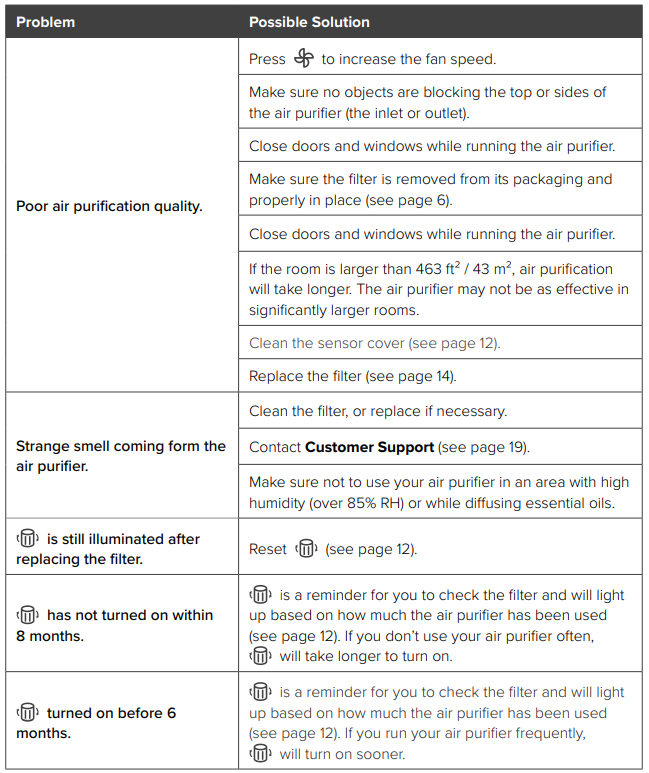
TROUBLESHOOTING
Pros & Cons of the Levoit Console True HEPA Air Purifier LV-H135
- Pros:
- High-efficiency 3-stage filtration system effectively removes 99.97% of airborne particles,s including allergens, smoke, and odors.
- Large coverage area suitable for rooms up to 463 ft², ideal for living rooms and medium-large bedrooms.
- Quiet operation with sound levels as low as 26 dB in sleep mode, perfect for nighttime use.
- Convenient features like auto mode, timer (2, 4, 8 hours), filter replacement indicator, and adjustable display brightness.
- Wheeled design increases portability and ease of placement within the home.
- Energy-efficient with low power consumption (~38-40W) and standby power under 0.8W.
- Cons:
- Filter replacements can be moderately expensive and need changing approximately every 6-8 months, hs depending on air quality.
- Does not include a smart app or Wi-Fi connectivity, limiting remote control capabilities compared to some competitors.
- Some users report rt the LED display can be overly bright at night without a dedicated dimming option.
- Though large, the coverage area is less than some premium models, reaching 700+ sq ft, so not ideal for very large open spaces.
- Filter design is cylindrical,l which may limit compatibility with other filter brands, requiring proprietary replacements.
- Value for Money: The Levoit Console True HEPA Air Purifier LV-H135 offers strong filtration performance and user-focused features at a mid-range price point, making it a competitive choice against models like Coway Airmega and Honeywell HPA300 for large room purification.
Customer Reviews and Feedback on the Levoit Console True HEPA Air Purifier LV-H135
Users consistently praise the Levoit Console True HEPA Air Purifier LV-H135 for its effective air cleaning, especially its ability to reduce allergens, pet dander, and smoke odors. Many reviewers highlight its quiet operation and the convenience of the wheeled design for moving the unit between rooms. The air quality indicator LED receives positive notes for providing real-time visual feedback on environmental conditions.
Common complaints include the brightness of the LED display during night use and the ongoing cost of filter replacements. Some customers also mention the absence of smart connectivity features as a downside compared to similarly priced models. Overall, the purifier holds an average rating of around 4.5 out of 5 stars on major retail sites, with frequent recommendations for allergy sufferers and pet owners seeking a reliable, easy-to-use device.
Typical testimonial: “This air purifier has noticeably improved my indoor air quality; the smell of smoke and pet odors disappeared within days. It's quiet enough to run at night without disturbance.”
Purchase recommendation is strong for users looking for a robust True HEPA purifier without the need for smartphone integration, especially for medium to large rooms.
Faqs
How do I set up the Levoit Console True HEPA Air Purifier LV-H135 for the first time?
What should I do if the Levoit Console True HEPA Air Purifier LV-H135 is not working properly?
What are the key features of the Levoit Console True HEPA Air Purifier LV-H135?
How often should I maintain the Levoit Console True HEPA Air Purifier LV-H135?
Can I use the Levoit Console True HEPA Air Purifier LV-H135 in a small room?
What is the purpose of the Auto Mode on the Levoit Console True HEPA Air Purifier LV-H135?
How do I reset the Check Filter Indicator on the Levoit Console True HEPA Air Purifier LV-H135?
Can I customize the brightness of the LED display on the Levoit Console True HEPA Air Purifier LV-H135?
More levoit manuals
- Setup: Levoit Vital 100S Smart True HEPA Air Purifier User Manual
- Setup: Levoit Air Purifier Core 300 User Manual
- How to Use: Levoit Smart True HEPA Air Purifier Core 300S User Manual
- Specifications: Levoit True HEPA Air Purifier LAP-C601S-WUS
- Setup: Levoit Vital 100 True HEPA Air Purifier User Manual
- Levoit True Hepa Air Purifier LAP-C201S-AUSR User Guide
Leave a Comment