
How to Use: Levoit Smart True HEPA Air Purifier Core 300S User Manual
Content
Levoit Smart True HEPA Air Purifier Core 300S
Introduction
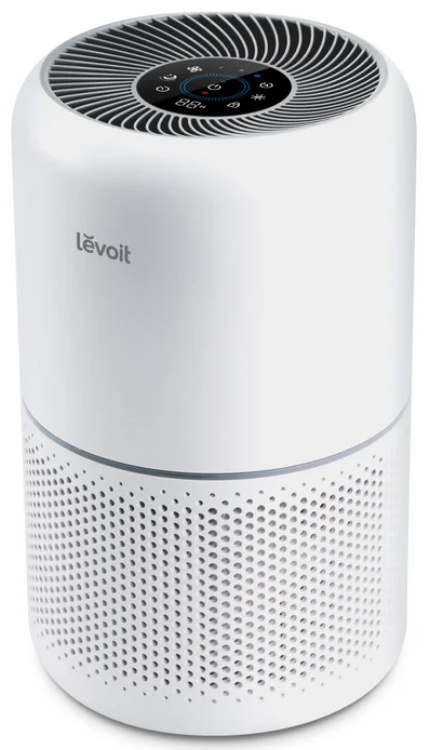
The Levoit Smart True HEPA Air Purifier Core 300S is a highly advanced, smart air purifier designed to deliver clean and healthy indoor air with impressive efficiency. Featuring a three-stage filtration system including a pre-filter, True HEPA filter, and activated carbon filter, it effectively removes airborne pollutants such as dust, pet dander, pollen, smoke, odors, VOCs, bacteria, and viruses. Its compact design makes it suitable for rooms up to 219 square feet, making it perfect for bedrooms, offices, and small living areas.
Key benefits include the AirSight Plus laser particle sensor that monitors air quality in real-time, an intuitive LED air quality indicator, and smart automation via the VeSync app, allowing remote control, scheduling, and monitoring from anywhere. The Core 300S supports auto mode, which adjusts fan speeds automatically based on air quality, ensuring optimal purification with minimal user intervention. It also operates quietly, particularly in sleep mode, making it ideal for night use without disturbance.
This model targets health-conscious individuals, allergy sufferers, pet owners, and anyone seeking to improve indoor air quality effortlessly. Its estimated price range is around $100 to $130, offering excellent value for its smart features and performance. The Core 300S is widely available through major online retailers and specialized home appliance stores.
Package Contents
- 1 x Sman Air Purifier
- 1 x True HEPA 3-Stage Original Filter (Pre-installed)
- 1 x User Manual
- 1 x Quick Start Guide
Specifications
- Power Supply: AC 120V, 60Hz
- Rated Power: 23W
- Ideal Room Size: 219 ft2 / 20 m2
Note: Effective for larger rooms, but purification will take longer. - CADR(CFM): 141 CFM / 240 m3/h
- Operating Conditions:
- Temperature:
14'-104'F / -10'-40'C - Humidity: < 85% RH
- Temperature:
- Noise Level: 22-50dB
- Standby Power: <2W
- Dimensions: 8.7 X 8.7 X 14.2 in / 22 x 22 x 36 cm
- Weight: 5.95 lb/ 2.7 kg
Fetures
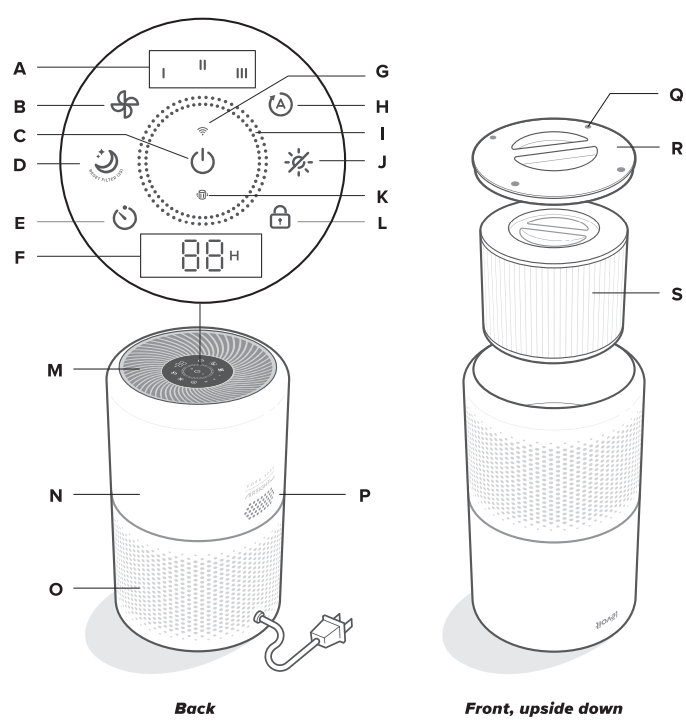
GETTING TO KNOW YOUR SMART AIR PURIFIER
- Fan Speed Indicators
- Fan Speed Button
- On/Off Button
- Sleep Mode Button
- Timer Button
- Timer Indicator
- Wi-Fi® Indicator
- Auto Mode Button
- Air Quality Indicator Rings Display Off Button
- Check Filter Indicator
- Display Lock Button
- Air Outlets
- Housing
- Air Inlets
- AirSight" Plus Laser Dust Sensor
- Anti-Skid Pads
- Filter Cover
- True HEPA 3-Stage Original Filter
VeSync App Functions
The VeSync app allows you to access additional smart air purifier functions, including those listed below. As the app develops, more features may become available.
Remote Control
- Change any air purifier settings through the app, even while Display Lock is on.
Air Quality Updates
- View real-time PM2.5 updates in the app.
- See your air quality history for the previous week.
Auto Mode
- Access additional Auto Modes: Quiet Auto Mode and Efficient Auto Mode.
- Quiet Auto Mode never uses the highest fan speed to avoid making too much noise.
- Efficient Auto Mode lets you choose the size of the area you want to purify. The air purifier will use the highest fan speed to clean the air in that area. Once your air is clean, it will lower to the fan speed best suited to the selected room size.
Schedules
- Create and customize schedules for your air purifier to match your routines.
Timer Function
- Set a timer between 1-24 hours.
Filter Replacement Info
- Keep tabs on the remaining filter life by checking the filter life percentage in the app.
- Shop for replacement filters.
CARE & MAINTENANCE
Cleaning the Smart Air Purifier
- Unplug before cleaning.
- Wipe the outside of the air purifier with a soft, dry cloth. If necessary, wipe the housing with a damp cloth, then immediately dry.
- Vacuum the inside of the air purifier.
- Do not clean with abrasive chemicals or flammable cleaning agents.
Check Filter Indicator
 will light up as a reminder to check the filter. You will also receive a notification from VeSync when it's time to check your filter, and you can view your filter life percentage in the app at any time. Depending on how often you use the air purifier, the indicator should turn on within 6-8 months. You may not need to replace your filter yet, but you should check it when turns on.
Cleaning the Filter
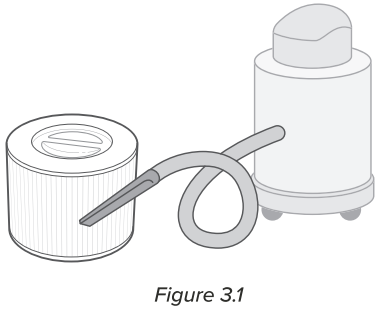
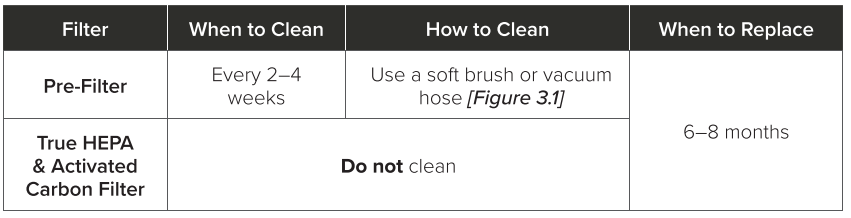
The outer pre-filter should be cleaned every 2-4 weeks to increase efficiency and extend the life of your filter. Clean the pre-filter using a soft brush or vacuum hose to remove hair, dust, and large particles. [Figure 3.1] Do not clean the filter with water or other liquids.
Resetting the Check
Filter Indicator
Reset the Check Filter Indicator when:
Lights up red.
- Replace the filter (see page 14).
- Turn on the air purifier.
- Press and hold
 for 3 seconds.
 - Will turn off when successfully reset.
The filter was changed before it lit up.
- Press and hold for 3 seconds.
- The will flash for 3 seconds.
- Will turn off when successfully reset.
CARE & MAINTENANCE (CONT.)
When Should I Replace the Filter?
The filter should be replaced every 6-8 months. You may need to replace your filter earlier or later, depending on how often you use your air purifier. Using your air purifier in an environment with
Relatively high pollution may mean you will need to replace the filter more often, even if is off.
You may need to replace your filter if you notice:
- Increased noise when the air purifier is on
- Decreased AI flow
- Unusual odors
- A vi si b ly clogged filter
TROUBLESHOOTING
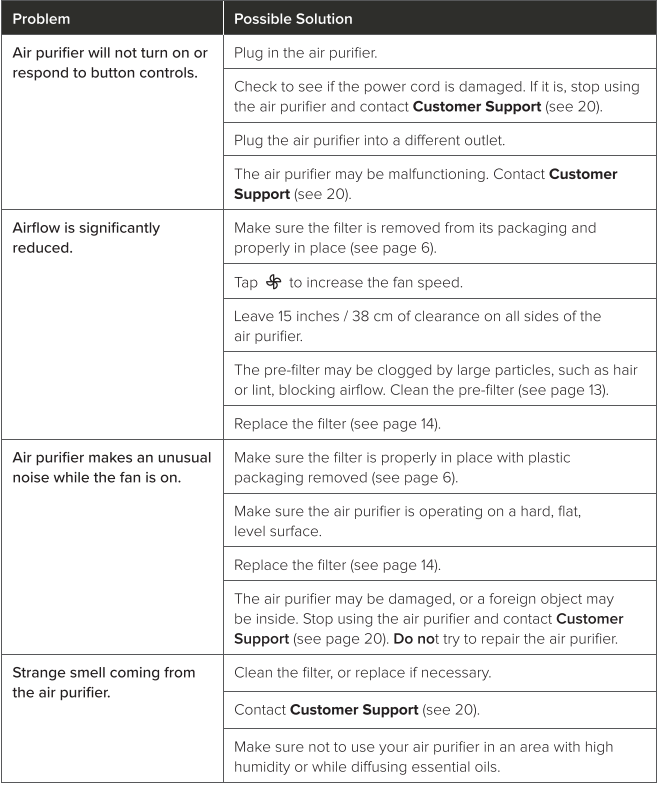
.png)
VESYNC APP TROUBLESHOOTING
My air purifier isn't connecting to the VeSync app.
- During the setup process, you must be on a secure 2.4GHz WiFi network. Confirm that the network is working correctly.
- Make sure the WiFi password you entered is correct.
- There should be no spaces at the beginning or end of the password.
- Test the password by connecting a different electronic device to the router.
- If you're manually typing in the SSID and password, double-check that both are entered correctly.
- Try moving your air purifier closer to the router. Your phone should be as close as possible to your air purifier.
- Your router may need to be at a higher location, away from obstructions.
- Make sure your air purifier and router are away from appliances (such as microwave ovens, refrigerators, electronic devices, etc.) to avoid signal interference.
- If you're using a VPN, make sure it's turned off while setting up your air purifier.
- Disable portal authentication for your WiFi network. If portal authentication is enabled, the air purifier will not be able to access your WiFi network, and setup will fail.
Note: Portal authentication means that you need to sign in to your WiFi network through a web page before you can use the Internet.
My air purifier is offline.
- Make sure the air purifier is plugged in and has power, then refresh the VeSync menu by swiping down on the screen.
- Make sure your router is connected to the internet and your phone's network connection is working.
- Delete the offline air purifier from the VeSync app. Swipe left (iOS®) or tap and hold (Android™), then tap Delete. Reconfigure the air purifier with the VeSync app.
Note: Power outages, internet outages, or changing WiFi routers may cause the air purifier to go offline.
Pros & Cons of Levoit Smart True HEPA Air Purifier Core 300S
Pros
- Advanced 3-Stage Filtration: Efficiently captures fine particles, odors, and VOCs with True HEPA and activated carbon filters.
- Smart Features & App Control: Wi-Fi enabled with VeSync app for remote monitoring, scheduling, and real-time air quality updates.
- Accurate Air Quality Sensor: AirSight Plus laser particle sensor enables auto mode for hands-free operation and constant air quality awareness.
- Quiet Operation: Sleep mode produces sound as low as ~24 dB, suitable for bedrooms and workspaces.
- Energy Efficient: It consumes around 23 watts at maximum speed, making it cost-effective to run daily.
- Compact & Lightweight: Easy to place and move, ideal for small to medium rooms up to 219 sq. ft.
Cons
- Filter Replacement Cost: Filters last 6-8 months, but add to ongoing maintenance expenses.
- Room Size Limitation: Best suited for rooms under 220 sq. ft., less effective in large open spaces without multiple units.
- App Connectivity Occasional Issues: Some users report intermittent Wi-Fi connection drops or app syncing delays.
- Lacks Advanced VOC Sensors: While effective, the VOC detection and control are basic compared to higher-end models.
- Noise at Max Speed: Noise levels can reach 54-65 dB on the highest fan setting, which may be noticeable in quiet environments.
Compared to alternatives like the original Core 300, the 300S offers enhanced smart features and sensor accuracy, delivering better automation and usability at a comparable price point.
Customer Reviews and User Feedback on the Levoit Smart True HEPA Air Purifier Core 300S
Customers frequently praise the Levoit Smart True HEPA Air Purifier Core 300S for its effective purification capabilities, especially appreciating the three-stage filtration that noticeably reduces dust, pet dander, and smoke odors. The smart app control and air quality sensor are often highlighted as standout features, providing convenience and peace of mind through real-time air quality monitoring.
On average, the product receives ratings of around 4 to 4.5 stars out of 5 across major retail platforms. Testimonials emphasize its quiet operation in sleep mode and the value for money considering its smart capabilities and performance. Many users recommend it for bedrooms and small living rooms where clean air is essential.
Common complaints include occasional challenges with Wi-Fi connectivity and the recurring cost of filter replacements. A few users noted that the noise at maximum fan speed is louder than expected, which can be intrusive in quiet settings. Despite these, the majority recommend the Core 300S for anyone seeking an affordable, feature-packed smart air purifier that balances performance and convenience.
Faqs
How do I set up the levoit Smart True HEPA Air Purifier Core 300S for the first time?
What should I do if my levoit Smart True HEPA Air Purifier Core 300S is not connecting to Wi-Fi?
Can I control the levoit Smart True HEPA Air Purifier Core 300S with voice assistants like Alexa or Google Assistant?
How often should I replace the filter in my levoit Smart True HEPA Air Purifier Core 300S?
What is the best way to maintain the levoit Smart True HEPA Air Purifier Core 300S for optimal air cleaning performance?
Why is my levoit Smart True HEPA Air Purifier Core 300S making unusual noises, and how can I fix it?
How does the AirSight™ Plus technology in the levoit Smart True HEPA Air Purifier Core 300S improve indoor air quality?
Is the levoit Smart True HEPA Air Purifier Core 300S suitable for large rooms or only small spaces?
More levoit manuals
- Setup: Levoit Vital 100 True HEPA Air Purifier User Manual
- Setup: Levoit Vital 100S Smart True HEPA Air Purifier User Manual
- Setup: Levoit Pet Care Air Purifier Core P350 User Manual
- Setup: Levoit Console True HEPA Air Purifier LV-H135 User Manual
- Setup & Features: Levoit Classic 42-Inch Smart Tower Fan User Manual
- Setup: Levoit Air Purifier Core 300 User Manual
Leave a Comment