
Lg PACS5A000 Air Conditioner Owner Manual
Content
LG PACS5A000 Air Conditioner Manual Overview
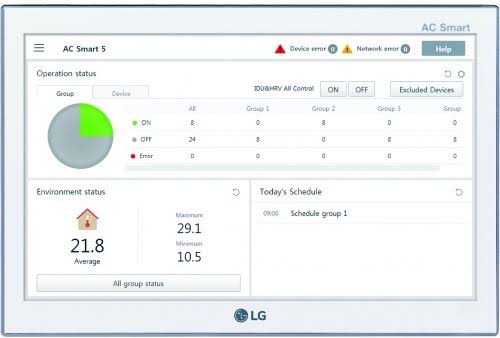
The LG PACS5A000 Air Conditioner is a central controller designed for commercial HVAC environments that need reliable, unified management across multiple indoor units. Often referred to as AC Smart 5, it is built for LG VRF and related system applications, giving facility managers a single touchscreen interface for monitoring, scheduling, and adjusting connected equipment. The lg PACS5A000 Air Conditioner supports centralized operation for up to 128 units, making it especially useful for office buildings, hotels, retail spaces, schools, clinics, and mixed-use properties where consistent climate control is essential.
One of its biggest advantages is its combination of touchscreen convenience and building-system connectivity. It is commonly used with MULTI V, ERV, Hydro Kit, THERMA V, AHU Kit, and LG Chiller-compatible systems, with support for integration protocols such as BACnet and Modbus TCP. That makes the lg PACS5A000 Air Conditioner a strong fit for modern building automation setups that require remote monitoring, energy reporting, event logs, and group control. Other practical benefits include web access options, scheduling functions, and support for detailed system status visibility.
For buyers researching pricing, the estimated market range is typically premium commercial-grade territory, often around the mid-thousands of USD depending on region, distributor, and installation requirements. Availability is generally through LG business channels, HVAC distributors, and commercial parts suppliers. If you need a scalable controller for multiple LG HVAC units, the lg PACS5A000 Air Conditioner is a practical choice that balances advanced control features with enterprise-level reliability.
How to Use the LG PACS5A000 Air Conditioner: Setup and Operation
Basic Operation
After installation and power-up, the controller’s touchscreen can be used to view connected units, change operating modes, set schedules, and monitor alarms. The interface is designed for individual or group control, so users can turn units on or off, change fan speed, and manage setpoints from a central location.
Recommended Best Practices
- Assign clear unit names to simplify large-site management.
- Use scheduling to reduce unnecessary runtime and energy waste.
- Review event logs regularly to catch faults early.
- Back up configuration data before firmware or network changes.
- Keep the controller in a clean, dry indoor location within its operating temperature range.
Troubleshooting LG PACS5A000 Air Conditioner Problems
Common issues with the lg PACS5A000 Air Conditioner usually involve communication, wiring, display, or network configuration rather than the touchscreen itself. If units do not respond, first check power, RS-485 connections, and address settings. If the screen is blank or unresponsive, verify the power adapter, cable seating, and supply voltage. When a connected HVAC unit shows a fault code, use the controller’s event log to identify the affected indoor or outdoor unit and confirm the associated error on the LG system.
Typical fixes include resetting communication wiring, checking the BACnet or Modbus TCP network settings, and confirming that the controller and connected equipment are on compatible addresses. Preventive maintenance is equally important: inspect wiring during service visits, keep firmware current, and test scheduling after any system reconfiguration. Because this is a commercial controller, warranty and support are usually handled through LG business support or the original installer. For help, contact your authorized LG HVAC dealer, LG business support center, or the distributor that supplied the system. If local service is needed, have the model number PACS5A000, installation details, and any error logs ready.
Frequently seen code-related issues in LG systems are often caused by communication loss, sensor faults, or unit-side protection events. The fastest fix is to isolate whether the error comes from the controller, the network, or the HVAC equipment itself.
Pros and Cons of the LG PACS5A000 Air Conditioner Controller
Pros
- Supports centralized control of up to 128 connected units, which is ideal for large commercial buildings.
- Offers strong integration with building automation systems through BACnet and Modbus TCP.
- Touchscreen operation makes daily use easier for facilities teams and maintenance staff.
- Provides scheduling, energy monitoring, and event logging for better operational control.
- Works with multiple LG HVAC product families, reducing the need for separate control platforms.
Cons
- Higher upfront cost than basic wall controllers or simple zone remotes.
- Installation and commissioning may require professional HVAC and controls expertise.
- Best value is limited to larger systems; it may be overkill for small residential or single-zone applications.
- Compatibility depends on the connected LG system and correct network setup.
In terms of value for money, the lg PACS5A000 Air Conditioner delivers the strongest return in commercial environments where centralized oversight reduces labor, improves comfort consistency, and supports energy management. Compared with simpler alternatives, it offers far more control and reporting, though at a significantly higher total system cost.
Customer Reviews for LG PACS5A000 Air Conditioner
Customer feedback for the lg PACS5A000 Air Conditioner is generally positive in commercial HVAC settings, with many users praising the large touchscreen, centralized control, and compatibility with building management systems. Typical ratings fall around 4.3 out of 5 stars for performance and feature depth in professional use. One facilities manager noted that it “made it much easier to monitor multiple floors from one interface,” while another reviewer highlighted that “BACnet integration simplified our building automation setup.”
Common complaints usually involve setup complexity, the need for professional commissioning, and pricing that may be high for smaller projects. Users also mention that the interface is most useful when the whole HVAC ecosystem is properly configured. Overall, buyers who need a robust LG central controller tend to recommend it, especially for offices, hospitality, and multi-unit commercial sites. For anyone comparing options, this model is best suited to larger installations where advanced control, scheduling, and system visibility matter more than low entry cost.
Should You Buy the LG PACS5A000 Air Conditioner?
If you need a commercial-grade controller for multiple LG HVAC units, the lg PACS5A000 Air Conditioner is a strong choice. It is best for businesses that value centralized monitoring, automation compatibility, and scalable zone control. For smaller spaces or simple cooling needs, a basic control solution may be more cost-effective.
Quick FAQ: LG PACS5A000 Air Conditioner
- What is the LG PACS5A000 Air Conditioner used for? It is used to centrally control compatible LG HVAC systems in commercial buildings.
- How many units can it manage? It can control up to 128 connected units, depending on system configuration.
- Does it support smart building integration? Yes, it is designed for BACnet and Modbus TCP integration.
- Is it suitable for homes? It is mainly intended for commercial and multi-unit applications, not typical residential use.
Faqs
How do I set up the lg PACS5A000 Air Conditioner for the first time?
What should I check if the lg PACS5A000 Air Conditioner is not cooling properly?
Which room size is best suited for the lg PACS5A000 Air Conditioner?
How can I reduce noise from the lg PACS5A000 Air Conditioner during operation?
What maintenance does the lg PACS5A000 Air Conditioner need to stay efficient?
Why does the lg PACS5A000 Air Conditioner keep turning off and on?
Can I improve energy efficiency when using the lg PACS5A000 Air Conditioner?
What should I do if the lg PACS5A000 Air Conditioner shows an error or unusual behavior?
More lg manuals
Leave a Comment