
Mackie Onyx 1220 12-channel Analog Audio Mixer User Manual
Content
Mackie Onyx 1220 12-channel Analog Audio Mixer Manual
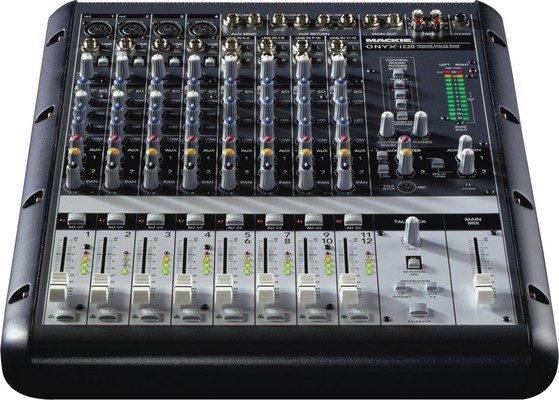
The Mackie Onyx 1220 12-channel Analog Audio Mixer is a compact, professional-grade small-format mixer designed for musicians, podcasters, home studios, and live sound setups that need clean analog routing with flexible connectivity. Built around four Onyx microphone preamps, Perkins EQ, and a rugged all-metal chassis, it delivers the kind of headroom and tonal control that users expect from a serious analog mixing console. Its 12-channel layout combines mic, line, and stereo inputs, making it a practical choice for recording vocals, instruments, keyboards, and playback sources at the same time.
One of the biggest advantages of the Mackie Onyx 1220 12-channel Analog Audio Mixer is its balance of studio-friendly features and live-sound usability. It includes direct outs for multitrack recording, 48V phantom power for condenser microphones, and sweepable mids for more precise EQ shaping. The first two channels also support instrument-level input, which makes it easier to connect guitars or bass without a separate DI box. This flexibility makes the mixer especially attractive for content creators, rehearsal spaces, small venues, and project studios that need reliable analog signal flow without complicated setup.
As of 2026, the Mackie Onyx 1220 is typically available on the used market rather than as a new retail product, with prices commonly ranging from about $180 to $260 depending on condition, included accessories, and whether the unit has the optional FireWire expansion. For buyers seeking an affordable analog mixer with premium preamps, the Onyx 1220 remains a strong value option in the compact mixer category.
Technical Specifications and Key Features of the Mackie Onyx 1220
- 12-channel analog mixer with 4 premium Onyx microphone preamps
- Perkins EQ with sweepable midrange for detailed tonal shaping
- 4 stereo line-level inputs for keyboards, media players, and external audio sources
- Balanced direct outputs on all channels via DB-25 connection for multitrack recording
- 48V phantom power with individual switching for mic channels
- Selectable instrument inputs on the first two channels
- 2 auxiliary sends with pre/post switching for monitor and effects routing
- 60mm faders for smooth level control
- Built-in talkback section for communication in studio or live environments
- Universal power supply support for worldwide use
- Approximate dimensions: 439 mm wide, 353 mm deep, 150 mm high
- Approximate weight: 7.3 kg
- Power consumption: about 40 watts
In practical use, the Mackie Onyx 1220 offers more recording flexibility than many entry-level 12-channel analog mixers because of its direct outputs and high-quality mic pres. Compared with simpler compact mixers, it is better suited for users who want both live mixing and studio capture in one unit. If you are comparing it with a basic USB mixer, the Onyx 1220 is more analog-focused and better suited to external audio interfaces or multitrack recording workflows.
Step-by-Step Setup Guide for the Mackie Onyx 1220
Start by placing the mixer on a stable, well-ventilated surface and make sure the power switch is off before connecting any cables. Next, connect microphones to the XLR inputs, line-level devices to the 1/4-inch inputs, and stereo sources to the stereo channels. If you are using condenser microphones, enable phantom power only on the channels that need it and confirm that all connected devices can safely accept it.
Set the channel gain controls low before powering on, then bring them up gradually while checking input meters or listening for clean signal. Use the EQ section to shape tone, set auxiliary sends for monitor mixes or external effects, and route your main outputs to powered speakers, a power amplifier, or an audio interface. If you plan to record, connect the direct outs to your recording system for individual track capture.
For troubleshooting during setup, check cable integrity, confirm the correct input type, and make sure the output destination is powered and set to the proper source. Avoid hot-plugging sensitive gear when phantom power is active. Always turn down monitor speakers before powering the mixer on or off to reduce pop noise and protect equipment.
Troubleshooting the Mackie Onyx 1220 12-channel Analog Audio Mixer
If you hear no sound, verify that the channel gain, fader, master level, and mute or routing settings are correctly adjusted. Also confirm that the source device is outputting audio and that the output destination is connected to the correct main or control room outputs. If one channel sounds weak or distorted, try another cable, reduce the gain, and inspect the source for clipping.
If phantom-powered microphones are not working, make sure phantom power is enabled on the correct channels and that the microphone is a condenser type that requires 48V. If hum or noise appears, use balanced connections where possible, separate audio cables from power cables, and test with different equipment to isolate ground-related issues. The Onyx 1220 does not use typical error codes, so most problems are resolved through signal-path checks rather than code-based fixes.
To prevent future issues, keep knobs and faders clean, store the mixer in a dry location, and avoid strain on the connectors. For support, refer to the product documentation, check the seller or retailer warranty if the unit was purchased used, and contact Mackie support through the official support channels listed in current product documentation or retailer resources. If the mixer shows physical damage or intermittent channel failure, professional servicing is recommended.
Pros and Cons of the Mackie Onyx 1220
Pros
- Clean, high-headroom Onyx preamps that suit vocals, instruments, and spoken voice
- Flexible analog routing with direct outs for recording and live applications
- Perkins EQ offers more precise tone control than many basic small-format mixers
- Instrument inputs on the first two channels reduce the need for extra DI boxes
- Solid build quality and a layout that is easy to learn quickly
- Strong value on the used market for studio and stage use
Cons
- No modern built-in USB audio interface, so recording requires external hardware
- Used-only availability can make condition and accessory completeness inconsistent
- Smaller channel count than larger mixers for expanding setups
- Some buyers may prefer newer digital mixers with scene recall and onboard effects
For users who want a straightforward analog console, the Mackie Onyx 1220 12-channel Analog Audio Mixer offers excellent sound quality and routing flexibility. Compared with newer digital alternatives, it is simpler to operate but lacks onboard recording convenience and memory presets. That makes it best for people who value hands-on control, reliable analog signal flow, and proven build quality over automation.
Customer Reviews and Real-World User Feedback
Typical user feedback for the Mackie Onyx 1220 12-channel Analog Audio Mixer is very positive, with many owners praising the sound quality, especially the mic preamps and EQ section. A common rating pattern from user impressions is around 4.5 out of 5 stars for audio quality, build, and flexibility. One recurring comment is that the mixer feels “small but seriously capable” for studio and rehearsal use.
Frequent praise includes clean gain, sturdy construction, and useful direct outputs for recording. Common complaints usually focus on age-related wear, limited modern connectivity, and the fact that used units may need cleaning or inspection before long-term use. Buyers who want a compact analog mixer for microphones, instruments, and line sources often recommend it as a smart purchase, especially when found in good condition at a fair price.
Is the Mackie Onyx 1220 Worth It?
The Mackie Onyx 1220 remains a strong choice for anyone who wants a dependable analog mixer with professional routing, useful preamps, and a practical workflow for small studios or live gigs. It is especially appealing if you need a compact console that can handle microphones, instruments, and stereo playback without sacrificing sound quality.
If your priority is a hands-on mixer with real analog character, multitrack-ready outputs, and a proven design, the Mackie Onyx 1220 12-channel Analog Audio Mixer is still worth considering in 2026. If you need USB audio, onboard effects, or digital recall, a newer hybrid or digital mixer may be a better fit.
Faqs
How do I set up the Mackie Onyx 1220 12-channel Analog Audio Mixer for first-time use?
What should I do if the Mackie Onyx 1220 12-channel Analog Audio Mixer has no sound on one channel?
Can I connect guitars directly to the Mackie Onyx 1220 12-channel Analog Audio Mixer without a DI box?
How do I use the Mackie Onyx 1220 12-channel Analog Audio Mixer for multitrack recording?
What is the best way to set gain and EQ on the Mackie Onyx 1220 12-channel Analog Audio Mixer?
Does the Mackie Onyx 1220 12-channel Analog Audio Mixer work with condenser microphones and phantom power?
Why is the Mackie Onyx 1220 12-channel Analog Audio Mixer creating hum or noise, and how can I fix it?
How should I clean and maintain the Mackie Onyx 1220 12-channel Analog Audio Mixer for long-term reliability?
More mackie manuals
- Mackie THUMP v4 Series Professional Subwoofer User Manual
- Setup & Features: Mackie MainStream Complete Live Streaming & Video Capture Interface Featuring Programmable Control Keys User Manual
- Mackie THUMP 210 Powered Loudspeaker User Manual
- How to Use: Mackie Thump Go 8" Portable Battery-Powered Loudspeaker User Manual
Leave a Comment