
How to Use: Mackie Thump Go 8" Portable Battery-Powered Loudspeaker User Manual
Content
Mackie Thump Go 8" Portable Battery-Powered Loudspeaker Review and Manual
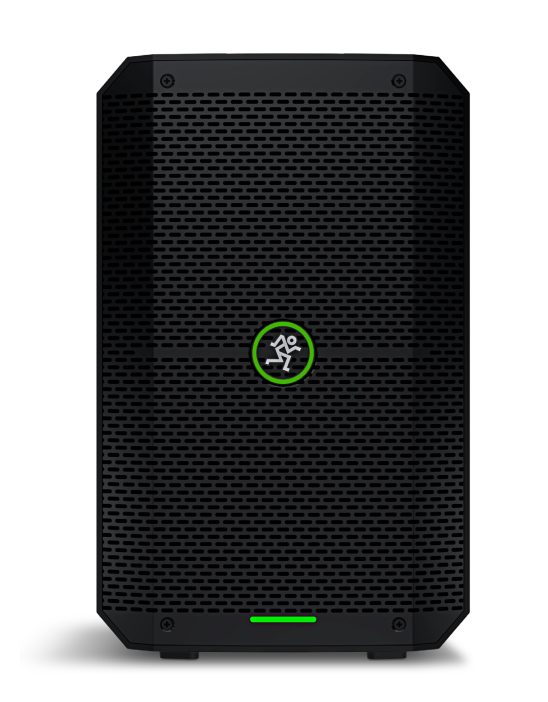
The Mackie Thump Go 8" Portable Battery-Powered Loudspeaker is a compact, high-output PA speaker built for mobile performers, presenters, instructors, and event hosts who need serious sound without a wall outlet. With a built-in rechargeable battery, Bluetooth streaming, a lightweight enclosure, and flexible input options, it is designed for everything from backyard parties and small gigs to fitness classes, pop-up events, and public speaking. The speaker is a practical choice for users who want portable sound reinforcement with minimal setup and dependable wireless convenience.
One of its biggest strengths is its balance of portability and performance. The 8-inch woofer and 1-inch compression driver deliver punchy sound for speech and music, while the battery lets you keep the show going for up to 12 hours under favorable conditions. It also includes a built-in mixer, multiple inputs, and true wireless stereo support, making it easy to adapt to different setups. For users searching for a battery-powered loudspeaker with strong output and simple controls, the Mackie Thump Go 8" Portable Battery-Powered Loudspeaker stands out as a versatile solution.
Estimated pricing typically falls around the mid-range portable PA category, with common market prices near $399 to $400 depending on retailer, region, and availability. It is widely sold through pro audio dealers and major online electronics retailers, and stock can vary due to demand. If you need a compact battery-powered Bluetooth PA speaker that is easy to transport and quick to deploy, this model is worth close consideration.
Technical Specifications and Key Features of the Mackie Thump Go 8" Portable Battery-Powered Loudspeaker
- Speaker type: 2-way portable battery-powered loudspeaker
- Driver configuration: 8-inch custom high-output woofer and 1-inch compression driver
- Amplifier power: 200 watts peak total output
- Frequency response: 50 Hz to 20 kHz at -10 dB; 57 Hz to 20 kHz at -3 dB
- Maximum SPL: 115 dB peak
- Coverage: 90° horizontal and 60° vertical dispersion
- Battery life: up to 12 hours depending on volume and content
- Charge time: about 3 hours with no signal and 4 hours with signal
- Inputs: dual combo XLR/1/4-inch mic-line inputs, 1/8-inch stereo input, Bluetooth audio
- Output: balanced XLR thru output
- Weight: 17.6 lb / 8 kg
- Dimensions: 18 x 9.1 x 11.2 in / 457 x 230 x 285 mm
- Power supply: 100–240 VAC, 50–60 Hz
Compared with many compact battery PA speakers, the Mackie Thump Go 8" Portable Battery-Powered Loudspeaker offers a stronger combination of output, portability, and pro-style connectivity than basic consumer Bluetooth speakers. It is also more travel-friendly than larger battery PA systems while still delivering enough volume for small to medium spaces.
Detailed Description of the Mackie Thump Go 8" Portable Battery-Powered Loudspeaker
The Mackie Thump Go 8" Portable Battery-Powered Loudspeaker works as a self-contained portable sound system. The internal Class-D amplification powers the woofer and compression driver, while the built-in lithium-ion battery keeps the unit operating away from AC power. Users can connect microphones, instruments, or playback devices through the combo inputs or stream audio wirelessly over Bluetooth for quick music playback.
This speaker is well suited for real-world applications such as weddings, fitness instruction, street performances, classroom presentations, small DJ setups, and outdoor gatherings. The enclosure uses molded polypropylene for durability, and the metal grille helps protect the drivers during transport and regular use. Its compact footprint and carry-friendly weight make it easier to move than many conventional powered speakers.
User experience is centered on simplicity. The controls are straightforward, the sound is loud for its size, and the battery makes it especially useful for locations where power access is limited. The monitor angle also adds flexibility for stage use or floor monitoring. For many buyers, the value comes from getting a portable PA speaker that feels purpose-built for fast setup and dependable performance.
How to Set Up the Mackie Thump Go 8" Portable Battery-Powered Loudspeaker
- Fully charge the speaker before first use using the included AC power connection.
- Place the speaker on a stable surface, stand, or floor position with the grille facing the audience.
- Connect a microphone or line-level source to one of the combo inputs using an XLR or 1/4-inch cable.
- For music playback, pair a phone, tablet, or laptop through Bluetooth and confirm pairing from your device settings.
- Adjust the input levels and master volume slowly to avoid distortion or feedback.
- Select the appropriate EQ or voicing mode if available for speech, music, or monitor-style use.
- Use the XLR thru output if you want to send the same signal to another speaker or recording device.
For best results, keep microphones behind the front of the loudspeaker to reduce feedback. Avoid placing the unit near water, in extreme heat, or on unstable furniture. If Bluetooth does not connect, turn Bluetooth off and on again on both devices, clear previous pairings, and restart the speaker.
Troubleshooting the Mackie Thump Go 8" Portable Battery-Powered Loudspeaker
- No sound: check power, battery charge, input gain, master volume, cable condition, and source output level.
- Bluetooth pairing fails: remove the device from saved pairings, restart both devices, and try pairing again within close range.
- Distortion or clipping: lower the source level, reduce channel gain, and avoid running all inputs at maximum.
- Feedback: move the microphone away from the speaker, reduce treble or gain, and point the mic away from the cabinet.
- Short battery life: charge fully, lower overall volume, and reduce bass-heavy material when possible.
- Speaker does not charge: confirm the power cable is seated firmly and test another outlet if needed.
There are no commonly used public error codes for this speaker, so most issues are handled through basic input, power, and battery checks. Preventive care includes keeping the charging contacts clean, storing the unit in a dry place, and avoiding deep battery depletion whenever practical. Warranty coverage and service support are handled through Mackie’s official support channels and authorized dealers, with service terms varying by region and purchase location. Buyers should contact the retailer or Mackie support for repair, replacement, or parts assistance.
Pros and Cons of the Mackie Thump Go 8" Portable Battery-Powered Loudspeaker
Pros
- Portable 17.6 lb design makes transport easy for solo users.
- Up to 12 hours of battery life supports long events and outdoor use.
- 200-watt peak output is strong for the cabinet size.
- Bluetooth, combo inputs, and thru output provide flexible connectivity.
- Good option for speech, music playback, and light performance duties.
- Strong value compared with larger battery PA systems.
Cons
- Not as powerful as larger mains-powered PA speakers for big venues.
- Battery runtime varies significantly with volume and bass content.
- Best suited to small and medium spaces rather than full-size concert use.
- Some users may prefer more advanced app control or digital mixing features.
Overall, the Mackie Thump Go 8" Portable Battery-Powered Loudspeaker offers excellent value for users who need a compact battery PA speaker instead of a traditional wired cabinet. Compared with smaller consumer Bluetooth speakers, it delivers far more volume and pro-level inputs. Compared with larger portable PA systems, it trades some output for easier handling and quicker deployment.
Customer Reviews for the Mackie Thump Go 8" Portable Battery-Powered Loudspeaker
Typical customer feedback is strong, with many users rating it around 4.5 out of 5 stars for portability, output, and battery convenience. One common praise is how easy it is to carry and set up for events, especially for solo performers and instructors. Another frequent compliment is the loud, punchy sound for its size.
Common complaints usually focus on battery life at higher volumes and the fact that bass output is limited compared with larger speakers. A typical testimonial might read: “Perfect for outdoor yoga classes and small parties. It is light, loud, and the Bluetooth works fast.” Another might say: “Great sound for a portable PA, but don’t expect it to replace a big club speaker.”
For buyers who need a dependable mobile PA with battery power and simple operation, this model is often recommended. Users who plan to push deep bass or cover large crowds should consider larger alternatives.
Faqs
How do I set up the mackie Thump Go 8 Portable Battery-Powered Loudspeaker for the first time?
Why is my mackie Thump Go 8 Portable Battery-Powered Loudspeaker not turning on?
How can I get better sound quality from the mackie Thump Go 8 Portable Battery-Powered Loudspeaker?
Can the mackie Thump Go 8 Portable Battery-Powered Loudspeaker connect to Bluetooth devices and microphones at the same time?
What should I do if the mackie Thump Go 8 Portable Battery-Powered Loudspeaker has Bluetooth pairing problems?
How long does the battery last on the mackie Thump Go 8 Portable Battery-Powered Loudspeaker?
Is the mackie Thump Go 8 Portable Battery-Powered Loudspeaker suitable for outdoor events and small gigs?
How should I clean and maintain the mackie Thump Go 8 Portable Battery-Powered Loudspeaker?
More mackie manuals
Leave a Comment