
How to Use: Medline Vital Signs Monitor User Manual
Content
Medline Vital Signs Monitor: Complete Product Manual and Buyer Guide
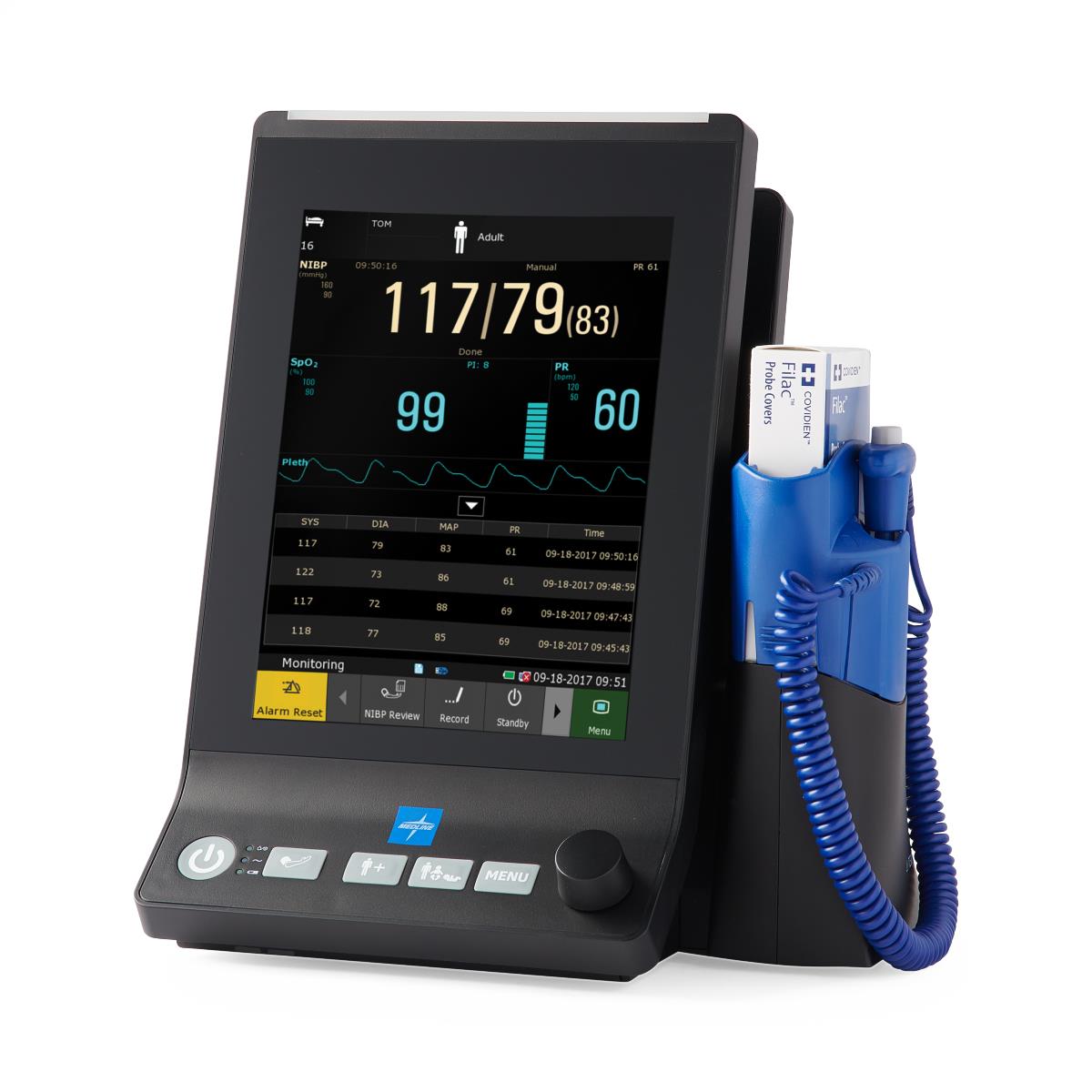
The Medline Vital Signs Monitor is a compact, all-in-one patient monitoring system designed for fast, reliable bedside assessments in clinics, hospitals, urgent care centers, long-term care facilities, and school health offices. It combines blood pressure, SpO2, and temperature monitoring in one portable platform, helping staff streamline routine checks without moving between multiple devices. With its 8-inch touchscreen interface, lightweight build, and lithium-ion battery power, the Medline Vital Signs Monitor is built for efficiency in busy clinical environments.
One of its biggest strengths is versatility. Depending on the configuration, the monitor can support oral or tympanic temperature measurement, making it suitable for adult, pediatric, and general patient screening workflows. The intuitive display reduces training time, while the compact form factor makes it easy to place on a cart, desktop, or rolling stand. It is also latex-free and available in black or black-and-blue finishes, which makes it a practical choice for facilities focused on safety and hygiene.
For buyers researching the Medline Vital Signs Monitor, estimated pricing typically falls in the mid-thousands of dollars, with common market listings ranging from about $3,900 to $4,500 depending on configuration and accessories. Availability is generally through medical supply distributors and healthcare equipment retailers, with some versions listed as ships soon or special order. This monitor is best suited for organizations that need a dependable, professional-grade vital signs solution with strong value for money and minimal setup complexity.
Technical Specifications and Key Features
The Medline Vital Signs Monitor is designed to deliver essential patient data in one device, making it a practical option for fast clinical workflows and spot-check assessments.
- Display: 8-inch color touchscreen for quick navigation and patient readings
- Core functions: Non-invasive blood pressure, SpO2, and temperature monitoring
- Thermometer options: Oral or tympanic temperature module depending on configuration
- Power: Lithium-ion battery for portable use and cart-based mobility
- Design: Lightweight, compact, and latex-free construction
- Printer: Not included on standard configurations
- Color options: Black or black and blue
- Accessories: Rolling stand available separately in some packages
- Warranty: Commonly sold with a 3-year monitor warranty and 1-year accessory warranty
Performance is aimed at routine patient monitoring rather than advanced ICU use. Compared with basic handheld pulse oximeters or standalone blood pressure devices, this monitor offers a more complete vital signs workflow. Compared with higher-end multi-parameter monitors, it is simpler, more affordable, and easier to deploy for front-line screening. That balance of capability and usability is what makes the medline Vital Signs Monitor attractive to outpatient practices, school nurses, and general care units.
Detailed Product Description
The Medline Vital Signs Monitor brings together the most commonly needed patient measurements into a single easy-to-use device. It works by capturing blood pressure through an automated cuff system, measuring oxygen saturation through a pulse oximetry sensor, and reading temperature through the selected thermometer module. The touchscreen interface presents the data clearly, which helps clinicians review readings quickly and keep the patient interaction moving.
In real-world use, this monitor is helpful for triage stations, routine checkups, pre-procedure screening, school wellness visits, and long-term care assessments. The compact footprint makes it easy to fit into crowded exam rooms or mobile care carts. Its build quality is practical and clinical, with durable materials suited for repeated daily use. The lightweight body and battery-powered operation support mobility without sacrificing readability or core performance.
User experience is generally straightforward. Staff members can power on the unit, apply the cuff or sensor, and capture a complete vital signs set with minimal navigation. This simplicity reduces the chance of workflow delays in fast-paced settings. For facilities that need a dependable monitoring device without the complexity of an advanced ICU system, the medline Vital Signs Monitor is a strong fit.
Setup Guide: How to Use the Medline Vital Signs Monitor
Setting up the monitor is simple and can usually be completed in just a few minutes. Before first use, charge the battery fully and verify that all accessories are included, such as the cuff, SpO2 sensor, and temperature probe or module. Place the unit on a stable surface or compatible stand, then power it on and confirm that the touchscreen responds correctly.
- Step 1: Inspect the device, battery, cuff, and sensors for visible damage.
- Step 2: Connect the blood pressure cuff to the correct port and select the proper cuff size.
- Step 3: Attach the SpO2 sensor and confirm the sensor is seated firmly.
- Step 4: Install or verify the oral or tympanic temperature accessory if included.
- Step 5: Use the touchscreen to review measurement settings, patient type, and alarm preferences.
- Step 6: Run a test reading on a stable subject or simulator before clinical use.
Safety precautions are important. Do not use damaged cables or cuffs, and avoid placing sensors on compromised skin unless clinically appropriate. If readings are unstable, check patient motion, sensor placement, cuff size, and battery charge. For connectivity or pairing issues with accessories, disconnect and reconnect the component, then restart the unit if needed. Always follow institutional infection-control procedures between patients.
Troubleshooting Common Problems
Most issues with the Medline Vital Signs Monitor are easy to resolve with basic checks. If the unit does not power on, first verify battery charge and power connection. If blood pressure readings appear inconsistent, confirm proper cuff placement, correct cuff size, and that the patient is resting quietly. Motion, talking, or a loose cuff can affect accuracy.
- Problem: SpO2 reading is not stable. Solution: Reposition the sensor, warm cold fingers, and minimize motion.
- Problem: Temperature reading is delayed or incorrect. Solution: Check probe positioning and confirm the correct temperature mode.
- Problem: Touchscreen is unresponsive. Solution: Restart the device and ensure the screen is clean and dry.
- Problem: Alarm sounds too frequently. Solution: Review alarm limits and patient profile settings.
- Problem: Weak battery performance. Solution: Fully recharge the unit and check battery health if runtime remains short.
Although specific error codes may vary by configuration, persistent fault messages, sensor failures, or measurement errors should be documented and reported to support. Preventive maintenance includes regular cleaning, routine inspection of cables and cuffs, battery charging, and proper storage. Warranty coverage is commonly listed as three years for the monitor and one year for accessories, with extended coverage sometimes available. For help, contact the selling distributor or Medline customer support through their official service channel.
Pros and Cons of the Medline Vital Signs Monitor
Pros
- Combines blood pressure, SpO2, and temperature in one device
- Large 8-inch touchscreen improves readability and ease of use
- Portable lithium-ion battery supports flexible clinical deployment
- Latex-free design is suitable for safety-conscious environments
- Simplifies workflow for triage, screening, and routine checks
- Strong value for facilities that need essential monitoring without unnecessary complexity
Cons
- Higher upfront cost than basic single-function devices
- Standard configurations may not include a printer
- Some accessories and stands are sold separately
- Not intended to replace advanced multi-parameter ICU monitors
Overall, the medline Vital Signs Monitor offers good value for money in outpatient and general care settings. It is more capable than a standalone pulse oximeter or blood pressure monitor, while remaining easier to use and less expensive than a full bedside critical care system. Facilities comparing it with similar products will appreciate its balance of portability, touchscreen usability, and core monitoring functions.
Customer Reviews and User Feedback
Customer feedback for the Medline Vital Signs Monitor is generally positive, with many users giving it around 4 out of 5 stars for ease of use, display quality, and practical functionality. Clinicians often praise the clear touchscreen, quick setup, and ability to capture several vital signs in one workflow. One common testimonial theme is that it “saves time during busy patient intake” and helps staff move faster through routine checks.
Common complaints usually focus on price, optional accessories, and the fact that some configurations require separate purchases for stands or upgraded thermometry options. A few users also note that battery life and sensor fit can affect performance if the device is not maintained properly. For buyers who want a dependable vital signs monitor for everyday clinical use, the medline Vital Signs Monitor is frequently recommended as a strong mid-range choice.
Final Buying Recommendation
If you need a reliable, easy-to-operate monitor for routine patient assessments, the Medline Vital Signs Monitor is a practical and professional solution. It is especially well suited for clinics, urgent care centers, school health programs, and long-term care facilities that want a compact device with essential monitoring capabilities, strong usability, and solid warranty support.
Faqs
How do I set up the medline Vital Signs Monitor for the first time?
Why is my medline Vital Signs Monitor showing inaccurate readings, and how can I fix it?
What features should I use on the medline Vital Signs Monitor to improve daily workflow?
Can the medline Vital Signs Monitor work with different cuff sizes and accessories?
How do I troubleshoot a medline Vital Signs Monitor that will not power on?
How often should I calibrate the medline Vital Signs Monitor for reliable performance?
What cleaning and maintenance steps help extend the life of a medline Vital Signs Monitor?
What should I check if the medline Vital Signs Monitor gives error messages during use?
More medline manuals
- Medline MDSTH1002 Clinical IR Thermometer User Manual
- How to Use: Medline MDS9950 Oral Digital Thermometer User Manual
- Medline MDS4003 Automatic Blood Pressure Monitor User Manual
- Setup & Features: Medline Digital Thermometer MDS9953 User Manual
- Medline MDSTH1002 Talking Infrared Thermometer User Manual
- Medline Steel Rollator Knockdown Rolling Walker User Guide
Leave a Comment