
Midea MCS2045IT Vacuum Cleaner User Manual
Content
midea MCS2045IT Vacuum Cleaner: Complete Product Manual and Buying Guide
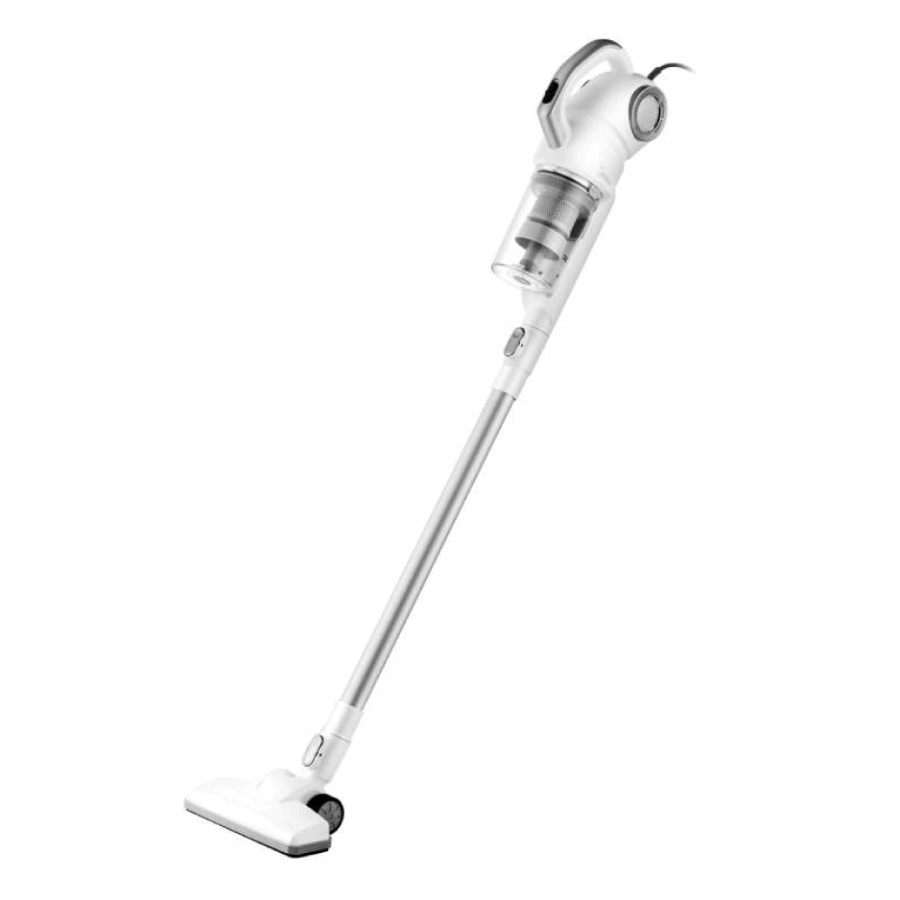
Introduction to the Midea MCS2045IT Vacuum Cleaner
The midea MCS2045IT Vacuum Cleaner is a corded 2-in-1 stick vacuum designed for fast, everyday cleaning in homes that need a lightweight, compact, and easy-to-store solution. With a 450W motor, cyclonic dust separation, and suction performance rated up to 18 kPa, it offers strong pickup for dust, crumbs, pet hair, and general debris on hard floors and low-pile surfaces. Its bagless design makes maintenance simpler, while the 5-meter power cord gives enough reach for small to medium rooms without frequent plug changes.
This model is a practical choice for apartment dwellers, families, students, and anyone looking for a budget-friendly vacuum cleaner for daily use. The included wall mount, crevice nozzle, and brush attachment improve convenience for quick cleanups and edge cleaning. The compact body and low weight also make it easier to carry upstairs or move between rooms. In terms of market positioning, the Midea MCS2045IT typically sits in the affordable entry-level range, with an estimated price of about €50 to €90 depending on retailer, promotions, and country availability. It is commonly available through major appliance stores, online marketplaces, and regional Midea distributors. For shoppers searching for a lightweight stick vacuum cleaner with solid suction and low running complexity, this model delivers strong value for money.
Specifications: Midea MCS2045IT Vacuum Cleaner Technical Details
- Product type: Corded 2-in-1 stick vacuum cleaner
- Motor power: 450W
- Suction power: Up to 18 kPa
- Dust capacity: 0.45 L bagless dust container
- Noise level: 79 dB
- Power supply: 220–240V ~ 50Hz
- Power cord length: 5 m
- Weight: About 1.4 kg net, with retail listings varying slightly by market
- Dimensions: Approximately 1100 x 200 x 250 mm
- Included accessories: Crevice tool, brush nozzle, wall mount
- Filtration: Cyclonic system with multi-stage filtering
- Surface use: Suitable for universal household cleaning
Compared with other budget stick vacuums, the midea MCS2045IT Vacuum Cleaner stands out for pairing strong suction with a lightweight frame and simple corded operation. It is more affordable than many cordless models, while offering more consistent runtime because it does not rely on a battery. This makes it especially competitive against entry-level corded stick vacuums from brands that prioritize battery-powered convenience over continuous cleaning power.
Setup Guide: How to Use the Midea MCS2045IT Vacuum Cleaner
Setting up the vacuum is straightforward. First, unpack the unit and confirm that the main body, handle, dust container, nozzle attachments, and wall bracket are included. Next, assemble the handle and floor head according to the locking points on the frame. If the model is being used in handheld mode, attach the desired accessory directly to the suction tube or main body.
For installation, mount the bracket on a stable wall surface if you want vertical storage and easy access. Plug the vacuum into a compatible 220–240V outlet and make sure the cord is fully extended away from walkways to reduce tripping hazards. The cleaner is corded, so there is no pairing or wireless connectivity process required. Before first use, empty the dust cup if packaging residue is present and check that the filter is seated correctly.
If suction seems weak during setup, verify that the dust container is closed properly, the filter is clean, and the nozzle is free of blockages. Always keep the unit away from water, do not vacuum wet spills, and avoid pulling the cord sharply from the socket. Let the motor cool briefly if the vacuum is used continuously for an extended period.
Troubleshooting the Midea MCS2045IT Vacuum Cleaner
- Weak suction: Empty the dust bin, clean the filter, and remove hair or debris from the nozzle and tube.
- Vacuum will not start: Check the outlet, cord, and plug connection. Try another socket to confirm power supply.
- Overheating or shutdown: Switch off the unit, inspect for blockages, and allow the motor to cool before restarting.
- Excessive noise: Look for loose attachments, clogged airflow paths, or an improperly fitted dust container.
- Dust escaping: Reinstall the container and ensure the filter is fully in place.
This model does not typically rely on visible digital error codes, so most issues are solved through airflow checks and basic maintenance. Preventive care is simple: clean the filter regularly, empty the dust cup before it becomes packed, and inspect the brush and crevice nozzle after each major cleaning session. For warranty service and support, refer to the retailer invoice, user manual, or regional Midea service center. If the product was purchased from an authorized seller, contact the store first for return or replacement guidance, then escalate to Midea support if needed.
Pros and Cons of the Midea MCS2045IT Vacuum Cleaner
Pros
- Lightweight and easy to handle: The compact design makes it ideal for quick daily cleaning and carrying between rooms.
- Strong suction for the price: The 450W motor and up to 18 kPa suction are impressive in the entry-level segment.
- Bagless convenience: The 0.45L dust container reduces ongoing costs and simplifies emptying.
- Useful accessories included: The crevice tool and brush help with corners, furniture edges, and tight spaces.
- Good value for money: It is often cheaper than cordless alternatives with similar cleaning performance.
Cons
- Corded operation only: The 5-meter cable limits mobility compared with cordless stick vacuums.
- Smaller dust capacity: The 0.45L bin may require frequent emptying in larger homes.
- Noise level is moderate: At 79 dB, it is not the quietest vacuum in its class.
- Best for light to medium cleaning: It is less suited to deep carpet cleaning than premium upright models.
Overall, the midea MCS2045IT Vacuum Cleaner is a strong budget pick for everyday household use. Compared with cordless alternatives, it offers steadier power and lower cost, but users who want longer reach or quieter operation may prefer a higher-end model.
Customer Reviews: What Users Say About the Midea MCS2045IT Vacuum Cleaner
User feedback is generally positive, with many buyers rating it around 4.2 out of 5 stars for affordability, suction strength, and light weight. Common praise highlights the easy assembly, practical wall mount, and surprisingly strong pickup for dust and crumbs on hard floors. One typical comment is, “It feels light in the hand but still cleans really well for quick daily use.”
Common complaints focus on the cord length, which some users find restrictive in larger rooms, and the relatively small dust bin that needs frequent emptying. A few reviewers also mention that the vacuum is noisier than expected during maximum use. Despite these points, many customers recommend it as a reliable starter vacuum or a secondary cleaner for apartments, studios, and kitchens. Buyers looking for a compact, low-cost machine with dependable suction generally view it as a smart purchase.
Faqs
How do I set up the Midea MCS2045IT Vacuum Cleaner for the first time?
Why is my Midea MCS2045IT Vacuum Cleaner losing suction and how can I fix it?
What surfaces can the Midea MCS2045IT Vacuum Cleaner clean effectively?
How do I clean and maintain the filter on the Midea MCS2045IT Vacuum Cleaner?
Why does the Midea MCS2045IT Vacuum Cleaner keep overheating or shutting off?
Is the Midea MCS2045IT Vacuum Cleaner compatible with standard household power outlets?
How can I improve the cleaning performance of the Midea MCS2045IT Vacuum Cleaner?
What should I do if the Midea MCS2045IT Vacuum Cleaner makes unusual noise?
More midea manuals
Leave a Comment