
Setup & Pairing: Mobvoi Earbuds ANC User Manual
Content
Mobvoi Earbuds ANC
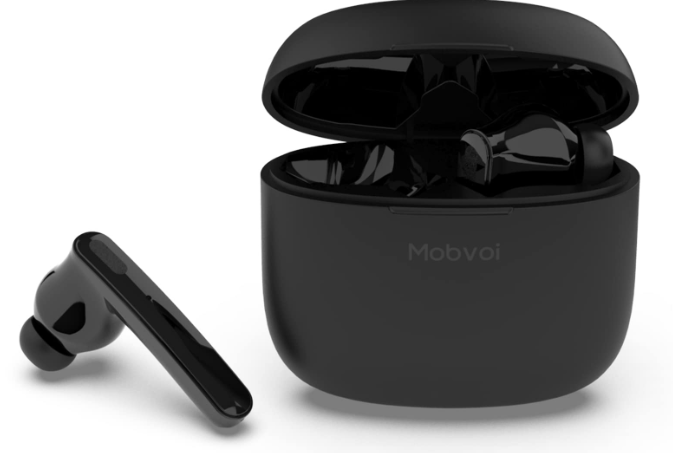
Introduction
The Mobvoi Earbuds ANC are premium wireless earbuds designed for music lovers, podcast listeners, and everyday users seeking high-quality sound and active noise cancellation at an affordable price. Featuring a powerful 13mm speaker driver, these earbuds deliver deep bass and crystal-clear Hi-Fi audio, making them ideal for immersive listening experiences. With three noise-cancelling modes—Quiet, Sound Passthrough, and ANC-off—you can tailor your audio environment to suit any situation, whether you’re commuting, working out, or relaxing at home.
Designed for comfort and durability, the Mobvoi Earbuds ANC come with three sizes of eartips for a secure, personalized fit and are IPX5 certified for sweat and water resistance. The ergonomic design ensures all-day comfort, while the compact charging case provides up to 21 hours of total playtime. Voice control and dual-mic noise cancellation enhance usability and call clarity, setting these earbuds apart in the budget-friendly segment.
Available for around $59.99 in the US and £49.99 in the UK, the Mobvoi Earbuds ANC are perfect for budget-conscious buyers who want reliable performance without sacrificing essential features. Whether you’re a student, commuter, or fitness enthusiast, these earbuds offer excellent value for money and are widely available online and in select retail stores.
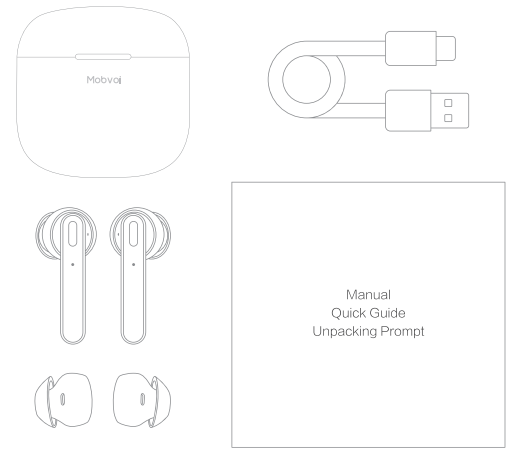
What's in the box
Specifications: Mobvoi Earbuds ANC
- Driver Size: 13mm dynamic driver for rich, balanced sound
- Noise Cancellation: Three modes—Quiet (ANC), Sound Passthrough, ANC-off
- Battery Life: Up to 7 hours per charge (ANC on), up to 21 hours with charging case
- Charging Case: Compact, USB-C charging, provides 2-3 full charges
- Connectivity: Bluetooth 5.0, seamless pairing with smartphones and tablets
- Water Resistance: IPX5 rating for sweat and splash protection
- Eartips: Three sizes (S, M, L) for optimal fit and noise isolation
- Controls: Touch-sensitive controls for playback, calls, and mode switching
- Weight: 5 grams per earbud
- Additional Features: Voice control, dual-mic ENC for clear calls, no companion app required
Compared to similar models like the TicPods ANC, the Mobvoi Earbuds ANC offer longer battery life and a more robust noise-cancelling experience, making them a top choice in the sub-$60 wireless earbud market.
First-time pairing
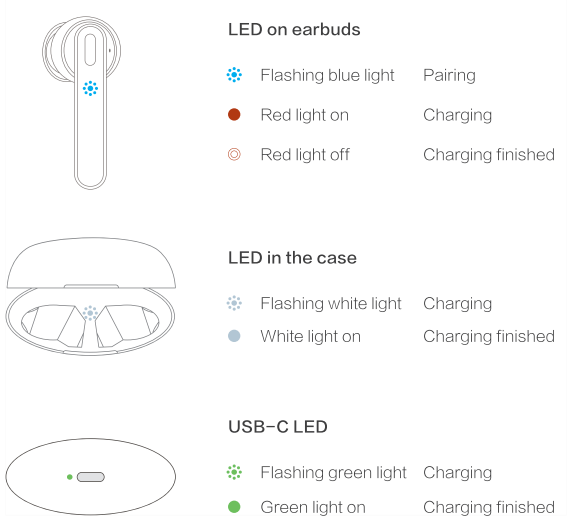
The flashing blue lights indicate that the earbuds are in pairing mode. Turn on Bluetooth 9 in Settings and select Mobvoi Earbuds ANC.
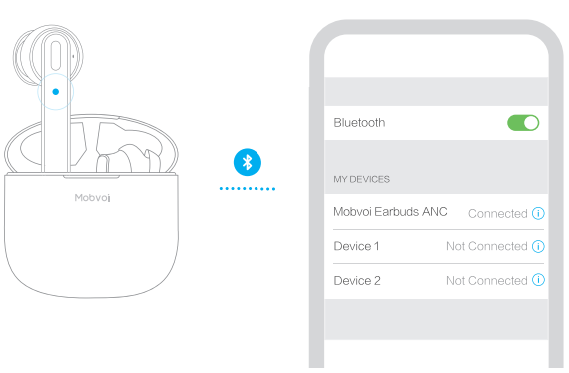
If there are two "Mobvoi Earbuds ANC on your phone's device list, turn Bluetooth off and on, then there should only be one device on the list.
Auto - reconnect
- Open the case to reconnect with the previous device
- Close the case to disconnect from the current device
Pairing with a new device
- Tap to disconnect or forget the existing device.
- Follow the first-time pairing steps to pair a new device .
Use both or one earbud freely
- Use both earbuds for a better music and ANC experience.
- Use only one earbud to save battery life and to have a longer phone call.
- Switch between modes without reconnecting.
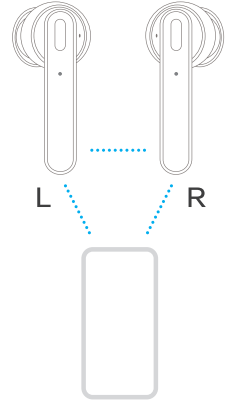
Under extreme circumstances, such as in the subway or crowded areas, you might experience short periods of disruption when switching earbuds at times. It will usually return to normal in seconds.
Switch Modes of ANC
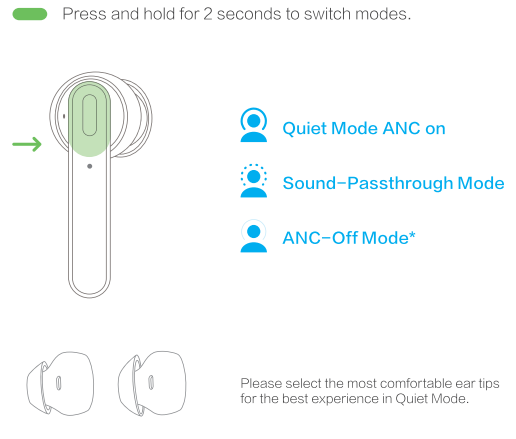
It is recommended to enable ANG-Off Mode in a windy environment.
Music and phone control
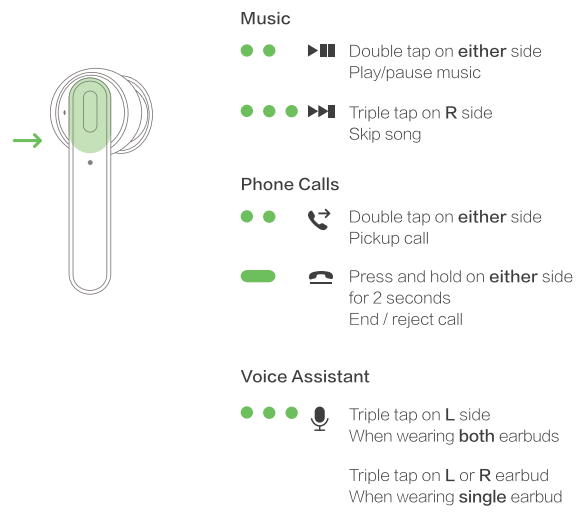
LED light indicator
Troubleshooting: Mobvoi Earbuds ANC
- Earbuds won’t connect: Ensure Bluetooth is enabled and the earbuds are charged. Reset by placing both earbuds in the case, closing the lid for 10 seconds, then reopening.
- Noise cancellation not working: Hold touch control for 2 seconds to cycle modes. Check that ANC is enabled in Quiet mode.
- Low battery or charging issues: Use the included USB-C cable. Clean charging pins if the connection is poor.
- Sound distortion or low volume: Try different eartip sizes for a better fit. Reset the earbuds if the problem persists.
- Touch controls unresponsive: Clean the touch area with a dry cloth. Avoid using it with wet hands.
Prevent issues by regularly cleaning earbuds and storing them in the case when not in use. The Mobvoi Earbuds ANC come with a standard 1-year warranty. For support, visit Mobvoi’s official website or contact customer service via email or live chat.
Pros & Cons: Mobvoi Earbuds ANC
Pros
- Excellent battery life (7 hours per charge, 21 hours with case)
- Effective active noise cancellation for the price
- Comfortable, ergonomic design with multiple eartip sizes
- IPX5 water and sweat resistance for workouts
- Voice control and clear call quality with dual-mic ENC
- Affordable price point compared to premium brands
Cons
- No companion app for EQ or control customization
- ANC performance is not as strong as higher-end models
- Touch controls can be sensitive or unresponsive at times
- Sound quality may lack depth for audiophiles
The Mobvoi Earbuds ANC offer outstanding value for budget buyers, especially those prioritizing battery life and noise cancellation over advanced features.
Customer Reviews: Mobvoi Earbuds ANC
Users consistently rate the Mobvoi Earbuds ANC 4 out of 5 stars, praising their comfort, battery life, and noise-cancelling performance. Many highlight the clear sound and effective voice control, calling them “great for podcasts and daily use.” Common complaints include occasional touch control issues and the lack of an app for customization. Most reviewers recommend these earbuds for casual listeners and commuters seeking reliable, affordable wireless audio. Frequent mentions of the comfortable fit and long battery life reinforce their appeal as a solid choice in the budget earbud market.
Faqs
How do I set up my mobvoi Earbuds ANC for the first time?
What should I do if my mobvoi Earbuds ANC are not pairing or connecting properly?
How do I switch between ANC, Sound Passthrough, and ANC-off modes on mobvoi Earbuds ANC?
Are mobvoi Earbuds ANC compatible with both Android and iOS devices?
How can I maximize battery life and optimize performance on my mobvoi Earbuds ANC?
Why does wind noise increase when using ANC on my mobvoi Earbuds ANC outdoors?
How do I clean and maintain my mobvoi Earbuds ANC to ensure long-lasting use?
What should I do if one earbud of my mobvoi Earbuds ANC stops working or is lost?
More mobvoi manuals
- Setup: Mobvoi Treadmill Plus Incline T4225 User Manual
- Pairing & Usage: Mobvoi Earbuds Gesture User Manual
- Setup: Mobvoi Treadmill SE T4089 User Manual
- Setup: Mobvoi Walking Treadmill Plus N4225 User Manual
- Setup: Mobvoi Treadmill Plus T4225 User Manual
- Setup: Mobvoi Walking Treadmill Edge TM10 User Manual
Leave a Comment