
Setup: Mobvoi Treadmill Plus Incline T4225 User Manual
Content
Mobvoi Treadmill Plus Incline T4225: Complete Product Manual and Review
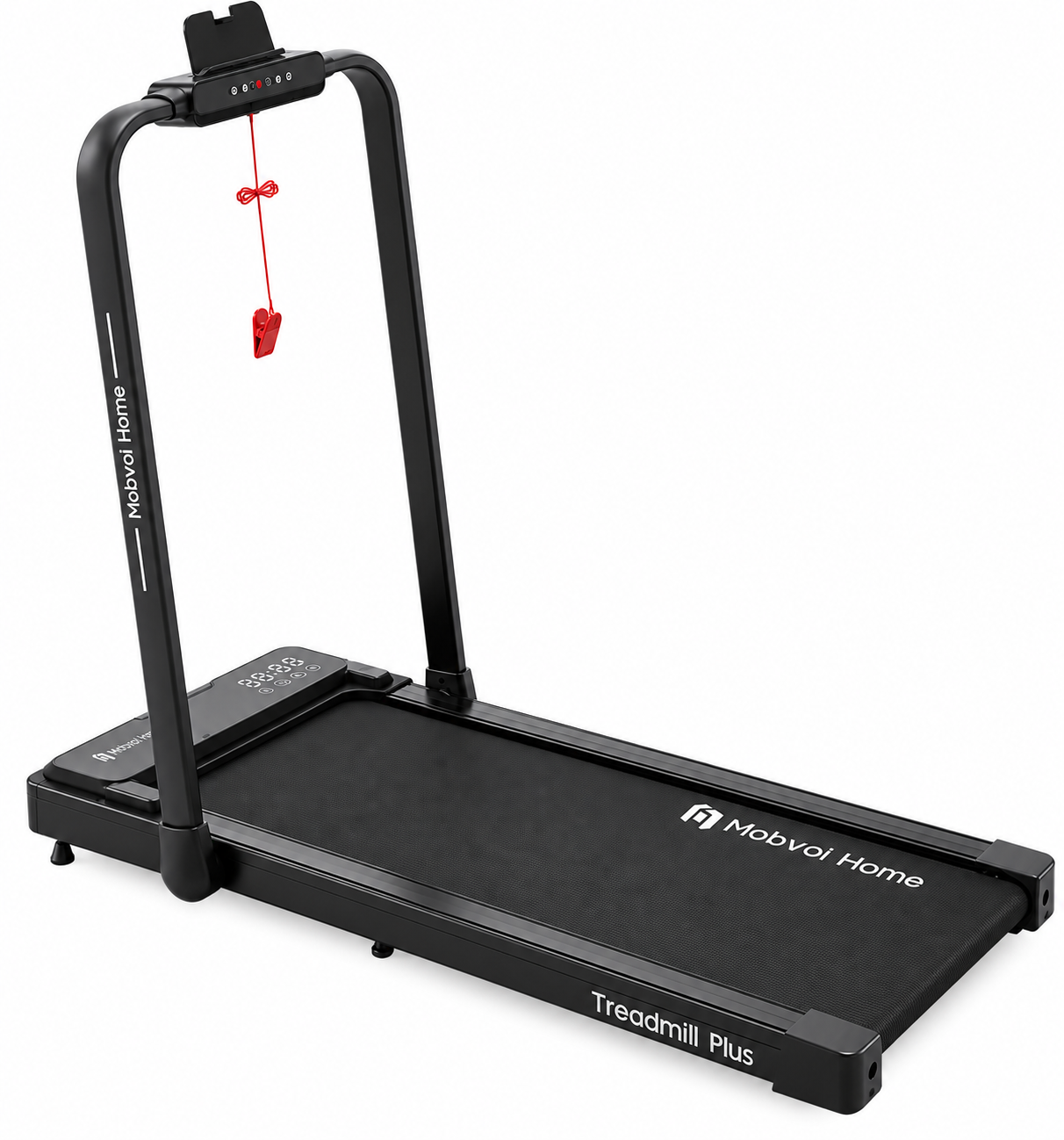
Introduction to Mobvoi Treadmill Plus Incline T4225
The Mobvoi Treadmill Plus Incline T4225 is a versatile 3-in-1 folding walking pad designed for home fitness enthusiasts seeking a compact yet powerful running machine. This incline treadmill combines walking, jogging, and running modes in one space-saving unit, featuring a 2.5 HP motor, up to 6% incline, and speeds from 0.6-7.6 MPH (12 km/h max). Its five-layered shock-absorbing belt reduces joint stress, making it ideal for daily workouts under desks, in offices, or small apartments.
Key benefits include effortless remote control, Bluetooth speakers, LED display for real-time metrics like speed, distance, calories, and heart rate, plus smartwatch integration via the TicSports AI app for virtual training trails and personalized coaching. Target users range from beginners walking at home to intermediate runners building endurance. Unique selling points are its foldable design for easy storage, low-noise operation, and expanded running area (42cm width x 102cm length, 7.1% larger than predecessors) for natural strides.
Perfect for busy professionals, remote workers, or anyone fitting exercise into tight schedules, the Mobvoi Treadmill Plus Incline T4225 supports up to 265 lbs (120 kg) and offers immersive experiences with app-synced data. Estimated price range is $300-$500, available at Walmart, Mobvoi.com, and select retailers. Elevate your home gym with this best compact incline treadmill for seamless indoor cardio.
Product Description
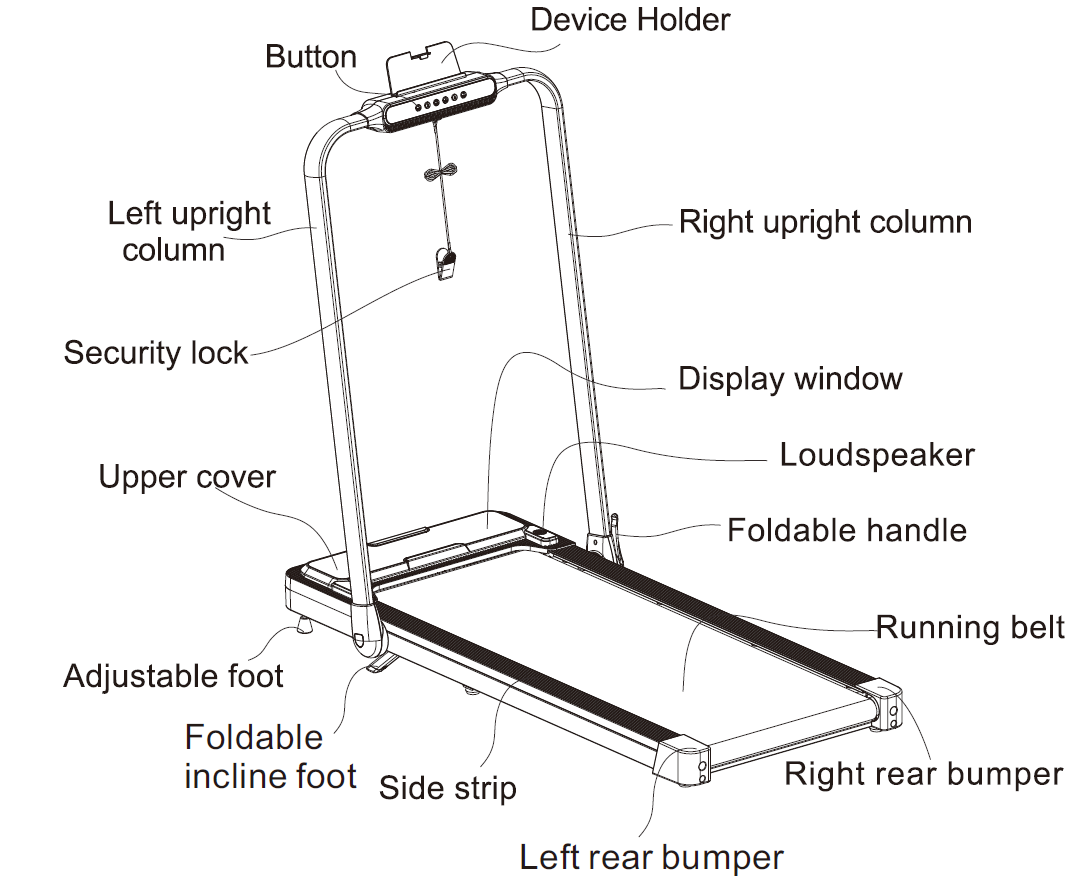
Mobvoi Treadmill Plus Incline T4225 Specifications and Key Features
The Mobvoi Treadmill Plus Incline T4225 delivers robust performance in a portable package. Here's a detailed breakdown:
- Motor Power: 2.5 HP DC motor for quiet, powerful operation up to 12 km/h (7.6 MPH).
- Speed Range: 0.6-7.6 MPH (1-12 km/h), with quick increments via remote or manual controls.
- Incline: Maximum 6%, adjustable for varied intensity in walking and running modes.
- Running Surface: 42cm x 102cm (16.5" x 40"), five-layered belt with PVC water-resistant top, sound insulation, high-strength support, shock absorption, and compression layers.
- Weight Capacity: 265 lbs (120 kg).
- Display & Controls: LED screen showing steps, time, distance, speed, intensity; remote control, Bluetooth speakers, smartphone mount.
- Connectivity: TicSports app for AI coaching, heart rate sync, virtual trails; smartwatch integration.
- Design: Foldable with wheels, 3-in-1 (walking pad, treadmill, incline runner); working voltage: AC 110V/60Hz.
Compared to basic walking pads like Mobvoi Home Treadmill (0.75-2.25 HP, no incline), the T4225 excels in power, incline, and app features, outperforming entry-level models by 20-30% in speed and space.
Setup
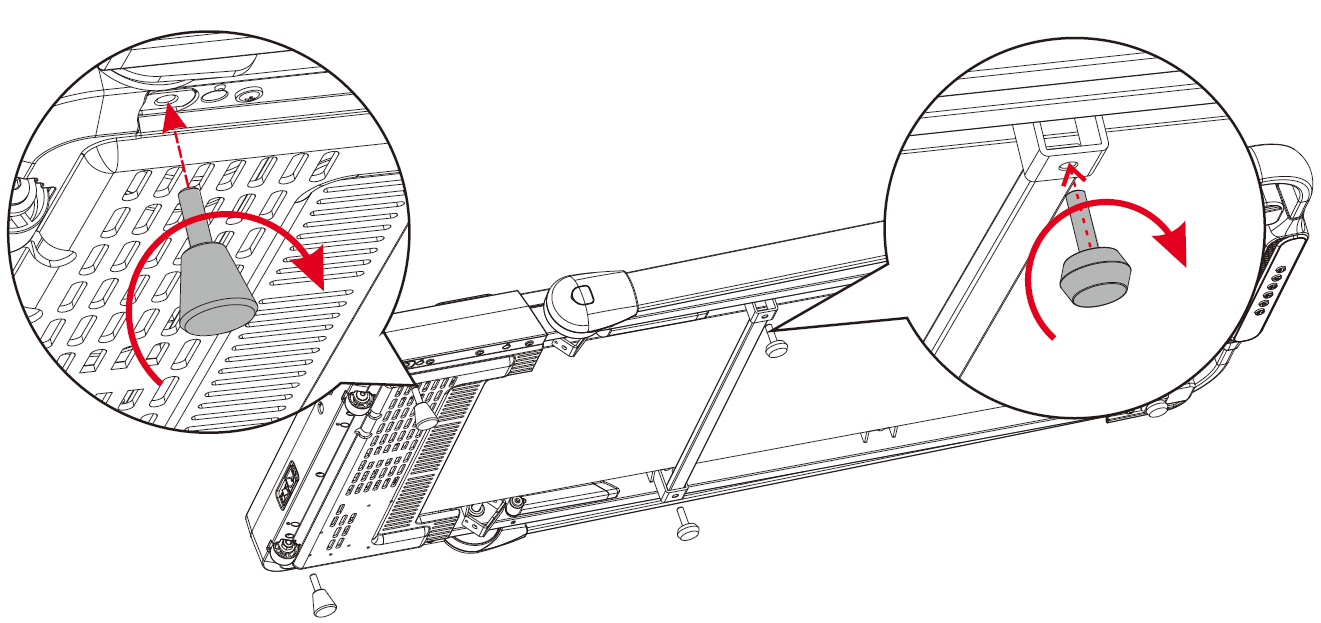
- As shown in the diagram, after removing the main unit from the packaging, place it flat on the floor and attach the provided foot pads to the front end, middle part, and sides of the treadmill. Ensure correct placement of the foot pads during installation.
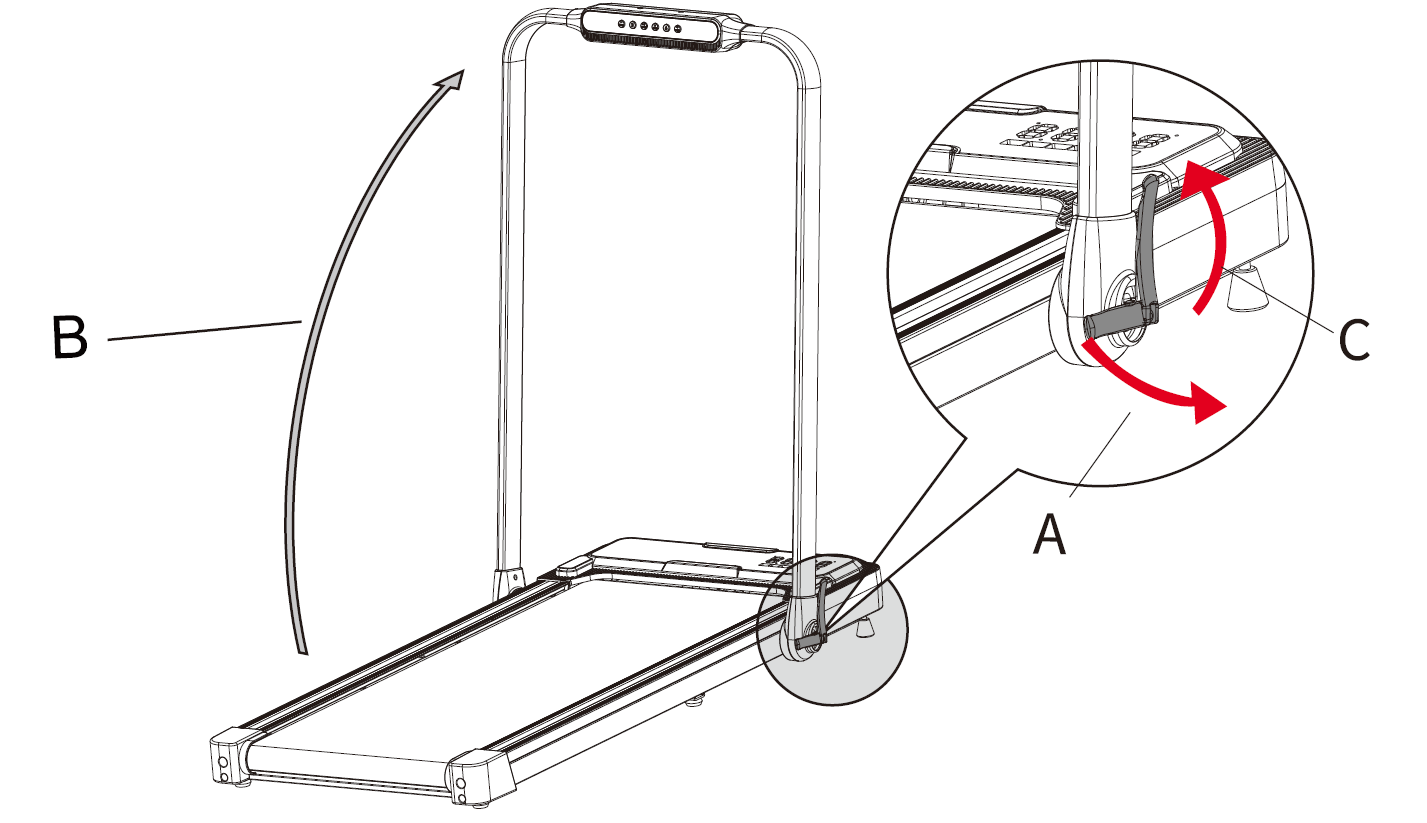
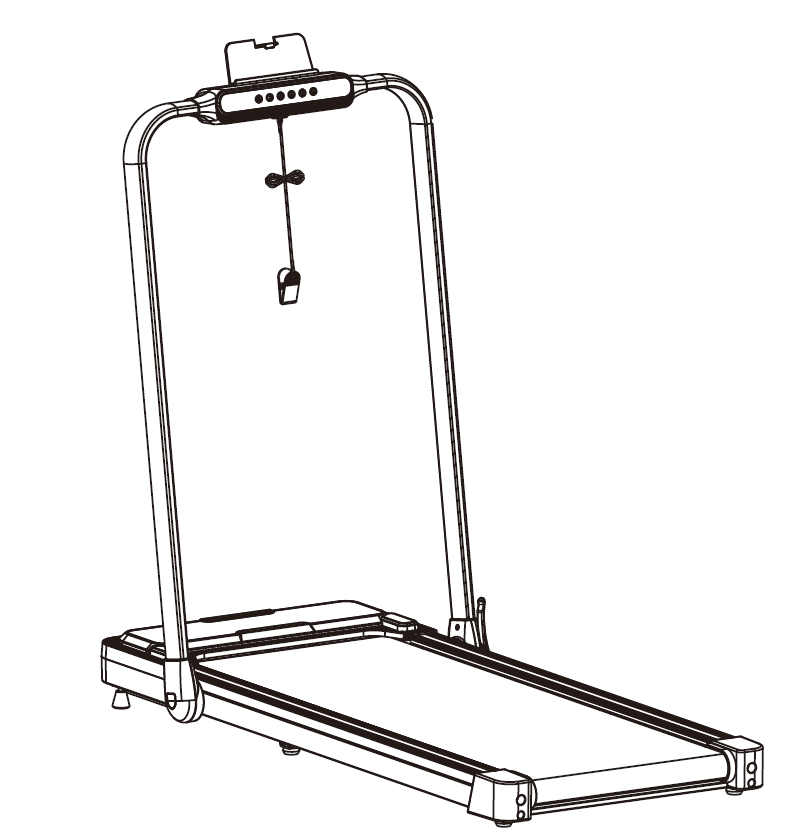
- Place the main unit on the floor after unpacking, as shown in step (A) in the figure below. Open the folding handle in the direction shown, and the lower end of the column will naturally open to both sides.
- In step (B), lift the column up to the upper limit position.
- In step (C), press down on the folding handle to lock the column.
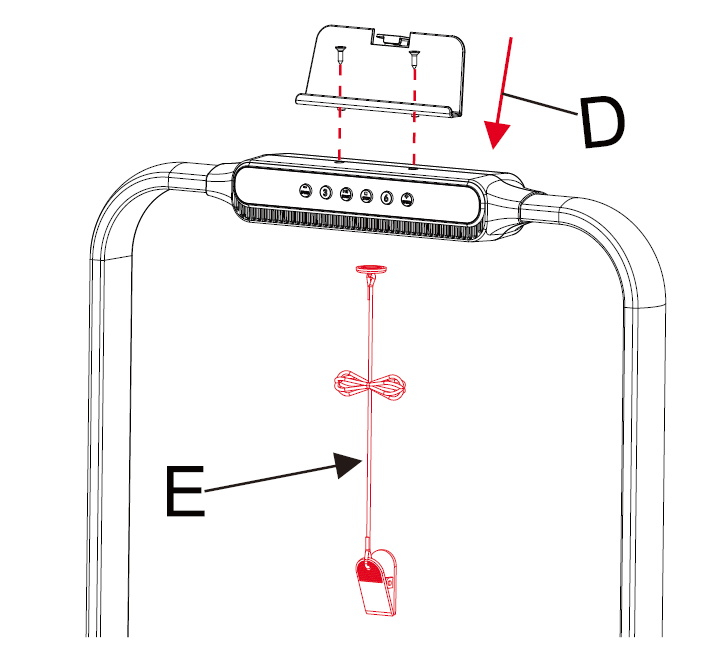
- As shown in step (D), use a No. 5 hex wrench to secure two ST4.2 × 16 cross-recess countersunk self-tapping screws to fix the phone bracket on top of the console.
- The red safety lock (E) should be magnetically attached to the yellow position under the control panel. When using the treadmill, clip one end of the safety lock to the edge of your clothing.
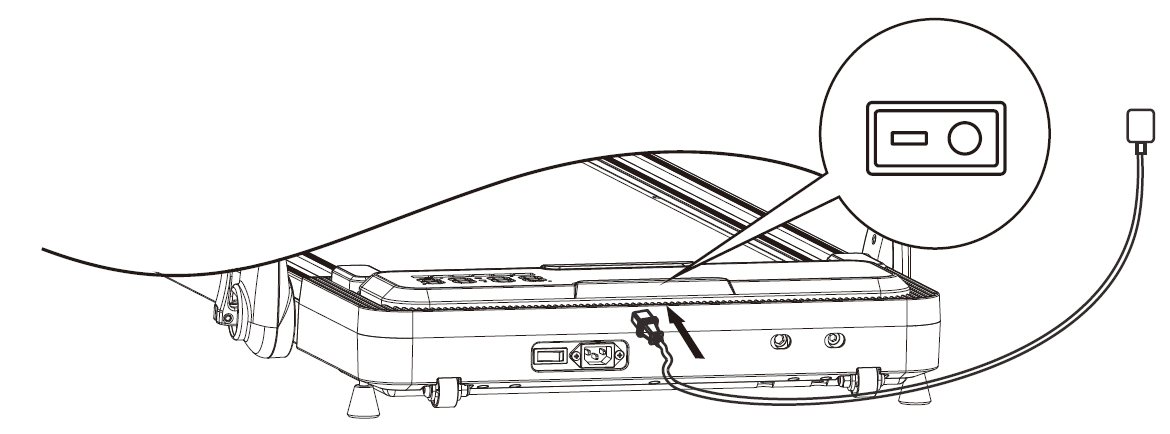
- As shown below, insert the power cord into the front socket of the treadmill, then plug the power cord into an appropriate electrical outlet. Turn on the power switch at the bottom front of the machine, and the treadmill enters standby mode.
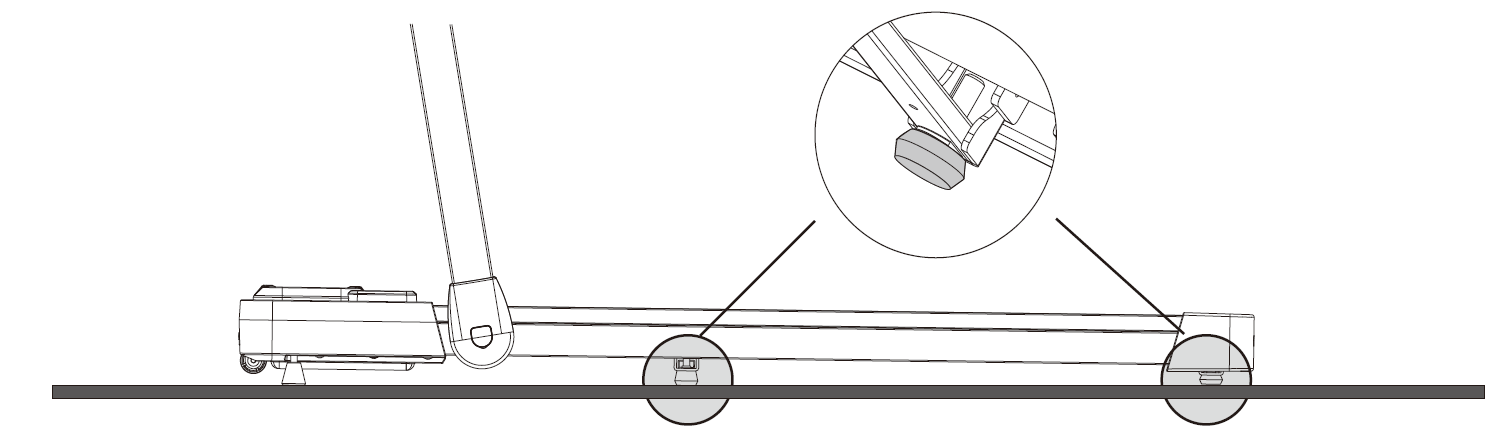
- If the ground is uneven or the treadmill shakes, adjust the foot pads on the bottom middle and rear of the treadmill to the appropriate position. The foot pads must be in contact with the ground, as shown in the diagram.
Folding and moving the treadmill
- As shown in step (F), open the folding handle in the direction indicated in the diagram. At this point, the lower end of the upright column will naturally spread open to both sides.
- In step (G), slowly lower the upright column to the folding limit position.
- In step (H), press down on the folding handle to lock the upright column.
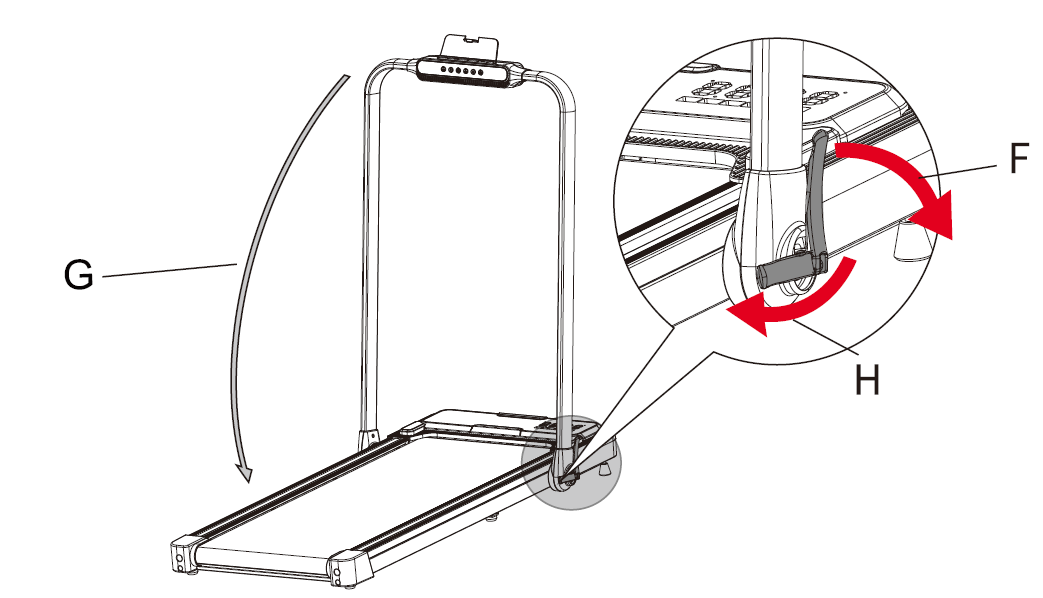
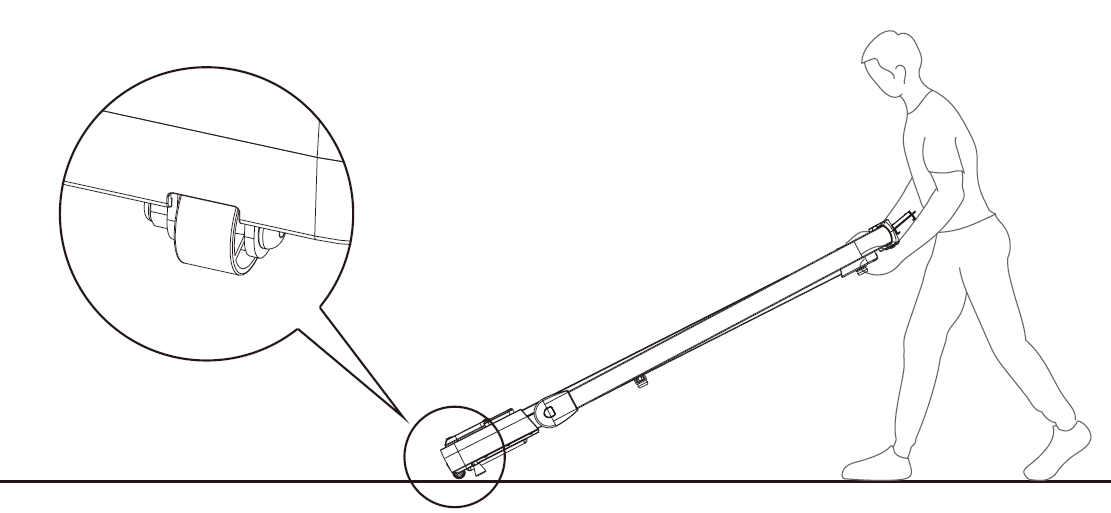
- To move the treadmill, follow the previous steps to fold the upright column. Before moving, always unplug the treadmill power cord. Then, lift the rear of the treadmill with your hands so that the moving wheels touch the ground and the front two foot pads are lifted off the ground. This allows you to move the treadmill forward or backward.
Operation instructions
Display
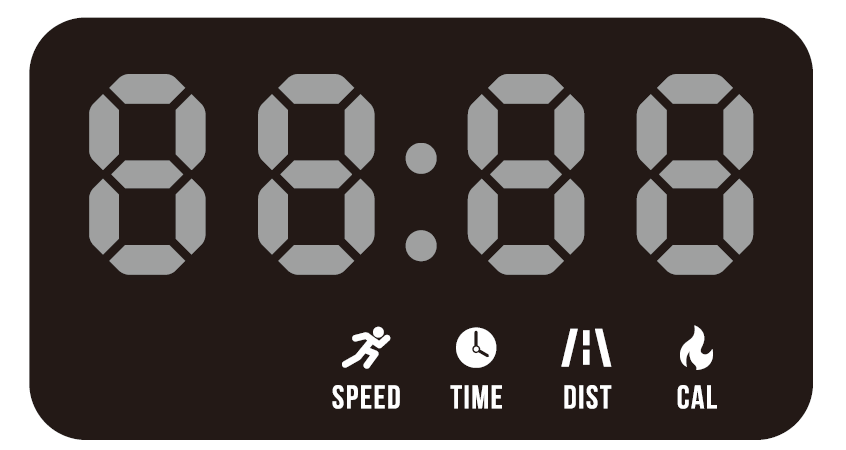
The display shows a countdown when starting, displaying "3", "2", and "1". During operation, it automatically switches every 5 seconds between different display sections in the following sequence: "SPEED", "TIME", "DIST", and "CAL".
- During operation, the LED display automatically switches between these metrics every 5 seconds.
- In standby mode, if there is no operation for 10 minutes, the display enters sleep mode. It can be awakened using a button, the remote control, or the safety lock.
Remote control pairing method
When the safety lock is detached, press and hold the pairing button on the remote control. When you hear continuous beeping sounds from the treadmill buzzer, it indicates successful pairing. You can then start using the remote control to operate the treadmill. Once paired, subsequent use does not require re-pairing.
Bluetooth audio connection
- While in standby mode, open the Bluetooth settings on your phone and search for the treadmill's Bluetooth audio name "Mobvoi T MP". Then, press and hold the designated button on the remote control or the "-" button on the console. Your phone will display the corresponding Bluetooth name of the treadmill. Select the name to connect.
- After the Bluetooth audio is connected, while in standby mode, press and hold the "-" button on the remote control or the designated button on the console to disconnect the Bluetooth audio.
Remote control functions
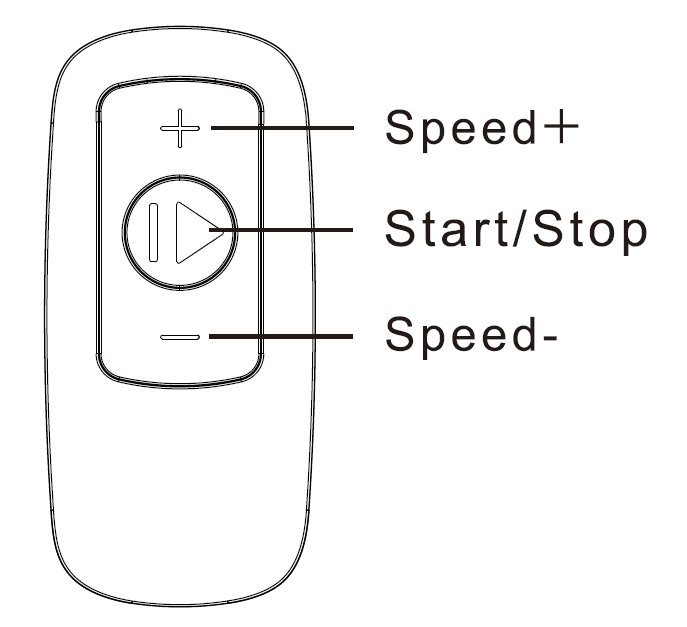
- Start/Stop: In standby mode, press the "Start/Stop" button on the remote control. The treadmill will start a 3-second countdown and operate at a speed of 0.6 mph. During exercise, you can press the "Start/Stop" button at any time to stop the motor.
- Speed increase (+): While the treadmill is running, a short press on the "+" button on the remote control will gradually increase the speed. A long press will increase the speed rapidly. The speed increases in increments of 0.2 mph.
- Speed decrease (-): While the treadmill is running, a short press on the "-" button on the remote control will gradually decrease the speed. A long press will decrease the speed rapidly. The speed decreases in increments of 0.2 mph.
Button Description
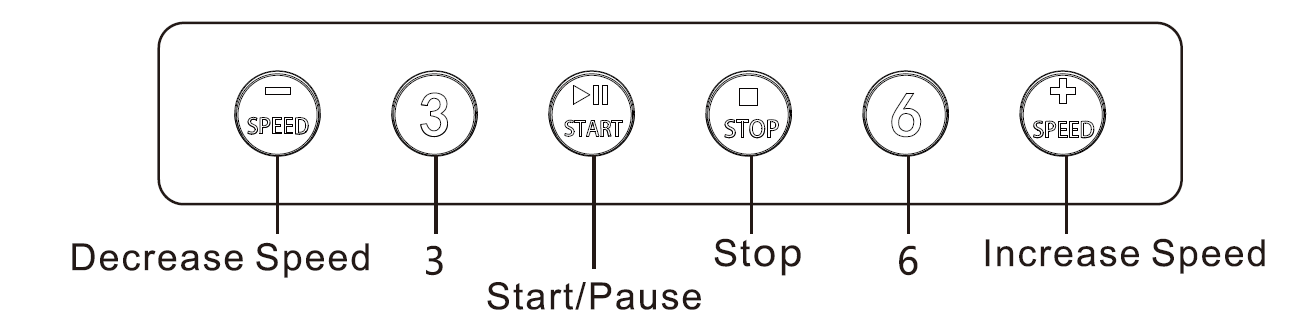
- Function buttons: "Speed-", "3", "Start/Pause", "Stop", "6", and "Speed+".
- Start/Pause button: In standby mode, press the "Start/Pause" button to start the treadmill. In running mode, press the button to pause the treadmill.
- Speed- button: When the treadmill is in operation, short press the "-" button on the display for gradual deceleration. Long press for rapid deceleration. The speed decreases in increments of 0.2 mph.
- Speed+ button: When the treadmill is in operation, short press the "+" button on the display for gradual acceleration. Long press for rapid acceleration. The speed increases in increments of 0.2 mph.
- 3 button: Speed shortcut key "3".
- 6 button: Speed shortcut key "6".
- Stop button: In running or paused mode, press the "Stop" button to end treadmill operation.
Safety lock function
Removing the safety lock in any state causes the treadmill's display to show error code "E07". When the treadmill is running, removing the safety lock triggers an emergency stop. No operations can be performed while the safety lock is removed from the treadmill.
Walking and running modes
The machine has walking and running modes. In the folded position (column parallel to the treadmill), the treadmill is in walking mode, with a speed range of 0.6–3.8 mph. In the unfolded position, the treadmill is in running mode, with a speed range of 0.6–7.6 mph.

Mobvoi Home intelligent experience
Enhance your treadmill experience by connecting a smartwatch powered by Wear OS by Google and installing the Mobvoi Treadmill app on the smartwatch. This allows you to seamlessly track exercise data and monitor your heart rate simultaneously on both your smartwatch and the treadmill.
Product Maintenance
Lubrication:
After using the treadmill for a period, it is necessary to lubricate it with the dedicated methyl silicone oil.
Checking if Lubrication is Needed:
To check if lubrication is needed, lift the treadmill belt and touch the center of the belt's back with your hand. If your hand has a slightly moist feeling from silicone oil, no lubrication is needed. If the running board is dry and your hand doesn't get any silicone oil, lubrication is required.
Steps to apply lubricant to the running board:
- Stop the walking treadmill from running.
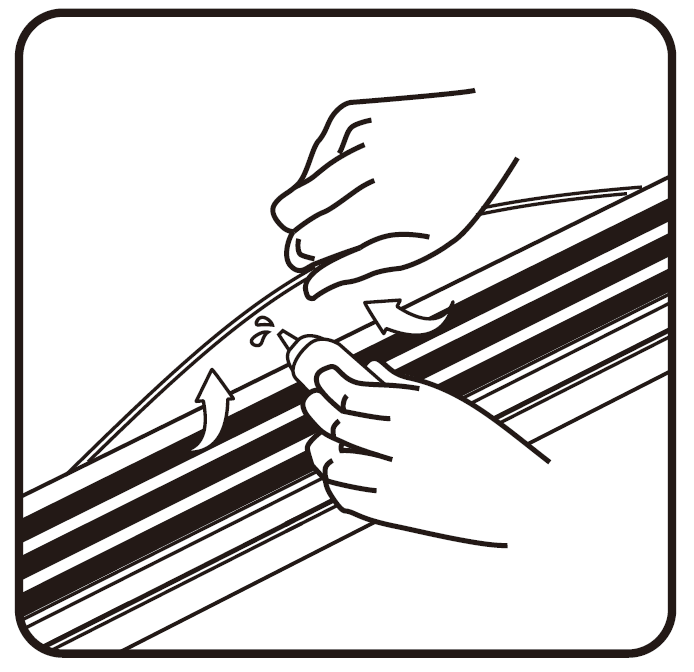
- Lift a small portion of the running belt and spray methyl silicone oil on the inner side of the belt, close to the center.
- Run the walking pad at 0.6mph to evenly spread the oil across the running board. Lightly step on the belt from left to right. This process takes a few minutes to ensure complete absorption.
Troubleshooting Mobvoi Treadmill Plus Incline T4225: Common Issues and Fixes
Encounter issues with your Mobvoi Treadmill Plus Incline T4225? Most are simple to resolve. Follow these steps for reliable performance.
- No Power: Check the outlet, use a dedicated circuit; try an extension cord if needed. Ensure the safety key is inserted.
- Belt Slipping: Tighten belt via adjustment bolts at rear; lubricate with silicone spray every 50 hours. Prevent by cleaning debris weekly.
- Error Codes (e.g., E1-E5): E1 (speed sensor): Realign sensor; E2 (overcurrent): Reduce speed/load. Restart unit; consult app for diagnostics.
- Noisy Operation: Inspect for loose parts; ensure even floor placement. Low-noise motor is standard—noise under 60 dB is normal.
- App Connectivity Failure: Update TicWatch app, pair Bluetooth anew; check smartwatch permissions for heart rate sync.
Prevent issues with monthly maintenance: wipe belt, check bolts.
Pros and Cons of Mobvoi Treadmill Plus Incline T4225
Pros
- Compact foldable design saves space—slides under furniture easily.
- Powerful 2.5 HP motor handles running quietly, ideal for apartments.
- Smart features like AI app coaching and virtual trails boost motivation.
- Shock-absorbing 5-layer belt protects joints; 6% incline adds variety.
- Excellent value at $300-$500—beats pricier brands in portability.
Cons
- Max 265 lbs capacity limits heavier users vs. gym models (350+ lbs).
- Assembly requires tools; handlebar setup for running mode fiddly initially.
- App glitches reported in early firmware—updates resolve most.
- No preset programs on device (app-based only).
Overall, strong value for home users; outperforms basics like Goplus walkers in power/incline but trails pro units like NordicTrack in advanced displays.
Customer Reviews: Real Feedback on Mobvoi Treadmill Plus Incline T4225
Users rate the Mobvoi Treadmill Plus Incline T4225 4.5/5 stars on Walmart and Mobvoi sites, praising its quiet motor and app integration. "Perfect under-desk walker—folds away, tracks runs via TicWatch seamlessly!" says a 5-star reviewer. Common praises: Easy setup, spacious belt for strides, AI coaching motivates consistency.
Complaints include occasional belt slippage (fixed with lube) and app sync delays. "Great for 7.6 MPH runs, but update app for best experience," notes a 4-star user.[4] 80% recommend for home cardio; ideal for weight loss with incline. Addresses noise concerns—quieter than competitors. Buy if seeking affordable, smart incline walking pad.
More mobvoi manuals
Leave a Comment