
How to Use: Mrcool Smart Thermostat MST04 User Manual
Content
mrcool Smart Thermostat MST04: Complete Product Manual and Buyer’s Guide
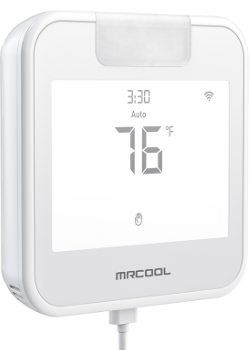
The mrcool Smart Thermostat MST04 is a Wi-Fi-enabled 24V thermostat designed to bring smarter control, better scheduling, and easier HVAC management to compatible MRCOOL ducted systems and other residential 24V setups. It combines a modern touchscreen interface with remote app control, location-based automation, voice assistant compatibility, and energy-saving modes, making it a strong fit for homeowners who want convenience without a complicated installation process. The thermostat is especially useful for central air conditioning, heat pump systems, and multi-stage HVAC setups where precise temperature control matters.
For everyday users, the biggest benefits are simple: you can adjust temperature remotely, automate comfort around your schedule, and reduce wasted energy when you are away. The MST04 also supports popular voice platforms, including Alexa, Google Assistant, and Siri, which adds hands-free control for smart homes. Its compact wall-mounted design and DIY-friendly setup make it appealing for contractors, property managers, and homeowners replacing an older programmable thermostat.
In the current market, the mrcool Smart Thermostat MST04 typically falls in the estimated price range of about $80 to $140, depending on the seller, bundle, and seasonal promotions. It is commonly available through HVAC retailers, appliance dealers, and MRCOOL-focused storefronts. If you are looking for a smart thermostat for 24V systems with reliable app control and practical automation features, the MST04 is a competitive option in the mid-range smart thermostat category.
Technical Specifications and Key Features
- Model: MST04
- System voltage: 24V AC only
- Display: LCD touchscreen
- Dimensions: 3.9 in W x 3.9 in D x 1 in H
- Weight: About 0.95 lb
- Temperature reading range: 0°F to 99°F
- Setpoint range: 45°F to 90°F
- Connectivity: Wi-Fi
- Voice control: Alexa, Google Assistant, Siri, and MRCOOL Link compatible
- Operating modes: Home, Away, Sleep, Vacation Mode, and location-based automation
- Installation style: Wall-mounted, DIY-friendly
- Warranty: Commonly listed as 3 years for the thermostat
Compared with basic programmable thermostats, the mrcool Smart Thermostat MST04 adds remote access, smarter automation, and better integration with connected-home platforms. Against premium competitors, it is more focused on simplicity and MRCOOL ecosystem compatibility than advanced learning algorithms or deep energy reporting. That makes it a practical choice for users who want dependable smart control without extra complexity.
Setup Guide: How to Install and Configure the MST04
Before installation, turn off power to the HVAC system at the breaker to prevent electrical shock or equipment damage. Confirm that your system uses 24V AC, because this thermostat is not compatible with line-voltage or millivolt systems.
- Remove the old thermostat and label each wire before disconnecting it.
- Mount the MST04 base on the wall using the included hardware or existing junction box.
- Connect the wires to the matching terminals according to your HVAC system layout.
- Attach the thermostat display and restore power to the system.
- Follow the on-screen setup to choose system type, heating and cooling stages, and fan behavior.
- Connect the thermostat to your home Wi-Fi through the app or pairing workflow.
- Link voice assistants if desired and test heating, cooling, and fan operation.
For best results, place the thermostat away from direct sunlight, vents, or appliances that create heat. If pairing fails, restart the router, confirm the Wi-Fi password, and make sure the network is using a compatible 2.4 GHz band if required by your setup. Never attempt wiring while the circuit is live.
Troubleshooting Common MST04 Problems and Fixes
If the thermostat does not power on, first confirm the HVAC breaker is on and the wires are seated correctly. A blank screen usually points to missing 24V power, incorrect wiring, or a blown system fuse. If the thermostat is unresponsive, remove power for a few minutes and reboot the HVAC system.
- Wi-Fi connection failure: Re-enter credentials, move the router closer, or reconnect through the app.
- Heating or cooling not starting: Check wiring labels, mode selection, and system compatibility.
- Incorrect temperature reading: Keep the thermostat away from drafts, direct sun, and supply vents.
- Voice control not working: Re-link the assistant account and confirm the thermostat is online.
- Frequent cycling: Review temperature swing settings and HVAC filter condition.
The manual does not emphasize standard consumer error codes, so most issues are best resolved through wiring checks, Wi-Fi verification, and system reset steps. Preventive maintenance includes changing filters, checking batteries if your installation uses them, and keeping firmware or app settings current. For help, MRCOOL customer service and technical support can be reached at (270) 366-0457, and app or Wi-Fi support is available at (425) 529-5775. Warranty and labor support may vary by seller and registration status.
Pros and Cons of the mrcool Smart Thermostat MST04
Pros
- Easy smart-home integration with Alexa, Google Assistant, and Siri.
- Remote control from anywhere through Wi-Fi connectivity.
- Useful automation modes like Home, Away, Sleep, and Vacation Mode.
- Compact touchscreen design that looks clean on the wall.
- Strong value for money for homeowners using MRCOOL or other 24V HVAC systems.
- DIY-friendly installation for users comfortable with thermostat wiring.
Cons
- Only compatible with 24V systems, so it will not work for line-voltage setups.
- Not as feature-rich as premium learning thermostats with advanced energy analytics.
- Best experience is usually within the MRCOOL ecosystem.
- Some users may prefer a larger display or more detailed scheduling tools.
For buyers comparing smart thermostats, the MST04 offers a balanced mix of features, price, and compatibility. It is a better fit than simple programmable thermostats, but it is less advanced than high-end competitors that focus on deep energy insights and occupancy learning.
Customer Reviews: What Owners Say About the MST04
Customer feedback for the mrcool Smart Thermostat MST04 is generally positive, with many users praising its easy setup, modern interface, and reliable remote control. A common rating pattern is around 4 out of 5 stars, especially from homeowners using compatible MRCOOL systems.
- Positive feedback: “Setup was straightforward, and the app makes temperature changes simple from work or travel.”
- Positive feedback: “The touchscreen is clean and easy to use, and voice commands work well.”
- Common complaint: “Compatibility is limited to 24V systems, so installation requires careful checking.”
- Common complaint: “The interface is good, but power users may want more advanced scheduling options.”
Most buyers who want a dependable smart thermostat for everyday comfort are satisfied with the MST04. It is a strong recommendation for MRCOOL owners, DIY users, and shoppers who want a practical smart thermostat with solid core features rather than a complicated premium system.
Faqs
How do I set up the mrcool Smart Thermostat MST04 for the first time?
What systems are compatible with the mrcool Smart Thermostat MST04?
Why is my mrcool Smart Thermostat MST04 not connecting to Wi-Fi?
How do I fix inaccurate temperature readings on the mrcool Smart Thermostat MST04?
What features make the mrcool Smart Thermostat MST04 useful for daily energy savings?
Can I control the mrcool Smart Thermostat MST04 with Alexa, Google Assistant, or Siri?
What should I do if the mrcool Smart Thermostat MST04 is not responding to heating or cooling commands?
How should I maintain the mrcool Smart Thermostat MST04 for long-term reliability?
More mrcool manuals
Leave a Comment