
Setup: Nordictrack Studio Cycle S22i User Manual
Content
NordicTrack Studio Cycle S22i: Complete Product Manual and Buyer’s Guide
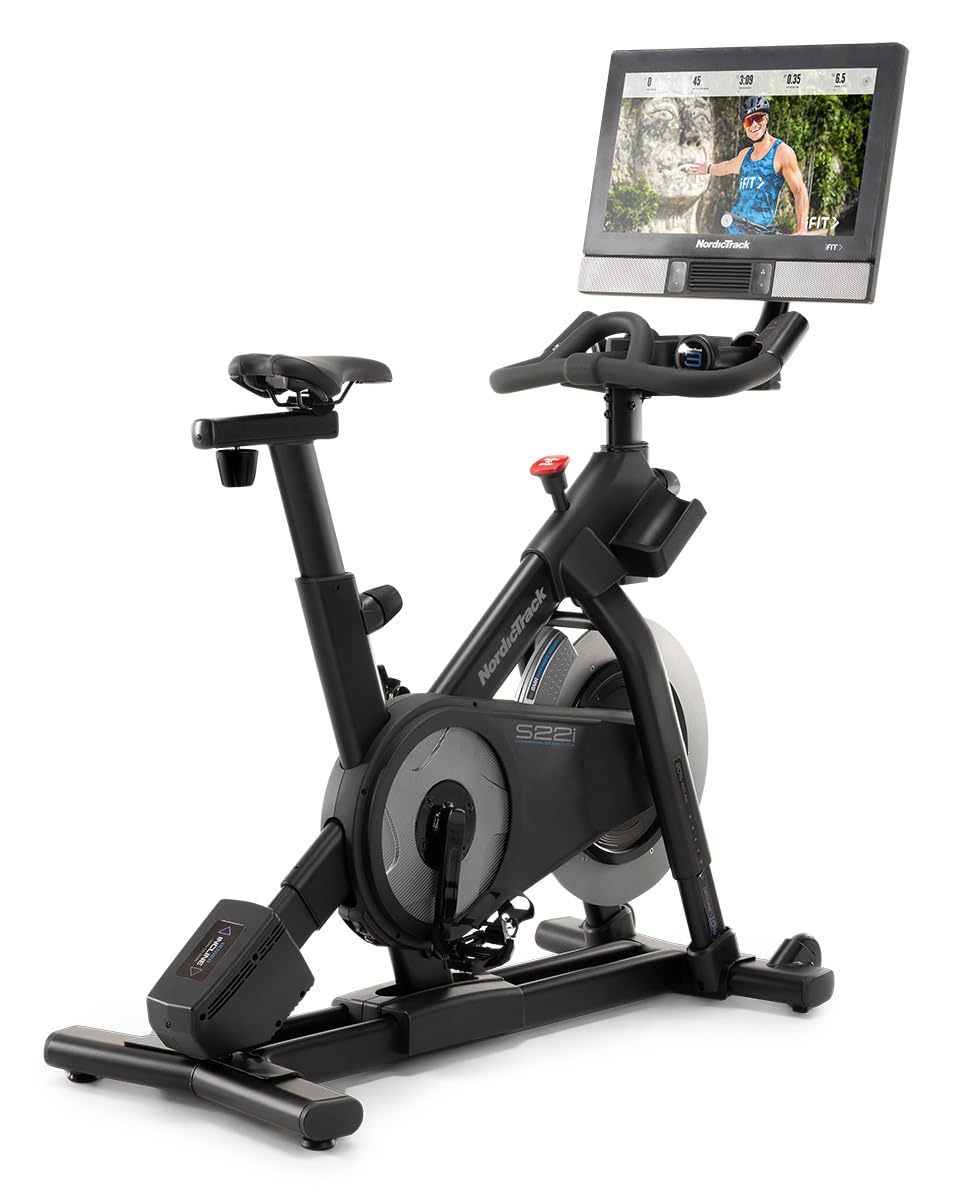
Introduction: What Is the NordicTrack Studio Cycle S22i?
The NordicTrack Studio Cycle S22i is a premium indoor cycling bike built for riders who want studio-style training at home, with immersive interactive workouts, automatic incline and decline, and a large rotating touchscreen for off-bike classes. It stands out for its 22-inch HD smart display, 24 levels of silent magnetic resistance, and a ride experience that can simulate real-world terrain with up to 20% incline and 10% decline. For home fitness users, that combination makes the S22i one of the most feature-rich smart exercise bikes in the indoor cycling category.
This bike is designed for dedicated cyclists, HIIT fans, beginners who want guided coaching, and households looking for a connected cardio machine that supports multiple training styles. The rotating screen also makes it useful for cross-training sessions such as strength work, stretching, yoga, and mobility drills. In everyday use, riders appreciate the smooth resistance changes, sturdy frame, dual-sided pedals, and integrated fan and dumbbells for full-session convenience.
The estimated price range typically falls around the premium home-bike segment, often near $1,899 to $2,199 depending on retailer, delivery, and promotions. Availability can vary by region and retailer, with NordicTrack direct sales, major fitness stores, and warehouse clubs commonly offering the model or close variants. For shoppers comparing smart bikes, the NordicTrack Studio Cycle S22i remains a strong option for immersive training, incline control, and iFit-based workouts.
Specifications: NordicTrack Studio Cycle S22i Technical Details
- Display: 22-inch HD touchscreen with 360-degree rotation for off-bike training.
- Resistance: 24 levels of silent magnetic resistance with both automatic and manual control.
- Incline/Decline: Up to 20% incline and 10% decline for terrain simulation.
- Footprint: Approximately 61 in. L x 22 in. W x 58 in. H, depending on retailer configuration.
- Weight Capacity: 350 lbs user limit.
- Bike Weight: About 205 lbs, contributing to stable in-ride performance.
- Drive System: Belt-driven system for a quieter, smoother ride.
- Pedals: Dual-sided SPD clip-in and toe-cage pedals.
- Extras: Built-in fan, front-facing speakers, dual water bottle holders, and included 3-lb dumbbells.
- Warranty: Commonly offered with 10-year frame, 2-year parts, and 1-year labor coverage.
Compared with similar connected bikes, the S22i is known for its incline and decline capability, which many rivals do not offer. Against bikes such as the Peloton Bike and other smart spin bikes, it offers more terrain simulation and a rotating screen, though app ecosystems and subscription experience may differ.
Troubleshooting the NordicTrack Studio Cycle S22i
Common issues with the NordicTrack Studio Cycle S22i usually involve connectivity, console response, resistance calibration, or power-related interruptions. If the screen freezes, restart the console by powering the bike off, unplugging it briefly, then reconnecting and rebooting. If resistance feels inconsistent, check whether the bike needs calibration through the settings menu and make sure the magnetic brake assembly is not obstructed.
When an error code appears, the first step is to power-cycle the bike and verify all cable connections at the console and frame. If an incline or decline movement stalls, inspect for debris around moving parts and confirm that the bike is on a level surface. For audio or touchscreen issues, make sure the software is updated and the Wi-Fi connection is stable. Preventive care includes wiping sweat from the console, tightening visible hardware periodically, and keeping the bike in a dry room with enough ventilation.
Warranty support commonly includes frame, parts, and labor coverage, though terms can vary by seller and region. For help, NordicTrack customer support is typically available through its service portal and phone support, often listed as 1-800-TO-BE-FIT (1-800-862-3348) in official manuals. If your bike is under warranty, keep your purchase receipt, serial number, and a record of symptoms ready before requesting service.
Pros and Cons of the NordicTrack Studio Cycle S22i
Pros
- Immersive training: The rotating 22-inch screen and iFit-style workouts make classes feel highly interactive.
- Terrain simulation: Incline and decline settings add realism for hill training and interval sessions.
- Quiet ride: Silent magnetic resistance and belt drive are well suited for apartments or shared spaces.
- High stability: The heavy frame and 350-lb capacity support intense sprint and climb workouts.
- Extra features: Fan, dumbbells, dual bottle holders, and speakers improve convenience during long sessions.
Cons
- Premium cost: The NordicTrack Studio Cycle S22i is priced above basic spin bikes and some competing smart cycles.
- Subscription reliance: The best experience depends on connected programming and ongoing membership costs.
- Large footprint: It requires more room than compact indoor bikes.
- Heavy build: Assembly and repositioning can be difficult without help.
- Alternative comparison: Riders wanting a simpler, lower-cost bike may prefer a non-connected model, while those seeking a larger app ecosystem may compare it with Peloton or Echelon.
Overall, the value for money is strongest for users who will regularly use interactive training, incline features, and structured cycling programs.
Customer Reviews: What Buyers Say About the NordicTrack S22i
Customer feedback on the NordicTrack Studio Cycle S22i is generally positive, with many users praising the smooth ride, realistic incline changes, and large immersive display. A common rating pattern is around 4 out of 5 stars, especially among buyers who use it for daily workouts and scenic rides. Many testimonials highlight the bike’s “gym-quality feel” and the motivation provided by coached classes.
Frequent complaints focus on subscription costs, occasional software glitches, and the size of the machine. Some users also mention that assembly takes time and that service experiences can vary. Even so, most owners say the bike is worth recommending if the goal is a premium connected cycling experience. For shoppers who value interactive training, the NordicTrack Studio Cycle S22i remains a strong pick.
Faqs
How do I set up nordictrack Studio Cycle S22i for the first time?
Why is my nordictrack Studio Cycle S22i not powering on, and how can I troubleshoot it?
How do I connect nordictrack Studio Cycle S22i to Wi-Fi and iFIT successfully?
What should I do if nordictrack Studio Cycle S22i resistance is not changing during a ride?
Which devices and apps are compatible with nordictrack Studio Cycle S22i?
How do I calibrate the nordictrack Studio Cycle S22i seat, handlebars, and pedals for better performance?
How should I maintain and clean nordictrack Studio Cycle S22i to extend its lifespan?
What are common nordictrack Studio Cycle S22i problems after assembly, and how can I fix them?
More nordictrack manuals
Leave a Comment