
Orbit 28954 Sprinkler Timer User Manual
Content
Orbit 28954 Sprinkler Timer Review and User Manual Guide
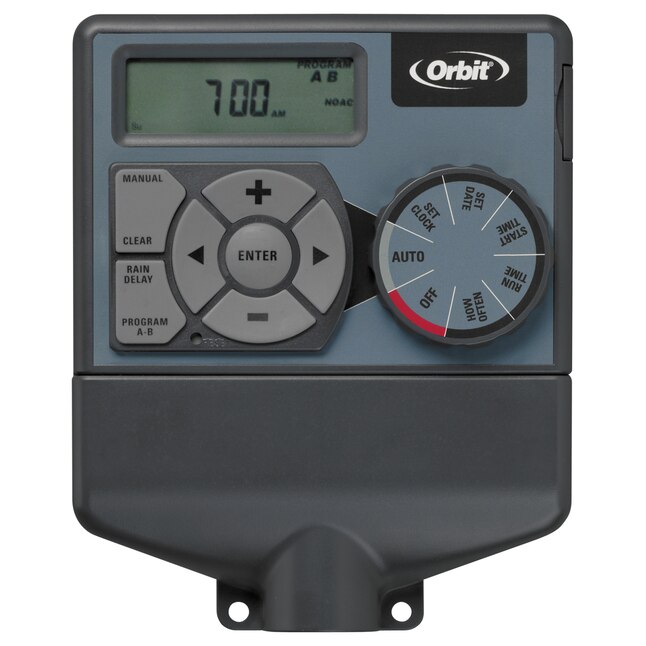
The orbit 28954 sprinkler timer is an easy-to-use indoor irrigation controller designed for homeowners who want reliable zone-based watering without the complexity of a smart app. It is commonly used for small to medium residential sprinkler systems, especially where simple scheduling, manual watering, and seasonal adjustments are the main priorities. The Orbit Easy Dial design makes setup straightforward, which is a major advantage for first-time users and anyone replacing an older timer.
This model is known for supporting multiple watering zones, two independent programs, and flexible start times that help tailor irrigation schedules to lawns, flower beds, and garden areas. It is a practical choice for users who want dependable automatic watering while keeping water use under control. The orbit 28954 sprinkler timer also appeals to buyers who prefer a hardwired controller with a clear interface instead of a connected smart system.
Typical pricing for the orbit 28954 sprinkler timer usually falls in the budget-to-midrange category, often around $30 to $60 depending on seller condition, stock availability, and whether it is new, refurbished, or discontinued surplus. Availability is most common through third-party marketplaces, local irrigation suppliers, and manual archives, since older Orbit controllers may not always be stocked by major retailers.
Specifications for Orbit 28954 Sprinkler Timer
- Indoor sprinkler timer with Easy-Set style dial controls for simple programming
- Supports 4 stations/zones for residential irrigation setups
- 2 independent watering programs for different areas or plant types
- Up to 4 start times per program for flexible scheduling
- Manual watering mode for on-demand zone control
- Water budgeting adjustment for seasonal run-time changes
- Rain delay function to pause watering during wet weather
- Compatible with standard 24-volt sprinkler valves
- Battery backup support to help retain time during outages
- Designed for basic home irrigation rather than advanced Wi-Fi control
In performance terms, the orbit 28954 sprinkler timer is best suited for users who need dependable scheduling and easy zone management rather than app-based automation. Compared with newer smart controllers, it offers fewer advanced features, but it is often easier to operate and cheaper to replace. Compared with basic mechanical hose timers, it provides more control, more zones, and better scheduling flexibility.
Pros and Cons of the Orbit 28954 Sprinkler Timer
Pros
- Simple dial-based interface makes programming fast and beginner-friendly
- Two separate programs help manage different watering needs across zones
- Manual watering option is useful for testing sprinklers or watering extras
- Rain delay and water budgeting support better water conservation
- Good value for homeowners who do not need Wi-Fi or smart-home integration
Cons
- No modern app control, remote access, or voice assistant compatibility
- Indoor-focused design may limit placement options
- Older unit availability can vary, which may affect replacement part sourcing
- Less advanced than newer Orbit smart irrigation controllers
- Some users may prefer a touchscreen or larger display on competing models
For value for money, the orbit 28954 sprinkler timer is strongest for users who want a reliable, no-frills controller at a reasonable cost. It is a practical alternative to expensive smart timers when remote features are unnecessary.
Customer Reviews for Orbit 28954 Sprinkler Timer
Customer feedback for the orbit 28954 sprinkler timer is generally positive, especially from users who appreciate its easy setup and dependable scheduling. Common praise centers on the straightforward dial controls, with many buyers describing it as a solid replacement timer for older sprinkler systems. Typical satisfaction ratings trend around 4 out of 5 stars among practical users who value function over advanced technology.
Frequent complaints usually mention that it lacks smart features, so users expecting Wi-Fi or phone control may feel limited. Some reviews also note that older units may need careful wiring during installation. One common style of testimonial is: “Simple to program and works well for my four zones,” while another is: “Great basic controller, but I wish it had remote access.”
Purchase is recommended for homeowners needing a dependable indoor irrigation timer with easy manual control and basic scheduling. It is less suitable for buyers who want a fully connected smart watering system.
Frequently Asked Questions About Orbit 28954 Sprinkler Timer
- What is the Orbit 28954 used for? It is used to automate watering for up to four sprinkler zones in a residential irrigation system.
- Does it support manual watering? Yes, manual watering is available for quick zone activation.
- Is the Orbit 28954 a smart timer? No, it is a traditional dial-based sprinkler controller without Wi-Fi.
- Is it good for beginners? Yes, the simple interface makes it a beginner-friendly sprinkler timer.
Buying Advice for the Orbit 28954 Sprinkler Timer
If you need a straightforward irrigation controller for a small home system, the orbit 28954 sprinkler timer remains a practical choice. It is best for users who want reliable zone control, easy setup, and water-saving functions without paying for smart features they may never use. For newer builds or app-based irrigation, a modern Wi-Fi controller may be the better long-term option.
Faqs
How do I set up orbit 28954 Sprinkler Timer for the first time?
Why is my orbit 28954 Sprinkler Timer not watering on schedule?
What should I do if a zone on my orbit 28954 Sprinkler Timer turns on but will not shut off?
How do I program multiple watering schedules on the orbit 28954 Sprinkler Timer?
Is the orbit 28954 Sprinkler Timer compatible with standard indoor sprinkler systems?
How do I use rain delay on the orbit 28954 Sprinkler Timer?
What battery does the orbit 28954 Sprinkler Timer use, and how often should I replace it?
How do I maintain and clean the orbit 28954 Sprinkler Timer for reliable performance?
Tags
More orbit manuals
Leave a Comment