
Setup & Features: Orbit SuperStar and WaterMaster Dual Program Sprinkler Timers User Manual
Content
Orbit SuperStar and WaterMaster Dual Program Sprinkler Timers: Complete Product Manual
Introduction
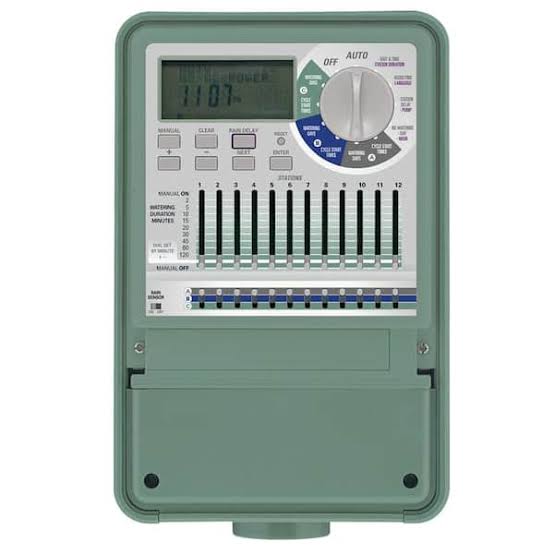
The Orbit SuperStar and WaterMaster Dual Program Sprinkler Timers are designed for homeowners who want reliable, flexible irrigation control without complicated programming. Built for 24 VAC sprinkler systems, this dual-program controller lets you manage separate watering schedules for lawns, flower beds, shrubs, and seasonal zones from one easy-to-use timer. The standout benefit is its two independent watering programs, which makes it simple to customize watering by day, interval, or odd/even schedules depending on your landscape needs.
The Orbit SuperStar and WaterMaster Dual Program Sprinkler Timers are especially useful for users who want to automate watering while reducing waste and improving plant health. Features such as Easy-Set Logic programming, multiple start times, rain delay, and manual watering support make the unit practical for both beginners and experienced DIY irrigation users. Some versions also include built-in wireless remote control, adding extra convenience for larger yards or hard-to-reach valve boxes.
This model is a strong fit for residential yards, drip irrigation setups, and multi-zone systems that need separate scheduling flexibility. Typical pricing varies by model and seller, but comparable Orbit dual-program timers generally fall in the budget-to-midrange category, often around $50 to $120 depending on station count, indoor or outdoor design, and remote-control features. Availability is usually best through irrigation suppliers, home improvement stores, and online retailers.
Specifications
- Controller type: Dual program sprinkler timer for automatic irrigation scheduling
- Programs: Two independent watering programs for separate zones or landscape needs
- Compatibility: Designed for standard 24 VAC sprinkler valves and irrigation systems
- Station runtime: Adjustable from 1 to 99 minutes per station
- Start times: Up to 8 start times per valve on supported versions
- Scheduling options: Day-of-week, interval watering, and odd/even day formats
- Power: Plug-in indoor power on many WaterMaster versions; some models use battery backup for memory retention
- Display: Large LCD screen for easy viewing and programming
- Convenience features: Easy-Set Logic, rain delay, calendar-based leap-year tracking, and manual watering
- Remote capability: Select models include built-in wireless remote control
Compared with basic single-program timers, this dual-program design gives more control over mixed planting zones and seasonal watering changes. Against higher-end smart controllers, it offers fewer app-based features but wins on simplicity, affordability, and dependable stand-alone operation.
Setup Guide
Start by mounting the timer in a dry, accessible location and connecting the wiring to the corresponding valve terminals. Confirm that the system uses 24 VAC valves before powering the unit. If your model uses battery backup, install the AA batteries first so schedule memory is protected during power loss. Next, set the current time, day, and date before configuring watering programs.
Choose Program A or Program B, then select station run times, watering days, and start times. For dual-program operation, assign zones carefully so lawns and garden beds can follow different schedules. If your model supports wireless remote pairing, follow the pairing button sequence in the manual before testing. Run a manual cycle on each station to verify correct wiring and valve response.
Troubleshooting tip: if a zone does not activate, check wire connections, confirm the valve solenoid is functioning, and ensure the timer is in AUTO mode. Safety warning: disconnect power before touching wiring, and use the timer only with cold-water irrigation systems.
Troubleshooting
- Zone will not turn on: Check the valve wiring, station settings, and solenoid connection.
- Timer display is blank: Confirm power supply, plug connection, and battery backup installation if applicable.
- Programs were lost after outage: Replace backup batteries and reset the clock and schedule.
- Watering occurs at the wrong time: Verify AM/PM settings and start-time configuration.
- Timer ignores schedule: Make sure the controller is in AUTO mode and not paused by rain delay.
- Weak or inconsistent watering: Inspect clogged sprinkler heads, low water pressure, or partially open valves.
Preventive care includes replacing backup batteries annually, keeping the unit dry, and testing each zone monthly. Warranty coverage typically depends on seller and model, while Orbit technical support is commonly available by phone through the manufacturer’s customer service line listed in the product manual and packaging. For faster help, keep the model number, station count, and wiring details ready when contacting support.
Pros & Cons
Pros
- Dual-program scheduling is ideal for separate lawn and garden watering plans.
- Easy-Set Logic makes setup approachable for first-time users.
- Flexible run times and multiple start times support efficient irrigation control.
- Manual watering and rain delay add practical day-to-day convenience.
- Good value for money compared with many smart controllers.
Cons
- Fewer advanced automation features than Wi-Fi-based smart timers.
- Some versions rely on battery backup, which must be maintained.
- Interface may feel dated compared with newer app-controlled models.
- Remote-control features are not available on every version.
For buyers who want dependable watering control without subscriptions or app setup, the Orbit SuperStar and WaterMaster Dual Program Sprinkler Timers remain a strong choice. Compared with premium smart irrigation controllers, they are simpler and usually cheaper, though they trade away weather-based automation and mobile management.
Customer Reviews
Average user sentiment for the Orbit SuperStar and WaterMaster Dual Program Sprinkler Timers is generally positive, often around 4 out of 5 stars for value and ease of use. Many homeowners praise the straightforward programming, reliable zone control, and the ability to manage two watering schedules from one controller. A frequent compliment is that the timer is practical for mixed landscapes with lawns, shrubs, and drip lines.
Common complaints include older-style controls, occasional confusion during initial setup, and the need to replace backup batteries to preserve schedules. One typical testimonial reads: “Simple to program, solid performance, and much easier than my old timer.” Another common comment is: “Great for basic irrigation, but not as advanced as a Wi-Fi controller.” For most buyers, it is a smart purchase if the goal is dependable, affordable irrigation scheduling rather than app-based automation.
Faqs
How do I set up orbit SuperStar and WaterMaster Dual Program Sprinkler Timers for the first time?
Why is my orbit SuperStar and WaterMaster Dual Program Sprinkler Timers not starting a watering cycle?
What does the dual program feature on orbit SuperStar and WaterMaster Dual Program Sprinkler Timers actually do?
Is orbit SuperStar and WaterMaster Dual Program Sprinkler Timers compatible with standard garden hoses and outdoor faucets?
How do I program watering days and run times on orbit SuperStar and WaterMaster Dual Program Sprinkler Timers for better lawn performance?
What should I do if orbit SuperStar and WaterMaster Dual Program Sprinkler Timers is leaking at the hose connection?
How can I use orbit SuperStar and WaterMaster Dual Program Sprinkler Timers more efficiently during hot or rainy weather?
How often should I maintain orbit SuperStar and WaterMaster Dual Program Sprinkler Timers to keep it working reliably?
Tags
More orbit manuals
Leave a Comment