
Panasonic AW-UE40KED 4K Integrated Camera User Manual
Content
Panasonic AW-UE40KED 4K Integrated Camera Review and Product Manual
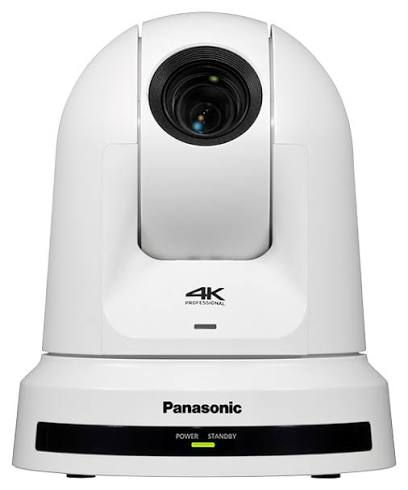
The Panasonic AW-UE40KED 4K Integrated Camera is a compact PTZ camera built for reliable professional video capture in meeting rooms, classrooms, houses of worship, corporate studios, and live event environments. It delivers 4K UHD output, a 24x optical zoom lens, and flexible IP-based connectivity, making it a strong choice for users who need broadcast-style control without a large rig. The black AW-UE40KED model is especially popular in discreet installations where a low-profile finish matters.
One of its biggest advantages is versatility. The camera supports ceiling or wall-style integration, remote pan-tilt-zoom operation, and multiple output workflows for streaming, conferencing, and production. It is designed to fit modern hybrid environments where one camera must handle presentations, interviews, and wide-room coverage with minimal operator effort. Real-world users appreciate the smooth motorized movement, sharp 4K image quality, and dependable performance over IP or HDMI workflows.
The Panasonic AW-UE40KED 4K Integrated Camera typically sits in the premium mid-range category, with estimated street pricing around $2,400 to $3,000 depending on region, accessories, and reseller. Availability is generally good through professional AV dealers and Panasonic channel partners, though stock can vary by market and bundle configuration. For buyers comparing PTZ alternatives, it offers a compelling balance of image quality, installation flexibility, and brand reliability.
Key Benefits of the Panasonic AW-UE40KED 4K Integrated Camera
- 4K UHD video capture for presentations, events, and remote production workflows
- 24x optical zoom for flexible framing in medium and larger rooms
- Motorized pan, tilt, and zoom for quiet remote operation
- PoE+ support and standard 12 V DC power options for easier installation
- Black finish that blends well into professional environments
- LAN, HDMI, and serial control support for integration with AV systems
Pros and Cons of the Panasonic AW-UE40KED 4K Integrated Camera
Pros
- Excellent value for professional PTZ buyers who need 4K capture without moving into ultra-high-end pricing.
- 24x optical zoom gives strong reach for classrooms, auditoriums, and conference rooms, especially when the camera is mounted far from the speaker.
- Quiet operation makes it suitable for churches, boardrooms, and live streaming setups where distracting motor noise is a problem.
- Flexible connectivity supports modern AV installs, including IP control and common production workflows.
- Sharp, dependable image performance makes it a practical upgrade over basic USB webcams and lower-cost PTZ cameras.
Cons
- More expensive than entry-level PTZ cameras, so it may be overkill for small rooms or casual use.
- Advanced users may want a larger sensor or higher-end low-light performance found in pricier alternatives.
- Setup can feel complex for first-time integrators compared with plug-and-play conferencing cameras.
- If your budget is tight, competing models from AVer, Logitech, or Sony may offer simpler deployment at a lower cost.
Overall, the Panasonic AW-UE40KED 4K Integrated Camera offers strong value for organizations that need dependable professional video and long-term installation flexibility. It compares well against similarly priced PTZ models, especially when image quality, control options, and build quality matter more than the lowest possible price.
Customer Reviews and User Feedback on the Panasonic AW-UE40KED 4K Integrated Camera
Customer feedback for the Panasonic AW-UE40KED 4K Integrated Camera is generally positive, with many users rating it around 4.5 out of 5 stars for image clarity, zoom range, and reliability. Buyers frequently praise the smooth motion, clean 4K output, and professional look of the black chassis.
Typical comments include:
- “Great picture quality for webinars and live events.”
- “The zoom is strong enough for our medium-sized training room.”
- “Installation took some planning, but the results were worth it.”
Common complaints usually focus on price, the learning curve for configuration, and the need for a proper AV setup to get the best results. Some users note that this is not a casual consumer camera and performs best when paired with a controlled lighting environment and a dedicated operator or integrator.
Buyers looking for a professional 4K PTZ camera with reliable remote control and polished output are usually satisfied with the Panasonic AW-UE40KED 4K Integrated Camera. It is a strong purchase recommendation for conference rooms, education, worship, and hybrid event production, especially when long-term installation quality matters more than saving a few hundred dollars.
Panasonic AW-UE40KED 4K Integrated Camera Specifications and Features
- Video resolution: 4K UHD up to 3840 x 2160
- Optical zoom: 24x
- Sensor type: 1/2.5-type 4K MOS
- Video output: HDMI and IP-based streaming/control support
- Power options: 12 V DC and PoE+ support
- Color: Black
- Mounting: Ceiling and integrated professional installation use
- Use cases: Conference rooms, education, worship, live streaming, and remote production
How to Use the Panasonic AW-UE40KED 4K Integrated Camera
1. Install the Camera Securely
Mount the camera in a stable location with a clear view of the stage, desk, or presentation area. Ceiling placement is ideal for professional rooms where coverage and cable management matter.
2. Connect Power and Signal
Use PoE+ when available to simplify installation, or connect the supplied power method if required by your setup. Then route HDMI or network connections depending on your workflow.
3. Configure Remote Control
Set up IP control, camera presets, and any controller or software integration before production use. Presets are especially helpful in rooms with multiple speaking positions.
4. Optimize Framing and Lighting
Adjust white balance, exposure, and framing to match your room lighting. For the best 4K PTZ camera results, avoid harsh backlight and keep the subject evenly lit.
5. Test Before Live Use
Run a full test of pan, tilt, zoom, focus, and output switching before meetings or recordings. This ensures stable performance and avoids last-minute issues.
Frequently Asked Questions
Is the Panasonic AW-UE40KED good for live streaming?
Yes, it is well suited for live streaming, webinars, hybrid meetings, and event production thanks to its 4K output, optical zoom, and remote control features.
Is the Panasonic AW-UE40KED suitable for small rooms?
It can work in small rooms, but its strengths are more noticeable in medium to large spaces where the 24x zoom and PTZ control provide more value.
What makes it different from cheaper PTZ cameras?
It stands out with stronger build quality, dependable professional integration, and a feature set designed for commercial AV environments rather than basic conferencing.
Who should buy it?
It is best for AV integrators, businesses, educators, worship teams, and content creators who need a reliable professional-grade 4K PTZ camera.
Faqs
How do I set up the panasonic AW-UE40KED 4K Integrated Camera for the first time in a conference room or studio?
What should I check if the panasonic AW-UE40KED 4K Integrated Camera is not showing video on my display or capture software?
Which streaming and control workflows are best for the panasonic AW-UE40KED 4K Integrated Camera?
Is the panasonic AW-UE40KED 4K Integrated Camera compatible with common video conferencing systems and streaming platforms?
How can I improve image quality and autofocus performance on the panasonic AW-UE40KED 4K Integrated Camera?
What are the most useful presets and automation tips for the panasonic AW-UE40KED 4K Integrated Camera?
How often should I clean and maintain the panasonic AW-UE40KED 4K Integrated Camera?
Why does the panasonic AW-UE40KED 4K Integrated Camera move slowly or fail to respond to remote control commands?
More panasonic manuals
- Panasonic NN-CD58JS Microwave Oven User Manual
- How to Use: Panasonic Hair Dryer EH-NE84, EH-NE83, EH-N2500 User Manual
- Panasonic TH-50BFIW Touch Screen LCD Display User Manual
- How to Use: Panasonic UHD LCD TV TH-86CQ1 U User Manual
- Panasonic PT-VMW50 LCD Projector User Manual
- Setup: Panasonic Home Network System Smart Plug KX-HNA101C User Manual
Leave a Comment