
Setup: Panasonic Home Network System Smart Plug KX-HNA101C User Manual
Content
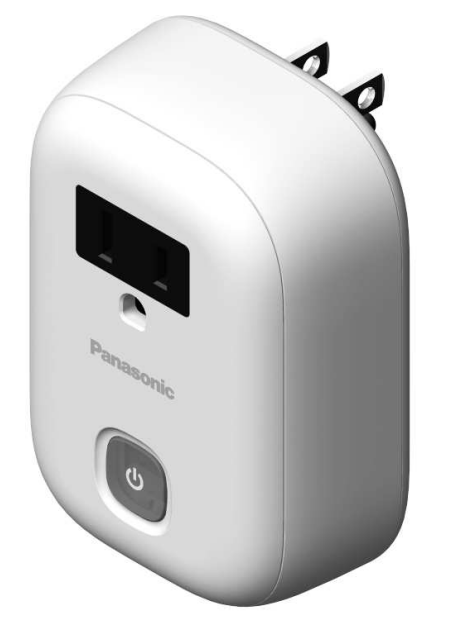
Panasonic Home Network System Smart Plug KX-HNA101C
Introduction
The Panasonic Home Network System Smart Plug KX-HNA101C is a versatile smart home accessory designed to seamlessly integrate with the Panasonic Home Monitoring System. This smart plug allows users to remotely control electrical devices such as lamps and small appliances from a smartphone or tablet, providing convenience and energy savings. Optimized for easy DIY installation and one-touch syncing with the KX-HNB600 Hub unit (sold separately), this device enhances home automation by enabling scheduled and sensor-triggered operation.
Key benefits include remote on/off control, scheduling capabilities to manage energy consumption, and integration with motion or door/window sensors to automate lighting based on activity or presence. For example, lights can automatically turn on when motion is detected or upon returning home, enhancing security and comfort. Additionally, the smart plug supports real-time monitoring, notifying users of device status and power consumption, contributing to informed energy management.
Ideal for homeowners, renters, and tech enthusiasts seeking to modernize their living spaces, the Panasonic KX-HNA101C supports iOS (iPhone, iPad) and Android devices for broad compatibility. While the product's availability varies by region and may require purchasing through authorized dealers or online partners, its estimated price range typically falls within the affordable smart plug segment, offering excellent value when paired with the Panasonic Home Monitoring ecosystem.
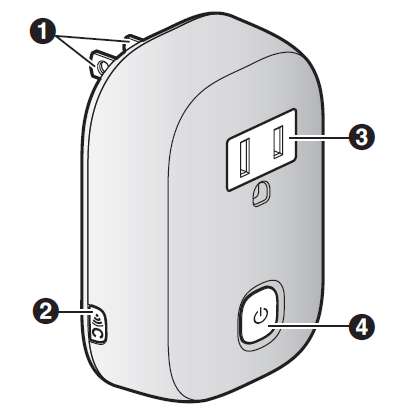
Part names and functions
- Power plug

Used when registering the smart plug to the hub.- Power outlet
 (on/off)
LED indicator
Turns the connected device on and off. Also serves as the LED indicator.
Specifications
- Standards
DECT (Digital Enhanced Cordless Telecommunications) - Frequency range
DECT: 1.92 GHz – 1.93 GHz - RF transmission power
DECT: 115 mW (max.) - Power source
120 V AC, 60 Hz - Power consumption
Standby: 0.5 W
Maximum: 1.1 W - Operating conditions
0 °C – 40 °C (32 °F – 104 °F) 20 % – 80 % relative air humidity (dry) - Maximum wattage
Approx. 1,200 W - Maximum current
Approx. 10 A - Dimensions (height ´ width ´ depth)
Approx. 94 mm ´ 64 mm ´ 35 mm (3 11/16 inches ´ 2 17/32 inches ´ 1 3/8 inches), excluding the pins - Mass (weight)
Approx. 140 g (0.31 lb)
Note:
- Design and specifications are subject to change without notice.
- The illustrations in these instructions may vary slightly from the actual product.
Important safety instructions
When using your product, basic safety precautions should always be followed to reduce the risk of fire, electric shock, and injury to persons, including the following:
- Do not use this product near water, for example, near a bathtub, washbowl, kitchen sink, or laundry tub, in a wet basement, or near a swimming pool.
LED indicator
You can use the LED indicator to confirm the smart plug’s status.
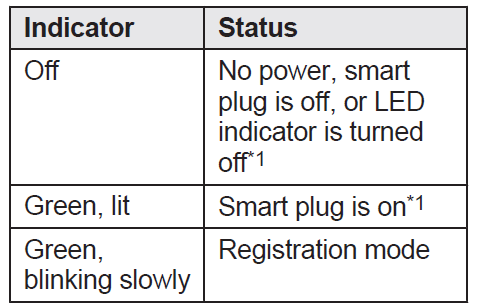
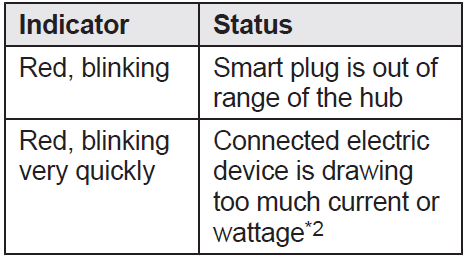
- You can configure the smart plug so that its LED indicator does not light during normal operation. For more information, refer to the User’s Guide (page 10).
- In this case, the smart plug will turn off automatically. To turn the smart plug on again, disconnect it from the power outlet, disconnect the connected electric device, and then connect the smart plug to the power outlet.
Setup overview
- Initial setup
Make sure you can access the system using your mobile device.
For details, refer to the System The The
Setup Guide is included with your hub. - Connection
Connect the smart plug to the power outlet and connect the desired electric device to the smart plug. - Registration
Required only if the smart plug was purchased separately (i.e., not as part of a bundle). - Confirm the usage area.
Read the information in this document to confirm that the desired usage area is suitable for proper operation.
Wireless communication range
The wireless communication range of each device in the system from the hub is approximately 50 m (160 feet) indoors and approximately 300 m (1,000 feet) outdoors. Wireless communication may be unreliable when the following obstacles are located between the hub and other devices.
- Metal doors or screens
- Walls containing aluminum-sheet insulation
- Walls made of concrete or corrugated iron
- Double-pane glass windows
- Multiple walls
- When using each device on separate floors or in different buildings
Note:
The LED indicator blinks in red if it is out of range of the hub. In this case, confirm all connections, including those of the hub.
Features available when using the [Home Network] app
Some of the features that are available when using the [Home Network] app are listed below. For more information, refer to the User’s Guide.
- Remote power on/off
You can turn the electric device on and off remotely, even when away from home. - Sensor integration
You can configure the system to turn the electric device on when a sensor is triggered. (Sensor required.) - Timer on/off
You can configure a timer to turn the electric device on and off at the desired times. - Excessive power notification
The smart plug can monitor the power supplied to the connected electric device. If overcurrent or overwattage is detected, the smart plug sends a notification to the [Home Network] app.
Troubleshooting Common Issues with Panasonic Home Network System Smart Plug KX-HNA101C
Despite its reliability, users may encounter occasional issues with the Panasonic Home Network System Smart Plug KX-HNA101C. Common problems include connectivity loss with the KX-HNB600 Hub, unresponsive controls, or difficulty syncing during setup.
- Connectivity Issues: Ensure that the smart plug is within the DECT wireless range (1.88–1.93 GHz) of the KX-HNB600 Hub and that no obstacles interfere. Restart the hub and smart plug if connection drops persist.
- Syncing Errors: Use the one-touch pairing button on the smart plug and the hub to re-establish connection. Verify that the firmware on the hub and app is up to date.
- Device Unresponsive: Check power source stability (120 V AC for KX-HNA101C) and confirm the maximum wattage (approx. 1,200 to 2,400 W depending on region) is not exceeded. Reset the smart plug by unplugging and plugging g back in.
Error codes are generally managed by the Home Network App, which provides notifications and troubleshooting guidance. Preventive measures include regular firmware updates, avoiding electrical overloads, and keeping the device within recommended operating conditions (0 °C–40 °C and 20%–80% humidity).
The Panasonic KX-HNA101C carries a manufacturer's warranty with support options accessible through Panasonic customer service. For assistance, users can contact Panasonic support via their official website or local service centers.
Warranty
PANASONIC PRODUCT - LIMITED WARRANTY EXCHANGE PROGRAM
Panasonic Canada Inc. warrants this product to be free from defects in material and workmanship under normal use and for a period as stated below from the date of original purchase agrees to, at its option either (a) repair your product with new or refurbished parts, (b) replace it with a new or a refurbished equivalent value product, or (c) refund your purchase price. The decision to repair, replace, or refund will be made by Panasonic Canada Inc.
- Home Network System Products – One (1) year
- microSD card (Included model only) – One (1) year
This warranty is given only to the original purchaser, or the person for whom it was purchased as a gift, of a Panasonic brand product mentioned above sold by an authorized Panasonic dealer in Canada and purchased and used in Canada, which product was not sold “as is”, and which product was delivered to you in new condition in the original packaging.
Pros & Cons of the Panasonic Home Network System Smart Plug KX-HNA101C
- Pros:
- Seamless integration with Panasonic Home Monitoring Hub (KX-HNB600) for unified smart home control
- Remote and scheduled control capabilities maximize convenience and energy savings
- Compact design (approximately 94mm x 64mm x 35mm) fits easily into standard outlets
- Supports automated triggers with motion and door/window sensors
- Compatible with both iOS and Android devices, ensuring broad user accessibility
- Built-in safety features, such as overcurrent and overwattage detection,n enhance user peace of mind
- Cons:
- Requires the Panasonic KX-HNB600 Hub for functionality, adding to the o initial setup cost
- Limited availability in some markets, which can make purchasing difficult
- The maximum supported load of around 1,200W to 2,400W may not suit very high-power appliances
- Some users report occasional connectivity or syncing difficulties during setup
Compared to generic smart plugs, the Panasonic KX-HNA101C offers superior integration within a dedicated home monitoring system but involves a higher initial investment. For users prioritizing seamless ecosystem compatibility and sensor automation, this model is a valuable choice.
Customer Reviews of Panasonic Home Network System Smart Plug KX-HNA101C
Users generally praise the Panasonic Home Network System Smart Plug KX-HNA101C for its reliable remote control and automation features. Many appreciate the energy-saving benefits from scheduled operations and sensor-triggered lighting, with ratings averaging around 4 out of 5 stars. Customers highlight the convenience of controlling lights from different floors or while away from home.
Common complaints include initial setup challenges, particularly syncing the plug with the hub, and occasional disconnections reported by some users. A few reviewers note the need to purchase the hub separately, which increases the overall cost. Despite these issues, the smart plug receives recommendations for users invested in the Panasonic ecosystem who want robust home automation.
Testimonials reflect satisfaction with the product’s build quality and integration, often emphasizing improved home security and comfort. Buyers frequently recommend pairing the KX-HNA101C with motion sensors and cameras for optimal automation and monitoring.
Faqs
How do I register the panasonic Home Network System Smart Plug KX-HNA101C to my hub if I purchased it separately?
What devices or appliances are not recommended for use with panasonic Home Network System Smart Plug KX-HNA101C?
How can I turn my panasonic Home Network System Smart Plug KX-HNA101C on or off remotely using my phone or tablet?
Why does my panasonic Home Network System Smart Plug KX-HNA101C keep turning off unexpectedly?
What should I do if the LED indicator on my panasonic Home Network System Smart Plug KX-HNA101C is not lighting up?
How many panasonic Home Network System Smart Plug KX-HNA101C devices can I connect to a single hub?
Can I use the panasonic Home Network System Smart Plug KX-HNA101C outdoors or in damp locations?
How do I troubleshoot connection issues between my panasonic Home Network System Smart Plug KX-HNA101C and the hub?
More panasonic manuals
- How to Use: Panasonic UHD LCD TV TH-86CQ1 U User Manual
- How to Use: Panasonic Home Monitoring Front Door-Outdoor KX-HN7052C Instruction Manual
- How to Use: Panasonic Hair Dryer EH-NE84, EH-NE83, EH-N2500 User Manual
- How to Use: Panasonic Home Network System HUB UKX-HNB600C Instruction Manual
- Panasonic AW-UE40KED 4K Integrated Camera User Manual
- How to Use: Panasonic Home Network System Indoor Camera KX-HNC200 Instruction Manual
Leave a Comment